
Of course! Here is a comprehensive guide to the Python Pandas API, structured from beginner concepts to advanced techniques.
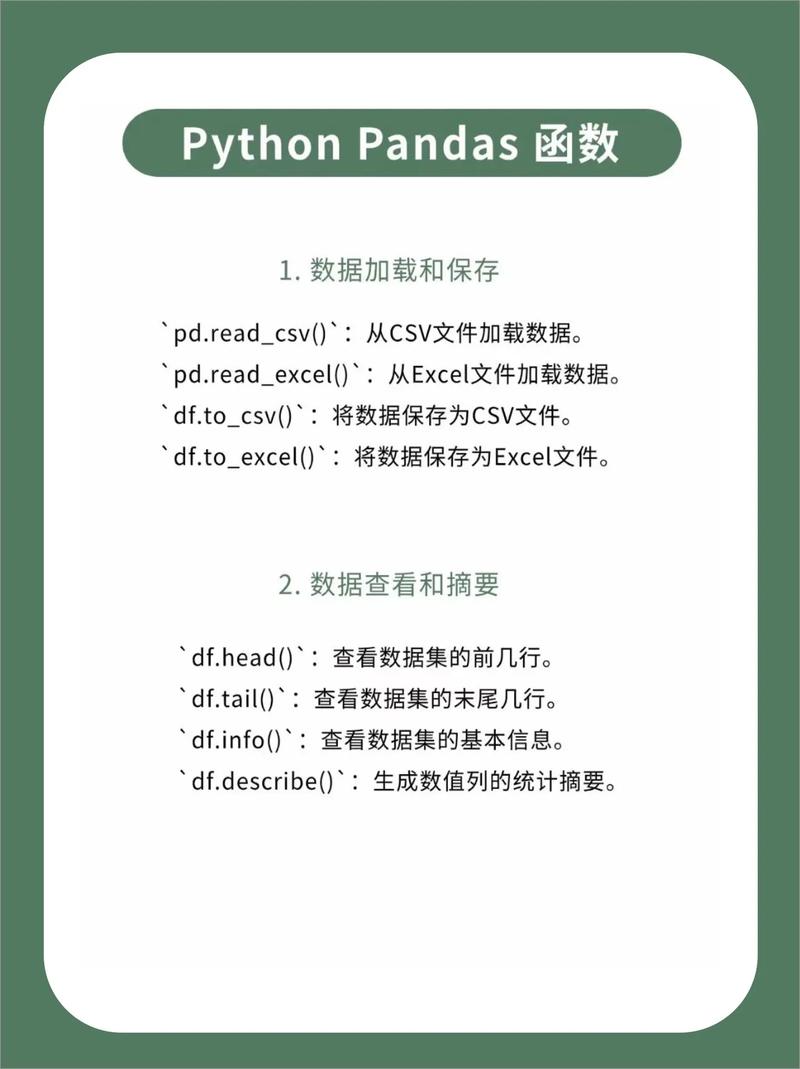
What is Pandas?
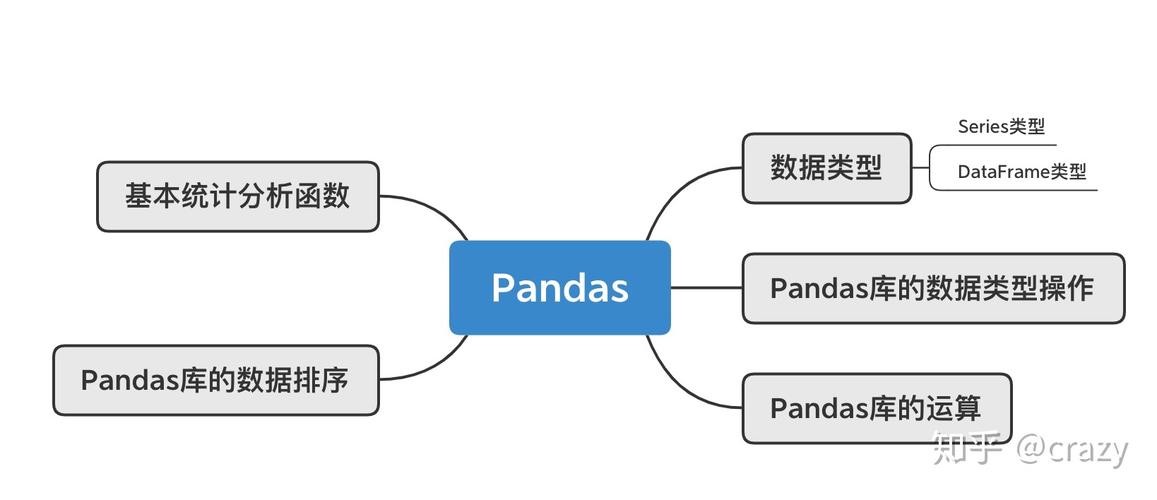
Pandas is a fast, powerful, and flexible open-source data analysis and manipulation library for Python. Its name is derived from "Panel Data". The primary data structures it provides are:
Series: A one-dimensional labeled array, similar to a column in a spreadsheet or a dictionary.DataFrame: A two-dimensional labeled data structure with columns of potentially different types. It's the workhorse of Pandas and is conceptually similar to a spreadsheet, SQL table, or a dictionary ofSeriesobjects.
Part 1: The Core Data Structures
The Series
A Series is a single column of data.
import pandas as pd
import numpy as np
# Create a Series from a list
s = pd.Series([1, 3, 5, np.nan, 6, 8])
print(s)
# Output:
# 0    1.0
# 1    3.0
# 2    5.0
# 3    NaN
# 4    6.0
# 5    8.0
# dtype: float64
# Create a Series with a custom index
s_with_index = pd.Series([10, 20, 30], index=['a', 'b', 'c'])
print(s_with_index)
# Output:
# a    10
# b    20
# c    30
# dtype: int64
The DataFrame
This is the most commonly used object.
# Create a DataFrame from a dictionary
data = {
    'Name': ['Alice', 'Bob', 'Charlie', 'David'],
    'Age': [25, 30, 35, 28],
    'City': ['New York', 'Los Angeles', 'Chicago', 'Houston']
}
df = pd.DataFrame(data)
print(df)
# Output:
#       Name  Age         City
# 0    Alice   25     New York
# 1      Bob   30  Los Angeles
# 2  Charlie   35      Chicago
# 3    David   28      Houston
Part 2: Essential DataFrame Operations
Viewing Data
# View the first 5 rows
df.head()
# View the last 3 rows
df.tail(3)
# Get a concise summary of the DataFrame
# (Non-null counts, dtypes, memory usage)
df.info()
# Get descriptive statistics for numeric columns
df.describe()
# Get the column names
df.columns
# Get the row labels (index)
df.index
# Get the dimensions (rows, columns)
df.shape
Selection (Indexing & Slicing)
This is a critical area. Pandas offers several ways to select data.
# Select a single column (returns a Series)
df['Name']
# Select multiple columns (returns a DataFrame)
df[['Name', 'City']]
# Select rows by label (index) using .loc
# .loc is label-based
df.loc[0:2] # Selects rows with index 0, 1, and 2
# Select rows by integer position using .iloc
# .iloc is position-based (like Python standard slicing)
df.iloc[0:2] # Selects rows at positions 0 and 1
# Select a specific cell
df.loc[1, 'Age'] # Value at row index 1, column 'Age'
df.iloc[1, 1]    # Value at row position 1, column position 1
# Select rows with a condition (Boolean Indexing)
# This is extremely powerful
adults = df[df['Age'] > 30]
print(adults)
# Output:
#       Name  Age     City
# 1      Bob   30  Los Angeles
# 2  Charlie   35    Chicago
# Combining conditions
# Use & for AND, | for OR, and use parentheses!
ny_and_adult = df[(df['City'] == 'New York') & (df['Age'] >= 25)]
Data Cleaning & Manipulation
# Check for missing values (NaN/None)
df.isnull().sum()
# Fill missing values
# df.fillna(0) # Fill all NaNs with 0
df['Age'].fillna(df['Age'].mean(), inplace=True) # Fill NaNs in 'Age' with the mean age
# Drop rows with any missing values
df.dropna()
# Drop columns with any missing values
df.dropna(axis=1)
# Add a new column
df['Country'] = 'USA'
# Apply a function to a column
df['Age_in_10_Years'] = df['Age'].apply(lambda x: x + 10)
# Rename columns
df.rename(columns={'Name': 'Full Name'}, inplace=True)
# Drop a column
df.drop('Country', axis=1, inplace=True)
Part 3: Data Aggregation & Grouping
This is where Pandas shines for data analysis.
groupby()
The groupby() operation involves one of the following steps:
- Split the data into groups based on some criteria.
- Apply a function to each group independently (e.g., sum, mean, count).
- Combine the results into a new data structure.
# Create some sample sales data
sales_data = {
    'Region': ['East', 'West', 'East', 'West', 'East', 'West'],
    'Salesperson': ['Alice', 'Bob', 'Alice', 'Bob', 'Charlie', 'Bob'],
    'Product': ['A', 'B', 'A', 'B', 'A', 'B'],
    'Sales': [100, 150, 200, 120, 180, 90]
}
sales_df = pd.DataFrame(sales_data)
# 1. Group by a single column and calculate the mean of other numeric columns
avg_sales_by_region = sales_df.groupby('Region').mean()
print(avg_sales_by_region)
# Output:
#         Sales
# Region
# East    160.0
# West    120.0
# 2. Group by multiple columns
sales_by_region_product = sales_df.groupby(['Region', 'Product']).sum()
print(sales_by_region_product)
# Output:
#                 Sales
# Region Product
# East   A          300
#        B            0
# West   A            0
#        B          360
# 3. Use the .agg() function to apply multiple aggregations at once
# This is very flexible
summary = sales_df.groupby('Region').agg(
    Total_Sales=('Sales', 'sum'),
    Average_Sales=('Sales', 'mean'),
    Num_Salespeople=('Salesperson', 'nunique') # nunique counts unique values
)
print(summary)
# Output:
#         Total_Sales  Average_Sales  Num_Salespeople
# Region
# East            480     160.000000                2
# West            360     120.000000                2
Part 4: Merging, Joining, and Concatenating
Pandas provides powerful tools to combine DataFrames.
pd.concat()
Stacks DataFrames on top of each other or side-by-side.
df1 = pd.DataFrame({'A': ['A0', 'A1'], 'B': ['B0', 'B1']})
df2 = pd.DataFrame({'A': ['A2', 'A3'], 'B': ['B2', 'B3']})
# Stack vertically (default)
vertical_concat = pd.concat([df1, df2])
print(vertical_concat)
# Stack horizontally
df3 = pd.DataFrame({'C': ['C0', 'C1'], 'D': ['D0', 'D1']})
horizontal_concat = pd.concat([df1, df3], axis=1)
print(horizontal_concat)
pd.merge()
SQL-style joins. Most powerful for combining DataFrames based on a common key.
# Two DataFrames with a common key 'EmployeeID'
employees = pd.DataFrame({'EmployeeID': [1, 2, 3, 4],
                          'Name': ['Alice', 'Bob', 'Charlie', 'David'],
                          'DeptID': [101, 102, 101, 103]})
departments = pd.DataFrame({'DeptID': [101, 102, 103, 104],
                            'DeptName': ['Sales', 'Engineering', 'HR', 'Marketing']})
# INNER JOIN (default) - keeps only matching keys
merged_inner = pd.merge(employees, departments, on='DeptID')
print("Inner Merge:")
print(merged_inner)
# LEFT JOIN - keeps all rows from the left DataFrame (employees)
merged_left = pd.merge(employees, departments, on='DeptID', how='left')
print("\nLeft Merge:")
print(merged_left)
Part 5: Working with Time Series
Pandas has excellent built-in support for time series data.
# Create a date range
dates = pd.date_range('20250101', periods=6)
df_time = pd.DataFrame(np.random.randn(6, 4), index=dates, columns=list('ABCD'))
# Select data by date range
df_time['2025-01-02':'2025-01-04']
# Resample time series data (e.g., convert daily to monthly)
# First, let's create a daily series
daily_series = pd.Series(np.random.randint(10, 100, size=30), index=pd.date_range('2025-01-01', periods=30))
# Now, resample to get the mean for each month
monthly_mean = daily_series.resample('M').mean()
Part 6: Input/Output (I/O)
Pandas can read from and write to a wide variety of file formats.
# --- Reading ---
# CSV
df_from_csv = pd.read_csv('data.csv')
# Excel
df_from_excel = pd.read_excel('data.xlsx', sheet_name='Sheet1')
# JSON
df_from_json = pd.read_json('data.json')
# SQL
import sqlite3
conn = sqlite3.connect('database.db')
df_from_sql = pd.read_sql('SELECT * FROM my_table', conn)
conn.close()
# --- Writing ---
# CSV
df.to_csv('output.csv', index=False) # index=False avoids writing row numbers
# Excel
df.to_excel('output.xlsx', sheet_name='Sheet1', index=False)
# JSON
df.to_json('output.json', orient='records') # orient='records' is a common format
Part 7: Performance Tips
-
Vectorize your operations: Avoid iterating over rows with
forloops. Use built-in Pandas and NumPy functions which are highly optimized.- Bad:
df['new_col'] = [row['A'] * 2 for index, row in df.iterrows()] - Good:
df['new_col'] = df['A'] * 2
- Bad:
-
Use
.locand.ilocfor selection: They are faster and more explicit than chained indexing (df['A']['row1']). -
Be careful with
inplace=True: While it can save memory, it can make code harder to debug and chain. Assigning back to the variable is often clearer (e.g.,df = df.drop('column', axis=1)). -
Use
dtypesefficiently: Downcast numeric columns (e.g.,int64toint32orfloat64tofloat32) or use categorical data for string columns with low cardinality to reduce memory usage.df['City'] = df['City'].astype('category') -
Filter early: Reduce the size of your DataFrame as early as possible in your script to speed up subsequent operations.
Official Documentation
The absolute best resource for the Pandas API is the official documentation. It is incredibly detailed and well-maintained.
- Pandas Official Documentation: https://pandas.pydata.org/docs/
Learning Resources
- Pandas Tutorial (10 Minutes to Pandas): https://pandas.pydata.org/pandas-docs/stable/user_guide/10min.html
- Data School (YouTube Channel): Excellent tutorials by Kevin Markham.
- Corey Schafer (YouTube Channel): Great Python tutorials, including a detailed Pandas series.


