Of course! Let's dive deep into thread pools in Java. This is a fundamental concept for writing efficient, concurrent applications.
What is a Thread Pool and Why Do We Need It?
Imagine you're running a restaurant. You can't hire a new chef for every single order that comes in. That would be incredibly expensive and inefficient. Instead, you have a fixed number of chefs (a "kitchen team") who take orders from a queue as they become available.
A thread pool works in the exact same way.
Without a Thread Pool:
For every task, you create a new thread (new Thread(runnable).start()).
- Pro: Simple to write.
- Con: Extremely inefficient. Creating and destroying threads is a very expensive operation in terms of CPU and memory. If you have thousands of tasks, you could run out of memory or cause the system to thrash, spending more time on context switching than on actual work.
With a Thread Pool: You create a fixed number of threads upfront. Tasks are submitted to the pool, and the threads pick them up from a queue to execute.

- Pro: Performance and Resource Management.
- Reuses Threads: Eliminates the overhead of thread creation/destruction.
- Controls Concurrency: Limits the number of threads running at once, preventing the system from being overwhelmed.
- Manages Tasks: A queue holds tasks that are waiting to be executed, ensuring that no work is lost.
Key Components of a Thread Pool
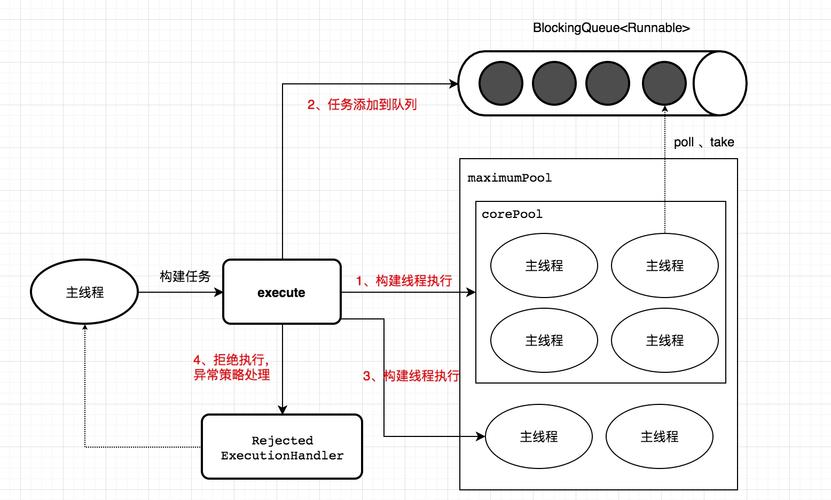
A typical thread pool implementation has three main components:
- A Pool of Worker Threads: These are the long-lived threads that do the actual work. They are started when the pool is created and run in a loop, waiting for tasks.
- A Task Queue (BlockingQueue): This is where submitted tasks are stored. It's "blocking," meaning if a thread tries to take a task from an empty queue, it will wait (block) until a task becomes available.
- A Task Submission Mechanism: A way for you to add tasks to the queue. This is typically done through an
execute()orsubmit()method.
The Executor Framework in Java
Java provides a powerful and flexible framework for managing thread pools centered around the java.util.concurrent package. You don't usually have to implement a thread pool from scratch. Instead, you use the built-in Executor interface and its implementations.
The core interfaces are:
Executor: The simplest interface. It has a single method:void execute(Runnable command).ExecutorService: A sub-interface ofExecutorthat adds lifecycle management methods (likeshutdown()andawaitTermination()) and the ability to submitCallabletasks (which can return a result).ScheduledExecutorService: ExtendsExecutorServiceto support scheduling tasks to run after a delay or periodically.
How to Create and Use a Thread Pool: Executors
The java.util.concurrent.Executors class is a factory class that provides convenient methods for creating common pre-configured thread pool instances.
FixedThreadPool
This is the most common type. It creates a thread pool with a fixed number of threads.
- Use Case: When you have a known number of tasks or a predictable workload, and you want to limit resource usage. Perfect for handling a large number of HTTP requests in a web server.
- Characteristics:
- Fixed number of threads.
- An unbounded queue for tasks.
- If more tasks are submitted than threads are available, the tasks wait in the queue.
import java.util.concurrent.ExecutorService;
import java.util.concurrent.Executors;
import java.util.concurrent.TimeUnit;
public class FixedThreadPoolExample {
    public static void main(String[] args) {
        // Create a thread pool with 2 threads
        ExecutorService executor = Executors.newFixedThreadPool(2);
        // Submit 5 tasks to the pool
        for (int i = 1; i <= 5; i++) {
            final int taskId = i;
            executor.execute(() -> {
                System.out.println("Task " + taskId + " is starting on thread " + Thread.currentThread().getName());
                try {
                    // Simulate work
                    Thread.sleep(1000);
                } catch (InterruptedException e) {
                    e.printStackTrace();
                }
                System.out.println("Task " + taskId + " has finished.");
            });
        }
        // Shut down the executor
        executor.shutdown(); // Disable new tasks from being submitted
        try {
            // Wait a maximum of 1 minute for existing tasks to terminate
            if (!executor.awaitTermination(1, TimeUnit.MINUTES)) {
                executor.shutdownNow(); // Cancel currently executing tasks
            }
        } catch (InterruptedException e) {
            executor.shutdownNow();
            Thread.currentThread().interrupt();
        }
    }
}
Output (will vary slightly):
Task 1 is starting on pool-1-thread-1
Task 2 is starting on pool-1-thread-2
Task 1 has finished.
Task 3 is starting on pool-1-thread-1
Task 2 has finished.
Task 4 is starting on pool-1-thread-2
Task 3 has finished.
Task 5 is starting on pool-1-thread-1
Task 4 has finished.
Task 5 has finished.
Notice how only two threads are used, and tasks 3, 4, and 5 had to wait in the queue.
CachedThreadPool
This thread pool creates new threads as needed but will reuse previously constructed threads when they are available.
- Use Case: When you have many short-lived tasks. It's good for load-spreading but can be dangerous if tasks are long-lived, as it could create a huge number of threads.
- Characteristics:
- No fixed number of threads.
- Threads that have been idle for 60 seconds are terminated and removed from the cache.
- Uses an unbounded
SynchronousQueue, meaning a task is handed directly to a thread, or the submission will block until a thread is available.
// Creates a thread pool that can create new threads as needed
ExecutorService executor = Executors.newCachedThreadPool();
SingleThreadExecutor
This is a special case of FixedThreadPool with a single thread.
- Use Case: When you need to ensure that tasks are executed sequentially, in the order they are submitted. Useful for logging or transaction processing.
- Characteristics:
- Only one worker thread.
- An unbounded queue for tasks.
- Guarantees sequential execution.
// Creates an executor with a single worker thread
ExecutorService executor = Executors.newSingleThreadExecutor();
ScheduledThreadPool
This pool is designed for scheduling tasks to run after a given delay or to execute periodically.
- Use Case: For cron jobs, periodic cleanups, or delayed tasks (e.g., sending a reminder email 5 minutes after a user signs up).
- Characteristics:
- A fixed number of core threads for scheduled tasks.
- Can create additional threads if needed.
import java.util.concurrent.Executors;
import java.util.concurrent.ScheduledExecutorService;
import java.util.concurrent.TimeUnit;
public class ScheduledThreadPoolExample {
    public static void main(String[] args) {
        ScheduledExecutorService scheduler = Executors.newScheduledThreadPool(1);
        // Task to run once after a 3-second delay
        scheduler.schedule(() -> System.out.println("Delayed task!"), 3, TimeUnit.SECONDS);
        // Task to run repeatedly every 2 seconds, starting after a 1-second delay
        scheduler.scheduleAtFixedRate(() -> System.out.println("Fixed rate task!"), 1, 2, TimeUnit.SECONDS);
        // Let it run for a while then shut down
        try {
            Thread.sleep(10000); // Run for 10 seconds
        } catch (InterruptedException e) {
            e.printStackTrace();
        }
        scheduler.shutdown();
    }
}
The Modern Approach: ThreadPoolExecutor
While Executors is convenient, for production-grade applications, it's highly recommended to use ThreadPoolExecutor directly. It gives you fine-grained control over all the parameters of the pool.
A ThreadPoolExecutor is created with the following key parameters:
corePoolSize: The number of threads to keep in the pool, even if they are idle.maximumPoolSize: The maximum number of threads to allow in the pool.keepAliveTime: When the number of threads is greater thancorePoolSize, this is the maximum time that excess idle threads will wait for new tasks before being terminated.unit: The time unit forkeepAliveTime.workQueue: The queue to use for holding tasks before they are executed. Common types areLinkedBlockingQueue,ArrayBlockingQueue, andSynchronousQueue.threadFactory: The factory to use when creating new threads. You can customize this to give threads meaningful names.handler: TheRejectedExecutionHandlerto use when a task cannot be accepted for execution (e.g., the queue is full and the pool is atmaximumPoolSize).
Example:
import java.util.concurrent.ArrayBlockingQueue;
import java.util.concurrent.ThreadPoolExecutor;
import java.util.concurrent.TimeUnit;
public class CustomThreadPoolExample {
    public static void main(String[] args) {
        // Create a ThreadPoolExecutor with custom settings
        ThreadPoolExecutor executor = new ThreadPoolExecutor(
                2, // corePoolSize
                5, // maximumPoolSize
                60L, // keepAliveTime
                TimeUnit.SECONDS,
                new ArrayBlockingQueue<>(10), // workQueue with capacity of 10
                new ThreadPoolExecutor.CallerRunsPolicy() // handler
        );
        // Submit 20 tasks
        for (int i = 1; i <= 20; i++) {
            final int taskId = i;
            executor.execute(() -> {
                System.out.println("Executing task " + taskId + " on thread " + Thread.currentThread().getName());
                try {
                    Thread.sleep(2000); // Simulate a 2-second task
                } catch (InterruptedException e) {
                    Thread.currentThread().interrupt();
                }
            });
        }
        // Shutdown the executor
        executor.shutdown();
    }
}
Best Practices
- Always Shutdown Your Executor: Failing to shut down an
ExecutorServicewill cause your application to hang on exit, as the non-daemon threads in the pool will keep the JVM alive. Useshutdown()followed byawaitTermination(). - Choose the Right Pool Type:
FixedThreadPool: Default choice for most general-purpose concurrent tasks.SingleThreadExecutor: When order of execution matters.CachedThreadPool: Use with caution for a very large number of short-lived tasks.ScheduledThreadPool: For scheduling.
- Avoid
Executors.newCachedThreadPool()in Production: Its unbounded thread creation can lead toOutOfMemoryErrorif a large number of long-running tasks are submitted. - Prefer
ThreadPoolExecutoroverExecutorsFactory Methods: For critical systems, creating aThreadPoolExecutorexplicitly allows you to control the queue size and the rejection policy, preventing resource exhaustion.
Summary
| Feature | FixedThreadPool |
CachedThreadPool |
SingleThreadExecutor |
ScheduledThreadPool |
|---|---|---|---|---|
| Thread Count | Fixed | Grows/shrinks on demand | Exactly 1 | Fixed core, can grow |
| Task Queue | Unbounded LinkedBlockingQueue |
Uses SynchronousQueue (no capacity) |
Unbounded LinkedBlockingQueue |
DelayedWorkQueue |
| Best For | General purpose, known load | Many short-lived tasks | Sequential execution | Scheduling (delay/periodic) |
| Risk | Can starve if queue is too big | Can create too many threads | Bottleneck if task is slow | - |