Of course! The term you're likely looking for is "iteration" in Python. It's a fundamental concept that refers to the process of looping over a sequence of items (like a list, string, or dictionary) and performing an action on each item.
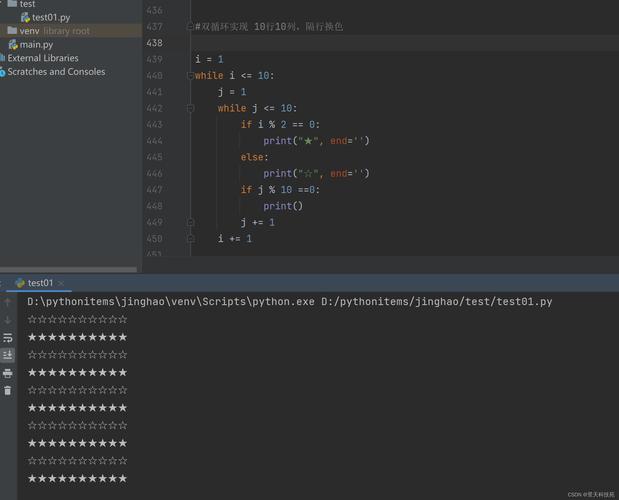
Let's break it down from the basics to more advanced concepts.
What is Iteration?
In simple terms, iteration is repeating a block of code. In Python, we most often use it to go through each item in a collection, one by one.
Think of it like going through a to-do list:
- Do the first task.
- Do the second task.
- ...and so on, until you've done all the tasks.
Python has two primary tools for iteration: the for loop and the while loop.
The for Loop (Most Common for Iteration)
The for loop is designed specifically for iterating over sequences. It's clean, readable, and the preferred way to handle most iteration tasks in Python.
Basic Syntax
for item in sequence:
    # Do something with the 'item'
    # This code block runs for each item in the sequence
Examples
a) Iterating over a List
This is the most common use case. You have a list of items, and you want to do something with each one.
fruits = ["apple", "banana", "cherry"]
# For each 'fruit' in the 'fruits' list...
for fruit in fruits:
    print(f"I love to eat {fruit}s!")
Output:
I love to eat apples!
I love to eat bananas!
I love to eat cherry s!
b) Iterating over a String
A string is just a sequence of characters, so you can iterate over it too.
for letter in "Python":
    print(letter)
Output:
P
y
t
h
o
n
c) Iterating over a Dictionary
When you iterate over a dictionary, you are, by default, iterating over its keys.
student_grades = {
    "Alice": 92,
    "Bob": 88,
    "Charlie": 95
}
for name in student_grades:
    print(f"Student: {name}")
Output:
Student: Alice
Student: Bob
Student: Charlie
To get the values, you can use the .values() method. To get both keys and values, use the .items() method.
# Using .items() to get both keys and values
for name, grade in student_grades.items():
    print(f"{name} got a grade of {grade}")
Output:
Alice got a grade of 92
Bob got a grade of 88
Charlie got a grade of 95
The while Loop (Conditional Iteration)
A while loop continues to run as long as a certain condition is True. It's not specifically for iterating over a sequence, but it can be used that way.
Basic Syntax
while condition_is_true:
    # Do something
    # (Important: something inside the loop must eventually make the condition false)
Example
Let's say we want to print numbers from 0 up to (but not including) 5.
count = 0
while count < 5:
    print(f"The count is: {count}")
    count += 1  # This is crucial! It increments the count, so the loop will eventually end.
Output:
The count is: 0
The count is: 1
The count is: 2
The count is: 3
The count is: 4
⚠️ Warning: If you forget to change the variable in the while loop (e.g., forget count += 1), you'll create an infinite loop that will never stop!
The range() Function
The range() function is often used with for loops to perform an action a specific number of times. It generates a sequence of numbers.
Examples
a) range(stop): Generates numbers from 0 up to (but not including) stop.
# Prints numbers 0, 1, 2, 3, 4
for i in range(5):
    print(i)
b) range(start, stop): Generates numbers from start up to (but not including) stop.
# Prints numbers 5, 6, 7, 8, 9
for i in range(5, 10):
    print(i)
c) range(start, stop, step): Generates numbers from start to stop, incrementing by step.
# Prints even numbers from 2 up to (but not including) 10: 2, 4, 6, 8
for i in range(2, 10, 2):
    print(i)
Controlling Loops: break and continue
Sometimes you need more control over the loop's flow.
break: Immediately exits the loop.continue: Skips the rest of the current iteration and moves to the next one.
Example: break
Find the first fruit in the list that is not an apple.
fruits = ["apple", "banana", "cherry", "apple", "mango"]
for fruit in fruits:
    if fruit == "cherry":
        print("Found the cherry! Stopping the search.")
        break  # Exit the loop immediately
    print(f"Checking {fruit}...")
Output:
Checking apple...
Checking banana...
Found the cherry! Stopping the search.
Example: continue
Print the name of every student, but skip "Bob".
students = ["Alice", "Bob", "Charlie", "David"]
for student in students:
    if student == "Bob":
        continue  # Skip this iteration and go to the next student
    print(f"Hello, {student}")
Output:
Hello, Alice
Hello, Charlie
Hello, David
Advanced Iteration: List Comprehensions
List comprehensions are a concise, "Pythonic" way to create lists by iterating over an existing sequence. They can often replace a for loop that builds a new list.
Basic Syntax
new_list = [expression for item in iterable if condition]
Example: The "Long Way" with a for loop
Let's create a list of squares for numbers from 0 to 9.
squares = []
for i in range(10):
    squares.append(i * i)
print(squares) # Output: [0, 1, 4, 9, 16, 25, 36, 49, 64, 81]
Example: The "Pythonic" Way with a List Comprehension
The same result can be achieved in a single, readable line.
squares = [i * i for i in range(10)]
print(squares) # Output: [0, 1, 4, 9, 16, 25, 36, 49, 64, 81]
Example: List Comprehension with a if condition
Let's get only the squares of even numbers.
even_squares = [i * i for i in range(10) if i % 2 == 0]
print(even_squares) # Output: [0, 4, 16, 36, 64]
Summary Table
| Concept | What it is | When to use it |
|---|---|---|
for loop |
Iterates over each item in a sequence (list, string, etc.). | Most common case. When you have a collection of items and want to do something with each one. |
while loop |
Repeats code as long as a condition is True. |
When you don't know how many times you need to loop, but you know the condition to stop. |
range() |
Generates a sequence of numbers. | When you need to loop a specific number of times, often with a counter. |
break |
Exits a loop immediately. | When you've found what you're looking for and don't need to check the rest of the items. |
continue |
Skips to the next iteration of the loop. | When you want to ignore the current item but continue processing the rest. |
| List Comprehension | A compact way to build a new list by iterating. | When you want to create a new list by transforming or filtering an existing one. It's more readable and often faster than a for loop. |