Of course! Let's take a deep dive into Java Collections. This is a fundamental and crucial topic in Java programming.
What are Java Collections?
In simple terms, Java Collections are a framework that provides a set of interfaces, classes, and algorithms to store and manipulate groups of objects (or data) efficiently.
Think of it as a well-organized toolbox for managing data. Before collections, Java had the Vector, Hashtable, and Arrays classes, but they were not part of a unified framework. The Collections Framework was introduced in Java 1.2 to provide a consistent, powerful, and flexible way to handle data.
Core Components of the Framework
The framework is built around three core components:
-
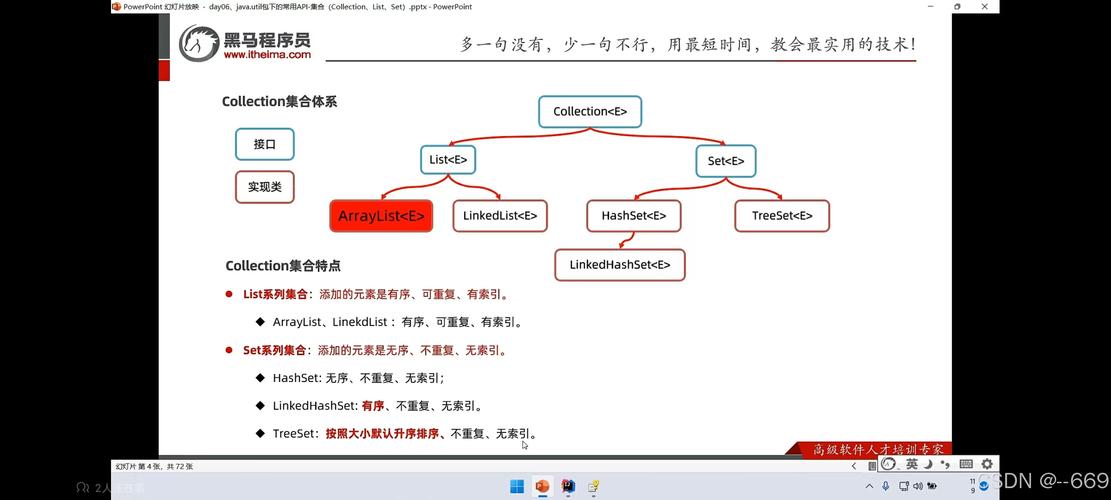
Interfaces: These are abstract data types that represent collections. They define the contracts (the "what") that any concrete collection class must follow. The primary interfaces are
Collection,List,Set,Queue, andMap.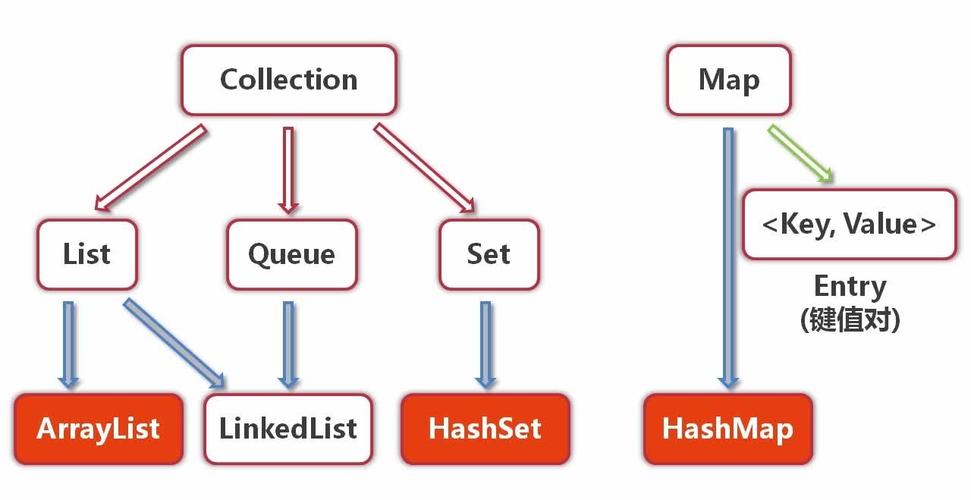 (图片来源网络,侵删)
 -
Implementations (Classes): These are the concrete, ready-to-use classes that implement the interfaces. They represent the actual data structures (the "how"). For example,
ArrayListis an implementation of theListinterface. -
Algorithms: These are static methods in the
Collectionsclass (note the 's') that perform useful operations on collections, such as sorting (Collections.sort()) and searching (Collections.binarySearch()).
The Core Interfaces (The "Blueprints")
This is the most important part to understand. The interfaces define the behavior of the collection.
The Collection Interface (The Root)
This is the top-level interface in the hierarchy (except for Map, which is separate). It's a general-purpose interface for a group of objects called "elements". It has methods like add(), remove(), size(), iterator(), etc.
Most other interfaces (List, Set, Queue) extend Collection.
The List Interface (An Ordered Collection)
A List is a collection that stores elements in a specific order (usually the order of insertion). It allows duplicate elements.
-
Key Characteristics:
- Ordered: Maintains insertion order.
- Duplicates: Allows duplicate elements.
- Index-based: Elements can be accessed by their position (index).
-
Common Implementations:
ArrayList: The most commonListimplementation. It's like a resizable array. Offers fast random access (get(index)) but can be slow for adding/removing elements in the middle of the list because it needs to shift all subsequent elements.- Use Case: When you need fast access by index and don't frequently add/remove elements from the middle.
LinkedList: Implemented as a doubly-linked list. Offers fast addition and removal of elements at any position but slow random access.- Use Case: When you frequently add or remove elements from the beginning or middle of the list.
The Set Interface (A Unique Collection)
A Set is a collection that cannot contain duplicate elements. It models the mathematical concept of a set.
-
Key Characteristics:
- No Duplicates: Ensures that each element is unique.
- Unordered (Generally): Most
Setimplementations do not guarantee any specific order of elements (though some do, likeLinkedHashSet).
-
Common Implementations:
HashSet: The most commonSetimplementation. It provides constant-time performance (O(1)) for basic operations likeadd(),remove(), andcontains(). It does not maintain any order.- Use Case: When you need to store unique items and don't care about the order.
LinkedHashSet: ExtendsHashSet. It maintains a doubly-linked list of all elements, so it preserves the insertion order. Performance is slightly slower thanHashSetbut still very good.- Use Case: When you need to store unique items and need to remember the order in which they were added.
TreeSet: Implemented as a balanced tree (Red-Black Tree). It stores elements in a sorted order (natural order or a customComparator). Performance is good (logarithmic time, O(log n)).- Use Case: When you need a sorted set of unique items.
The Map Interface (Key-Value Pairs)
Map is a bit different. It's not a Collection but is part of the framework. It stores data as key-value pairs. Each key must be unique.
-
Key Characteristics:
- Key-Value: Stores data in pairs.
- Unique Keys: Keys must be unique.
- Values can be duplicated.
-
Common Implementations:
HashMap: The most commonMapimplementation. LikeHashSet, it provides constant-time performance (O(1)) for basic operations. It does not maintain any order.- Use Case: The default choice for key-value storage when order is not important.
LinkedHashMap: ExtendsHashMap. It maintains a linked list of entries, so it preserves the insertion order of the keys.- Use Case: When you need to iterate over a map in the order the keys were inserted.
TreeMap: Implemented as a Red-Black Tree. It stores the keys in a sorted order (natural order or a customComparator). Performance is logarithmic (O(log n)).- Use Case: When you need a sorted map of key-value pairs.
The Queue Interface (First-In, First-Out)
A Queue is designed to hold elements before processing. It follows the FIFO (First-In, First-Out) principle.
-
Key Characteristics:
- FIFO: The first element added is the first one to be removed.
- Typically used for task scheduling, message passing, etc.
-
Common Implementations:
LinkedList: Can be used as aQueue.PriorityQueue: A special queue where elements are ordered based on their natural order or aComparator. The element with the "highest priority" (the smallest value for natural ordering) is removed first, not necessarily the first one added.
Visualizing the Hierarchy
Here's a simplified class hierarchy to help you visualize the relationships:
java.util.Collection (Interface)
    |
    +-- java.util.List (Interface)
    |       |
    |       +-- java.util.ArrayList (Class)
    |       |
    |       +-- java.util.LinkedList (Class)
    |
    +-- java.util.Set (Interface)
    |       |
    |       +-- java.util.HashSet (Class)
    |       |
    |       +-- java.util.LinkedHashSet (Class)
    |       |
    |       +-- java.util.TreeSet (Class)
    |
    +-- java.util.Queue (Interface)
            |
            +-- java.util.LinkedList (Class)
            |
            +-- java.util.PriorityQueue (Class)
java.util.Map (Interface)
    |
    +-- java.util.HashMap (Class)
    |
    +-- java.util.LinkedHashMap (Class)
    |
    +-- java.util.TreeMap (Class)
Key Differences: List vs. Set vs. Map
| Feature | List |
Set |
Map |
|---|---|---|---|
| Purpose | Ordered sequence of elements | Collection of unique elements | Key-value pair storage |
| Duplicates | Allowed | Not Allowed | Keys are unique, values can be duplicates |
| Order | Insertion order (e.g., ArrayList, LinkedList) |
Generally unordered (e.g., HashSet), or insertion order (e.g., LinkedHashSet), or sorted order (e.g., TreeSet) |
Generally unordered (e.g., HashMap), or insertion order (e.g., LinkedHashMap), or sorted order (e.g., TreeMap) |
| Example | [ "apple", "banana", "apple" ] |
{ "apple", "banana" } |
{ "fruit": "apple", "color": "red" } |
How to Choose the Right Collection?
This is the most practical question. Here’s a decision guide:
-
Do you need to store key-value pairs?
- YES -> Use a
Map.- Do you need the keys to be sorted? -> Use
TreeMap. - Do you need to remember the insertion order of keys? -> Use
LinkedHashMap. - Otherwise -> Use
HashMap.
- Do you need the keys to be sorted? -> Use
- YES -> Use a
-
NO, you just need to store a group of objects. Do you need to allow duplicates?
-
YES, duplicates are needed. -> Use a
List.- Do you need fast access by index? -> Use
ArrayList. - Do you frequently add/remove elements from the middle/beginning? -> Use
LinkedList.
- Do you need fast access by index? -> Use
-
NO, all elements must be unique. -> Use a
Set.- Do you need the elements to be sorted? -> Use
TreeSet. - Do you need to remember the insertion order? -> Use
LinkedHashSet. - Otherwise -> Use
HashSet.
- Do you need the elements to be sorted? -> Use
-
-
Do you need a specific processing order (like FIFO)?
- YES -> Use a
Queue.- Do you need elements processed based on priority, not insertion order? -> Use
PriorityQueue. - Otherwise, a
LinkedListcan be used as a queue.
- Do you need elements processed based on priority, not insertion order? -> Use
- YES -> Use a
Code Example
Let's see these in action.
import java.util.*;
public class CollectionExample {
    public static void main(String[] args) {
        // 1. List: Ordered, allows duplicates
        List<String> fruitsList = new ArrayList<>();
        fruitsList.add("Apple");
        fruitsList.add("Banana");
        fruitsList.add("Orange");
        fruitsList.add("Apple"); // Duplicate is allowed
        System.out.println("List: " + fruitsList); // Output: [Apple, Banana, Orange, Apple]
        System.out.println("First fruit: " + fruitsList.get(0)); // Access by index
        // 2. Set: Unique elements
        Set<String> fruitsSet = new HashSet<>();
        fruitsSet.add("Apple");
        fruitsSet.add("Banana");
        fruitsSet.add("Orange");
        fruitsSet.add("Apple"); // Duplicate is ignored
        System.out.println("\nHashSet (Unordered): " + fruitsSet); // Output might be [Orange, Apple, Banana]
        Set<String> fruitsLinkedSet = new LinkedHashSet<>();
        fruitsLinkedSet.add("Apple");
        fruitsLinkedSet.add("Banana");
        fruitsLinkedSet.add("Orange");
        fruitsLinkedSet.add("Apple");
        System.out.println("LinkedHashSet (Insertion Order): " + fruitsLinkedSet); // Output: [Apple, Banana, Orange]
        // 3. Map: Key-Value pairs
        Map<String, Integer> fruitPrices = new HashMap<>();
        fruitPrices.put("Apple", 50);
        fruitPrices.put("Banana", 30);
        fruitPrices.put("Orange", 40);
        fruitPrices.put("Apple", 55); // Value for key "Apple" is updated
        System.out.println("\nHashMap (Unordered): " + fruitPrices); // Output might be {Apple=55, Orange=40, Banana=30}
        // Get a value by key
        System.out.println("Price of Apple: " + fruitPrices.get("Apple"));
        // 4. Using the Collections utility class
        List<Integer> numbers = new ArrayList<>(Arrays.asList(5, 1, 9, 3, 7));
        System.out.println("\nUnsorted List: " + numbers);
        Collections.sort(numbers); // Sorts the list in place
        System.out.println("Sorted List: " + numbers);
    }
}
Modern Java (Java 8+) Enhancements
Java 8 introduced powerful new methods that make collections much more expressive:
- Streams (
stream()): Allow for functional-style operations on collections (e.g., filtering, mapping, reducing).List<String> fruits = Arrays.asList("apple", "banana", "cherry"); List<String> longFruits = fruits.stream() .filter(fruit -> fruit.length() > 5) .collect(Collectors.toList()); // longFruits is ["banana", "cherry"] - Lambda Expressions & Method References: Make code more concise, especially for methods like
forEach.fruits.forEach(fruit -> System.out.println(fruit)); // Or even shorter: fruits.forEach(System.out::println);
- New Methods:
removeIf(),replaceAll(), etc., for in-place modifications.
Best Practices
-
Always Program to Interfaces: Declare your collection variables with the interface type, not the implementation class.
- Good:
List<String> names = new ArrayList<>(); - Bad:
ArrayList<String> names = new ArrayList<>(); - Why? It allows you to change the implementation later (e.g., from
ArrayListtoLinkedList) without changing the code that uses thenamesvariable.
- Good:
-
Choose the Right Collection: As shown in the decision guide, picking the right collection for the job is crucial for performance and correctness.
-
Prefer
ArrayListfor Lists: Unless you have a specific reason (like frequent mid-list insertions/deletions),ArrayListis almost always the best choice for aListdue to its excellent performance for most common operations.