AES(Advanced Encryption Standard)是一种对称加密算法,意味着加密和解密使用的是同一个密钥,它速度快,安全性高,是目前最广泛使用的对称加密算法之一。
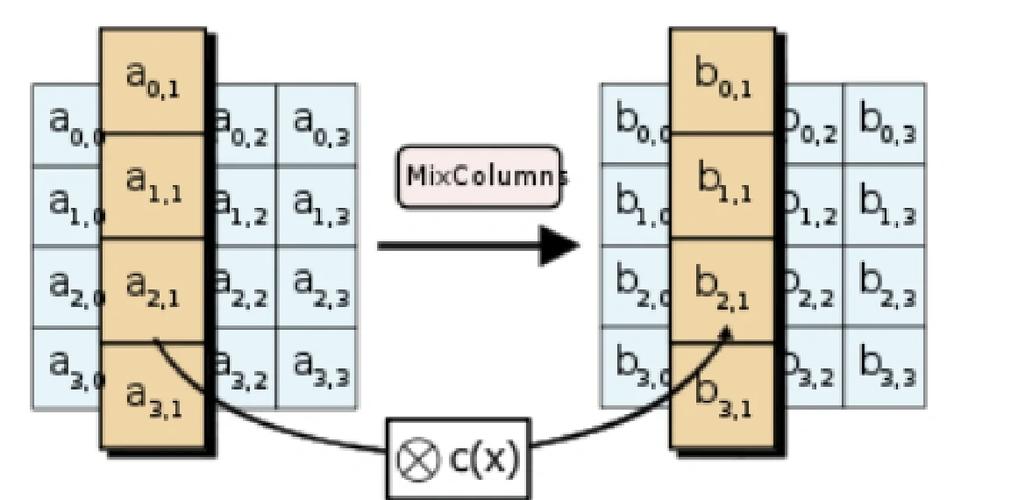
(图片来源网络,侵删)
在 Java 中,我们通常使用 javax.crypto 包中的类来实现 AES 加密解密,下面我将提供一个完整、可运行的示例,并逐步解释其中的关键点。
完整代码示例
这是一个可以直接运行的 Java 类,包含了 AES 的加密和解密方法。
import javax.crypto.Cipher;
import javax.crypto.KeyGenerator;
import javax.crypto.SecretKey;
import javax.crypto.spec.IvParameterSpec;
import javax.crypto.spec.SecretKeySpec;
import java.nio.charset.StandardCharsets;
import java.security.SecureRandom;
import java.util.Base64;
public class AESUtils {
    // AES 算法名称
    private static final String AES_ALGORITHM = "AES";
    // 加密模式 / 填充方式
    // 推荐使用 CBC 或 GCM 模式,这里以 CBC 为例
    private static final String AES_TRANSFORMATION = "AES/CBC/PKCS5Padding";
    // IV 的长度,CBC 模式下必须为 16 字节
    private static final int IV_LENGTH = 16;
    /**
     * 生成 AES 密钥
     * @param keySize 密钥长度(128, 192, 256)
     * @return Base64 编码的密钥字符串
     * @throws Exception
     */
    public static String generateKey(int keySize) throws Exception {
        KeyGenerator keyGenerator = KeyGenerator.getInstance(AES_ALGORITHM);
        keyGenerator.init(keySize);
        SecretKey secretKey = keyGenerator.generateKey();
        return Base64.getEncoder().encodeToString(secretKey.getEncoded());
    }
    /**
     * 加密
     * @param plaintext  明文
     * @param keyStr     Base64 编码的密钥字符串
     * @return Base64 编码的密文 + IV 的字符串 (格式: "iv:base64 ciphertext")
     * @throws Exception
     */
    public static String encrypt(String plaintext, String keyStr) throws Exception {
        // 1. 准备密钥
        byte[] keyBytes = Base64.getDecoder().decode(keyStr);
        SecretKeySpec secretKey = new SecretKeySpec(keyBytes, AES_ALGORITHM);
        // 2. 生成随机 IV
        byte[] iv = new byte[IV_LENGTH];
        new SecureRandom().nextBytes(iv);
        IvParameterSpec ivParameterSpec = new IvParameterSpec(iv);
        // 3. 初始化 Cipher
        Cipher cipher = Cipher.getInstance(AES_TRANSFORMATION);
        cipher.init(Cipher.ENCRYPT_MODE, secretKey, ivParameterSpec);
        // 4. 执行加密
        byte[] encryptedBytes = cipher.doFinal(plaintext.getBytes(StandardCharsets.UTF_8));
        // 5. 组合 IV 和密文,并返回 Base64 编码后的字符串
        // IV 不需要保密,但必须与密文一起传输或存储,用于解密
        byte[] combined = new byte[iv.length + encryptedBytes.length];
        System.arraycopy(iv, 0, combined, 0, iv.length);
        System.arraycopy(encryptedBytes, 0, combined, iv.length, encryptedBytes.length);
        return "iv:" + Base64.getEncoder().encodeToString(combined);
    }
    /**
     * 解密
     * @param encryptedStr 加密后的字符串 (格式: "iv:base64 ciphertext")
     * @param keyStr       Base64 编码的密钥字符串
     * @return 明文字符串
     * @throws Exception
     */
    public static String decrypt(String encryptedStr, String keyStr) throws Exception {
        // 1. 准备密钥
        byte[] keyBytes = Base64.getDecoder().decode(keyStr);
        SecretKeySpec secretKey = new SecretKeySpec(keyBytes, AES_ALGORITHM);
        // 2. 从加密字符串中提取 IV 和密文
        if (!encryptedStr.startsWith("iv:")) {
            throw new IllegalArgumentException("Invalid encrypted string format.");
        }
        String combinedBase64 = encryptedStr.substring(3);
        byte[] combined = Base64.getDecoder().decode(combinedBase64);
        byte[] iv = new byte[IV_LENGTH];
        byte[] encryptedBytes = new byte[combined.length - IV_LENGTH];
        System.arraycopy(combined, 0, iv, 0, iv.length);
        System.arraycopy(combined, iv.length, encryptedBytes, 0, encryptedBytes.length);
        IvParameterSpec ivParameterSpec = new IvParameterSpec(iv);
        // 3. 初始化 Cipher
        Cipher cipher = Cipher.getInstance(AES_TRANSFORMATION);
        cipher.init(Cipher.DECRYPT_MODE, secretKey, ivParameterSpec);
        // 4. 执行解密
        byte[] decryptedBytes = cipher.doFinal(encryptedBytes);
        return new String(decryptedBytes, StandardCharsets.UTF_8);
    }
    public static void main(String[] args) {
        try {
            // --- 步骤 1: 生成密钥 ---
            // AES 支持 128, 192, 256 位密钥,Java 默认限制为 128 位,如需 256 位,需安装 JCE 无限强度策略文件。
            String key = generateKey(256);
            System.out.println("生成的 AES 密钥 (Base64): " + key);
            // --- 步骤 2: 准备明文 ---
            String originalText = "这是一段需要加密的敏感信息 Hello, AES!";
            System.out.println("原始明文: " + originalText);
            // --- 步骤 3: 加密 ---
            String encryptedText = encrypt(originalText, key);
            System.out.println("加密后的字符串: " + encryptedText);
            // --- 步骤 4: 解密 ---
            String decryptedText = decrypt(encryptedText, key);
            System.out.println("解密后的明文: " + decryptedText);
            // --- 验证 ---
            if (originalText.equals(decryptedText)) {
                System.out.println("解密成功,与原始明文一致!");
            } else {
                System.out.println("解密失败,明文不匹配!");
            }
        } catch (Exception e) {
            e.printStackTrace();
        }
    }
}
核心概念解析
1 javax.crypto 包中的核心类
KeyGenerator: 用于生成对称密钥,我们可以用它来生成 AES 密钥。SecretKey: 表示一个秘密密钥。KeyGenerator.generateKey()返回的就是这个对象,我们通常将其编码为字节数组或 Base64 字符串以便存储和传输。SecretKeySpec:SecretKey的一个具体实现,它允许我们从一个字节数组来构造一个密钥,这在当我们从存储中读取密钥时非常有用。Cipher: 这是执行加密和解密的核心引擎,我们用它来初始化模式(加密/解密)并处理数据。IvParameterSpec: 初始化向量(IV)的规范,IV 是一个随机数,用于增加加密的安全性,防止相同的明文总是产生相同的密文(这被称为“确定性加密”)。
2 加密模式与填充方式 (AES_TRANSFORMATION)
Cipher.getInstance("AES/CBC/PKCS5Padding") 这行代码指定了加密的三个要素:
- 算法:
AES。 - 模式:
CBC(Cipher Block Chaining, 密码块链接)。- ECB (Electronic Codebook): 不推荐使用,它会独立地加密每个数据块,相同的明文块会产生相同的密文块,不安全。
- CBC (Cipher Block Chain): 推荐使用,每个明文块在加密前会与前一个密文块进行异或(XOR)操作,并且需要一个随机的 IV 来加密第一个块,这使得相同的明文在不同的 IV 下会产生不同的密文。
- GCM (Galois/Counter Mode): 现代且更安全的模式,它不仅提供加密,还提供认证,能检测密文是否被篡改,如果你需要更高的安全性,可以考虑使用
AES/GCM/NoPadding。
- 填充方式:
PKCS5Padding。- AES 算法要求数据长度必须是 16 字节(128位)的整数倍,如果原始数据长度不够,就需要进行填充。
PKCS5Padding是一种常用的填充方案,它会填充缺少的字节数,并在每个填充字节中填入这个字节数。
- AES 算法要求数据长度必须是 16 字节(128位)的整数倍,如果原始数据长度不够,就需要进行填充。
3 初始化向量
- 作用: IV 是 CBC 模式下的“盐”,它确保即使加密的是完全相同的数据,每次生成的密文也不同,这是防止“彩虹表”攻击和模式分析的关键。
- 生成: IV 必须是随机且不可预测的,通常使用
SecureRandom来生成。 - 传输/存储: IV 不需要保密,但它必须与密文一起发送给接收方,或者与密文一起存储,如果没有正确的 IV,解密将无法进行,在我们的示例中,我们将 IV 和密文拼接在一起,并用 Base64 编码,方便传输和存储。
4 密钥长度
AES 支持 128、192 和 256 位三种密钥长度。
- 在 Java 中,出于历史原因,默认的策略限制密钥长度为 128 位。
- 如果要使用 192 或 256 位密钥,你需要下载并安装 Java Cryptography Extension (JCE) Unlimited Strength Jurisdiction Policy Files,否则,
KeyGenerator.init(256)会抛出InvalidKeyException。 - 对于大多数应用场景,256 位密钥提供了极高的安全性,是推荐的选择。
使用 GCM 模式的更安全实现
GCM (Galois/Counter Mode) 是比 CBC 更现代的模式,它结合了加密和消息认证码,能够有效防止数据篡改,使用 GCM 时,IV 的长度通常为 12 字节(96位),这是推荐值。
下面是使用 GCM 模式的代码:
import javax.crypto.*;
import javax.crypto.spec.GCMParameterSpec;
import javax.crypto.spec.SecretKeySpec;
import java.nio.charset.StandardCharsets;
import java.security.SecureRandom;
import java.util.Base64;
public class AESGCMUtils {
    private static final String AES_ALGORITHM = "AES";
    private static final String AES_GCM_TRANSFORMATION = "AES/GCM/NoPadding";
    // GCM 推荐使用 12 字节的 IV
    private static final int GCM_IV_LENGTH = 12;
    // GCM 认证标签长度,通常为 128 位 (16 字节)
    private static final int GCM_TAG_LENGTH = 128;
    /**
     * 使用 GCM 模式加密
     */
    public static String encryptGCM(String plaintext, String keyStr) throws Exception {
        byte[] keyBytes = Base64.getDecoder().decode(keyStr);
        SecretKeySpec secretKey = new SecretKeySpec(keyBytes, AES_ALGORITHM);
        byte[] iv = new byte[GCM_IV_LENGTH];
        new SecureRandom().nextBytes(iv);
        GCMParameterSpec gcmParameterSpec = new GCMParameterSpec(GCM_TAG_LENGTH, iv);
        Cipher cipher = Cipher.getInstance(AES_GCM_TRANSFORMATION);
        cipher.init(Cipher.ENCRYPT_MODE, secretKey, gcmParameterSpec);
        byte[] encryptedBytes = cipher.doFinal(plaintext.getBytes(StandardCharsets.UTF_8));
        // IV + 密文
        byte[] combined = new byte[iv.length + encryptedBytes.length];
        System.arraycopy(iv, 0, combined, 0, iv.length);
        System.arraycopy(encryptedBytes, 0, combined, iv.length, encryptedBytes.length);
        return "gcm:" + Base64.getEncoder().encodeToString(combined);
    }
    /**
     * 使用 GCM 模式解密
     */
    public static String decryptGCM(String encryptedStr, String keyStr) throws Exception {
        if (!encryptedStr.startsWith("gcm:")) {
            throw new IllegalArgumentException("Invalid GCM encrypted string format.");
        }
        String combinedBase64 = encryptedStr.substring(4);
        byte[] combined = Base64.getDecoder().decode(combinedBase64);
        byte[] keyBytes = Base64.getDecoder().decode(keyStr);
        SecretKeySpec secretKey = new SecretKeySpec(keyBytes, AES_ALGORITHM);
        byte[] iv = new byte[GCM_IV_LENGTH];
        byte[] encryptedBytes = new byte[combined.length - GCM_IV_LENGTH];
        System.arraycopy(combined, 0, iv, 0, iv.length);
        System.arraycopy(combined, iv.length, encryptedBytes, 0, encryptedBytes.length);
        GCMParameterSpec gcmParameterSpec = new GCMParameterSpec(GCM_TAG_LENGTH, iv);
        Cipher cipher = Cipher.getInstance(AES_GCM_TRANSFORMATION);
        cipher.init(Cipher.DECRYPT_MODE, secretKey, gcmParameterSpec);
        // 如果密文被篡改,doFinal 会抛出 AEADBadTagException
        byte[] decryptedBytes = cipher.doFinal(encryptedBytes);
        return new String(decryptedBytes, StandardCharsets.UTF_8);
    }
    // main 方法可以复用上面的,只需调用 encryptGCM 和 decryptGCM
}
| 特性 | CBC 模式 | GCM 模式 |
|---|---|---|
| 安全性 | 良好,但易受到填充 oracle 攻击(如果实现不当) | 优秀,提供加密和认证,防篡改 |
| 性能 | 较慢,需要串行处理数据块 | 更快,可以并行处理数据块 |
| IV | 必须是 16 字节随机数 | 推荐 12 字节随机数 |
| 额外输出 | 无 | 生成一个认证标签(密文的一部分) |
| 推荐度 | 仍然可用,但 GCM 是更好的选择 | 强烈推荐用于新的项目 |
在实际开发中,优先选择 AES/GCM 模式,因为它提供了更高级别的安全性和更好的性能,无论使用哪种模式,IV 的正确生成和管理都是至关重要的。