Of course! Let's break down what "Java Platform Binary" means in a clear and comprehensive way.
The Short Answer
"Java Platform Binary" is the executable file or program that allows you to run Java applications.
Think of it like this:
- Java Code (
.javafile): The recipe for a dish. - Java Compiler (
javac): The chef who reads the recipe and prepares the raw ingredients (compiles the code into bytecode). - Java Platform Binary (e.g.,
java.exe): The oven. You put the prepared ingredients (the bytecode) into it, and it does the actual work of cooking and producing the final result (running the application).
The Detailed Explanation
To fully understand it, let's break down the key terms.
What is a "Binary"?
In computing, a binary is a file that contains executable instructions for a computer's processor. These instructions are written in machine code (a sequence of 0s and 1s). When you "run" a program, your operating system loads this binary file into memory and the processor executes its instructions.
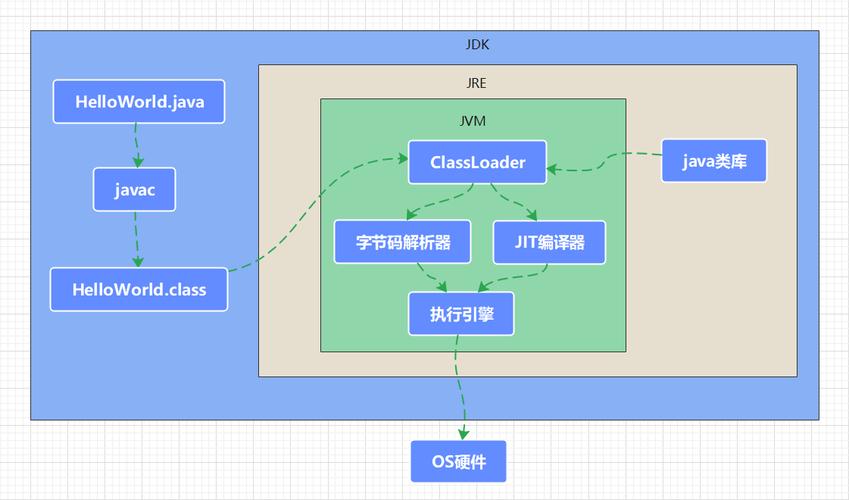
So, "Java Platform Binary" simply refers to the main executable program for the Java Platform.
What is the "Java Platform"?
The Java Platform is the environment in which Java programs are developed and run. It has two main components:
-
The Java Application Programming Interface (API): A vast collection of pre-written software components (classes and libraries) that provide ready-made functionality for common tasks like networking, data structures, database access, and graphical user interfaces (GUIs). This saves developers from having to write everything from scratch.
-
The Java Virtual Machine (JVM): This is the heart of the Java Platform. The JVM is a program that acts as a virtual or abstract computer. It has two crucial jobs:
 (图片来源网络,侵删)
- It loads compiled Java code (bytecode).
- It interprets or just-in-time (JIT) compiles that bytecode into native machine code that your specific computer's processor can understand and execute.
Putting It All Together: The Role of the Binary
The Java Platform Binary is the executable file that starts the JVM.
When you write a Java program, you compile your source code (.java files) into bytecode (.class files). This bytecode is not specific to Windows, macOS, or Linux—it's a universal format.
To run your program, you use the java command from your command line. This command launches the Java Platform Binary (e.g., java.exe on Windows, java on Linux/macOS).
This binary's primary job is to:
- Initialize the JVM.
- Load your compiled bytecode into the JVM's memory.
- Tell the JVM to start executing the code you specified.
Because the JVM handles the translation to the specific machine code, your Java bytecode can run on any device that has a compatible JVM installed. This is the core principle of "Write Once, Run Anywhere" (WORA).
Common Java Platform Binaries
The name of the binary file can vary slightly depending on the operating system and the specific Java distribution:
| Operating System | Common Filename(s) | What it Does |
|---|---|---|
| Windows | java.exe |
The standard command to launch a Java application. Also javaw.exe (same as java.exe but runs without a console window). |
| Linux | java |
A shell script or a symlink to the actual JVM executable (e.g., libjvm.so). |
| macOS | java |
Similar to Linux, it's often a script that launches the correct JVM for the architecture (Intel or Apple Silicon). |
How to Check if You Have It
You can easily check if the Java Platform Binary is installed and on your system's PATH by opening a terminal or command prompt and typing:
java -version
If it's installed, you will see output similar to this:
openjdk version "17.0.8" 2025-07-18
OpenJDK Runtime Environment Temurin-17.0.8+7 (build 17.0.8+7)
OpenJDK 64-Bit Server VM Temurin-17.0.8+7 (build 17.0.8+7, mixed mode, sharing)
If you get an error like 'java' is not recognized..., it means the binary is either not installed or the system doesn't know where to find it.
Why is it Important?
- Enabling Java Applications: Without this binary, you cannot run any Java-based software, from simple command-line tools to massive enterprise systems and popular games like Minecraft.
- Platform Independence: The existence of a JVM for every major OS, started by this binary, is what makes Java so portable.
- Security: The JVM provides a secure "sandboxed" environment where Java applications run, protecting the underlying host system from potentially malicious code.
- Performance: Modern JVMs use sophisticated techniques like Just-In-Time (JIT) compilation to optimize performance, often making Java applications run nearly as fast as native applications.