
Of course! This is a very common question for Python developers. Here’s a detailed breakdown of pytest and nose, comparing them, explaining their roles, and guiding you on which to use.
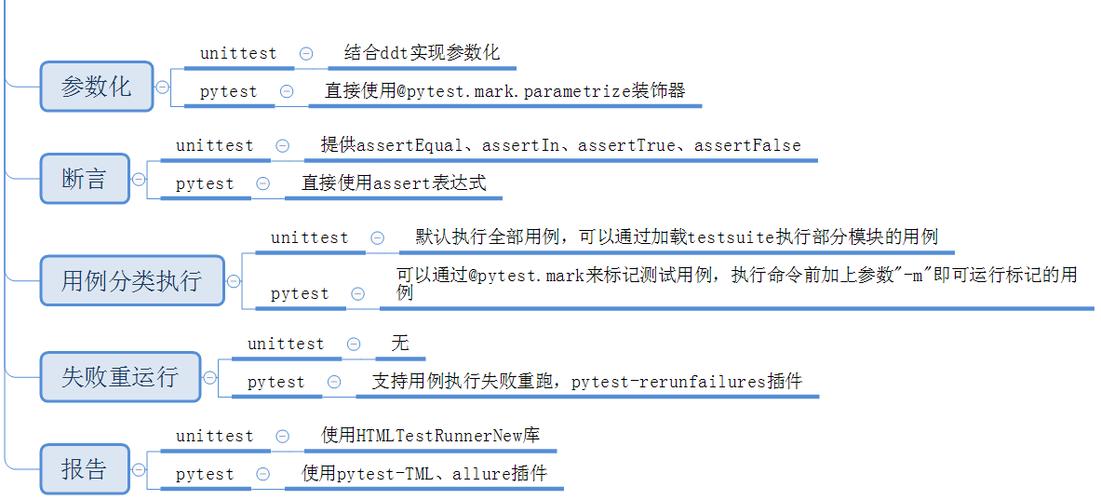
The Short Answer (TL;DR)
pytestis the modern, de-facto standard for testing in Python. It's more powerful, more feature-rich, and has a much larger, more active community. You should usepytestfor any new project.noseis the predecessor topytest. It was fantastic in its time and popularized many conventions thatpytestlater adopted and improved. It is now in maintenance mode and not recommended for new projects.
Detailed Comparison
Let's break down the key differences across several important dimensions.
| Feature | pytest |
nose (and nose2) |
Verdict |
|---|---|---|---|
| Status & Popularity | Dominant & Active. The community favorite, constantly updated with new features and improvements. | Legacy & Deprecated. nose is unmaintained. nose2 is its successor but has a much smaller community. |
pytest wins easily. |
| Installation | pip install pytest |
pip install nose (legacy) or pip install nose2 |
Both are simple. pytest is more common. |
| Test Discovery | Excellent. Finds files like test_*.py and *_test.py and functions/methods/classes starting with test_. Highly configurable. |
Good. Similar conventions to pytest. Also finds test*.py and Test* classes. |
Very similar. pytest is slightly more flexible. |
| Fixture System | Powerful & Flexible. The @pytest.fixture decorator is a game-changer. It allows for complex dependency injection, setup/teardown at any scope (function, class, module, session), and parameterized fixtures. |
Basic. Relied on setup/teardown methods in test classes or modules. Less powerful and flexible than pytest fixtures. |
pytest wins by a landslide. pytest's fixtures are one of its killer features. |
| Assertions | "Magic" Assertions. You can use standard assert statements. pytest rewrites them on import to provide detailed, helpful error messages on failure, including diffs for strings and lists. |
Standard Assertions. Also used assert, but error messages were less detailed. You often had to use helper methods like self.assertEqual(). |
pytest wins. The improved assert feedback is a huge quality-of-life improvement. |
| Parametrization | Built-in & Powerful. The @pytest.mark.parametrize decorator makes it trivial to run the same test logic with multiple inputs and expected outputs. |
Possible but clunkier. Required third-party plugins or manual loops within test methods. Not a first-class citizen. | pytest wins. Parametrization is core to pytest and incredibly easy to use. |
| Plugins | Huge Ecosystem. A massive collection of plugins for coverage, mocking, parallel execution, benchmarking, and much more (e.g., pytest-cov, pytest-mock, pytest-xdist). |
Limited. Had some plugins, but the ecosystem was much smaller and has stagnated. | pytest wins overwhelmingly. The plugin system is a massive strength. |
| Running Tests | pytest (from the project root) or pytest path/to/test_file.py. Automatically discovers and runs tests. Very fast. |
nosetests or python -m nose. Also automatic discovery. |
Both are simple, but pytest is generally faster and has more options. |
| Parallel Execution | Excellent. The pytest-xdist plugin allows for simple and powerful parallel test execution, which is crucial for speeding up CI/CD pipelines. |
Limited/None. Not a built-in or widely adopted feature in the core library. | pytest wins. Parallel execution is a critical feature for modern development. |
Code Example: Side-by-Side
Let's see how a simple parametrized test looks in both.
The Test Logic
We want to test a simple function add(a, b).
# my_code.py
def add(a, b):
    """Adds two numbers together."""
    return a + b
The Test with pytest
Notice the clean, declarative style using @pytest.fixture and @pytest.mark.parametrize.
# test_my_code_pytest.py
import pytest
from my_code import add
# A fixture to provide the test data
# It can be reused across multiple tests
@pytest.mark.parametrize("a, b, expected", [
    (1, 2, 3),
    (-1, 5, 4),
    (0, 0, 0),
    ("a", "b", "ab"), # Works with strings too!
])
def test_add_pytest(a, b, expected):
    """Test the add function with multiple inputs using pytest."""
    assert add(a, b) == expected
To run it:
$ pytest test_my_code_pytest.py -v
Output will be something like:
============================= test session starts ==============================
...
collected 4 items
test_my_code_pytest.py::test_add_pytest[1-2-3] PASSED                    [ 25%]
test_my_code_pytest.py::test_add_pytest[-1-5-4] PASSED                   [ 50%]
test_my_code_pytest.py::test_add_pytest[0-0-0] PASSED                    [ 75%]
test_my_code_pytest.py::test_add_pytest[a-b-ab] PASSED                   [100%]
============================== 4 passed in ...s ===============================
The Test with nose
With nose, you would typically have to handle parametrization manually inside a loop. It's more verbose.
# test_my_code_nose.py
import unittest
from my_code import add
class TestAddWithNose(unittest.TestCase):
    """Test the add function using nose/unittest style."""
    def test_add_with_nose(self):
        """Test the add function with multiple inputs using a loop."""
        test_data = [
            (1, 2, 3),
            (-1, 5, 4),
            (0, 0, 0),
            ("a", "b", "ab"),
        ]
        for a, b, expected in test_data:
            # If one assert fails, the rest in the loop won't be run for this call
            self.assertEqual(add(a, b), expected)
To run it:
$ nosetests test_my_code_nose.py -v
Output:
test_my_code_nose.TestAddWithNose.test_add_with_nose ... ok
----------------------------------------------------------------------
Ran 1 test in ...s
OK
Notice nose reports it as 1 test, whereas pytest correctly identified it as 4 separate test cases. This makes debugging failures much easier with pytest.
When Might You Encounter nose?
You will primarily encounter nose in one of these situations:
- Legacy Codebases: You might be hired to maintain an old project that was built when
nosewas the standard. - CI/CD Pipelines: An old CI configuration might still be set up to run
nosetests. - Older Tutorials/Books: You might find learning resources from the early 2010s that use
nose.
If you find yourself in a nose project, you can often migrate to pytest with very little effort, as pytest is designed to be able to run unittest and nose style tests out of the box. This is often the best long-term strategy for a legacy project.
Final Recommendation
| Scenario | Recommendation | Why? |
|---|---|---|
| Starting a new project | Use pytest |
It's the modern standard. You'll get better tools, a larger community for help, and a more productive testing experience. |
| Maintaining an old project | Stick with nose for now, but plan a migration to pytest |
Don't fix what isn't broken immediately. However, recognize that nose is a dead end. When you have time, start migrating tests to the pytest style to unlock its benefits. |
| Learning Python testing | Learn pytest |
You are learning the current, relevant skill. Learning pytest will teach you the concepts of testing (fixtures, parametrization, etc.) in the most powerful and modern way. |
Conclusion: Choose pytest. It's the clear winner in terms of features, community support, and future development.


