Of course! This is a very common and important topic in Java, especially when working with databases. Let's break down the relationship between String and CLOB in Java.
The Core Difference: In-Memory vs. Database
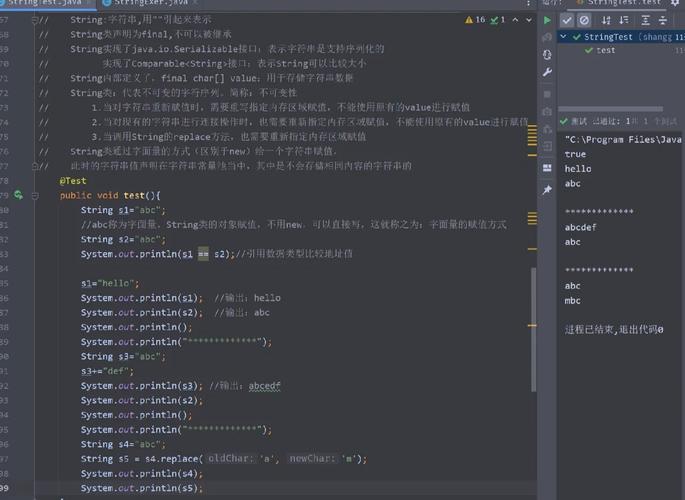
java.lang.String: This is a standard Java object. An instance ofStringrepresents a sequence of characters that resides in your application's memory (JVM heap). It's designed for efficient manipulation within the Java application itself.java.sql.Clob(Character Large Object): This is an interface that represents a large character data object that is typically stored in a database. It's a handle or a pointer to the data, which might be stored on disk, not in your application's memory. It's used to handle text data that is too large to fit comfortably into a standardStringobject.
Why Use CLOBs? The Problem with Large Strings
Imagine you have a 10 MB text file (e.g., a book, a long log, a JSON configuration) that you need to store in a database column.
-
Using
String(The Problem):- You would read the 10 MB file into a
Stringvariable. - This
Stringobject, along with all its character data, would be loaded into your application's JVM heap memory. - This can quickly lead to
OutOfMemoryErrorif you're dealing with many large strings or limited heap space. - When you send this
Stringto the database, the entire 10 MB of data has to be transferred from your application to the database driver, which can be inefficient.
- You would read the 10 MB file into a
-
Using
CLOB(The Solution):- A
CLOBis designed for this. TheClobobject itself is very small in memory. It contains metadata and methods to access the large data. - The actual 10 MB of text data remains on the database server's disk.
- You can stream the data in chunks from the database to your application (or vice-versa) without ever loading the entire 10 MB into your application's heap at once.
- A
Key Clob Methods
The java.sql.Clob interface provides methods to work with the large text data:
length(): Returns the number of characters in theCLOB.getSubString(long pos, int length): Retrieves a portion of theCLOBas aString. Be careful with this on very largeCLOBs, as it can still cause memory issues if you request a huge substring.getCharacterStream(): This is the most important method. It returns aReaderobject, allowing you to stream the character data from theCLOBin manageable chunks. This is the ideal way to process a largeCLOB.setCharacterStream(): Returns aWriterobject, allowing you to stream character data into aCLOB.truncate(long length): Truncates theCLOBto a specified length.
Practical Examples: String ↔ CLOB Conversion
Here’s how you typically convert between String and CLOB in a Java application using JDBC.
Scenario 1: Converting a String to a CLOB (for inserting/updating a database)
You have a String in your Java code and you want to save it to a CLOB column in the database.
import java.sql.Connection;
import java.sql.DriverManager;
import java.sql.PreparedStatement;
import java.sql.SQLException;
import java.io.StringReader;
import java.io.Reader;
public class StringToClobExample {
    public static void main(String[] args) {
        String dbUrl = "jdbc:your_database_url";
        String user = "your_username";
        String password = "your_password";
        String largeText = "This is a very large string that we want to store in a CLOB...\n" +
                           "It could be the entire content of a book or a log file.\n" +
                           // ... imagine this string is very long
                           "End of the large text.";
        String sql = "INSERT INTO documents (id, content_clob) VALUES (?, ?)";
        try (Connection conn = DriverManager.getConnection(dbUrl, user, password);
             PreparedStatement pstmt = conn.prepareStatement(sql)) {
            pstmt.setInt(1, 101);
            // The modern and recommended way (JDBC 4.0+)
            // The driver handles the conversion efficiently.
            pstmt.setString(2, largeText);
            int rowsInserted = pstmt.executeUpdate();
            if (rowsInserted > 0) {
                System.out.println("A large String was successfully inserted as a CLOB.");
            }
        } catch (SQLException e) {
            e.printStackTrace();
        }
    }
}
Note: Modern JDBC drivers are very smart. When you use PreparedStatement.setString() for a CLOB column, the driver often automatically detects the column type and handles the conversion efficiently, potentially streaming the data if it's large. You don't always need to manually create a Clob object.
Scenario 2: Converting a CLOB to a String (for reading from a database)
This is where you must be cautious. Only convert a CLOB to a String if you are certain the data is small enough to fit in memory.
import java.sql.Connection;
import java.sql.DriverManager;
import java.sql.PreparedStatement;
import java.sql.ResultSet;
import java.sql.SQLException;
import java.sql.Clob;
public class ClobToStringExample {
    public static void main(String[] args) {
        String dbUrl = "jdbc:your_database_url";
        String user = "your_username";
        String password = "your_password";
        String sql = "SELECT content_clob FROM documents WHERE id = ?";
        try (Connection conn = DriverManager.getConnection(dbUrl, user, password);
             PreparedStatement pstmt = conn.prepareStatement(sql)) {
            pstmt.setInt(1, 101);
            try (ResultSet rs = pstmt.executeQuery()) {
                if (rs.next()) {
                    Clob clob = rs.getClob("content_clob");
                    // --- DANGEROUS for large CLOBs ---
                    // This can cause OutOfMemoryError if the CLOB is huge!
                    // String content = clob.getSubString(1, (int) clob.length());
                    // --- SAFE way for large CLOBs (streaming) ---
                    System.out.println("Streaming content from CLOB:");
                    try (Reader reader = clob.getCharacterStream()) {
                        int data;
                        while ((data = reader.read()) != -1) {
                            System.out.print((char) data);
                        }
                    }
                    System.out.println("\n--- End of CLOB content ---");
                    // --- SAFE way for small CLOBs ---
                    if (clob.length() < 10000) { // Example: only convert if less than 10KB
                        String content = clob.getSubString(1, (int) clob.length());
                        System.out.println("Content as a String (small CLOB): " + content.substring(0, Math.min(50, content.length())) + "...");
                    }
                }
            }
        } catch (SQLException | java.io.IOException e) {
            e.printStackTrace();
        }
    }
}
Summary Table
| Feature | java.lang.String |
java.sql.Clob |
|---|---|---|
| Purpose | General-purpose text data in Java applications. | Handling large text data stored in a database. |
| Location | In the JVM's heap memory. | A handle to data typically stored on the database server. |
| Memory Usage | Proportional to the length of the string. | The object itself is small; data is external. |
| Primary Use Case | In-memory manipulation, small data transfer. | Storing/retrieving large documents, logs, XML, JSON, etc. |
| Key Methods | substring(), length(), split(), etc. |
getCharacterStream(), length(), getSubString() |
| JDBC Interaction | Used with setString() / getString(). |
Used with getClob() / setClob(). |
Key Takeaway
- Use
Stringfor text that is reasonably sized and lives within your application. - Use
Clobwhen you need to interact with large text data that is stored in or needs to be stored in a database. Always prefer streaming (getCharacterStream()) over converting the entireClobto aStringto prevent memory issues.