Apache CXF WebService 完整教程
目录
- 什么是 WebService?
- 什么是 Apache CXF?
- 环境准备
- 快速入门:第一个 CXF WebService
- 1 服务端开发
- 2 客户端开发
- 深入讲解:核心概念
- 1
@WebService注解 - 2 发布方式
- 3 WSDL (Web Services Description Language)
- 1
- 进阶功能
- 1 处理复杂数据类型(JavaBean)
- 2 使用 JAXB 注解(
@XmlRootElement,@XmlElement) - 3 异常处理 (
@WebFault) - 4 发布 RESTful 风格的 WebService (JAX-RS)
什么是 WebService?
WebService 是一种跨编程语言和跨操作系统平台的远程调用技术,它使用 XML 来传输数据,通过 HTTP 协议进行通信。
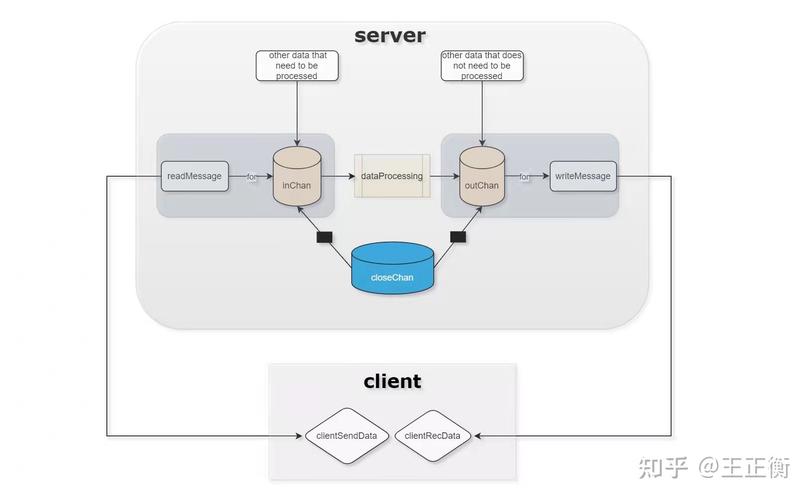
- 跨平台:只要能解析 XML 和发送 HTTP 请求,任何平台都可以调用。
- 跨语言:与语言无关。
- 基于标准:主要基于 WSDL (描述服务)、SOAP (通信协议)、UDDI (注册发现) 等标准。
什么是 Apache CXF?
Apache CXF 是一个开源的、功能强大的框架,用于构建和开发 WebService,它支持多种 WebService 标准,包括:
- SOAP:最传统的 WebService 协议。
- RESTful:轻量级的 WebService 架构风格。
- *WS- 标准**:如 WS-Security (安全), WS-Addressing (寻址) 等。
CXF 的核心优势在于它的灵活性和易用性,它既可以和 Spring 框架无缝集成,也支持纯 Java 代码开发。
环境准备
- JDK: JDK 1.8 或更高版本。
- IDE: IntelliJ IDEA 或 Eclipse。
- 构建工具: Maven (推荐)。
- Web 服务器: Tomcat (可选,用于将 WebService 部署到 Web 容器中)。
Maven 依赖:在你的 pom.xml 文件中添加 CXF 的核心依赖。
<dependencies>
    <!-- CXF 核心依赖 -->
    <dependency>
        <groupId>org.apache.cxf</groupId>
        <artifactId>cxf-rt-frontend-jaxws</artifactId>
        <version>3.4.5</version> <!-- 使用最新稳定版本 -->
    </dependency>
    <dependency>
        <groupId>org.apache.cxf</groupId>
        <artifactId>cxf-rt-transports-http</artifactId>
        <version>3.4.5</version>
    </dependency>
    <!-- 如果需要集成 Spring -->
    <dependency>
        <groupId>org.apache.cxf</groupId>
        <artifactId>cxf-rt-transports-http-jetty</artifactId>
        <version>3.4.5</version>
        <scope>provided</scope> <!-- Jetty 用于内嵌服务器,开发时方便 -->
    </dependency>
    <!-- 日志依赖,如 SLF4J + Logback -->
    <dependency>
        <groupId>ch.qos.logback</groupId>
        <artifactId>logback-classic</artifactId>
        <version>1.2.11</version>
    </dependency>
</dependencies>
快速入门:第一个 CXF WebService
我们将创建一个最简单的 "Hello World" WebService。
1 服务端开发
步骤 1: 创建服务接口
这个接口定义了 WebService 提供的方法,CXF 会根据这个接口生成 WSDL 和服务端实现代码。
// src/main/java/com/example/service/HelloWorld.java
package com.example.service;
import javax.jws.WebMethod;
import javax.jws.WebService;
import javax.jws.soap.SOAPBinding;
// @WebService 注解将这个类标记为一个 WebService 接口
@WebService
// @SOAPBinding 指定 SOAP 协议的样式,默认是 DOCUMENT
@SOAPBinding(style = SOAPBinding.Style.RPC)
public interface HelloWorld {
    // @WebMethod 注解将此方法暴露为 WebService 的一个操作
    @WebMethod
    String sayHello(String name);
}
步骤 2: 创建服务实现类
这个类实现了上面的接口,是 WebService 的具体逻辑。
// src/main/java/com/example/service/HelloWorldImpl.java
package com.example.service;
import javax.jws.WebService;
// endpointInterface 指向它实现的接口
@WebService(endpointInterface = "com.example.service.HelloWorld")
public class HelloWorldImpl implements HelloWorld {
    @Override
    public String sayHello(String name) {
        return "Hello, " + name + "!";
    }
}
步骤 3: 发布 WebService
CXF 提供了多种发布方式,这里我们使用最简单的 Java 代码直接发布。
// src/main/java/com/example/publisher/HelloWorldPublisher.java
package com.example.publisher;
import com.example.service.HelloWorld;
import com.example.service.HelloWorldImpl;
import org.apache.cxf.jaxws.JaxWsServerFactoryBean;
public class HelloWorldPublisher {
    public static void main(String[] args) {
        // 1. 创建 JaxWsServerFactoryBean
        JaxWsServerFactoryBean factory = new JaxWsServerFactoryBean();
        // 2. 设置服务地址
        factory.setAddress("http://localhost:8080/ws/hello");
        // 3. 设置服务实现类
        factory.setServiceBean(new HelloWorldImpl());
        // 4. 创建并启动服务
        factory.create();
        System.out.println("WebService 发布成功!");
        System.out.println("WSDL 地址: http://localhost:8080/ws/hello?wsdl");
    }
}
运行 HelloWorldPublisher,控制台会打印 "WebService 发布成功!",你的 WebService 已经在 http://localhost:8080/ws/hello 地址上运行了。
2 客户端开发
步骤 1: 生成客户端代码
CXF 提供了一个工具可以根据 WSDL 文件生成客户端代码,打开命令行,执行以下命令:
wsdl2java -p com.example.client -d src/main/java http://localhost:8080/ws/hello?wsdl
-p: 指定生成代码的包名。-d: 指定生成代码的目录。- WSDL 的 URL。
执行后,src/main/java/com/example/client 目录下会生成一堆 Java 文件,包括 HelloWorld 接口和 HelloWorldService 等。
步骤 2: 调用 WebService
// src/main/java/com/example/client/HelloWorldClient.java
package com.example.client;
public class HelloWorldClient {
    public static void main(String[] args) {
        // 创建服务视图
        HelloWorldService service = new HelloWorldService();
        // 获取服务端点
        HelloWorld helloWorld = service.getHelloWorldPort();
        // 调用方法
        String response = helloWorld.sayHello("CXF User");
        System.out.println("收到响应: " + response);
    }
}
运行 HelloWorldClient,控制台会打印:收到响应: Hello, CXF User!
恭喜!你已经成功创建了你的第一个 CXF WebService 并调用了它。
深入讲解:核心概念
1 @WebService 注解
这是 CXF 开发中最核心的注解。
| 注解/属性 | 位置 | 作用 |
|---|---|---|
@WebService |
接口或实现类 | 标记一个类或接口为 WebService。 |
name |
接口/类 | 指定 WSDL 中的 <wsdl:portType> 的名称。 |
targetNamespace |
接口/类 | 指定 WSDL 中的目标命名空间,通常与接口包名反向。 |
serviceName |
接口/类 | 指定 WSDL 中的 <wsdl:service> 的名称。 |
endpointInterface |
实现类 | 指定该实现类实现的接口全限定名。必须设置。 |
@WebMethod |
方法 | 标记一个方法为 WebService 的操作。 |
operationName |
方法 | 指定 WSDL 中操作(<wsdl:operation>)的名称。 |
exclude |
方法 | 标记此方法不作为 WebService 操作 |