Of course! This is a very common and important topic when working with Java and MySQL. The interaction between Java's long type and MySQL's numeric types is a frequent source of bugs and data loss if not handled correctly.
Let's break it down into the key concepts: mapping, handling, and best practices.
The Core Mapping: Java long to MySQL
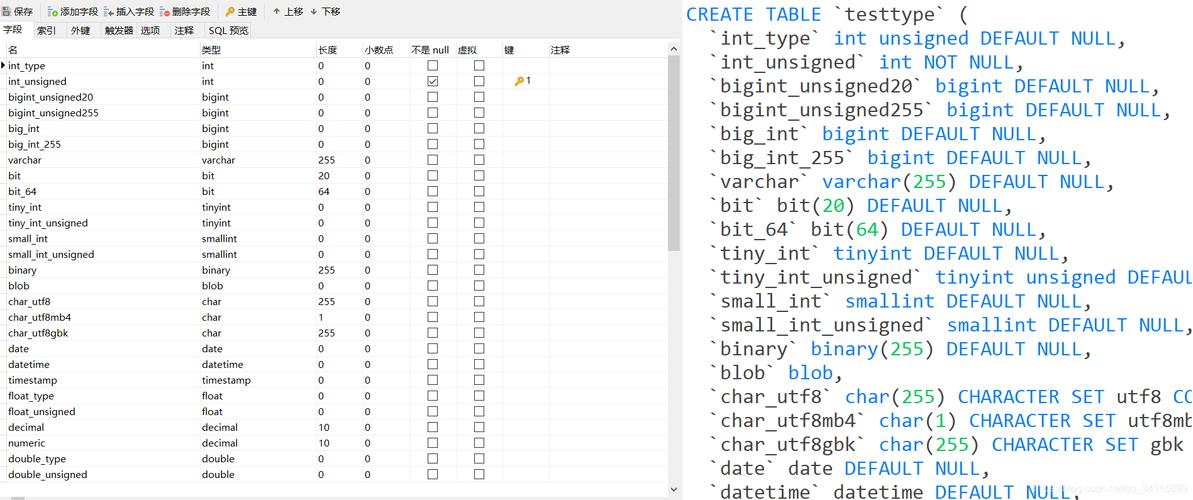
The most direct and recommended mapping for a Java long is the MySQL BIGINT data type.
| Java Type | MySQL Type | Notes |
|---|---|---|
long |
BIGINT |
(Recommended) The perfect match. Both are 64-bit signed integers, ranging from -9,223,372,036,854,775,808 to 9,223,372,036,854,775,807. No data loss. |
long |
INT |
(DANGEROUS) INT is 32-bit. If a Java long holds a value outside the INT range, it will be truncated when stored, leading to incorrect data. Avoid this. |
Long (Object) |
BIGINT |
Also a perfect match. This is used when the value can be null. |
Why BIGINT is Crucial
Modern systems often use large numbers for IDs (e.g., in a distributed system using Snowflake IDs), timestamps, or counters. A standard INT (max ~2.1 billion) is often insufficient. A BIGINT can hold values up to ~9 quintillion, making it the safe, future-proof choice.
Handling in JDBC (The How-To)
When you use JDBC to interact with the database, you'll use specific methods to set and retrieve long values.
Setting a long into a PreparedStatement (Insert/Update)
Use the setLong() method.
import java.sql.Connection;
import java.sql.DriverManager;
import java.sql.PreparedStatement;
import java.sql.SQLException;
public class LongInsertExample {
    public static void main(String[] args) {
        String url = "jdbc:mysql://localhost:3306/your_database";
        String user = "your_user";
        String password = "your_password";
        // A large ID that would overflow an INT
        long userId = 1234567890123L;
        String userName = "John Doe";
        String sql = "INSERT INTO users (id, name) VALUES (?, ?)";
        try (Connection conn = DriverManager.getConnection(url, user, password);
             PreparedStatement pstmt = conn.prepareStatement(sql)) {
            // Set the first parameter (id) as a long
            pstmt.setLong(1, userId);
            // Set the second parameter (name) as a String
            pstmt.setString(2, userName);
            int affectedRows = pstmt.executeUpdate();
            System.out.println(affectedRows + " row(s) inserted.");
        } catch (SQLException e) {
            e.printStackTrace();
        }
    }
}
Retrieving a long from a ResultSet (Select)
Use the getLong() method.
import java.sql.Connection;
import java.sql.DriverManager;
import java.sql.PreparedStatement;
import java.sql.ResultSet;
import java.sql.SQLException;
public class LongSelectExample {
    public static void main(String[] args) {
        String url = "jdbc:mysql://localhost:3306/your_database";
        String user = "your_user";
        password = "your_password";
        String sql = "SELECT id, name FROM users WHERE name = ?";
        try (Connection conn = DriverManager.getConnection(url, user, password);
             PreparedStatement pstmt = conn.prepareStatement(sql)) {
            pstmt.setString(1, "John Doe");
            try (ResultSet rs = pstmt.executeQuery()) {
                if (rs.next()) {
                    // Retrieve the 'id' column as a long
                    long userId = rs.getLong("id");
                    String userName = rs.getString("name");
                    System.out.println("User ID: " + userId);
                    System.out.println("User Name: " + userName);
                    // You can also use the column index (1-based)
                    // long userIdFromIndex = rs.getLong(1);
                }
            }
        } catch (SQLException e) {
            e.printStackTrace();
        }
    }
}
Handling NULL Values with Long
If a column in your database can be NULL, you should use Java's wrapper class java.lang.Long instead of the primitive long.
The getLong() method on a ResultSet has a special behavior: if the database column is NULL, it returns 0. This can be a silent bug because 0 might be a valid value in your application.
The solution: Always check for NULL explicitly using wasNull() after you call getLong().
// Assuming 'nullable_bigint_column' can be NULL in the database
Long nullableValue = null; // Default to null
// ... inside your try-with-resources block for ResultSet
if (rs.next()) {
    // Get the value as a primitive long
    long primitiveValue = rs.getLong("nullable_bigint_column");
    // CRITICAL: Check if the last column read was NULL
    if (rs.wasNull()) {
        // If it was NULL, assign null to your object
        nullableValue = null;
    } else {
        // If it was not NULL, assign the value
        nullableValue = primitiveValue;
    }
}
// Now you can safely use 'nullableValue'
if (nullableValue != null) {
    System.out.println("Value is: " + nullableValue);
} else {
    System.out.println("Value is NULL");
}
Best Practices and Common Pitfalls
Always Use BIGINT for IDs
Never use INT for a primary key or any ID that might grow large. Start with BIGINT from the beginning. The storage difference is negligible (8 bytes vs 4 bytes), but the benefit is enormous.
Use PreparedStatement
Always use PreparedStatement with placeholders. This prevents SQL injection and handles type conversion safely and efficiently.
Be Meticulous with NULLs
If a column is nullable, use the Long wrapper class and always call rs.wasNull() after getting a value that could be null. This is a classic source of bugs.
Use Modern JDBC Drivers
Ensure you are using a recent JDBC driver (e.g., mysql-connector-j version 8.x). They have better performance, security, and compatibility with modern Java versions.
Handling BigInteger for Extremely Large Numbers
What if you need a number larger than Long.MAX_VALUE? In that case, use java.math.BigInteger. The JDBC driver supports this via setObject() and getObject().
// For inserting
BigInteger hugeNumber = new BigInteger("123456789012345678901234567890");
pstmt.setObject(1, hugeNumber);
// For retrieving
BigInteger retrievedHugeNumber = (BigInteger) rs.getObject("huge_number_column");
Your MySQL column for this should be DECIMAL(precision, 0) or a text type like VARCHAR or TEXT, depending on your needs. BIGINT is not sufficient.
Summary Table
| Scenario | Java Type | MySQL Type | JDBC Method | Key Consideration |
|---|---|---|---|---|
| Standard Number | long |
BIGINT |
stmt.setLong(), rs.getLong() |
The standard, safe choice. |
| Nullable Number | Long |
BIGINT |
stmt.setLong(), rs.getLong() |
Must use rs.wasNull() after getLong(). |
| Primary Key / ID | long |
BIGINT |
stmt.setLong(), rs.getLong() |
Best practice to avoid overflow. |
| Extremely Large Number | BigInteger |
DECIMAL or TEXT |
stmt.setObject(), rs.getObject() |
Use when long is not big enough. |