Of course! Making an HTTP POST request in Java is a common task. I'll guide you through the most popular and modern methods, starting with the recommended approach and covering legacy methods as well.
Here are the methods we'll cover:
- Java 11+
HttpClient(Recommended): The modern, built-in, and standard way. It's non-blocking, powerful, and easy to use. - Apache HttpClient (Very Popular): A robust, third-party library that has been the industry standard for years. It's great for complex scenarios.
- OkHttp (Modern Alternative): Another excellent third-party library known for its performance and simplicity, especially when dealing with JSON.
- Legacy
HttpURLConnection(Not Recommended for New Code): The built-in way before Java 11. It's verbose and clunky, but you might see it in older codebases.
Java 11+ HttpClient (Recommended)
This is the best choice for any new project. It's part of the standard Java Development Kit (JDK) since version 11.
Key Features:
- Clean, modern API.
- Supports both synchronous and asynchronous (non-blocking) requests.
- Built-in support for JSON and WebSocket.
- No external dependencies needed.
Example: POST JSON Data
Let's send a JSON payload to a test API endpoint.
import java.net.URI;
import java.net.http.HttpClient;
import java.net.http.HttpRequest;
import java.net.http.HttpResponse;
import java.time.Duration;
import java.util.concurrent.CompletableFuture;
public class Java11HttpClientPost {
    public static void main(String[] args) throws Exception {
        // The URL of the API endpoint
        String url = "https://httpbin.org/post"; // A great testing service
        // The JSON payload we want to send
        String jsonPayload = """
                {
                    "name": "John Doe",
                    "job": "Software Developer",
                    "message": "Hello from Java 11 HttpClient!"
                }
                """;
        // 1. Create an HttpClient
        HttpClient client = HttpClient.newBuilder()
                .version(HttpClient.Version.HTTP_2)
                .connectTimeout(Duration.ofSeconds(10))
                .build();
        // 2. Create an HttpRequest
        HttpRequest request = HttpRequest.newBuilder()
                .uri(URI.create(url))
                .header("Content-Type", "application/json") // Set the content type
                .timeout(Duration.ofSeconds(15))
                .POST(HttpRequest.BodyPublishers.ofString(jsonPayload)) // Set the method and body
                .build();
        // 3. Send the request and get the response (Synchronously)
        System.out.println("Sending synchronous request...");
        HttpResponse<String> response = client.send(request, HttpResponse.BodyHandlers.ofString());
        // 4. Print the response status and body
        System.out.println("Status Code: " + response.statusCode());
        System.out.println("Response Body: " + response.body());
        // --- Asynchronous Example ---
        System.out.println("\nSending asynchronous request...");
        CompletableFuture<HttpResponse<String>> asyncResponse = client.sendAsync(request, HttpResponse.BodyHandlers.ofString());
        // You can do other work here while the request is in progress...
        // Block and get the result when ready
        HttpResponse<String> asyncResult = asyncResponse.join();
        System.out.println("Async Status Code: " + asyncResult.statusCode());
        System.out.println("Async Response Body: " + asyncResult.body());
    }
}
Explanation:
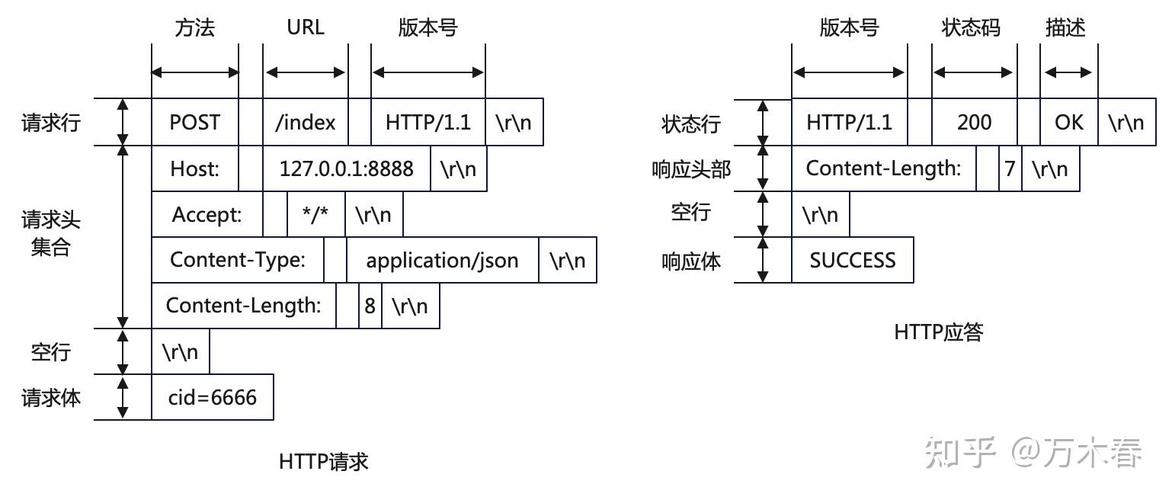
HttpClient: The central object for sending requests. We configure it to use HTTP/2 and set a connection timeout.HttpRequest: Represents the request itself. We set the URI, headers (likeContent-Type), timeout, and most importantly, thePOSTmethod with the body publisher.HttpRequest.BodyPublishers.ofString(jsonPayload): This tells the client how to send the body. We're sending a simpleString.client.send(...): The synchronous call that blocks until the response is received.HttpResponse.BodyHandlers.ofString(): This tells the client how to handle the response body. We want it as aString.client.sendAsync(...): The asynchronous version, which returns aCompletableFuture. This is perfect for non-blocking applications.
Apache HttpClient (Very Popular)
This is a powerful, third-party library. It's more feature-rich than the built-in HttpClient and has been around for a long time.
Setup (Maven)
You need to add the dependency to your pom.xml:
<dependency>
    <groupId>org.apache.httpcomponents.client5</groupId>
    <artifactId>httpclient5</artifactId>
    <version>5.3.1</version> <!-- Use the latest version -->
</dependency>
<dependency>
    <groupId>org.apache.httpcomponents.core5</groupId>
    <artifactId>httpcore5</artifactId>
    <version>5.2</version> <!-- Use the latest version -->
</dependency>
Example: POST JSON Data
import org.apache.hc.client5.http.classic.methods.HttpPost;
import org.apache.hc.client5.http.entity.mime.FileBody;
import org.apache.hc.client5.http.entity.mime.MultipartEntityBuilder;
import org.apache.hc.client5.http.entity.mime.StringBody;
import org.apache.hc.client5.http.impl.classic.CloseableHttpClient;
import org.apache.hc.client5.http.impl.classic.CloseableHttpResponse;
import org.apache.hc.client5.http.impl.classic.HttpClients;
import org.apache.hc.core5.http.ContentType;
import org.apache.hc.core5.http.HttpEntity;
import org.apache.hc.core5.http.io.entity.StringEntity;
import org.apache.hc.core5.http.io.entity.EntityUtils;
import java.io.File;
import java.nio.charset.StandardCharsets;
public class ApacheHttpClientPost {
    public static void main(String[] args) throws Exception {
        String url = "https://httpbin.org/post";
        String jsonPayload = "{\"name\":\"John Doe\", \"job\":\"Developer\"}";
        // 1. Create an HttpClient instance
        try (CloseableHttpClient httpClient = HttpClients.createDefault()) {
            // 2. Create an HttpPost object
            HttpPost httpPost = new HttpPost(url);
            // 3. Set the request body
            StringEntity entity = new StringEntity(jsonPayload, ContentType.APPLICATION_JSON);
            httpPost.setEntity(entity);
            // 4. Set headers
            httpPost.setHeader("Accept", "application/json");
            httpPost.setHeader("Content-Type", "application/json");
            System.out.println("Executing request: " + httpPost.getMethod() + " " + httpPost.getUri());
            // 5. Execute the request and get the response
            try (CloseableHttpResponse response = httpClient.execute(httpPost)) {
                // 6. Get the response entity
                HttpEntity responseEntity = response.getEntity();
                System.out.println("Status Code: " + response.getCode());
                // 7. Process the response body
                if (responseEntity != null) {
                    String responseBody = EntityUtils.toString(responseEntity, StandardCharsets.UTF_8);
                    System.out.println("Response Body: " + responseBody);
                }
            }
        }
    }
}
Explanation:
CloseableHttpClient: The main client object. Using atry-with-resourcesblock ensures it's closed properly.HttpPost: The request object specific to the POST method.StringEntity: Wraps our JSON string into an HTTP entity. We also set itsContentType.httpPost.setEntity(entity): Attaches the body to the request.httpClient.execute(httpPost): Executes the request and returns aCloseableHttpResponse.EntityUtils.toString(...): A utility to easily read the response entity into a string.
OkHttp (Modern Alternative)
OkHttp is another fantastic third-party library, renowned for its efficiency and ease of use, especially with JSON.
Setup (Maven)
Add this to your pom.xml:
<dependency>
    <groupId>com.squareup.okhttp3</groupId>
    <artifactId>okhttp</artifactId>
    <version>4.12.0</version> <!-- Use the latest version -->
</dependency>
Example: POST JSON Data
OkHttp has a very builder-like API that is very intuitive.
import okhttp3.*;
import java.io.IOException;
public class OkHttpPost {
    public static void main(String[] args) throws IOException {
        String url = "https://httpbin.org/post";
        String jsonPayload = "{\"name\":\"Jane Doe\", \"job\":\"QA Engineer\"}";
        // 1. Create an OkHttpClient instance
        OkHttpClient client = new OkHttpClient();
        // 2. Create the request body
        MediaType JSON = MediaType.get("application/json; charset=utf-8");
        RequestBody body = RequestBody.create(jsonPayload, JSON);
        // 3. Build the request
        Request request = new Request.Builder()
                .url(url)
                .post(body) // Set the POST body
                .build();
        // 4. Execute the request synchronously
        try (Response response = client.newCall(request).execute()) {
            if (!response.isSuccessful()) {
                throw new IOException("Unexpected code " + response);
            }
            // 5. Get the response body
            String responseBody = response.body().string();
            System.out.println("Status Code: " + response.code());
            System.out.println("Response Body: " + responseBody);
        }
    }
}
Explanation:
OkHttpClient: The client object.MediaType: Defines the content type of the request body.RequestBody.create(...): Creates the request body from a string and its media type.Request.Builder: A fluent builder for creating theRequestobject. We set the URL and the body with.post(body).client.newCall(request).execute(): Executes the call and gets the response.response.body().string(): Reads the response body as a string.
Legacy HttpURLConnection (Not Recommended)
This was the standard way before Java 11. It's verbose, requires manual resource management, and lacks many modern features. You should avoid using it in new projects, but it's useful to recognize.
import java.io.BufferedReader;
import java.io.DataOutputStream;
import java.io.InputStreamReader;
import java.net.HttpURLConnection;
import java.net.URL;
public class LegacyHttpUrlConnectionPost {
    public static void main(String[] args) throws Exception {
        String url = "https://httpbin.org/post";
        String jsonPayload = "{\"name\":\"Old School\", \"job\":\"Legacy Code\"}";
        URL obj = new URL(url);
        HttpURLConnection con = (HttpURLConnection) obj.openConnection();
        // 1. Set the request method
        con.setRequestMethod("POST");
        // 2. Set request headers
        con.setRequestProperty("Content-Type", "application/json");
        con.setRequestProperty("Accept", "application/json");
        // 3. Enable output and send the request body
        con.setDoOutput(true);
        try (DataOutputStream out = new DataOutputStream(con.getOutputStream())) {
            out.writeBytes(jsonPayload);
            out.flush();
        }
        // 4. Get the response code
        int responseCode = con.getResponseCode();
        System.out.println("Status Code: " + responseCode);
        // 5. Read the response
        if (responseCode == HttpURLConnection.HTTP_OK) { // success
            try (BufferedReader in = new BufferedReader(
                    new InputStreamReader(con.getInputStream()))) {
                String inputLine;
                StringBuilder response = new StringBuilder();
                while ((inputLine = in.readLine()) != null) {
                    response.append(inputLine);
                }
                System.out.println("Response Body: " + response.toString());
            }
        } else {
            System.out.println("POST request failed.");
        }
    }
}
Summary: Which One Should I Use?
| Method | Pros | Cons | Best For |
|---|---|---|---|
Java 11+ HttpClient |
Modern, standard, no dependencies, non-blocking. | Requires Java 11+. | All new Java projects. This is the future. |
| Apache HttpClient | Very powerful, mature, highly configurable. | Requires external dependency. Can be more verbose. | Existing projects already using it, or complex needs (like advanced auth). |
| OkHttp | Excellent performance, very easy-to-use API, great for JSON. | Requires external dependency. | Android development, or any Java project where simplicity and performance are key. |
HttpURLConnection |
Built-in (no dependency), works on very old Java versions. | Verbose, clunky, blocking, error-prone. | Legacy codebases or environments where you cannot update Java or add dependencies. |