
Of course! Let's break down the Python-to-MySQL architecture. This is a classic and fundamental pattern in software development, often referred to as a Two-Tier Architecture or a Client-Server Architecture.
Here’s a comprehensive overview, from the high-level concept down to practical implementation details.
High-Level Concept: The Client-Server Model
At its core, the architecture is a simple client-server relationship:
- Client (Python Application): Your Python script is the "client." It doesn't know how to store data or execute SQL queries on disk. Its job is to formulate a request ("I want to get all users with the name 'Alice'") and send it to the server.
- Server (MySQL Database): The MySQL server is the "server." It's a dedicated, powerful process that manages the database files, understands the SQL language, enforces data integrity, and is highly optimized for data storage and retrieval. It receives the request from the Python client, processes it, and sends back the results.
+-------------------------+      1. Request (SQL Query)      +-----------------------+
|                         | --------------------------------> |                       |
|   Python Application    |                                 |      MySQL Server     |
|   (The Client)          | <-------------------------------- |      (The Server)      |
|                         |      2. Response (Data/Error)     |                       |
+-------------------------+                                 +-----------------------+
          |                                                     ^
          | 3. Uses a Library (Connector)                       | 4. Listens on a Port
          |                                                     | (e.g., 3306)
          v                                                     |
+-------------------------+                                 +-----------------------+
|   Database Connector     |                                 |   Data Storage        |
|   (e.g., mysql-connector)|                                 |   (Files on Disk)     |
+-------------------------+                                 +-----------------------+
Key Components of the Architecture
The Python Application (Client-Side Logic)
This is where your business logic resides. It's responsible for:
- Connecting to the database.
- Building SQL queries (often dynamically, based on user input or application state).
- Executing those queries.
- Processing the results (e.g., converting them into Python dictionaries or objects).
- Handling errors gracefully.
The Database Connector (The Bridge)
This is the most critical piece of the puzzle. A "connector" (or "driver") is a Python library that acts as a translator and communication channel. It's not part of the Python standard library.
What it does:
- Implements the MySQL Protocol: It understands the specific language and rules the MySQL server uses to communicate. This is a complex protocol, so you're glad a library handles it!
- Manages Connection State: It handles establishing the connection, keeping it alive (or timing out), and closing it properly.
- Converts Data Types: It translates data between Python's native types (e.g.,
str,int,datetime.datetime) and MySQL's data types (e.g.,VARCHAR,INT,DATETIME). - Handles Escaping: It safely formats your data to prevent SQL Injection attacks by escaping special characters.
Popular MySQL Connectors for Python:
| Library | Performance | API Style | Recommendation |
|---|---|---|---|
mysql-connector-python |
Good | Object-Oriented | Official Oracle driver. Great for general use, well-documented, and actively maintained. |
PyMySQL |
Excellent | Pure Python, DB-API 2.0 | Very popular, lightweight, and pure Python (easy to install). Often the default choice in many frameworks. |
mysqlclient |
Excellent | C Extension, DB-API 2.0 | A fork of the old MySQLdb. It's a C extension, making it very fast. It's a dependency for Django. Requires C compilation. |
Recommendation: For most new projects, start with mysql-connector-python (official) or PyMySQL (fast, pure Python). If you're using Django, you'll likely use mysqlclient.
The MySQL Server (The Database Engine)
This is the backend powerhouse. Its responsibilities include:
- Connection Management: Listening for incoming connections on a specific port (default is 3306).
- Authentication: Verifying the username and password provided by the Python client.
- Query Parsing & Execution: Interpreting the SQL query, checking for syntax errors, creating an execution plan, and running it.
- Concurrency Control: Managing simultaneous requests from multiple clients without data corruption.
- Data Storage & Retrieval: Reading from and writing to the database files on disk using highly optimized storage engines like InnoDB (the default, which supports transactions).
Architectural Patterns & Best Practices
Simply connecting and running queries is fine for small scripts, but for real applications, you need more robust architecture.
Connection Management: The Connection Pool
Opening and closing a new database connection for every single query is extremely inefficient. It involves significant overhead (network handshake, authentication).
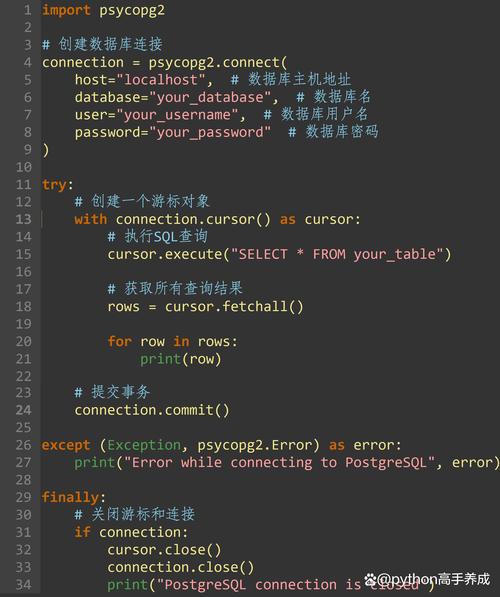
The Solution: Connection Pooling. A connection pool is a cache of database connections maintained by the connector library. When your application needs a connection, it "borrows" one from the pool. When it's done, it returns the connection to the pool instead of closing it. This dramatically improves performance.
Example with mysql-connector-python:
import mysql.connector
from mysql.connector import pooling
# Create a connection pool
connection_pool = pooling.MySQLConnectionPool(
    pool_name="mypool",
    pool_size=5,  # Number of connections to keep in the pool
    host="localhost",
    user="your_user",
    password="your_password",
    database="your_db"
)
# Get a connection from the pool
connection = connection_pool.get_connection()
try:
    cursor = connection.cursor(dictionary=True) # dictionary=True is a best practice
    cursor.execute("SELECT * FROM users WHERE age > %s", (25,))
    results = cursor.fetchall()
    for row in results:
        print(row)
finally:
    # IMPORTANT: Return the connection to the pool
    connection.close()
Data Access Logic: The DAO or Repository Pattern
In a well-structured application, you should not sprinkle SQL queries all over your code (e.g., in views, controllers, or business logic classes). This makes the code hard to maintain and test.
The Solution: The Data Access Object (DAO) or Repository Pattern. You create dedicated classes (modules) whose only responsibility is to handle communication with the database.
Example Structure:
my_app/
├── main.py
├── models/
│   └── user.py       # Represents a 'User' (e.g., a class with name, email attributes)
├── dao/
│   └── user_dao.py   # Contains all SQL for 'User' operations (CRUD)
└── db/
└── connection.py # Handles the connection pool setupdb/connection.py:
# (Connection pool setup code from above)
dao/user_dao.py:
from db.connection import connection_pool
class UserDAO:
    def get_users_over_age(self, age):
        connection = connection_pool.get_connection()
        try:
            cursor = connection.cursor(dictionary=True)
            cursor.execute("SELECT id, name, email FROM users WHERE age > %s", (age,))
            return cursor.fetchall()
        finally:
            connection.close()
main.py:
from dao.user_dao import UserDAO
user_dao = UserDAO()
users = user_dao.get_users_over_age(30)
print(users)
This separation makes your code clean, testable, and easy to update.
Security: Preventing SQL Injection
NEVER format queries by inserting variables directly into the string. This is a massive security vulnerability.
VULNERABLE CODE (DO NOT DO THIS):
user_id = input("Enter user ID: ")
# DANGEROUS! Allows for SQL injection
query = f"SELECT * FROM users WHERE id = {user_id}"
cursor.execute(query)
SECURE CODE (The Right Way): Use parameterized queries. The connector library will safely handle the data, escaping any malicious characters.
user_id = input("Enter user ID: ")
# SAFE! The library handles the escaping
query = "SELECT * FROM users WHERE id = %s"
cursor.execute(query, (user_id,)) # Pass the value as a tuple
This is the single most important security rule when interacting with a database from any language.
Summary: The Modern Python-MySQL Architecture
- Client: A Python application with business logic.
- Bridge: A robust connector library (like
mysql-connector-pythonorPyMySQL) that manages a connection pool. - Abstraction: Data Access Objects (DAOs) or Repository classes that encapsulate all SQL queries, keeping them separate from business logic.
- Server: A powerful MySQL database server that handles data storage, transactions, and concurrency.
- Security: Strict use of parameterized queries to prevent SQL injection.
This layered architecture provides a scalable, secure, and maintainable foundation for any application that needs to interact with a MySQL database.


