Of course! Here is a comprehensive guide to Java XML Schema (XSD), covering what it is, why it's important, and how to use it within the Java ecosystem.
What is XML Schema (XSD)?
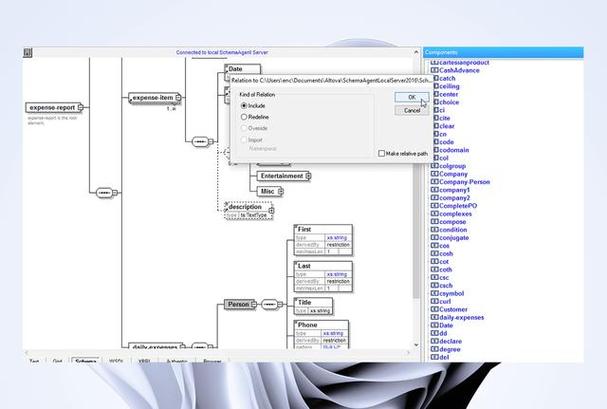
XML Schema Definition (XSD) is a World Wide Web Consortium (W3C) standard for describing the structure and constraining the contents of XML documents.
Think of it as a blueprint or a contract for your XML data. It defines:
- Elements: What elements can appear in the document.
- Attributes: What attributes those elements can have.
- Data Types: The type of data for elements and attributes (e.g.,
string,integer,boolean,date, or custom types). - Structure: The order and hierarchy of elements (e.g., an
Orderelement must contain aCustomerelement followed by one or moreItemelements). - Constraints: Rules like "the
priceelement must be greater than 0" or "theemailelement must contain a valid email format."
Why use XSD?
- Validation: Ensure your XML data is correct and conforms to a predefined structure before processing it. This prevents errors and data corruption.
- Documentation: The XSD file itself serves as clear documentation for the expected format of your XML data.
- Code Generation (The Java Connection): This is the most powerful feature for Java developers. An XSD can be used by tools to automatically generate Java classes (POJOs/Plain Old Java Objects) that perfectly model the XML structure. This makes working with XML in Java much easier, safer, and more object-oriented.
The Java XSD Processing Landscape
Java has several APIs and libraries for handling XML Schema. The main ones are:
| Technology | Description | When to Use |
|---|---|---|
| JAXB (Java Architecture for XML Binding) | The Standard. Part of Java SE (since Java 6). It provides a framework for binding XML schemas to Java objects. It's the most common and integrated approach. | This is the recommended starting point for most modern Java applications. It's built-in, well-supported, and simplifies XML to Java object mapping. |
| DOM (Document Object Model) | A standard API for accessing and manipulating XML as a tree of in-memory objects. It's very flexible but can be memory-intensive for large XML files. | When you need to read, write, and modify XML documents in a random, non-sequential way. Less common for simple data binding. |
| SAX (Simple API for XML) | An event-driven API for reading XML. It's very fast and memory-efficient because it doesn't load the entire document into memory. It's read-only. | When processing very large XML files where memory is a concern, and you only need to read the data once, from start to finish. |
| StAX (Streaming API for XML) | A modern, bidirectional API that sits between SAX and DOM. It's a "pull" parser, giving the developer more control over the parsing process than SAX's "push" model. | A good general-purpose choice for reading or writing large XML files when you need more control than SAX but less memory overhead than DOM. |
For this guide, we will focus on JAXB, as it's the most direct way to leverage XSD in Java for data binding.
A Practical Guide: Using XSD with JAXB
Let's walk through a complete example. We will:
- Create an XSD file to define a book structure.
- Use the
xjctool (from the JDK) to generate Java classes from the XSD. - Write Java code to create an object, marshal it (convert to XML), and unmarshal it (parse XML back into an object).
Step 1: Create the XSD File (book.xsd)
This schema defines a catalog that contains one or more book elements. Each book has a title, author, price, and publication date.
<!-- book.xsd -->
<xs:schema xmlns:xs="http://www.w3.org/2001/XMLSchema"
           elementFormDefault="qualified"
           targetNamespace="http://www.example.org/bookstore"
           xmlns:tns="http://www.example.org/bookstore">
    <!-- The main catalog element -->
    <xs:element name="catalog" type="tns:CatalogType"/>
    <!-- The CatalogType complex type -->
    <xs:complexType name="CatalogType">
        <xs:sequence>
            <!-- A catalog can have one or more books -->
            <xs:element name="book" type="tns:BookType" maxOccurs="unbounded"/>
        </xs:sequence>
    </xs:complexType>
    <!-- The BookType complex type -->
    <xs:complexType name="BookType">
        <xs:sequence>
            <xs:element name="title" type="xs:string"/>
            <xs:element name="author" type="xs:string"/>
            <xs:element name="price" type="xs:decimal"/>
            <xs:element name="publication_date" type="xs:date"/>
        </xs:sequence>
        <xs:attribute name="id" type="xs:ID" use="required"/>
    </xs:complexType>
</xs:schema>
Step 2: Generate Java Classes from the XSD
Java provides a command-line tool called xjc (XML Java Binding Compiler) that is part of the JDK.
-
Open a terminal or command prompt.
-
Navigate to the directory where you saved
book.xsd. -
Run the
xjccommand:xjc book.xsd
This command will generate a package named org.example.bookstore (based on the targetNamespace) and several Java files inside it:
ObjectFactory.java: A factory class for creating new instances of the generated classes.CatalogType.java: The Java class representing the<catalog>element.BookType.java: The Java class representing the<book>element.
The generated classes will have JAXB annotations like @XmlRootElement, @XmlElement, etc., which make them compatible with the JAXB API.
Step 3: Use the Generated Classes in Java
Now, let's write a Java program to use these classes.
First, make sure the generated classes are in your project's classpath.
import org.example.bookstore.BookType;
import org.example.bookstore.CatalogType;
import org.example.bookstore.ObjectFactory;
import javax.xml.bind.JAXBContext;
import javax.xml.bind.JAXBException;
import javax.xml.bind.Marshaller;
import javax.xml.bind.Unmarshaller;
import java.io.File;
import java.math.BigDecimal;
import java.util.Date;
public class BookstoreManager {
    public static void main(String[] args) {
        try {
            // 1. Create a JAXBContext for our generated classes
            JAXBContext jaxbContext = JAXBContext.newInstance(CatalogType.class);
            // --- PART 1: MARSHALLING (Java Object -> XML) ---
            System.out.println("--- Creating Java Object and Marshalling to XML ---");
            // Create the root object
            ObjectFactory factory = new ObjectFactory();
            CatalogType catalog = factory.createCatalogType();
            // Create and add a book
            BookType book = factory.createBookType();
            book.setId("bk101");
            book.setTitle("The Lord of the Rings");
            book.setAuthor("J.R.R. Tolkien");
            book.setPrice(new BigDecimal("29.99"));
            book.setPublicationDate(new Date()); // Current date for example
            catalog.getBook().add(book); // Add the book to the catalog list
            // Create a Marshaller to convert the object to XML
            Marshaller marshaller = jaxbContext.createMarshaller();
            marshaller.setProperty(Marshaller.JAXB_FORMATTED_OUTPUT, true); // Pretty print
            // Write the XML to a file
            File xmlFile = new File("bookstore.xml");
            marshaller.marshal(catalog, xmlFile);
            System.out.println("XML file created: bookstore.xml");
            System.out.println("-------------------------------------");
            // --- PART 2: UNMARSHALLING (XML -> Java Object) ---
            System.out.println("\n--- Reading XML File and Unmarshalling to Java Object ---");
            // Create an Unmarshaller
            Unmarshaller unmarshaller = jaxbContext.createUnmarshaller();
            // Read the XML file back into a Java object
            CatalogType loadedCatalog = (CatalogType) unmarshaller.unmarshal(xmlFile);
            // Access the data from the loaded object
            System.out.println("Loaded catalog with " + loadedCatalog.getBook().size() + " book(s).");
            BookType loadedBook = loadedCatalog.getBook().get(0);
            System.out.println("Book Title: " + loadedBook.getTitle());
            System.out.println("Book Author: " + loadedBook.getAuthor());
            System.out.println("Book Price: " + loadedBook.getPrice());
        } catch (JAXBException e) {
            e.printStackTrace();
        }
    }
}
Expected Output:
When you run the BookstoreManager, it will first create a file named bookstore.xml:
bookstore.xml
<?xml version="1.0" encoding="UTF-8" standalone="yes"?>
<catalog xmlns="http://www.example.org/bookstore">
    <book id="bk101">
        <title>The Lord of the Rings</title>
        <author>J.R.R. Tolkien</author>
        <price>29.99</price>
        <publication_date>2025-10-27</publication_date>
    </book>
</catalog>
Then, the console will show the unmarshalled data:
--- Creating Java Object and Marshalling to XML ---
XML file created: bookstore.xml
-------------------------------------
--- Reading XML File and Unmarshalling to Java Object ---
Loaded catalog with 1 book(s). The Lord of the Rings
Book Author: J.R.R. Tolkien
Book Price: 29.99
Key JAXB Annotations
The xjc tool generates these annotations for you. Understanding them is useful if you ever need to annotate your own Java classes.
| Annotation | Description |
|---|---|
@XmlRootElement |
Specifies the XML element name that maps to the top-level Java class. |
@XmlAccessorType |
Controls how fields/properties are mapped to XML. XmlAccessType.FIELD maps public/protected fields. XmlAccessType.PROPERTY (default) maps getter/setter methods. |
@XmlElement |
Maps a field or property to an XML element. You can specify the name to change the XML element name. |
@XmlAttribute |
Maps a field or property to an XML attribute. |
@XmlType |
Defines the XML schema type for a class, which can control the order of elements. |
@XmlTransient |
Excludes a field or property from being mapped to XML. |
Modern Java (Project Jakarta) and Maven
For modern Java projects (Java 9+), JAXB is no longer part of the standard java.xml.bind module. It's now part of the Jakarta EE specification.
Using Maven:
If you are using Maven, you need to add the jakarta.xml.bind-api and a JAXB implementation dependency to your pom.xml.
<dependencies>
    <!-- Jakarta XML Bind API -->
    <dependency>
        <groupId>jakarta.xml.bind</groupId>
        <artifactId>jakarta.xml.bind-api</artifactId>
        <version>4.0.1</version>
    </dependency>
    <!-- JAXB Implementation (e.g., from Eclipse) -->
    <dependency>
        <groupId>org.glassfish.jaxb</groupId>
        <artifactId>jaxb-runtime</artifactId>
        <version>4.0.3</version>
    </dependency>
</dependencies>
Note: The xjc tool is still part of the JDK and works the same way, but the runtime library you use in your application must be the Jakarta version.