Of course! Let's dive deep into numpy.tile(). This function is a powerful tool for creating new arrays by repeating an existing array in a patterned way.
The Short Answer: What is numpy.tile()?
numpy.tile(A, reps) creates a new array by repeating the input array A a number of times specified by reps.
Think of it like tiling a floor:
Ais your single floor tile.repstells you how many times to repeat the tile along each dimension (rows and columns).
The Basic Syntax
import numpy as np
numpy.tile(A, reps)
Parameters:
A: The input array. This is the "tile" you want to repeat.reps: An integer or a tuple of integers specifying the number of repetitions along each axis.- If
repsis an integer, it's applied to all dimensions. - If
repsis a tuple, its length must match the number of dimensions inA.
- If
Returns:
- A new array tiled from the input array.
Simple Examples (The "Tiling" Intuition)
Let's start with a simple 1D array and a 2D array.
Example 1: Tiling a 1D Array
Imagine you have [1, 2] and you want to repeat it 3 times.
import numpy as np
a = np.array([1, 2])
reps = 3
# Repeat the array 'a' 3 times, concatenating them horizontally
tiled_array = np.tile(a, reps)
print("Original array (a):\n", a)
print("\nRepetitions (reps):", reps)
print("\nTiled array:\n", tiled_array)
Output:
Original array (a):
 [1 2]
Repetitions (reps): 3
Tiled array:
 [1 2 1 2 1 2]
This is straightforward: it just concatenates [1, 2] with itself three times.
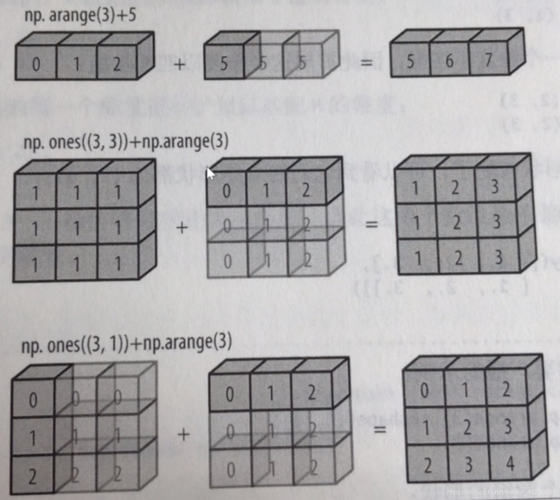
Example 2: Tiling a 2D Array
Now, let's use a 2D array. This is where reps becomes more interesting.
import numpy as np
b = np.array([[1, 2],
              [3, 4]])
# Let's try different reps values
Case A: reps is a single integer
If you give a single integer, it repeats the entire array that many times along the first axis (rows).
# Repeat the entire 2x2 array 2 times (vertically)
tiled_2 = np.tile(b, 2)
print("Original array (b):\n", b)
print("\nTiled array with reps=2 (entire array repeated vertically):\n", tiled_2)
Output:
Original array (b):
 [[1 2]
 [3 4]]
Tiled array with reps=2 (entire array repeated vertically):
 [[1 2]
 [3 4]
 [1 2]
 [3 4]]
Case B: reps is a tuple (m, n)
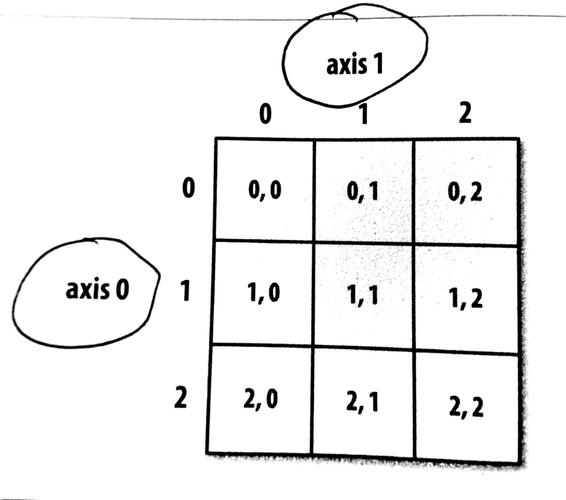
This is the most common use case. The tuple (m, n) means:
m: Repeat the arraymtimes along the first axis (rows).n: Repeat the arrayntimes along the second axis (columns).
# Repeat the array 2 times along rows and 3 times along columns
tiled_2_3 = np.tile(b, (2, 3))
print("Original array (b):\n", b)
print("\nTiled array with reps=(2, 3):\n", tiled_2_3)
Output:
Original array (b):
 [[1 2]
 [3 4]]
Tiled array with reps=(2, 3):
 [[1 2 1 2 1 2]
 [3 4 3 4 3 4]
 [1 2 1 2 1 2]
 [3 4 3 4 3 4]]
How to visualize this:
- Take the original tile
[[1, 2], [3, 4]]. - Repeat it 3 times horizontally (along columns):
[[1, 2, 1, 2, 1, 2], [3, 4, 3, 4, 3, 4]] - Repeat the result from step 2 2 times vertically (along rows):
[[1, 2, 1, 2, 1, 2], [3, 4, 3, 4, 3, 4], [1, 2, 1, 2, 1, 2], [3, 4, 3, 4, 3, 4]]
Advanced Examples
Example 3: Tiling with Different Repetitions per Axis
This is a direct extension of the tuple reps but is crucial for understanding. Let's create a 3x3 array and tile it with (2, 3).
import numpy as np
c = np.array([[1, 2, 3],
              [4, 5, 6],
              [7, 8, 9]])
# Repeat 2 times along rows, 3 times along columns
tiled_c = np.tile(c, (2, 3))
print("Original array (c):\n", c)
print("\nTiled array with reps=(2, 3):\n", tiled_c)
Output:
Original array (c):
 [[1 2 3]
 [4 5 6]
 [7 8 9]]
Tiled array with reps=(2, 3):
 [[1 2 3 1 2 3 1 2 3]
 [4 5 6 4 5 6 4 5 6]
 [7 8 9 7 8 9 7 8 9]
 [1 2 3 1 2 3 1 2 3]
 [4 5 6 4 5 6 4 5 6]
 [7 8 9 7 8 9 7 8 9]]
Example 4: Broadcasting with tile
You can use tile to efficiently create arrays with repeating patterns, which is often faster and more memory-efficient than manual loops.
# Create a checkerboard pattern
# Start with a 2x2 base tile
checker_tile = np.array([[0, 1],
                         [1, 0]])
# Tile it to make an 8x8 board
checkerboard = np.tile(checker_tile, (4, 4))
print("Checkerboard pattern:\n", checkerboard)
Output:
Checkerboard pattern:
 [[0 1 0 1 0 1 0 1]
 [1 0 1 0 1 0 1 0]
 [0 1 0 1 0 1 0 1]
 [1 0 1 0 1 0 1 0]
 [0 1 0 1 0 1 0 1]
 [1 0 1 0 1 0 1 0]
 [0 1 0 1 0 1 0 1]
 [1 0 1 0 1 0 1 0]]
Common Pitfalls and How to Avoid Them
Pitfall 1: Dimension Mismatch
The length of the reps tuple must match the number of dimensions in the input array A.
# A is 2D (has 2 axes)
d = np.array([[1, 2, 3]]) # Shape (1, 3)
# reps has 3 elements, but A only has 2 dimensions. This will cause an error.
# np.tile(d, (2, 3, 4)) # ValueError: inconsistent shape
Solution: Ensure the length of reps is equal to A.ndim. If you want to repeat along only one axis, you can often reshape A or use broadcasting tricks. For example, to repeat a (1, 3) array along a new third axis, you'd need to reshape it first.
Pitfall 2: Confusing tile with repeat
numpy.tile and numpy.repeat are similar but work differently. This is a very common point of confusion.
| Feature | numpy.tile(A, reps) |
numpy.repeat(A, repeats) |
|---|---|---|
| Action | Repeats the entire array A along its axes. |
Repeats each element of A repeats times. |
| Example | np.tile([1, 2], 2) -> [1, 2, 1, 2] |
np.repeat([1, 2], 2) -> [1, 1, 2, 2] |
| 2D Example | np.tile([[1,2],[3,4]], 2) |
np.repeat([[1,2],[3,4]], 2, axis=1) |
[[1,2,1,2], |
[[1,1,2,2], |
|
[3,4,3,4]] |
[3,3,4,4]] |
|
| Axis Argument | No axis argument. The reps tuple defines repetition for each dimension. |
Has an axis argument to specify along which dimension to repeat. |
Key Difference: tile repeats blocks, repeat repeats elements.
When to Use numpy.tile
Use numpy.tile when you need to:
-
Create Grids or Meshes: Easily build a coordinate grid from 1D vectors.
x = np.array([0, 1, 2])
y = np.array([10, 20])
# Create a grid of x and y coordinates
grid_x, grid_y = np.meshgrid(x, y)
# This is internally similar to tiling
# grid_x = [[0, 1, 2], [0, 1, 2]]
# grid_y = [[10, 10, 10], [20, 20, 20]]
-
Generate Repeating Patterns: As seen with the checkerboard example.
-
Expand Data for Broadcasting: You might need to create a larger array with a specific repeating structure to match the shape of another array for a calculation.
-
Efficiently Create Test Data: Generate large arrays with predictable, repeating values for testing algorithms.
Summary
| Function | Purpose | Key Idea |
|---|---|---|
numpy.tile(A, reps) |
Repeat the entire array A in a block-like fashion. |
"Copy and paste the whole tile." |
numpy.repeat(A, repeats, axis=...) |
Repeat individual elements of A. |
"Copy and paste each pixel of the tile." |
Mastering numpy.tile gives you a powerful tool for array manipulation, especially when dealing with structured, repetitive data patterns.