
Of course! The HOG (Histogram of Oriented Gradients) descriptor is a classic and powerful feature descriptor in computer vision. It's primarily used for object detection, famously in the Histogram of Oriented Gradients (HOG) human detector by Dalal and Triggs in 2005.

Here's a comprehensive guide covering the theory, how to use it in Python with OpenCV, and a complete practical example.
What is HOG? The Core Idea
Imagine you want to describe an object, like a person, in an image. A simple histogram of pixel brightness isn't very descriptive because it's sensitive to lighting changes. The HOG descriptor is smarter.
Instead of looking at pixel values, it looks at the structure and shape of the object. It does this by:
- Calculating Gradients: For every pixel in the image, it calculates the gradient (the direction of the most rapid change in intensity). This gradient points towards a dark-to-light edge. Think of it like a topographical map where lines point uphill.
- Creating Orientation Bins: It divides the image into small, connected cells (e.g., 8x8 pixels). For each cell, it creates a histogram of the gradient orientations. The x-axis of the histogram is the orientation (e.g., 0-180 degrees), and the y-axis is the count of gradients that fall into that bin.
- Normalizing Blocks: To make the descriptor robust to changes in lighting and shadow, it groups cells into larger blocks (e.g., 2x2 cells). It then normalizes the histogram values within each block. This means if one part of the image is brighter, the relative gradient strengths within the block remain the same.
- Flattening into a Vector: The normalized histograms from all the blocks across the image are concatenated into one long, single vector. This vector is the "HOG descriptor" for that image or image patch. This vector can then be fed into a machine learning classifier (like an SVM) to detect the object.
How to Use HOG in Python with OpenCV
OpenCV has a built-in cv2.HOGDescriptor() class that makes it easy to compute HOG features and even use the pre-trained human detector.
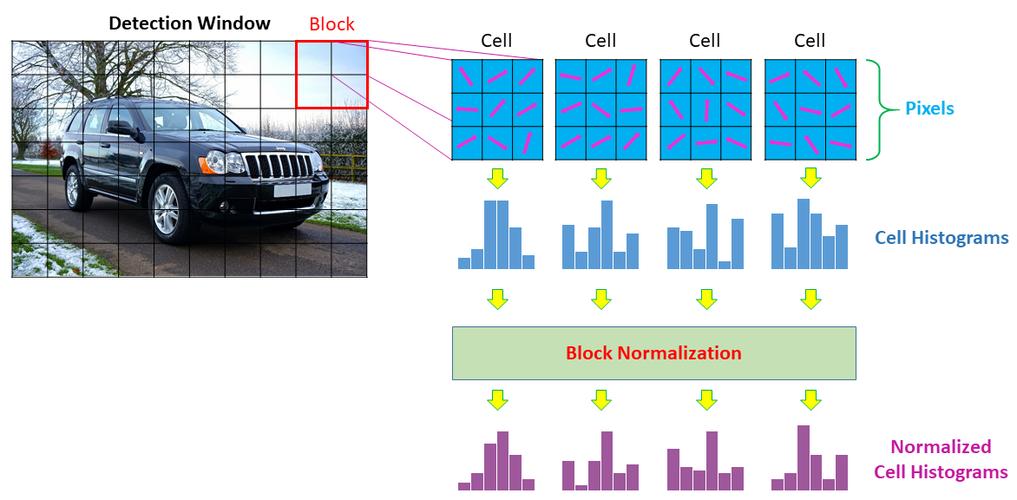
Key Parameters of cv2.HOGDescriptor()
When you create a HOG descriptor, you can configure its behavior. The most important parameters are:
winSize: The size of the detection window in pixels (e.g.,(64, 128)for the classic pedestrian detector).blockSize: The size of the block over which normalization is performed (e.g.,(16, 16)). Must be divisible bycellSize.blockStride: The step size the sliding window takes when moving to the next block (e.g.,(8, 8)).cellSize: The size of a single cell in pixels (e.g.,(8, 8)). The histogram is calculated for each cell.nbins: The number of bins in the orientation histogram (e.g.,9bins for 0-180 degrees).
A Simple Code Example: Computing HOG Features
Let's compute the HOG descriptor for a single image patch.
import cv2
import numpy as np
# 1. Load an image and convert it to grayscale
image = cv2.imread('person.jpg', cv2.IMREAD_GRAYSCALE)
# Check if the image was loaded successfully
if image is None:
    print("Error: Could not load image.")
    exit()
# 2. Define HOG parameters
# These are the classic parameters for the Dalal & Triggs pedestrian detector
winSize = (64, 128)
blockSize = (16, 16)
blockStride = (8, 8)
cellSize = (8, 8)
nbins = 9
# 3. Create the HOG Descriptor
hog = cv2.HOGDescriptor(winSize, blockSize, blockStride, cellSize, nbins)
# 4. Compute the HOG descriptor
# The image must be the same size as winSize
# We resize our image to match
if image.shape != winSize:
    image_resized = cv2.resize(image, winSize)
else:
    image_resized = image
hog_descriptor = hog.compute(image_resized)
print(f"Shape of the HOG descriptor vector: {hog_descriptor.shape}")
# Output will be: Shape of the HOG descriptor vector: (3780, 1)
# This is the 1D feature vector representing the image patch.
Practical Example: The HOG People Detector
This is the most common use case. OpenCV comes with a pre-trained HOG descriptor and SVM classifier specifically for detecting people in images and video.
Code: Detecting People in an Image
import cv2
# 1. Load the pre-trained HOG descriptor for people detection
# This loads the default SVM classifier and HOG settings
hog = cv2.HOGDescriptor()
hog.setSVMDetector(cv2.HOGDescriptor_getDefaultPeopleDetector())
# 2. Load the image
image_path = 'street_scene.jpg'
image = cv2.imread(image_path)
if image is None:
    print(f"Error: Could not load image at {image_path}")
    exit()
# 3. Detect people in the image
# The detectMultiScale function finds objects of a specified size in the image.
# It returns a list of rectangles (x, y, w, h) where people were found.
# - winStride: How much the sliding window moves.
# - padding: How much to pad the image before sliding the window.
# - scale: The image is scaled by this factor for each pass.
# - finalThreshold: Threshold on the decision function.
# - hitThreshold: Threshold for the feature vector to be considered a positive detection.
rects, weights = hog.detectMultiScale(image, winStride=(4, 4), padding=(8, 8), scale=1.05)
# 4. Draw the bounding boxes on the image
for (x, y, w, h) in rects:
    # cv2.rectangle(image, start_point, end_point, color, thickness)
    cv2.rectangle(image, (x, y), (x + w, y + h), (0, 255, 0), 2)
# 5. Display the result
cv2.imshow('HOG People Detection', image)
# Wait for a key press and then close the window
cv2.waitKey(0)
cv2.destroyAllWindows()
Code: Detecting People in a Video (Real-time)
This is the same logic, but applied frame-by-frame to a video file or your webcam.
import cv2
# 1. Load the pre-trained HOG descriptor
hog = cv2.HOGDescriptor()
hog.setSVMDetector(cv2.HOGDescriptor_getDefaultPeopleDetector())
# 2. Open a video capture (0 for webcam, or provide a video file path)
# cap = cv2.VideoCapture(0)
cap = cv2.VideoCapture('pedestrians.mp4')
while True:
    # Read a frame from the video
    ret, frame = cap.read()
    # If frame is not read correctly, break the loop
    if not ret:
        break
    # 3. Detect people in the current frame
    # We use a smaller scale and larger stride for faster processing in video
    rects, weights = hog.detectMultiScale(frame, winStride=(8, 8), scale=1.05)
    # 4. Draw the bounding boxes
    for (x, y, w, h) in rects:
        cv2.rectangle(frame, (x, y), (x + w, y + h), (0, 255, 0), 2)
    # 5. Display the frame with detections
    cv2.imshow('Real-time People Detection', frame)
    # Exit if 'q' is pressed
    if cv2.waitKey(1) & 0xFF == ord('q'):
        break
# 6. Release the capture and close all windows
cap.release()
cv2.destroyAllWindows()
Strengths and Weaknesses of HOG
Strengths
- Robustness to Illumination: By using gradients and normalization, HOG is much less affected by lighting changes than methods that use raw pixel values.
- Good for Rigid Objects: It works exceptionally well for detecting rigid or semi-rigid objects with a consistent shape, like humans, cars, and animals.
- Proven and Well-Established: It's a classic algorithm with a long history of successful use in computer vision.
Weaknesses
- Computationally Intensive: Calculating gradients and histograms for every block in an image can be slow, especially at high resolutions or for real-time video. The sliding window approach is particularly demanding.
- Sensitive to Scale and Orientation: The standard HOG detector is trained for a specific scale and orientation. It won't detect a person who is very far away (small scale) or rotated 90 degrees unless you run it at multiple scales and orientations (which is even slower).
- Can't Handle Articulation Well: It struggles with highly deformable objects. For example, detecting a person in a yoga pose or a dog running


