Of course! Here is a comprehensive guide to the best Python Online IDEs and code editors, categorized by their use case.
What is an Online IDE/Code Editor?
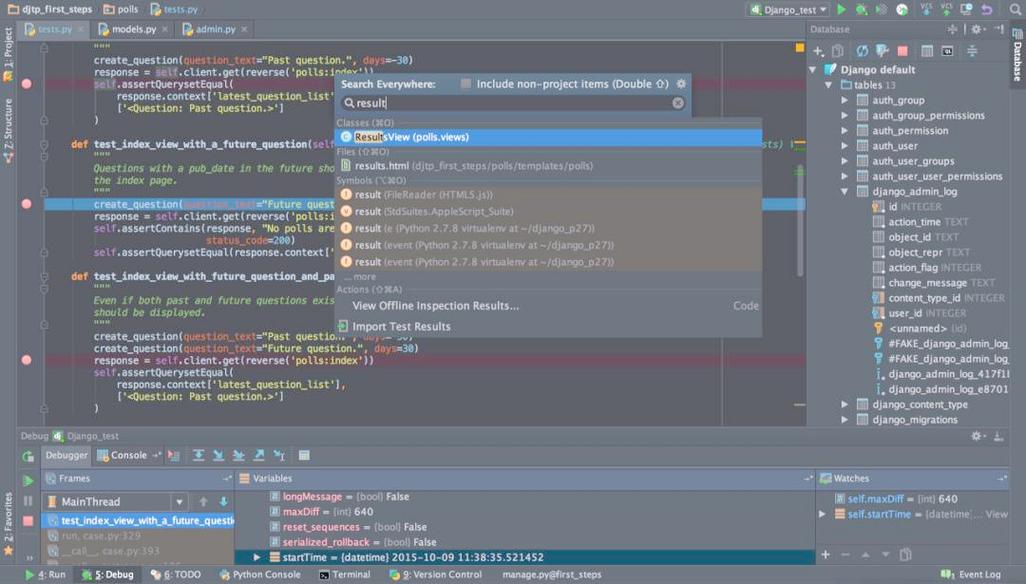
An online IDE (Integrated Development Environment) or code editor is a web-based application that allows you to write, run, debug, and share code directly in your browser without installing any software on your computer. They are perfect for:
- Quick Testing: Trying out a small piece of code.
- Learning Python: Following tutorials without setup hassle.
- Collaboration: Sharing code snippets with others.
- Environments with Restrictions: Using a computer where you can't install software (e.g., a school or work computer).
Category 1: Full-Featured Online IDEs (Best for Serious Development)
These are the most powerful options, designed to mimic a full desktop IDE experience like PyCharm or VS Code. They support complex projects, debugging, version control, and more.
Replit
Best for: All-around use, from beginners to professionals, especially for collaboration and full-stack projects.
Replit is one of the most popular and powerful online IDEs. It's incredibly versatile.
- Pros:
- Full Python Environment: Comes with a full terminal, package manager (
pip), and file system. - Collaboration in Real-Time: Multiple people can work on the same codebase simultaneously.
- Rich Ecosystem: Supports dozens of languages, not just Python. You can build websites, bots, games, and more.
- Deployment: One-click deployment of your projects to the web.
- Database & Storage: Easy integration with databases and cloud storage.
- Free Tier is Very Generous: The free plan is powerful enough for most projects.
- Full Python Environment: Comes with a full terminal, package manager (
- Cons:
- Can be slightly slower than a local desktop IDE for very large projects.
- Some advanced features are locked behind the paid "Replit Hacker" plan.
Link: https://replit.com/languages/python3
Google Colab
Best for: Data Science, Machine Learning, and academic research.
Google Colab is a Jupyter notebook environment that runs in the cloud. It's the go-to tool for anyone working with data.
- Pros:
- Free GPU/TPU Access: This is its killer feature. It provides free access to powerful hardware for training machine learning models.
- Seamless Google Drive Integration: Save and load notebooks directly from your Google Drive.
- Easy Sharing: Share notebooks with a simple link, perfect for teaching and research papers.
- Pre-installed Libraries: Comes with popular data science libraries like Pandas, NumPy, Matplotlib, and TensorFlow pre-installed.
- Cons:
- Not ideal for traditional software development (e.g., building an API or a complex app).
- Sessions can time out if left idle.
- File system access is more limited compared to Replit.
Link: https://colab.research.google.com/
GitHub Codespaces
Best for: Developers already using GitHub who want a full, customizable cloud development environment.
Codespaces provides a full-featured VS Code environment that runs on a powerful cloud server. It's deeply integrated with GitHub.
- Pros:
- Full VS Code Experience: You get the exact editor, extensions, and terminal you're used to.
- Highly Configurable: You can create
devcontainer.jsonfiles to define a perfect, reproducible environment for any project. - Excellent for CI/CD: Perfect for working on projects that use GitHub Actions.
- Scalable: You can get more CPU and RAM if you need it.
- Cons:
- Cost: It has a free monthly allotment of core hours (e.g., 60 hours on 2-core machines), but heavy use can become expensive.
- Can be overkill for simple scripts or quick tests.
Link: https://github.com/codespaces
Category 2: Simple Online Code Editors (Best for Quick Tests & Snippets)
These are lightweight and focused on one thing: writing and running a small piece of code quickly. They are not for building large projects.
Python.org's Online Interpreter
Best for: The absolute quickest way to test a line or two of Python code.
This is the official, no-frills Python interpreter in your browser. It's the fastest to load and use.
- Pros:
- Extremely Fast & Simple: No sign-up, no clutter. Just type and run.
- Official Python: You know you're running the real deal.
- Cons:
- No File System: You can't save or load files. It's a single session.
- No Libraries: You can't import anything beyond the standard library.
- No Editing History: Once you run code, it's gone.
Link: https://www.python.org/shell/
OnlineGDB
Best for: Quick code execution with a focus on debugging.
This is a step up from the official interpreter. It offers a simple interface with a code editor, output console, and a powerful online debugger.
- Pros:
- Built-in Debugger: You can set breakpoints, inspect variables, and step through your code line by line.
- Simple File Management: You can save your code snippets for later use.
- Clean Interface: Easy to use and focused.
- Cons:
- Lacks the advanced features of full-fledged IDEs like Replit.
- Not designed for large projects.
Link: https://www.onlinegdb.com/online_python_compiler
Programiz
Best for: Beginners learning Python with examples and tutorials.
Programiz combines an online compiler with a wealth of tutorials and example code. It's a great learning tool.
- Pros:
- Learning-Focused: Links to tutorials and lets you run the examples directly.
- Simple Interface: Very easy for new programmers to understand.
- No Installation Needed: Get started in seconds.
- Cons:
- Limited functionality compared to other options.
- Not suitable for complex development tasks.
Link: https://www.programiz.com/python-programming/online-compiler/
Comparison Table
| Feature | Replit | Google Colab | GitHub Codespaces | Python.org Shell | OnlineGDB |
|---|---|---|---|---|---|
| Primary Use Case | General Purpose, Collaboration | Data Science, ML | Professional Dev | Quick Tests | Quick Tests & Debugging |
| Full Terminal | ✅ | ✅ | ✅ | ❌ | ❌ |
| File System | ✅ | ✅ (Limited) | ✅ | ❌ | ✅ (Basic) |
| Debugging | ✅ (Good) | ✅ (Good) | ✅ (Excellent) | ❌ | ✅ (Excellent) |
| Import Libraries | ✅ (pip install) |
✅ (Pre-installed) | ✅ (pip install) |
❌ (Std Lib only) | ✅ (pip install) |
| Collaboration | ✅ (Excellent) | ✅ (Shareable) | ✅ (Via GitHub) | ❌ | ❌ |
| Free GPU/TPU | ❌ | ✅ (Killer Feature) | ❌ | ❌ | ❌ |
| Cost | Generous Free Tier | Free | Free (with limits) | Free | Free |
How to Choose: A Quick Guide
-
Are you a data scientist or ML engineer?
- Start with Google Colab. The free GPU access is unmatched.
-
Are you a beginner just learning Python or want to share a small project?
- Replit is the best all-around choice. It's powerful, easy to use, and great for collaboration.
- For a super quick test, use the Python.org Shell.
-
Are you an experienced developer working on a complex project with a team?
- GitHub Codespaces is the most professional option, giving you a full VS Code setup in the cloud.
-
Do you just need to debug a small script?
- OnlineGDB is perfect for its simple but powerful debugger.
-
Do you need the absolute fastest, simplest way to run one line of code?
- Python.org Shell. Nothing beats it for speed and simplicity.