Of course! Here is a comprehensive guide to using OpenCV for Java, covering setup, core concepts, and practical examples.
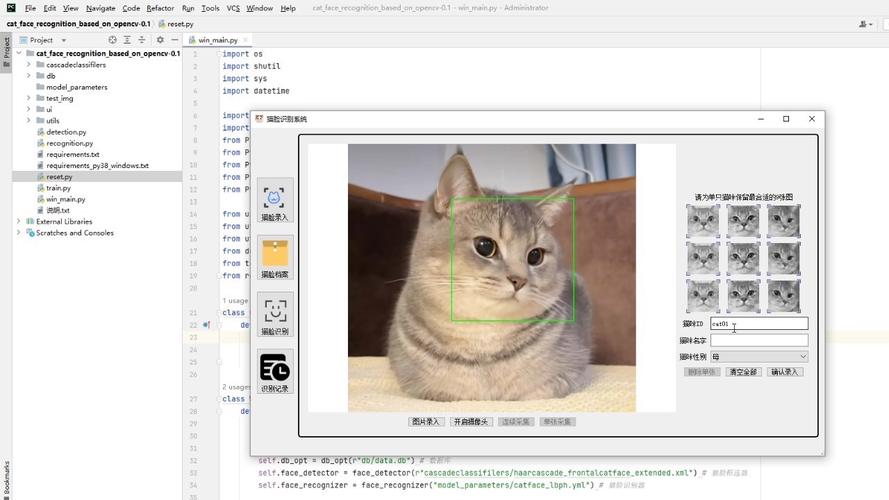
What is OpenCV for Java?
OpenCV (Open Source Computer Vision Library) is a massive, open-source library for computer vision and machine learning. The Java bindings for OpenCV allow you to use its powerful C++ core from within your Java applications. This is ideal for:
- Desktop Applications: Building GUI-based tools for image analysis.
- Web Applications: Processing images uploaded to a server.
- Android Development: OpenCV is the de-facto standard for CV on Android.
- Scientific Research: Leveraging Java's ecosystem for data analysis and visualization.
Setting Up OpenCV for Java
The easiest and most recommended way to add OpenCV to your project is using a build tool like Maven or Gradle.
Using Maven (for Eclipse, IntelliJ, etc.)
- Create a new Maven project in your favorite IDE (IntelliJ IDEA, Eclipse, VS Code with extensions).
- Add the OpenCV dependency to your
pom.xmlfile. The version number should match the OpenCV version you want to use (e.g.,9.0).
<dependencies>
    <dependency>
        <groupId>org.openpnp</groupId>
        <artifactId>opencv</artifactId>
        <version>4.9.0-1</version>
    </dependency>
</dependencies>
Note: The
org.openpnpgroup ID is the most commonly used and maintained set of Java bindings for OpenCV.
Using Gradle (for IntelliJ, Android Studio, etc.)
- Add the OpenCV dependency to your
build.gradle(orbuild.gradle.kts) file.
dependencies {
    implementation 'org.openpnp:opencv:4.9.0-1'
}
The Crucial Step: Loading the Native Library
After adding the dependency, you need to tell Java where to find the native OpenCV library (.dll on Windows, .so on Linux, .dylib on macOS). You do this at the start of your application.
The standard way is to use the nu.pattern.OpenCV class, which automatically downloads and loads the correct native library for your operating system.
import org.opencv.core.Core;
public class Main {
    public static void main(String[] args) {
        // Load the OpenCV native library
        // This will automatically download the correct library for your OS
        try {
            nu.pattern.OpenCV.loadLocally();
            System.out.println("OpenCV loaded successfully!");
            System.out.println("Version: " + Core.VERSION);
        } catch (Exception e) {
            System.err.println("Error loading OpenCV: " + e.getMessage());
            e.printStackTrace();
        }
    }
}
If you run this code and it prints the OpenCV version, your setup is complete!
Core Concepts in OpenCV for Java
OpenCV's Java API is a direct mapping of its C++ API. The key is understanding its core data structures.
Mat (Matrix)
This is the primary object in OpenCV for storing images, matrices, or other multi-dimensional arrays. Think of it as a container for pixel data.
-
Creation:
// Create a 100x100 black image (3 channels for BGR)
Mat blackImage = new Mat(100, 100, CvType.CV_8UC3);
-
Reading an Image:
// The path to your image
String imagePath = "path/to/your/image.jpg";
Mat image = Imgcodecs.imread(imagePath);
if (image.empty()) {
    System.out.println("Could not read the image.");
    return;
}
HighGui (High-Level GUI)
This class provides simple functions for displaying images and creating windows.
- Displaying an Image:
// Create a window to display the image
HighGui.namedWindow("My Image");
// Show the image in the window
HighGui.imshow("My Image", image);
// Wait for a key press to close the window
HighGui.waitKey(0);
// Destroy all windows
HighGui.destroyAllWindows();
Imgproc (Image Processing)
This is the most important class for performing core image processing tasks like filtering, edge detection, and morphological operations.
Practical Examples
Let's put these concepts together with some common tasks.
Example 1: Reading, Displaying, and Saving an Image
import org.opencv.core.Core;
import org.opencv.core.Mat;
import org.opencv.imgcodecs.Imgcodecs;
import org.opencv.imgproc.Imgproc;
import org.opencv.highgui.HighGui;
public class ImageProcessing {
    public static void main(String[] args) {
        // Load the native library
        nu.pattern.OpenCV.loadLocally();
        // 1. Read an image
        String inputPath = "resources/lenna.png"; // Place an image in a 'resources' folder
        String outputPath = "output/processed_lenna.jpg";
        Mat source = Imgcodecs.imread(inputPath);
        if (source.empty()) {
            System.out.println("Error: Could not open or find the image at " + inputPath);
            return;
        }
        System.out.println("Image loaded. Size: " + source.rows() + "x" + source.cols());
        // 2. Display the image
        HighGui.namedWindow("Original Image");
        HighGui.imshow("Original Image", source);
        HighGui.waitKey(1000); // Wait for 1 second
        // 3. Convert to Grayscale
        Mat grayImage = new Mat();
        Imgproc.cvtColor(source, grayImage, Imgproc.COLOR_BGR2GRAY);
        HighGui.namedWindow("Grayscale Image");
        HighGui.imshow("Grayscale Image", grayImage);
        HighGui.waitKey(1000);
        // 4. Save the processed image
        // Make sure the output directory exists
        new java.io.File("output").mkdirs();
        Imgcodecs.imwrite(outputPath, grayImage);
        System.out.println("Processed image saved to: " + outputPath);
        // 5. Close all windows
        HighGui.destroyAllWindows();
    }
}
Example 2: Detecting Edges with Canny
The Canny edge detector is a classic algorithm. It requires a grayscale image.
import org.opencv.core.Core;
import org.opencv.core.Mat;
import org.opencv.imgcodecs.Imgcodecs;
import org.opencv.imgproc.Imgproc;
import org.opencv.highgui.HighGui;
public class EdgeDetection {
    public static void main(String[] args) {
        nu.pattern.OpenCV.loadLocally();
        String imagePath = "resources/city.jpg";
        Mat source = Imgcodecs.imread(imagePath);
        if (source.empty()) {
            System.out.println("Error: Could not open or find the image.");
            return;
        }
        // Convert to grayscale
        Mat gray = new Mat();
        Imgproc.cvtColor(source, gray, Imgproc.COLOR_BGR2GRAY);
        // Apply Gaussian Blur to reduce noise
        Mat blurred = new Mat();
        Imgproc.GaussianBlur(gray, blurred, new org.opencv.core.Size(5, 5), 0);
        // Apply Canny edge detector
        Mat edges = new Mat();
        // 100 and 200 are the threshold values
        Imgproc.Canny(blurred, edges, 100, 200);
        // Display the result
        HighGui.namedWindow("Original Image");
        HighGui.imshow("Original Image", source);
        HighGui.namedWindow("Canny Edges");
        HighGui.imshow("Canny Edges", edges);
        System.out.println("Press any key to exit.");
        HighGui.waitKey(0);
        HighGui.destroyAllWindows();
    }
}
Example 3: Finding Contours
Contours are curves joining all the continuous points along the boundary of an object with the same color or intensity. This is useful for object detection.
import org.opencv.core.*;
import org.opencv.imgcodecs.Imgcodecs;
import org.opencv.imgproc.Imgproc;
import org.opencv.highgui.HighGui;
import java.util.ArrayList;
import java.util.List;
public class ContourDetection {
    public static void main(String[] args) {
        nu.pattern.OpenCV.loadLocally();
        String imagePath = "resources/shapes.png";
        Mat source = Imgcodecs.imread(imagePath);
        if (source.empty()) {
            System.out.println("Error: Could not open or find the image.");
            return;
        }
        // Convert to grayscale
        Mat gray = new Mat();
        Imgproc.cvtColor(source, gray, Imgproc.COLOR_BGR2GRAY);
        // Apply threshold to get a binary image
        Mat binary = new Mat();
        Imgproc.threshold(gray, binary, 127, 255, Imgproc.THRESH_BINARY_INV);
        // Find contours
        List<MatOfPoint> contours = new ArrayList<>();
        Mat hierarchy = new Mat();
        Imgproc.findContours(binary, contours, hierarchy, Imgproc.RETR_EXTERNAL, Imgproc.CHAIN_APPROX_SIMPLE);
        // Draw contours on the original image
        Mat result = source.clone();
        Imgproc.drawContours(result, contours, -1, new Scalar(0, 255, 0), 3);
        // Display results
        HighGui.namedWindow("Original Image");
        HighGui.imshow("Original Image", source);
        HighGui.namedWindow("Detected Contours");
        HighGui.imshow("Detected Contours", result);
        System.out.println("Found " + contours.size() + " contours.");
        System.out.println("Press any key to exit.");
        HighGui.waitKey(0);
        HighGui.destroyAllWindows();
    }
}
Important Considerations
- Performance: Java is generally slower than C++ for raw computation. For performance-critical applications, consider:
- Using a just-in-time (JIT) compiler like GraalVM.
- Offloading heavy processing to a native C++ library and calling it from Java via JNI (Java Native Interface). The OpenCV Java bindings themselves use JNI.
- OpenCV vs. Deep Learning: For modern deep learning tasks (object detection, segmentation), you'll often use a library like Deep Java Library (DJL), which provides a high-level API and can use different backends (PyTorch, TensorFlow, MXNet) optimized for Java. OpenCV has its own DNN module, but DJL is often more flexible for pure Java environments.
- Resources: Always place your images and other resources in a predictable location relative to your project's root (e.g., a
src/main/resourcesfolder) and access them using the classpath.
Useful Resources
- Official OpenCV Documentation: https://docs.opencv.org/4.x/ (Look for the "Java" sections).
- JavaCV (Alternative Library): https://github.com/bytedeco/javacv JavaCV is a wrapper for several native computer vision libraries, including OpenCV. It can sometimes offer better performance and more features but has a slightly different API.
- OpenCV Tutorials: The official site has excellent tutorials, many of which have Java equivalents.