Of course! It looks like you're asking about writelines in Python. This is a very useful method for writing multiple lines of text to a file at once.

Let's break it down.
What is file.writelines()?
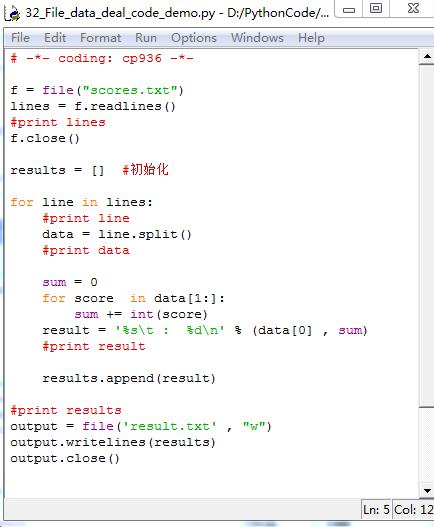
The writelines() method is used to write a list of strings to a file. It's important to understand that it does not automatically add newline characters (\n) for you. You must include them in the strings yourself if you want each item to appear on a new line.
Syntax
file_object.writelines(list_of_strings)
file_object: The file object you got from opening the file in write mode ('w') or append mode ('a').list_of_strings: An iterable (like a list or a tuple) containing strings that you want to write to the file.
Key Difference: write() vs. writelines()
file.write(string): Writes a single string to the file.file.writelines(list): Writes all the strings from a list to the file. It's essentially a convenient way to loop through the list and callwrite()on each item.
Example 1: The Correct Way (Adding Newlines Manually)
This is the most common and practical use case for writelines.
Let's say we have a list of tasks and we want to write each task to a new line in a file named tasks.txt.
# 1. Define the data to write
tasks = [
    "Finish the project report",
    "Buy groceries: milk, eggs, bread",
    "Call mom",
    "Schedule a meeting with the team"
]
# 2. Open the file in write mode ('w')
#    'w' will create the file if it doesn't exist, or overwrite it if it does.
with open('tasks.txt', 'w') as f:
    # 3. Use writelines() to write the list
    #    We add a '\n' to the end of each string to ensure a new line.
    f.writelines([task + '\n' for task in tasks])
print("File 'tasks.txt' has been written successfully.")
# Let's verify the content
print("\n--- Verifying file content ---")
with open('tasks.txt', 'r') as f:
    print(f.read())
Output of the script:
File 'tasks.txt' has been written successfully.
--- Verifying file content ---
Finish the project report
Buy groceries: milk, eggs, bread
Call mom
Schedule a meeting with the team
Explanation:
- We use a list comprehension
[task + '\n' for task in tasks]to create a new list where each task string has a newline character appended to it. writelines()then writes this new list to the file, resulting in each task being on its own line.
Example 2: The "Wrong" Way (Forgetting Newlines)
If you forget to add the newline character, all the strings will be concatenated into a single block of text.
# 1. Define the data to write
tasks = [
    "First line",
    "Second line",
    "Third line"
]
# 2. Open the file in write mode
with open('output_no_newlines.txt', 'w') as f:
    # 3. Use writelines() WITHOUT adding newlines
    f.writelines(tasks)
print("File 'output_no_newlines.txt' has been written.")
# Let's verify the content
print("\n--- Verifying file content ---")
with open('output_no_newlines.txt', 'r') as f:
    print(f.read())
Output of the script:
File 'output_no_newlines.txt' has been written.
--- Verifying file content ---
First lineSecond lineThird line
As you can see, all the lines are stuck together because writelines() just wrote the strings one after the other.
Example 3: Appending to a File
You can also use writelines() to add new lines to an existing file by opening it in append mode ('a').
Let's add more tasks to our tasks.txt file.
# New tasks to add
new_tasks = [
    "Review pull requests",
    "Update documentation\n" # Notice the last one has a newline
]
# Open the file in append mode ('a')
with open('tasks.txt', 'a') as f:
    # Append the new tasks
    f.writelines(new_tasks)
print("\nNew tasks have been appended to 'tasks.txt'.")
# Verify the final content
print("\n--- Verifying final file content ---")
with open('tasks.txt', 'r') as f:
    print(f.read())
Output of the script:
New tasks have been appended to 'tasks.txt'.
--- Verifying final file content ---
Finish the project report
Buy groceries: milk, eggs, bread
Call mom
Schedule a meeting with the team
Review pull requests
Update documentation
Notice that "Update documentation" is on a new line because we included the \n in the string itself.
Summary
| Method | Purpose | Newline Handling |
|---|---|---|
write() |
Writes a single string to a file. | You must add \n manually if you want a new line. |
writelines() |
Writes all strings from a list/iterable to a file. | You must add \n to each string in the list if you want new lines. |
When to use writelines():
It's most efficient when you have a list of strings and want to write them all to a file in one go. It's cleaner than writing a manual for loop to call write() on each item.