Of course! Let's dive deep into Java NIO Sockets. This is a fundamental topic for any Java developer looking to build high-performance, scalable network applications.
The "Why": From Blocking I/O to NIO
Before we get into the "how," it's crucial to understand the "why." Traditional Java networking uses Blocking I/O (BIO).
The Problem with Blocking I/O (BIO)
In a classic BIO server, the workflow looks like this:
- A server thread calls
ServerSocket.accept(). This method blocks (waits) until a new client connection arrives. - Once a client connects, the server typically spawns a new thread to handle that client.
- This new thread calls
InputStream.read(). This method also blocks until data is available from the client. - If the client is slow or sends data infrequently, the dedicated thread just sits idle, consuming resources.
The Big Problem: This "one thread per connection" model doesn't scale. For thousands or millions of connections, you'd need thousands or millions of threads, which is incredibly inefficient and consumes massive amounts of memory and CPU context-switching.
The Solution: Non-Blocking I/O (NIO)
Java NIO (New I/O) was introduced in Java 1.4 to solve this scalability problem. Its core idea is:
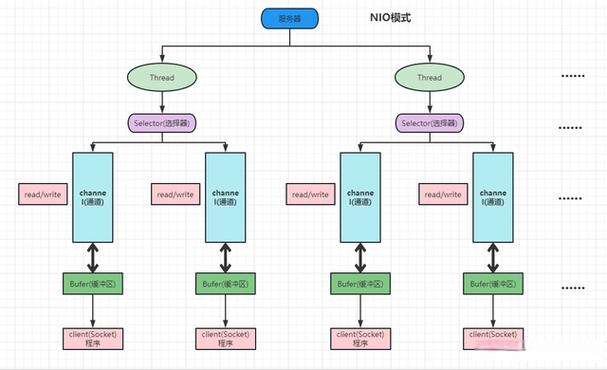
Use a small, fixed number of threads to manage thousands of connections.
It achieves this through three core components:
- Channels: A two-way (bidirectional) connection to a network entity (like a socket). Unlike BIO streams, channels can be used for both reading and writing.
- Buffers: Data is read from a channel into a buffer and written from a buffer into a channel. All data in NIO is handled through buffers. They have a position, limit, and capacity, allowing you to manage data flow precisely.
- Selectors: This is the magic ingredient. A single thread can use a
Selectorto monitor multipleChannelsfor "events" (like a new connection, data ready to be read, or the channel ready to be written). This is often called I/O Multiplexing.
The Core Components of NIO Sockets
Let's break down the key players.
a) ByteBuffer - The Data Container
ByteBuffer is the heart of data handling in NIO.
- Not a Stream: Unlike
InputStream, aByteBufferhas a fixed capacity and internal pointers (position,limit,capacity). - Writing Data: You put data into the buffer. The
positionmoves forward. - Flipping the Buffer: Before reading, you must "flip" the buffer. This sets the
limitto the currentpositionand resets thepositionto 0. This signals that the buffer is now ready for reading, and the read operation should not go past the data that was just written. - Reading Data: You get data from the buffer. The
positionmoves forward. - Clearing/Compacting: After reading, you can
clear()the buffer (reserving all space) orcompact()it (moves any remaining unread data to the beginning of the buffer).
Example:
// 1. Allocate a buffer
ByteBuffer buffer = ByteBuffer.allocate(1024);
// 2. Write data into the buffer
String message = "Hello from NIO!";
buffer.put(message.getBytes());
// 3. Flip the buffer to prepare for reading
buffer.flip();
// 4. Read data from the buffer (e.g., into a byte array)
byte[] data = new byte[buffer.remaining()];
buffer.get(data);
System.out.println("Read: " + new String(data)); // Output: Read: Hello from NIO!
// 5. Clear the buffer for the next operation
buffer.clear();
b) SocketChannel & ServerSocketChannel - The Endpoints
These are the NIO equivalents of Socket and ServerSocket.
ServerSocketChannel: Listens for incoming TCP connections.SocketChannel: Represents an active TCP connection to a server.
Key NIO Feature: Both can be configured into non-blocking mode. When in non-blocking mode, methods like accept() and read() won't wait. They will return immediately, indicating that no operation is possible at that moment (e.g., accept() returns null, read() returns -1).
c) Selector - The Multiplexer
A Selector is a single thread that can monitor multiple SocketChannels for various events. The events you can watch for are defined by SelectionKey constants:
SelectionKey.OP_ACCEPT: A new connection is ready to be accepted (forServerSocketChannel).SelectionKey.OP_CONNECT: A connection is established or failed (forSocketChannel).SelectionKey.OP_READ: Data is ready to be read from aSocketChannel.SelectionKey.OP_WRITE: The channel is ready to have data written to it (rarely used, but can be helpful for flow control).
Building a Simple NIO Echo Server
This is the best way to understand how all the pieces fit together. The server will accept connections and echo back any data it receives.
The Server Logic
-
Setup:
- Create a
ServerSocketChanneland bind it to a port. - Configure it to be non-blocking.
- Create a
Selector. - Register the
ServerSocketChannelwith theSelectorforOP_ACCEPTevents.
- Create a
-
The Main Loop (Event Loop):
- The server runs in an infinite loop.
selector.select(): This is the blocking call. It waits until at least one channel is ready for an event.selector.selectedKeys(): Get a set ofSelectionKeys for all channels that have events.- Iterate through the keys.
-
Handling Events:
OP_ACCEPT: A new client is connecting.- Get the
ServerSocketChannelfrom the key. - Call
accept()to get the newSocketChannel. - Configure the new
SocketChannelto be non-blocking. - Register this new
SocketChannelwith theSelectorforOP_READevents.
- Get the
OP_READ: Data is ready to be read from a client.- Get the
SocketChannelfrom the key. - Create a
ByteBuffer. - Read data from the channel into the buffer.
- If
read()returns-1, the client has disconnected. Close the channel. - If data was read, flip the buffer and write it back to the same channel (echoing).
- Reset the buffer (clear or compact) for the next read.
- Get the
The Code
import java.io.IOException;
import java.net.InetSocketAddress;
import java.nio.ByteBuffer;
import java.nio.channels.*;
import java.util.Iterator;
import java.util.Set;
public class NioEchoServer {
    public static void main(String[] args) throws IOException {
        // 1. Setup ServerSocketChannel
        Selector selector = Selector.open();
        ServerSocketChannel serverSocket = ServerSocketChannel.open();
        serverSocket.bind(new InetSocketAddress("localhost", 8080));
        serverSocket.configureBlocking(false); // Non-blocking mode
        // 2. Register the server socket with the selector for OP_ACCEPT events
        serverSocket.register(selector, SelectionKey.OP_ACCEPT);
        System.out.println("Server started on port 8080...");
        ByteBuffer buffer = ByteBuffer.allocate(256);
        // 3. Main event loop
        while (true) {
            // Wait for an event (blocking call)
            selector.select();
            // Get the set of keys that have events
            Set<SelectionKey> selectedKeys = selector.selectedKeys();
            Iterator<SelectionKey> iter = selectedKeys.iterator();
            while (iter.hasNext()) {
                SelectionKey key = iter.next();
                // 4. Handle the event
                if (key.isAcceptable()) {
                    // A new connection is ready to be accepted
                    handleAccept(serverSocket, selector);
                }
                if (key.isReadable()) {
                    // Data is ready to be read from a client
                    handleRead(key, buffer);
                }
                // IMPORTANT: Must remove the key from the set after processing
                iter.remove();
            }
        }
    }
    private static void handleAccept(ServerSocketChannel serverSocket, Selector selector) throws IOException {
        SocketChannel client = serverSocket.accept();
        if (client != null) {
            client.configureBlocking(false);
            // Register the new client channel with the selector for OP_READ events
            client.register(selector, SelectionKey.OP_READ);
            System.out.println("Accepted connection from " + client.getRemoteAddress());
        }
    }
    private static void handleRead(SelectionKey key, ByteBuffer buffer) throws IOException {
        SocketChannel client = (SocketChannel) key.channel();
        buffer.clear(); // Clear buffer before reading
        int bytesRead = client.read(buffer);
        if (bytesRead == -1) {
            // Client closed connection
            System.out.println("Client " + client.getRemoteAddress() + " disconnected.");
            client.close();
            key.cancel();
            return;
        }
        // Flip the buffer to prepare for writing
        buffer.flip();
        byte[] data = new byte[buffer.remaining()];
        buffer.get(data);
        System.out.println("Received from " + client.getRemoteAddress() + ": " + new String(data));
        // Echo the data back to the client
        client.write(buffer);
    }
}
The Client (for testing)
You can use a simple Java NIO client or even a telnet/netcat client to test this.
import java.io.IOException;
import java.net.InetSocketAddress;
import java.nio.ByteBuffer;
import java.nio.channels.SocketChannel;
public class NioClient {
    public static void main(String[] args) throws IOException {
        SocketChannel client = SocketChannel.open(new InetSocketAddress("localhost", 8080));
        client.configureBlocking(false);
        String message = "Hello from NIO Client!";
        ByteBuffer buffer = ByteBuffer.wrap(message.getBytes());
        // Send message
        client.write(buffer);
        System.out.println("Sent: " + message);
        // Read response
        buffer.clear();
        int bytesRead = client.read(buffer);
        if (bytesRead > 0) {
            buffer.flip();
            byte[] data = new byte[buffer.remaining()];
            buffer.get(data);
            System.out.println("Received from server: " + new String(data));
        }
        client.close();
    }
}
NIO vs. BIO: A Quick Comparison
| Feature | Blocking I/O (BIO) | Non-Blocking I/O (NIO) |
|---|---|---|
| Model | One thread per connection | One thread (or a small pool) for many connections |
| I/O Operations | Blocking (accept(), read(), write()) block until complete. |
Non-blocking (accept(), read(), write()) return immediately. |
| Scalability | Poor. Limited by OS thread count. | Excellent. Can handle thousands of connections. |
| Complexity | Simple and straightforward. | More complex. Requires managing buffers, selectors, and key sets. |
| Data Handling | Streams (InputStream, OutputStream). |
Buffers (ByteBuffer). |
| Use Case | Simple applications, low traffic. | High-performance servers, chat apps, proxies, game servers. |
Modern Evolution: N.2 (Asynchronous I/O)
Java 7 introduced Asynchronous I/O (NIO.2), which is even more advanced. It uses the java.nio.channels.Asynchronous* classes and provides two models:
- Future-based: You submit an I/O operation and get back a
Futureobject, which you can poll to check for completion. - Callback-based: You submit an I/O operation and provide a
CompletionHandlercallback object. The I/O operation is executed in a background thread pool, and yourcompleted()orfailed()method is invoked when it's done.
NIO.2 is often seen as the evolution of NIO, offering a more structured way to handle asynchronous operations without manually managing a selector loop.
Summary
Java NIO Sockets are a powerful paradigm for building scalable, high-performance network applications. By moving away from the "one-thread-per-connection" bottleneck and using a Selector to manage multiple Channels with Buffers, you can build servers that efficiently handle a massive number of concurrent connections. While the learning curve is steeper than BIO, the performance benefits for the right use case are enormous.