在Java中生成复杂的JSON
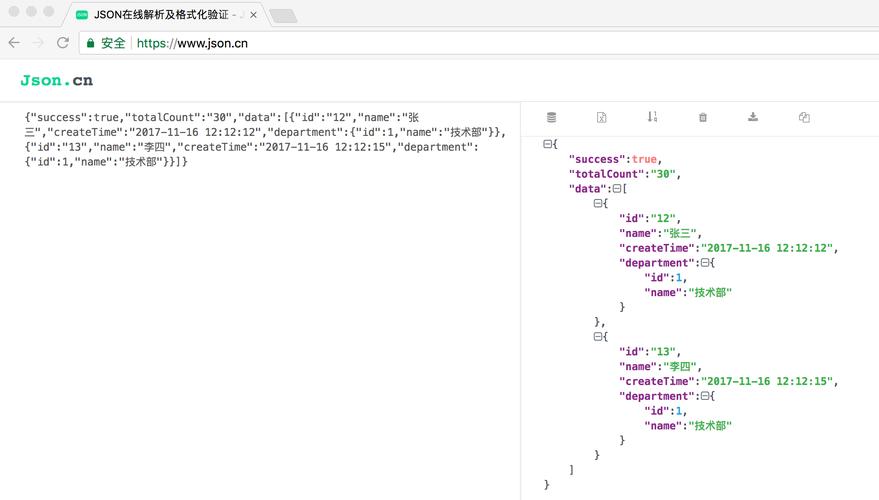
在Java中生成复杂的JSON数据,有多种方法可以实现,以下是几种常用的方法,从简单到复杂逐步介绍:
(图片来源网络,侵删)
使用 org.json 库
import org.json.JSONArray;
import org.json.JSONObject;
public class ComplexJsonGenerator {
    public static void main(String[] args) {
        // 创建顶层JSON对象
        JSONObject complexJson = new JSONObject();
        // 添加简单字段
        complexJson.put("name", "John Doe");
        complexJson.put("age", 30);
        complexJson.put("isStudent", false);
        // 添加嵌套对象
        JSONObject address = new JSONObject();
        address.put("street", "123 Main St");
        address.put("city", "New York");
        address.put("zipCode", "10001");
        complexJson.put("address", address);
        // 添加数组
        JSONArray hobbies = new JSONArray();
        hobbies.put("reading");
        hobbies.put("swimming");
        hobbies.put("coding");
        complexJson.put("hobbies", hobbies);
        // 添加包含数组的对象
        JSONObject education = new JSONObject();
        JSONArray degrees = new JSONArray();
        degrees.put(new JSONObject().put("degree", "BSc").put("year", 2025));
        degrees.put(new JSONObject().put("degree", "MSc").put("year", 2025));
        education.put("degrees", degrees);
        complexJson.put("education", education);
        // 添加null值
        complexJson.put("middleName", JSONObject.NULL);
        // 输出JSON字符串
        System.out.println(complexJson.toString(2)); // 2表示缩进2个空格
    }
}
使用 Jackson 库
import com.fasterxml.jackson.databind.ObjectMapper;
import com.fasterxml.jackson.databind.node.ArrayNode;
import com.fasterxml.jackson.databind.node.ObjectNode;
public class JacksonJsonGenerator {
    public static void main(String[] args) throws Exception {
        ObjectMapper mapper = new ObjectMapper();
        // 创建JSON对象
        ObjectNode complexJson = mapper.createObjectNode();
        // 添加简单字段
        complexJson.put("name", "John Doe");
        complexJson.put("age", 30);
        complexJson.put("isStudent", false);
        // 添加嵌套对象
        ObjectNode address = mapper.createObjectNode();
        address.put("street", "123 Main St");
        address.put("city", "New York");
        address.put("zipCode", "10001");
        complexJson.set("address", address);
        // 添加数组
        ArrayNode hobbies = mapper.createArrayNode();
        hobbies.add("reading");
        hobbies.add("swimming");
        hobbies.add("coding");
        complexJson.set("hobbies", hobbies);
        // 添加包含数组的对象
        ObjectNode education = mapper.createObjectNode();
        ArrayNode degrees = mapper.createArrayNode();
        ObjectNode degree1 = mapper.createObjectNode();
        degree1.put("degree", "BSc");
        degree1.put("year", 2025);
        degrees.add(degree1);
        ObjectNode degree2 = mapper.createObjectNode();
        degree2.put("degree", "MSc");
        degree2.put("year", 2025);
        degrees.add(degree2);
        education.set("degrees", degrees);
        complexJson.set("education", education);
        // 添加null值
        complexJson.putNull("middleName");
        // 输出JSON字符串
        System.out.println(mapper.writerWithDefaultPrettyPrinter().writeValueAsString(complexJson));
    }
}
使用 Gson 库
import com.google.gson.Gson;
import com.google.gson.JsonArray;
import com.google.gson.JsonObject;
public class GsonJsonGenerator {
    public static void main(String[] args) {
        Gson gson = new Gson();
        // 创建JSON对象
        JsonObject complexJson = new JsonObject();
        // 添加简单字段
        complexJson.addProperty("name", "John Doe");
        complexJson.addProperty("age", 30);
        complexJson.addProperty("isStudent", false);
        // 添加嵌套对象
        JsonObject address = new JsonObject();
        address.addProperty("street", "123 Main St");
        address.addProperty("city", "New York");
        address.addProperty("zipCode", "10001");
        complexJson.add("address", address);
        // 添加数组
        JsonArray hobbies = new JsonArray();
        hobbies.add("reading");
        hobbies.add("swimming");
        hobbies.add("coding");
        complexJson.add("hobbies", hobbies);
        // 添加包含数组的对象
        JsonObject education = new JsonObject();
        JsonArray degrees = new JsonArray();
        JsonObject degree1 = new JsonObject();
        degree1.addProperty("degree", "BSc");
        degree1.addProperty("year", 2025);
        degrees.add(degree1);
        JsonObject degree2 = new JsonObject();
        degree2.addProperty("degree", "MSc");
        degree2.addProperty("year", 2025);
        degrees.add(degree2);
        education.add("degrees", degrees);
        complexJson.add("education", education);
        // 添加null值
        complexJson.add("middleName", null);
        // 输出JSON字符串
        System.out.println(gson.toJson(complexJson));
    }
}
使用模型类生成JSON(推荐方法)
对于更复杂的JSON结构,建议先定义Java模型类,然后使用Jackson或Gson将其转换为JSON:
// 定义模型类
class Person {
    private String name;
    private int age;
    private boolean isStudent;
    private Address address;
    private List<String> hobbies;
    private Education education;
    private String middleName;
    // 构造方法、getter和setter省略...
}
class Address {
    private String street;
    private String city;
    private String zipCode;
    // 构造方法、getter和setter省略...
}
class Education {
    private List<Degree> degrees;
    // 构造方法、getter和setter省略...
}
class Degree {
    private String degree;
    private int year;
    // 构造方法、getter和setter省略...
}
// 使用Jackson生成JSON
public class ModelBasedJsonGenerator {
    public static void main(String[] args) throws Exception {
        ObjectMapper mapper = new ObjectMapper();
        // 创建对象实例
        Person person = new Person();
        person.setName("John Doe");
        person.setAge(30);
        person.setStudent(false);
        Address address = new Address();
        address.setStreet("123 Main St");
        address.setCity("New York");
        address.setZipCode("10001");
        person.setAddress(address);
        List<String> hobbies = Arrays.asList("reading", "swimming", "coding");
        person.setHobbies(hobbies);
        Education education = new Education();
        List<Degree> degrees = Arrays.asList(
            new Degree("BSc", 2025),
            new Degree("MSc", 2025)
        );
        education.setDegrees(degrees);
        person.setEducation(education);
        person.setMiddleName(null);
        // 转换为JSON
        String json = mapper.writerWithDefaultPrettyPrinter().writeValueAsString(person);
        System.out.println(json);
    }
}
使用Java 8 Stream API生成复杂JSON
import com.fasterxml.jackson.databind.ObjectMapper;
import com.fasterxml.jackson.databind.node.ArrayNode;
import com.fasterxml.jackson.databind.node.ObjectNode;
import java.util.stream.Collectors;
import java.util.stream.IntStream;
public class StreamBasedJsonGenerator {
    public static void main(String[] args) throws Exception {
        ObjectMapper mapper = new ObjectMapper();
        ObjectNode complexJson = mapper.createObjectNode();
        // 使用Stream API生成数组
        ArrayNode numbers = IntStream.rangeClosed(1, 10)
            .mapToObj(i -> mapper.createObjectNode()
                .put("value", i)
                .put("square", i * i))
            .collect(mapper::createArrayNode, ArrayNode::add, ArrayNode::addAll);
        complexJson.set("numbers", numbers);
        // 生成嵌套结构
        ObjectNode data = mapper.createObjectNode();
        data.set("items", IntStream.range(0, 3)
            .mapToObj(i -> {
                ObjectNode item = mapper.createObjectNode();
                item.put("id", i);
                item.put("name", "Item " + i);
                item.set("tags", IntStream.range(0, 2)
                    .mapToObj(j -> "tag-" + i + "-" + j)
                    .collect(mapper::createArrayNode, ArrayNode::add, ArrayNode::addAll));
                return item;
            })
            .collect(mapper::createArrayNode, ArrayNode::add, ArrayNode::addAll));
        complexJson.set("data", data);
        System.out.println(mapper.writerWithDefaultPrettyPrinter().writeValueAsString(complexJson));
    }
}
选择建议
- 简单JSON:使用
org.json或直接字符串拼接 - 中等复杂度JSON:使用Jackson或Gson的API构建
- 非常复杂的JSON:使用模型类 + Jackson/Gson序列化
- 动态JSON结构:使用Jackson的ObjectNode和ArrayNode
Jackson和Gson是功能最全面的库,推荐在生产环境中使用,Jackson的性能通常更好,而Gson的API可能更直观一些。
(图片来源网络,侵删)