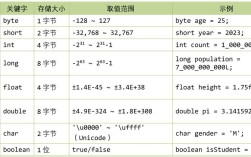
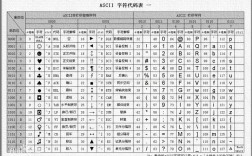
在 Java 中,获取字符的 ASCII 码(或更准确地说是 Unicode 码点,因为 Java 使用 Unicode 编码)可以通过强制类型转换将 char 类型转换为 int 类型来实现。
核心方法
char c = 'A'; // 你的字符
int ascii = (int) c; // 强制转换为 int
详细示例
下面是一个完整的示例,展示了如何获取单个字符、字符串中每个字符的 ASCII 码,以及处理非 ASCII 字符(如中文)的情况。
public class AsciiExample {
    public static void main(String[] args) {
        // 1. 获取单个字符的 ASCII/Unicode 码点
        char charA = 'A';
        char char0 = '0';
        char charChinese = '中'; // 这是一个非 ASCII 字符
        // 强制转换为 int
        int codePointA = (int) charA;
        int codePoint0 = (int) char0;
        int codePointChinese = (int) charChinese;
        System.out.println("字符 '" + charA + "' 的码点是: " + codePointA); // 输出: 65
        System.out.println("字符 '" + char0 + "' 的码点是: " + codePoint0); // 输出: 48
        System.out.println("字符 '" + charChinese + "' 的码点是: " + codePointChinese); // 输出: 20013
        System.out.println("-------------------------------------");
        // 2. 获取字符串中每个字符的 ASCII/Unicode 码点
        String text = "Hello 你好! 123";
        System.out.println("字符串 \"" + text + "\" 中每个字符的码点:");
        for (int i = 0; i < text.length(); i++) {
            char c = text.charAt(i);
            int codePoint = (int) c;
            System.out.println("字符 '" + c + "' -> 码点: " + codePoint);
        }
    }
}
输出结果:
字符 'A' 的码点是: 65
字符 '0' 的码点是: 48
字符 '中' 的码点是: 20013
-------------------------------------
字符串 "Hello 你好! 123" 中每个字符的码点:
字符 'H' -> 码点: 72
字符 'e' -> 码点: 101
字符 'l' -> 码点: 108
字符 'l' -> 码点: 108
字符 'o' -> 码点: 111
字符 ' ' -> 码点: 32
字符 '你' -> 码点: 20320
字符 '好' -> 码点: 22909
字符 '!' -> 码点: 33
字符 ' ' -> 码点: 32
字符 '1' -> 码点: 49
字符 '2' -> 码点: 50
字符 '3' -> 码点: 51
重要概念澄清:ASCII vs. Unicode
在讨论这个问题时,理解 ASCII 和 Unicode 的区别非常重要。
-
ASCII (American Standard Code for Information Interchange):
- 一个 7 位的编码标准,定义了 128 个字符。
- 包括英文字母(A-Z, a-z)、数字(0-9)和一些特殊符号(如 , , , )。
- 在 Java 中,所有英文字母和数字的
char码点都与其 ASCII 码相同。
-
Unicode:
- 一个全球通用的字符集,旨在表示世界上所有的书写系统中的字符。
- 它为每个字符分配一个唯一的数字,称为 码点。
- Java 的
char类型使用的是 UTF-16 编码,这是 Unicode 的一种实现方式,这意味着:- 大多数常见的字符(包括所有 ASCII 字符)都可以用一个
char(16位)表示。 - 一些非常特殊的字符(如某些生僻的emoji或汉字)可能需要两个
char组成一个“代理对”(surrogate pair)来表示,这种情况下,charAt(i)只能得到代理对的前半部分或后半部分。
- 大多数常见的字符(包括所有 ASCII 字符)都可以用一个
如何正确处理包含代理对的字符(高级)
如果你的字符串可能包含需要两个 char 表示的字符(即码点大于 0xFFFF),直接使用 charAt(i) 和 (int) 会得到错误的值,这时,应该使用 codePointAt() 方法。
public class CodePointExample {
    public static void main(String[] args) {
        // 这个字符 '𠮷' (古同“吉”) 的码点是 131083,超出了一个 char 能表示的范围 (0xFFFF)
        // 它在 UTF-16 中由两个 char 组成:\uD842\uDFB7
        String text = "A𠮷B";
        System.out.println("字符串: " + text);
        System.out.println("字符串长度: " + text.length()); // 输出 3, 因为 Java 认为 '𠮷' 占用了两个 char 位置
        // 错误的方式:直接使用 charAt
        System.out.println("\n--- 错误的方式 ---");
        for (int i = 0; i < text.length(); i++) {
            char c = text.charAt(i);
            int wrongCodePoint = (int) c;
            System.out.println("位置 " + i + ": 字符 '" + c + "' -> 错误的码点: " + wrongCodePoint);
        }
        // 输出:
        // 位置 0: 字符 'A' -> 错误的码点: 65
        // 位置 1: 字符 '𠮷' -> 错误的码点: 55352 (这是代理对的前半部分)
        // 位置 2: 字符 'B' -> 错误的码点: 66
        // 正确的方式:使用 codePointAt
        System.out.println("\n--- 正确的方式 ---");
        int[] codePoints = text.codePoints().toArray();
        for (int i = 0; i < codePoints.length; i++) {
            int codePoint = codePoints[i];
            System.out.println("字符 " + i + " 的码点是: " + codePoint);
        }
        // 输出:
        // 字符 0 的码点是: 65
        // 字符 1 的码点是: 131083 (这是 '𠮷' 的正确码点)
        // 字符 2 的码点是: 66
    }
}
| 场景 | 推荐方法 | 说明 |
|---|---|---|
| 获取单个字符的码点 | (int) myChar |
最简单直接的方法,适用于所有 char。 |
| 遍历字符串获取每个字符的码点 | for (int i = 0; i < s.length(); i++) { int cp = s.codePointAt(i); ... } |
最佳实践。codePointAt() 会自动处理代理对,确保你得到的是完整的码点,i 会正确地跳过代理对的两个 char。 |
| 将码点转换回字符 | char c = (char) myCodePoint; |
将一个码点(在 char 范围内)转换回 char。 |
| 处理包含代理对的字符串 | s.codePoints() |
返回一个 IntStream,流中的每个元素都是完整的码点,是处理复杂文本最安全、最现代的方式。 |
对于绝大多数日常开发(处理英文、数字、常见符号),使用 (int) char 就足够了,但一旦你开始处理包含中文、日文、emoji 或其他可能需要代理对的文本,就应该优先考虑使用 codePointAt() 或 codePoints()。