
目录
- 准备工作
- 安装 MySQL 数据库
- 安装 Python 的 MySQL 驱动
- 核心概念与连接
mysql-connector-python简介- 建立数据库连接
- 关闭连接
- 基本数据库操作
- 创建数据库
- 创建表
- CRUD 操作 (核心)
- Create (插入数据)
- Read (查询数据)
- Update (更新数据)
- Delete (删除数据)
- 最佳实践
- 使用
try...except...finally处理异常 - 使用
with语句自动管理资源 - 参数化查询 (防止 SQL 注入)
- 批量操作
- 使用
- 进阶特性
- 获取表结构信息
- 使用字典游标 (
DictCursor) - 事务管理 (
commit和rollback)
- 完整项目示例
- 项目结构
- 代码实现
- 运行演示
准备工作
1 安装 MySQL 数据库
如果你还没有安装 MySQL,请先从 MySQL 官网 下载并安装,安装过程中请记住你的 root 用户名 和 密码。
2 安装 Python 的 MySQL 驱动
Python 本身不包含数据库驱动,我们需要安装一个第三方库。mysql-connector-python 是官方推荐的驱动。
打开你的终端或命令提示符,运行以下命令:
pip install mysql-connector-python
安装完成后,你就可以在 Python 中导入并使用它了。
核心概念与连接
1 mysql-connector-python 简介
这个库提供了 Python 与 MySQL 数据库交互所需的所有功能,包括连接、执行 SQL 语句、获取结果等。

2 建立数据库连接
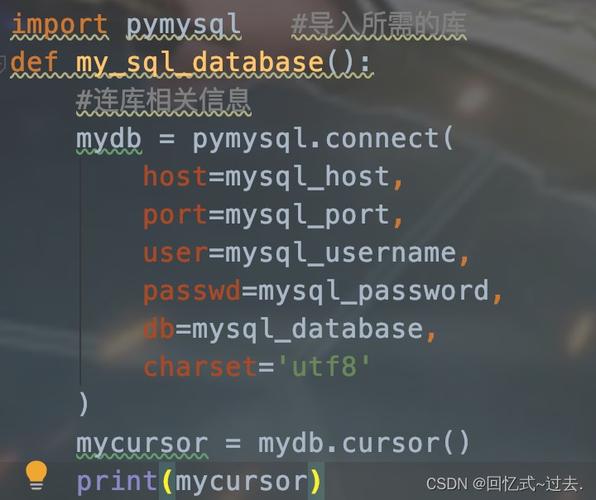
使用 mysql.connector.connect() 函数来建立连接,你需要提供数据库的基本信息:
import mysql.connector
# 创建数据库连接
# 请将下面的用户名、密码和数据库名替换为你自己的
db_connection = mysql.connector.connect(
    host="localhost",      # 数据库主机地址,通常是 'localhost'
    user="your_username",  # 数据库用户名
    password="your_password", # 数据库密码
    database="your_database"  # 要连接的数据库名 (可选,也可以先不指定)
)
# 检查连接是否成功
if db_connection.is_connected():
    print("成功连接到 MySQL 数据库!")
    # 获取数据库版本信息
    db_info = db_connection.get_server_info()
    print(f"MySQL 服务器版本: {db_info}")
# ...后续操作...
# 关闭连接 (非常重要!)
db_connection.close()
3 关闭连接
数据库连接是有限的资源,用完后必须关闭,否则会导致连接泄漏。db_connection.close() 会关闭连接并释放相关资源。
基本数据库操作
要执行 SQL 语句,你需要先从连接中创建一个 游标,游标就像一个指针,可以遍历 SQL 查询的结果集。
# ... (连接代码同上) ...
# 创建一个游标对象
cursor = db_connection.cursor()
1 创建数据库
如果数据库不存在,可以创建一个。
# 使用 execute() 方法执行 SQL 语句
cursor.execute("CREATE DATABASE IF NOT EXISTS my_test_db")
print("数据库 'my_test_db' 创建成功或已存在。")
2 创建表
在数据库中创建一张表。
# 选择要操作的数据库
cursor.execute("USE my_test_db")
# 创建表的 SQL 语句
create_table_query = """
CREATE TABLE IF NOT EXISTS employees (
    id INT AUTO_INCREMENT PRIMARY KEY,
    name VARCHAR(50) NOT NULL,
    department VARCHAR(50),
    salary DECIMAL(10, 2)
)
"""
cursor.execute(create_table_query)
print("表 'employees' 创建成功或已存在。")
3 CRUD 操作 (核心)
Create (插入数据)
# --- 单条数据插入 ---
insert_query = "INSERT INTO employees (name, department, salary) VALUES (%s, %s, %s)"
employee_data = ("张三", "研发部", 8500.00)
# 使用 execute() 插入单条数据
cursor.execute(insert_query, employee_data)
# 提交事务,否则数据不会真正写入数据库
db_connection.commit()
print(f"成功插入数据: {employee_data}")
# --- 批量数据插入 ---
employees_data = [
    ("李四", "市场部", 7500.50),
    ("王五", "财务部", 6800.00),
    ("赵六", "研发部", 9200.75)
]
# 使用 executemany() 进行批量插入
cursor.executemany(insert_query, employees_data)
# 再次提交事务
db_connection.commit()
print(f"成功批量插入 {len(employees_data)} 条数据。")
注意: %s 是参数占位符。永远不要用 Python 字符串拼接来构建 SQL 语句,这极易导致 SQL 注入攻击。cursor.execute() 会自动处理参数转义。
Read (查询数据)
# 查询所有员工
query_all = "SELECT * FROM employees"
cursor.execute(query_all)
# 获取所有查询结果
results = cursor.fetchall()
print("\n--- 所有员工信息 ---")
for row in results:
    print(f"ID: {row[0]}, 姓名: {row[1]}, 部门: {row[2]}, 薪资: {row[3]}")
# 查询特定条件的员工
query_specific = "SELECT name, salary FROM employees WHERE department = %s AND salary > %s"
dept = "研发部"
min_salary = 8000
cursor.execute(query_specific, (dept, min_salary))
# 获取查询结果
results_specific = cursor.fetchall()
print(f"\n--- {dept} 中薪资高于 {min_salary} 的员工 ---")
for row in results_specific:
    print(f"姓名: {row[0]}, 薪资: {row[1]}")
# 获取单行数据
# cursor.fetchone()
Update (更新数据)
# 更新员工薪资
update_query = "UPDATE employees SET salary = %s WHERE name = %s"
new_salary = 9000.00
employee_name = "张三"
cursor.execute(update_query, (new_salary, employee_name))
# 提交事务
db_connection.commit()
print(f"\n已将 {employee_name} 的薪资更新为 {new_salary}。")
Delete (删除数据)
# 删除员工
delete_query = "DELETE FROM employees WHERE name = %s"
employee_to_delete = "王五"
cursor.execute(delete_query, (employee_to_delete,))
# 提交事务
db_connection.commit()
print(f"\n已删除员工: {employee_to_delete}。")
最佳实践
1 使用 try...except...finally 处理异常
数据库操作可能会因为各种原因失败(如连接中断、SQL 语法错误等),所以必须进行异常处理。
try:
    # 连接和操作代码...
    db_connection = mysql.connector.connect(...)
    cursor = db_connection.cursor()
    cursor.execute("...")
    db_connection.commit()
except mysql.connector.Error as err:
    print(f"数据库错误: {err}")
    # 如果发生错误,回滚事务
    if db_connection.is_connected():
        db_connection.rollback()
finally:
    # 无论是否发生错误,最后都会执行这里,确保资源被释放
    if 'db_connection' in locals() and db_connection.is_connected():
        cursor.close()
        db_connection.close()
        print("数据库连接已关闭。")
2 使用 with 语句自动管理资源
从 mysql-connector-python 8.0.0 版本开始,支持上下文管理器(with 语句),可以自动处理连接和游标的关闭。
from mysql.connector import Error
try:
    with mysql.connector.connect(
        host="localhost",
        user="your_username",
        password="your_password",
        database="my_test_db"
    ) as db_connection:
        with db_connection.cursor() as cursor:
            # 在这里执行你的数据库操作
            cursor.execute("SELECT * FROM employees")
            results = cursor.fetchall()
            for row in results:
                print(row)
            # 提交事务
            db_connection.commit()
except Error as e:
    print(f"数据库错误: {e}")
# 当退出 'with' 代码块时,连接和游标会自动关闭,无需手动调用 close()
这是目前最推荐的方式,代码更简洁、安全。
3 参数化查询 (防止 SQL 注入)
这是最重要的一条安全规则。永远不要信任用户输入,始终使用参数化查询。
错误示范 (极易被 SQL 注入):
user_input = "李四; DROP TABLE employees;"
# 恶意的 user_input 会导致 employees 表被删除!
query = f"SELECT * FROM employees WHERE name = '{user_input}'"
cursor.execute(query)
正确示范 (安全):
user_input = "李四; DROP TABLE employees;" # 即使输入是恶意的,也会被当作普通字符串处理
query = "SELECT * FROM employees WHERE name = %s"
cursor.execute(query, (user_input,)) # %s 会被正确转义
4 批量操作
当需要插入或更新大量数据时,使用 executemany() 比在循环中多次调用 execute() 效率高得多。
进阶特性
1 使用字典游标 (DictCursor)
默认情况下,查询结果是一个元组,使用字典游标可以让结果以字典的形式返回,列名就是键,这样代码可读性更高。
# 在创建游标时传入字典游标类
with db_connection.cursor(dictionary=True) as cursor:
    cursor.execute("SELECT * FROM employees")
    results = cursor.fetchall()
    print("\n--- 使用字典游标 ---")
    for row in results:
        print(f"ID: {row['id']}, 姓名: {row['name']}, 部门: {row['department']}, 薪资: {row['salary']}")
2 事务管理
默认情况下,mysql-connector-python 是在自动提交模式下,这意味着每条 INSERT, UPDATE, DELETE 语句执行后都会立即提交。
如果你想在一个事务中执行多个操作(从 A 表转账到 B 表),你需要关闭自动提交,手动控制 commit() 和 rollback()。
db_connection = mysql.connector.connect(...)
db_connection.autocommit = False # 关闭自动提交
try:
    cursor = db_connection.cursor()
    # 操作1
    cursor.execute("UPDATE accounts SET balance = balance - 100 WHERE id = 1")
    # 操作2
    cursor.execute("UPDATE accounts SET balance = balance + 100 WHERE id = 2")
    # 所有操作成功,提交事务
    db_connection.commit()
    print("事务提交成功。")
except Exception as e:
    # 发生任何错误,回滚事务
    db_connection.rollback()
    print(f"事务执行失败,已回滚: {e}")
finally:
    if db_connection.is_connected():
        db_connection.autocommit = True # 恢复默认设置
        cursor.close()
        db_connection.close()
完整项目示例
1 项目结构
我们将创建一个简单的员工管理系统。
employee_manager/
├── db_config.py      # 数据库配置信息
├── employee.py       # 员工类和业务逻辑
└── main.py           # 主程序入口
2 代码实现
db_config.py
# 数据库配置文件
DB_CONFIG = {
    'host': 'localhost',
    'user': 'your_username',
    'password': 'your_password',
    'database': 'my_test_db'
}
employee.py
import mysql.connector
from mysql.connector import Error
from db_config import DB_CONFIG
class EmployeeManager:
    def __init__(self):
        self.connection = None
        self.cursor = None
    def connect(self):
        """连接到数据库"""
        try:
            self.connection = mysql.connector.connect(**DB_CONFIG)
            if self.connection.is_connected():
                print("成功连接到数据库")
                self.cursor = self.connection.cursor(dictionary=True)
        except Error as e:
            print(f"连接数据库时出错: {e}")
    def disconnect(self):
        """断开数据库连接"""
        if self.cursor:
            self.cursor.close()
        if self.connection and self.connection.is_connected():
            self.connection.close()
            print("数据库连接已关闭")
    def create_employee(self, name, department, salary):
        """创建新员工"""
        if not self.connection or not self.connection.is_connected():
            self.connect()
        query = "INSERT INTO employees (name, department, salary) VALUES (%s, %s, %s)"
        try:
            self.cursor.execute(query, (name, department, salary))
            self.connection.commit()
            print(f"成功创建员工: {name}")
        except Error as e:
            print(f"创建员工时出错: {e}")
            self.connection.rollback()
    def get_all_employees(self):
        """获取所有员工"""
        if not self.connection or not self.connection.is_connected():
            self.connect()
        query = "SELECT * FROM employees"
        try:
            self.cursor.execute(query)
            employees = self.cursor.fetchall()
            return employees
        except Error as e:
            print(f"获取员工列表时出错: {e}")
            return []
    def update_employee_salary(self, employee_id, new_salary):
        """更新员工薪资"""
        if not self.connection or not self.connection.is_connected():
            self.connect()
        query = "UPDATE employees SET salary = %s WHERE id = %s"
        try:
            self.cursor.execute(query, (new_salary, employee_id))
            self.connection.commit()
            print(f"成功更新 ID 为 {employee_id} 的员工薪资")
        except Error as e:
            print(f"更新员工薪资时出错: {e}")
            self.connection.rollback()
    def delete_employee(self, employee_id):
        """删除员工"""
        if not self.connection or not self.connection.is_connected():
            self.connect()
        query = "DELETE FROM employees WHERE id = %s"
        try:
            self.cursor.execute(query, (employee_id,))
            self.connection.commit()
            print(f"成功删除 ID 为 {employee_id} 的员工")
        except Error as e:
            print(f"删除员工时出错: {e}")
            self.connection.rollback()
main.py
from employee import EmployeeManager
def main():
    manager = EmployeeManager()
    # 确保数据库和表已存在 (简化处理,实际应用中应有专门的初始化脚本)
    manager.connect()
    manager.disconnect()
    # --- 演示 CRUD 操作 ---
    print("\n--- 创建员工 ---")
    manager.create_employee("钱七", "销售部", 7000.00)
    manager.create_employee("孙八", "人事部", 6500.00)
    print("\n--- 查询所有员工 ---")
    employees = manager.get_all_employees()
    for emp in employees:
        print(f"ID: {emp['id']}, 姓名: {emp['name']}, 部门: {emp['department']}, 薪资: {emp['salary']}")
    # 假设我们要更新钱七的薪资,先找到他的ID
    qiqi_id = None
    for emp in employees:
        if emp['name'] == '钱七':
            qiqi_id = emp['id']
            break
    if qiqi_id:
        print("\n--- 更新员工薪资 ---")
        manager.update_employee_salary(qiqi_id, 8000.00)
        print("\n--- 更新后查询所有员工 ---")
        updated_employees = manager.get_all_employees()
        for emp in updated_employees:
            print(f"ID: {emp['id']}, 姓名: {emp['name']}, 部门: {emp['department']}, 薪资: {emp['salary']}")
        print("\n--- 删除员工 ---")
        manager.delete_employee(qiqi_id)
        print("\n--- 删除后查询所有员工 ---")
        final_employees = manager.get_all_employees()
        for emp in final_employees:
            print(f"ID: {emp['id']}, 姓名: {emp['name']}, 部门: {emp['department']}, 薪资: {emp['salary']}")
if __name__ == "__main__":
    main()
3 运行演示
- 确保 MySQL 服务正在运行。
- 修改
db_config.py中的用户名和密码。 - 运行
main.py:python main.py
你将看到程序的输出,清晰地展示了创建、查询、更新和删除员工的全过程。
通过这份指南,你应该已经掌握了使用 Python 进行 MySQL 数据库编程的核心知识,关键点回顾:
- 安装驱动:
pip install mysql-connector-python - 建立连接:
mysql.connector.connect() - 执行SQL: 使用游标的
execute()和executemany()。 - 提交事务:
db_connection.commit()。 - 安全第一: 始终使用参数化查询 (
%s) 来防止 SQL 注入。 - 资源管理: 优先使用
with语句,或使用try...finally确保close()被调用。 - 错误处理: 使用
try...except捕获mysql.connector.Error。
希望这份详细的指南对你有帮助!


