Of course! Here is a comprehensive, structured Python tutorial, designed to take you from absolute beginner to a confident programmer who can build small projects. It follows the standard learning path and includes practical examples.

The Python Tutorial: From Zero to Hero
Welcome! This tutorial will guide you through the fundamentals of Python, one of the most popular and beginner-friendly programming languages in the world. We'll start with the very basics and gradually build up to more complex topics.
Who is this tutorial for?
- Absolute beginners with no programming experience.
- Programmers from other languages looking to learn Python's syntax and philosophy.
- Anyone who wants to automate tasks, analyze data, or build websites.
Part 1: Setting Up Your Environment
Before you can write code, you need to set up your tools.
1 Install Python
- Go to the official Python website: python.org
- Download the latest stable version (e.g., Python 3.11 or newer). It's highly recommended to use Python 3, as Python 2 is no longer supported.
- Run the installer. Crucially, on the first screen of the installer, check the box that says "Add Python to PATH" or "Add python.exe to PATH". This will allow you to run Python from your command line easily.
2 Verify the Installation
Open your command prompt (on Windows) or terminal (on macOS/Linux) and type:
python --version
or

python3 --version
If you see a version number (e.g., Python 3.11.4), you're all set!
3 Choose a Code Editor
A code editor is where you'll write your code. It provides helpful features like syntax highlighting and auto-completion.
- Beginner-Friendly: Visual Studio Code (VS Code) (free and powerful).
- Simpler: Sublime Text or Notepad++ (on Windows).
For this tutorial, we'll assume you're using VS Code. After installing it, open it, and you can create a new file (File > New File) and save it with a .py extension (e.g., hello.py).
Part 2: Your First Python Program
Let's write our first line of code. This is a tradition in programming called "Hello, World!".

Open your hello.py file in your editor and type the following:
print("Hello, World!")
Now, save the file and run it from your terminal/command prompt. Navigate to the directory where you saved the file and type:
python hello.py
You should see the output:
Hello, World!Congratulations! You've just written and executed your first Python program.
Part 3: Python Fundamentals
Now let's learn the building blocks of the language.
1 Variables and Data Types
Variables are containers for storing data values. In Python, you don't need to declare the type of a variable; it's inferred automatically.
# String (text)
name = "Alice"
greeting = 'Hello'
# Integer (whole number)
age = 30
# Float (decimal number)
height = 5.6
# Boolean (True or False)
is_student = True
print(name)
print(age)
print(is_student)
Common Data Types:
str: Text (e.g.,"hello",'world')int: Integer (e.g.,10,-5)float: Floating-point number (e.g.,14,-0.01)bool: Boolean (e.g.,True,False)list: An ordered, changeable collection (e.g.,[1, 2, 3])dict: A collection of key-value pairs (e.g.,{"name": "Bob", "age": 25})
2 Basic Operators
Operators are used to perform operations on variables and values.
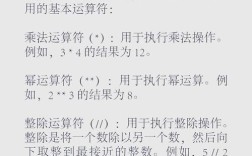
Arithmetic Operators:
x = 10
y = 3
print(x + y)  # Addition: 13
print(x - y)  # Subtraction: 7
print(x * y)  # Multiplication: 30
print(x / y)  # Division: 3.333...
print(x // y) # Floor Division (whole number result): 3
print(x % y)  # Modulus (remainder): 1
print(x ** y) # Exponentiation: 1000
Comparison Operators: (They return a bool)
a = 5
b = 10
print(a == b)  # Equal to? False
print(a != b)  # Not equal to? True
print(a > b)   # Greater than? False
print(a < b)   # Less than? True
print(a >= b)  # Greater than or equal to? False
print(a <= b)  # Less than or equal to? True
3 User Input
You can get input from the user using the input() function. It always returns a string, so you often need to convert it.
# The prompt inside the parentheses is what the user sees
name = input("What is your name? ")
age_str = input("How old are you? ")
# Convert the age string to an integer
age = int(age_str)
print(f"Hello, {name}!")
print(f"Next year, you will be {age + 1} years old.")
4 Conditional Statements (if, elif, else)
Conditionals allow your program to make decisions.
age = int(input("Enter your age: "))
if age < 13:
    print("You are a child.")
elif age < 18:
    print("You are a teenager.")
else:
    print("You are an adult.")
5 Loops
Loops let you repeat a block of code.
for loop: Iterates over a sequence (like a list or a range).
# Loop 5 times
for i in range(5):
    print(f"This is iteration {i}")
# Loop over a list of fruits
fruits = ["apple", "banana", "cherry"]
for fruit in fruits:
    print(f"I like {fruit}s")
while loop: Repeats as long as a condition is true.
count = 0
while count < 5:
    print(f"Count is {count}")
    count = count + 1 # Don't forget to update the condition!
6 Functions
Functions are reusable blocks of code that perform a specific task. They help organize your code and avoid repetition.
# Define a function
def greet(name, greeting="Hello"):
    """This function greets the person passed in as a parameter."""
    return f"{greeting}, {name}!"
# Call the function
message1 = greet("Charlie")
print(message1) # Output: Hello, Charlie!
message2 = greet("Diana", "Good morning")
print(message2) # Output: Good morning, Diana!
Part 4: Data Structures
Python has powerful built-in data structures for organizing your data.
1 Lists
Lists are ordered, changeable collections. They are defined with square brackets [].
# Create a list
numbers = [1, 2, 3, 4, 5]
# Access an item by index (starts at 0)
print(numbers[0]) # Output: 1
print(numbers[-1]) # Output: 5 (negative index counts from the end)
# Change an item
numbers[0] = 10
print(numbers) # Output: [10, 2, 3, 4, 5]
# Add an item to the end
numbers.append(6)
print(numbers) # Output: [10, 2, 3, 4, 5, 6]
# Remove an item
numbers.remove(2)
print(numbers) # Output: [10, 3, 4, 5, 6]
# Loop through a list
for num in numbers:
    print(num)
2 Dictionaries
Dictionaries are unordered collections of key-value pairs. They are defined with curly braces .
# Create a dictionary
person = {
    "name": "Eve",
    "age": 28,
    "city": "New York"
}
# Access a value by its key
print(person["name"]) # Output: Eve
# Add a new key-value pair
person["job"] = "Engineer"
print(person) # Output: {'name': 'Eve', 'age': 28, 'city': 'New York', 'job': 'Engineer'}
# Change a value
person["age"] = 29
print(person["age"]) # Output: 29
# Loop through a dictionary (by default, loops through keys)
for key in person:
    print(f"{key}: {person[key]}")
Part 5: Working with Files
Often, you'll want to read from or write to files.
1 Writing to a File
# 'w' mode will create the file or overwrite it if it exists
with open("my_file.txt", "w") as f:
    f.write("Hello, this is the first line.\n")
    f.write("This is the second line.")
The with statement is best practice as it automatically closes the file for you.
2 Reading from a File
# 'r' mode is for reading (it's the default mode)
with open("my_file.txt", "r") as f:
    content = f.read()
    print(content)
Part 6: Next Steps and Project Ideas
You now have a solid foundation in Python! The best way to learn is by doing. Here are some ideas for small projects to practice your skills.
Beginner Projects:
- Guess the Number Game: The computer picks a random number, and the user has to guess it. The program gives hints like "too high" or "too low".
- Simple Calculator: Ask the user for two numbers and an operation (+, -, *, /) and then print the result.
- To-Do List App: Allow a user to add, view, and delete tasks from a list that is saved to a file.
- Mad Libs Generator: Ask the user for various types of words (noun, verb, adjective) and then insert them into a pre-written story.
Intermediate Projects:
- Web Scraper: Use a library like
BeautifulSoupto extract data from a website (e.g., all the headlines from a news site). - API Client: Use the
requestslibrary to call a public API (like the weather API or a joke API) and display the data. - Basic Web App: Use a framework like
FlaskorDjangoto build a simple website with a few pages.
Where to Go from Here?
- Practice Platforms: HackerRank, LeetCode, and Exercism are great for solving coding challenges.
- Official Documentation: The Python Documentation is the ultimate source of truth.
- Libraries and Frameworks: Explore what you can build with Python's vast ecosystem (e.g.,
Pandasfor data analysis,Djangofor web development,Pygamefor games).
Happy coding