Of course! Using lists in Thrift with Python is a very common task. Here’s a comprehensive guide covering everything from defining lists in your .thrift file to generating Python code and using them in your client and server.
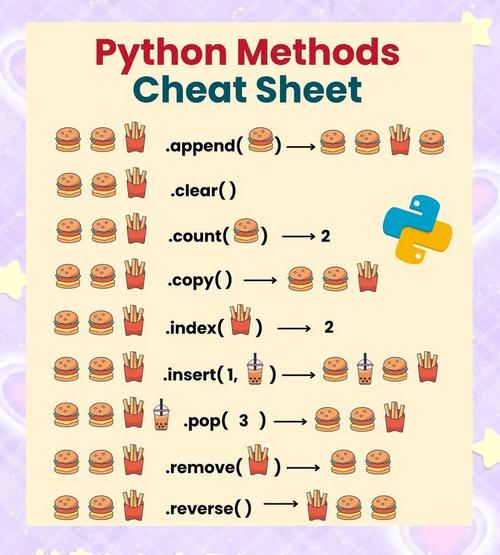
Defining Lists in a .thrift File
In Thrift, a list is defined using the list keyword, followed by angle brackets <> containing the data type of the elements in the list.
Supported element types: bool, byte, i16, i32, i64, double, string, binary, and even other structs or enums.
Basic Example: thrift_types.thrift
Let's create a simple Thrift file to demonstrate the different kinds of lists you can define.
// thrift_types.thrift
namespace py thrift_types
// A simple struct to be used as a list element
struct User {
    1: required i32 id,
    2: required string name,
}
// Service definition
service UserService {
    // Returns a list of integers (user IDs)
    list<i32> get_user_ids(),
    // Takes a list of strings (names) and returns a list of Users
    list<User> find_users_by_names(1: list<string> names),
    // A more complex example: a list of structs
    list<User> get_all_users(),
    // Example of a list of lists (a matrix of integers)
    list<list<i32>> get_matrix(),
}
Key points in the definition:
list<i32>: A list where each element is a 32-bit integer.list<string>: A list of strings.list<User>: A list ofUserstructs. This is extremely powerful for passing complex data collections.list<list<i32>>: A list containing other lists. Thrift handles this gracefully.
Generating Python Code
Once you have your .thrift file, you need to use the Thrift compiler to generate the Python "stub" code.
-
Install the Thrift compiler (if you haven't already):
# On macOS with Homebrew
brew install thrift
# On Ubuntu/Debian
sudo apt-get install thrift
-
Run the compiler to generate the Python code:
thrift --gen py thrift_types.thrift
This command will create a directory structure like this:
├── gen-py
│   └── thrift_types
│       ├── UserService.py
│       ├── __init__.py
│       ├── constants.py
│       └── ttypes.py  # <-- This is the most important file for data types
The ttypes.py file will contain the Python classes corresponding to your struct and list definitions.
Working with Lists in Python
Now you can import and use these generated classes in your Python code.
Generated Code Structure
For our thrift_types.thrift file, the ttypes.py file will contain:
- A
Userclass withidandnameattributes. - Helper classes like
UserStruct,UserStructHelper, etc., for serialization. - The
UserServiceclient class and theProcessorbase class for the server.
Example: Python Client
Here’s how you would use the client to interact with services that return or accept lists.
# client.py
import sys
import socket
from thrift import Thrift
from thrift.transport import TSocket, TTransport
from thrift.protocol import TBinaryProtocol
# Import the generated code
from thrift_types import UserService
from thrift_types.ttypes import User
def main():
    # Make socket
    transport = TSocket.TSocket('localhost', 9090)
    # Buffering is critical. Raw sockets are very slow
    transport = TTransport.TBufferedTransport(transport)
    # Wrap in a protocol
    protocol = TBinaryProtocol.TBinaryProtocol(transport)
    # Create a client to use the protocol encoder
    client = UserService.Client(protocol)
    # Connect!
    transport.open()
    print("--- Calling get_user_ids() ---")
    try:
        user_ids = client.get_user_ids()
        print(f"Received user IDs: {user_ids}")
        print(f"Type: {type(user_ids)}")
        print(f"First ID: {user_ids[0]}")
    except Thrift.TException as tx:
        print(f'{type(tx).__name__}: {tx}')
    print("\n--- Calling find_users_by_names() ---")
    try:
        names_to_find = ["Alice", "Bob", "Charlie"]
        found_users = client.find_users_by_names(names_to_find)
        print(f"Found {len(found_users)} users for names {names_to_find}:")
        for user in found_users:
            print(f"  - ID: {user.id}, Name: {user.name}")
    except Thrift.TException as tx:
        print(f'{type(tx).__name__}: {tx}')
    print("\n--- Calling get_all_users() ---")
    try:
        all_users = client.get_all_users()
        print(f"Total users in system: {len(all_users)}")
        # You can iterate and access attributes just like a normal list of objects
        for user in all_users:
            print(f"  - User: {user.name} (ID: {user.id})")
    except Thrift.TException as tx:
        print(f'{type(tx).__name__}: {tx}')
    print("\n--- Calling get_matrix() ---")
    try:
        matrix = client.get_matrix()
        print(f"Received matrix with {len(matrix)} rows.")
        for i, row in enumerate(matrix):
            print(f"  Row {i}: {row}")
    except Thrift.TException as tx:
        print(f'{type(tx).__name__}: {tx}')
    transport.close()
if __name__ == '__main__':
    main()
Example: Python Server
The server needs to implement the service methods. When a method is defined to take or return a list, your implementation will work with standard Python lists.
# server.py
import sys
from thrift import Thrift
from thrift.transport import TTransport, TSocket
from thrift.protocol import TBinaryProtocol
from thrift.server import TServer
# Import the generated code
from thrift_types import UserService
from thrift_types.ttypes import User
# --- Implementation of the UserService ---
class UserServiceHandler:
    def __init__(self):
        # In a real app, you'd fetch this from a database
        self.users = {
            1: User(id=1, name="Alice"),
            2: User(id=2, name="Bob"),
            3: User(id=3, name="Charlie"),
            4: User(id=4, name="Diana"),
        }
        self.user_ids = list(self.users.keys())
    def get_user_ids(self):
        """Returns a list of integers."""
        print("get_user_ids() called")
        return self.user_ids
    def find_users_by_names(self, names):
        """Takes a list of strings, returns a list of User structs."""
        print(f"find_users_by_names() called with names: {names}")
        found = []
        for name in names:
            for user in self.users.values():
                if user.name == name:
                    found.append(user)
        return found
    def get_all_users(self):
        """Returns a list of all User structs."""
        print("get_all_users() called")
        return list(self.users.values())
    def get_matrix(self):
        """Returns a list of lists of integers."""
        print("get_matrix() called")
        # Example 3x3 matrix
        return [
            [1, 2, 3],
            [4, 5, 6],
            [7, 8, 9]
        ]
# --- Server Setup ---
if __name__ == '__main__':
    handler = UserServiceHandler()
    processor = UserService.Processor(handler)
    transport = TSocket.TServerSocket(port=9090)
    tfactory = TTransport.TBufferedTransportFactory()
    pfactory = TBinaryProtocol.TBinaryProtocolFactory()
    # Create a server to serve the handler
    server = TServer.TSimpleServer(processor, transport, tfactory, pfactory)
    print('Starting the server...')
    server.serve()
    print('done.')
Running the Example
-
Start the server in one terminal:
python server.py
You should see
Starting the server.... -
Run the client in another terminal:
python client.py
Expected Output from Client:
--- Calling get_user_ids() ---
Received user IDs: [1, 2, 3, 4]
Type: <class 'list'>
First ID: 1
--- Calling find_users_by_names() ---
Found 2 users for names ['Alice', 'Bob', 'Charlie']:
  - ID: 1, Name: Alice
  - ID: 2, Name: Bob
--- Calling get_all_users() ---
Total users in system: 4
  - User: Alice (ID: 1)
  - User: Bob (ID: 2)
  - User: Charlie (ID: 3)
  - User: Diana (ID: 4)
--- Calling get_matrix() ---
Received matrix with 3 rows.
  Row 0: [1, 2, 3]
  Row 1: [4, 5, 6]
  Row 2: [7, 8, 9]
Expected Output from Server:
Starting the server...
get_user_ids() called
find_users_by_names() called with names: ['Alice', 'Bob', 'Charlie']
get_all_users() called
get_matrix() called
Summary
| Task | Thrift Syntax | Python Usage |
|---|---|---|
| Define a list | list<i32>, list<string>, etc. |
N/A |
| Pass a list as an argument | void myMethod(1: list<i32> nums) |
client.myMethod([1, 2, 3]) |
| Receive a list as a return value | list<string> getNames() |
names = client.getNames() names will be a standard Python list object. |
| Work with a list of structs | list<User> getUsers() |
users = client.getUsers() Iterate with for user in users: and access user.id, user.name, etc. |
| Handle a list of lists | list<list<i32>> getMatrix() |
matrix = client.getMatrix() Access elements like matrix[0][1]. |