Of course! "Python Codecademy" refers to the highly popular Python 3 Course on the Codecademy learning platform. It's one of the most well-known and effective ways for beginners to start learning Python.
Here’s a comprehensive breakdown of what the course is like, what you'll learn, and how it compares to other resources.
What is Codecademy?
Codecademy is an interactive online learning platform focused on coding. Instead of just reading or watching videos, you learn by writing code directly in your browser and getting instant feedback.
The Python 3 Course: An Overview
The Python 3 course is designed for complete beginners. It's structured as a guided path that takes you from zero knowledge to being able to build your own basic projects.
Key Features of the Course:
- Interactive Learning: This is Codecademy's biggest strength. You don't just read about a concept like a
forloop; you are prompted to write one immediately to solve a small problem. - In-Browser Coding Environment: You don't need to install Python or any software on your computer. All your coding happens in a web-based editor that's set up for you.
- Immediate Feedback: As you write code, the platform checks it in real-time. If you make a mistake, it tells you what's wrong. If you're successful, it gives you a green checkmark and moves you to the next concept. This removes the frustration of getting stuck.
- Project-Based Learning: The course is broken down into modules, and many modules end with a small project where you apply everything you've just learned. This is crucial for reinforcing concepts.
- Clear Explanations: Concepts are explained in simple, bite-sized text. They avoid overly technical jargon at the beginning and introduce it gradually.
What You'll Learn: The Curriculum Breakdown
The course is structured into several sections. Here’s a typical flow:
Part 1: Learn the Basics
- Variables & Data Types: You'll learn to store information in variables and understand different types like strings, integers, and floats.
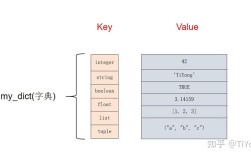
- Lists & Dictionaries: You'll work with collections of data, learning how to store, access, and modify items in lists (ordered) and dictionaries (key-value pairs).
- Control Flow: This is where your programs start making decisions. You'll learn
if,elif, andelsestatements. - Loops: You'll master
forloops to iterate over items in a list andwhileloops to repeat code as long as a condition is true. - Functions: You'll learn how to organize your code into reusable blocks called functions, a fundamental concept in programming.
Part 2: Intermediate Python
- File Input/Output (I/O): You'll learn how to read from and write to files on your computer (e.g.,
.txtfiles). - Error Handling: You'll learn to anticipate and handle potential errors in your code gracefully using
tryandexceptblocks. - Classes & Objects (OOP): This is a more advanced topic where you'll learn about Object-Oriented Programming, a way to model real-world things in your code.
Part 3: Final Project
- The course culminates in a final project where you combine all the skills you've learned. A common project is building a simple "Gradebook" or a "Magic 8-Ball" application. This solidifies your learning and gives you something tangible to show for your work.
Pros and Cons of the Codecademy Python Course
✅ Pros:
- Excellent for Absolute Beginners: The gentle, interactive approach is perfect for someone who has never coded before.
- Low Barrier to Entry: No installation required. You can start learning in minutes.
- Builds Confidence: The instant feedback loop helps you stay motivated and builds confidence quickly.
- Well-Structured & Organized: The curriculum is logical and builds upon itself progressively.
- Free Option: The basic course is available for free (with a Pro subscription offering more depth, quizzes, and projects).
❌ Cons:
- Can Create "Codecademy Zombies": Because you're often just filling in the blanks, some learners don't fully understand why they are writing a certain line of code. They learn the syntax but not the underlying problem-solving logic.
- Limited Real-World Context: The exercises are often small and isolated. You don't learn about software development best practices like version control (Git), virtual environments, or testing.
- The "Pro" Subscription is Expensive: The free version is a great starting point, but to unlock practice exams, quizzes, and portfolio projects, you need a paid Pro plan.
- No Focus on Data Science or Web Frameworks: The core course focuses on general-purpose Python. To learn about libraries like Pandas, NumPy, or frameworks like Django/Flask, you need to take separate Codecademy courses.
How Codecademy Compares to Other Resources
| Feature | Codecademy | freeCodeCamp | Coursera / edX | Books (e.g., Automate the Boring Stuff) |
|---|---|---|---|---|
| Learning Style | Interactive, Fill-in-the-blanks | Project-based, Read-then-code | Video lectures, Assignments | Read, then exercises |
| Best For | Absolute beginners who want instant feedback. | People who want to build complete projects from scratch. | Learners who prefer video lectures and a structured academic feel. | People who like to read and understand concepts deeply. |
| Cost | Free (basic), Paid (Pro) | Completely Free | Free to audit, Paid for certificate | Paid for the book, free exercises online. |
| Setup | None (in-browser) | None (in-browser) | None (in-browser) | Requires local Python installation |
| Depth | Good for fundamentals, but can be shallow. | Very deep, focuses on practical application. | Can range from beginner to expert, very deep. | Very deep, focuses on practical application. |
Who Should Take the Codecademy Python Course?
You should absolutely start with the Codecademy Python course if:
- You have zero programming experience.
- You want to learn by doing, not just by reading.
- You get intimidated by the idea of setting up a development environment on your computer.
- You want a quick, structured, and motivating introduction to the core concepts of Python.
Final Verdict
The Codecademy Python 3 course is an outstanding starting point for anyone new to programming. It's engaging, well-designed, and will give you a solid foundation in Python syntax and core concepts.
However, it should not be your only resource. To truly become a proficient Python developer, you should use it as a springboard and then move on to resources that teach more about problem-solving, project structure, and real-world tools.