Of course! This is a fundamental concept in Java. Here’s a detailed explanation of int and boolean, covering their definitions, differences, how they interact, and best practices.
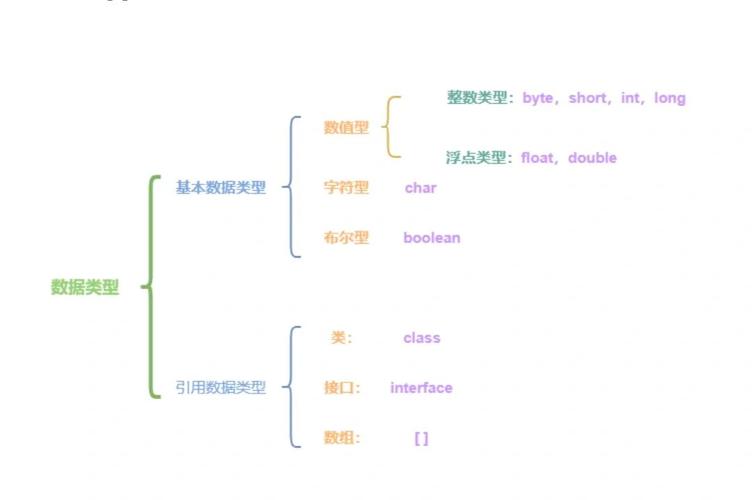
int - Integer Data Type
int is a primitive data type in Java used to represent whole numbers (integers). It's one of the most commonly used data types.
Key Characteristics of int:
- Purpose: Stores integer values (e.g., -10, 0, 100, 5000).
- Size: It occupies 32 bits (4 bytes) of memory.
- Range: Because it's 32 bits, it can store a specific range of values.
- Minimum value:
-2,147,483,648(-2^31) - Maximum value:
2,147,483,647(2^31 - 1)
- Minimum value:
- Default Value: If you declare an
intas an instance variable inside a class without initializing it, its default value is0.
Example of int:
public class IntExample {
    public static void main(String[] args) {
        // Declaring and initializing an int variable
        int age = 30;
        int studentCount = 150;
        int temperature = -5;
        System.out.println("Age: " + age);
        System.out.println("Student Count: " + studentCount);
        System.out.println("Temperature: " + temperature);
        // You can perform mathematical operations
        int sum = age + studentCount;
        System.out.println("Sum: " + sum); // Output: Sum: 180
    }
}
boolean - Logical Data Type
boolean is another primitive data type, but it's used for representing logical values. It's the cornerstone of decision-making in programming.
Key Characteristics of boolean:
- Purpose: Stores one of two possible values:
trueorfalse. - Size: It occupies 1 bit of memory (though JVMs often use a full byte for alignment).
- Range: Only two possible values:
trueorfalse. - Default Value: If you declare a
booleanas an instance variable without initializing it, its default value isfalse.
Example of boolean:
public class BooleanExample {
    public static void main(String[] args) {
        // Declaring and initializing boolean variables
        boolean isRaining = true;
        boolean hasPassedExam = false;
        boolean isJavaFun = true;
        System.out.println("Is it raining? " + isRaining);
        System.out.println("Has the exam been passed? " + hasPassedExam);
        // Booleans are used in conditional statements
        if (isJavaFun) {
            System.out.println("Great! Keep learning Java!");
        } else {
            System.out.println("Maybe give it another try!");
        }
    }
}
Key Differences at a Glance
| Feature | int |
boolean |
|---|---|---|
| Purpose | Represents whole numbers. | Represents a logical truth value. |
| Values | Any integer within its range (e.g., -10, 0, 100). | Only true or false. |
| Size | 32 bits (4 bytes) | 1 bit (usually stored as 1 byte) |
| Default | 0 |
false |
| Used For | Counting, indexing, mathematical calculations. | Conditional logic (if statements), flags. |
How They Interact: Common Scenarios
You often use int values to determine a boolean result.
a) Comparison Operators
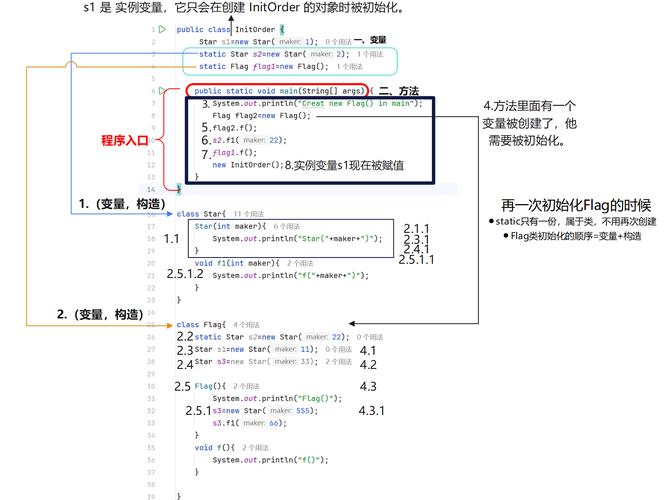
You use comparison operators (, , >, <, >=, <=) to compare two ints, which results in a boolean.
int score = 85;
int passingScore = 60;
// The expression 'score >= passingScore' evaluates to true or false.
boolean hasPassed = score >= passingScore;
System.out.println("Has the student passed? " + hasPassed); // Output: true
if (score == 100) {
    System.out.println("Perfect score!");
}
b) The Operator (A Crucial Distinction)
This is a very common point of confusion for beginners.
-
int == int: Compares the numerical value of two integers. The result is aboolean.int a = 5; int b = 5; boolean areEqual = (a == b); // This is true
-
boolean == boolean: Compares the logical value of two booleans. This is also valid but less common.boolean x = true; boolean y = true; boolean areSame = (x == y); // This is true
c) Using int in a boolean Context (Common Mistake)
You cannot directly use an int where a boolean is expected. The compiler will give you an error.
// THIS CODE WILL NOT COMPILE
int number = 10;
if (number) { // Error: incompatible types: int cannot be converted to boolean
    System.out.println("Number is truthy.");
}
However, you can use the result of a comparison:
// THIS CODE IS CORRECT
int number = 10;
if (number > 0) { // The expression 'number > 0' evaluates to the boolean 'true'
    System.out.println("Number is positive.");
}
Advanced Topic: int to boolean Conversion (Truthiness)
In some languages (like JavaScript), non-zero numbers are treated as "truthy" and zero as "falsy". This is not the case in Java. Java is strictly typed.
However, you can manually create this logic if you need it, typically using a ternary operator.
int status = 1; // Could be 0, 1, 2, etc.
// Convert the int 'status' to a boolean 'isActive'
// If status is not 0, isActive becomes true. Otherwise, it becomes false.
boolean isActive = (status != 0);
System.out.println("Is active? " + isActive); // Output: true
Summary
- Use
intwhen you need to store a whole number, like an age, a count, or an index. - Use
booleanwhen you need to store a state of truth, like whether a light is on (true) or off (false), or whether a condition has been met. - You often use
intvalues inside comparison expressions (score > 70) to produce abooleanresult, which is then used inifstatements and loops. - Remember, you cannot use an
intdirectly in a place that requires aboolean. You must first perform a comparison.