Of course! This is a very common and important question in Java because of how floating-point numbers work.

The short answer is: Do not use if (myDouble == 0).
Here’s the detailed explanation of why, and what you should do instead.
The Problem: Floating-Point Precision
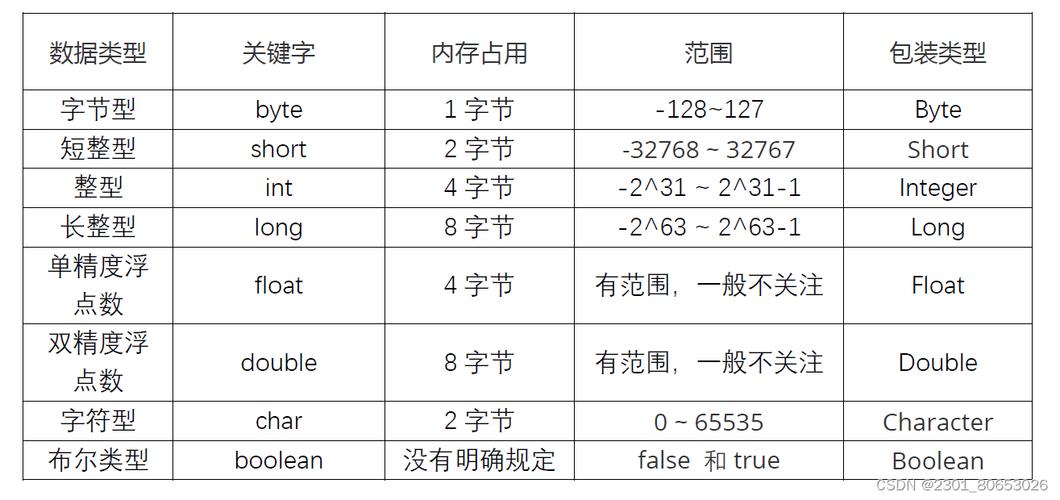
In Java (and most programming languages), double and float are represented using the IEEE 754 standard. This means they are stored as binary fractions, not decimal fractions.
Just like the decimal fraction 1/10 is 1 in base-10, some simple decimal fractions (like 1 or 01) cannot be represented exactly as binary fractions. They result in a repeating number that gets rounded to the nearest possible value.
Example:
double a = 0.1;
double b = 0.2;
double sum = a + b;
// What is the actual value of sum?
System.out.println(sum); // Prints: 0.30000000000000004
// Now, let's try to compare it to 0.3
if (sum == 0.3) {
    System.out.println("sum is exactly 0.3"); // This line will NOT be printed
} else {
    System.out.println("sum is NOT exactly 0.3"); // This line WILL be printed
}
Because 1 + 0.2 is not exactly 3, the comparison sum == 0.3 fails. This problem extends to zero as well.
Example with Zero:
double d1 = 1.0 / 10.0 - 0.1; // This should be zero, right?
double d2 = 0.0;
System.out.println(d1); // Prints: 1.1102230246251565E-17 (a very small number, not zero)
// This comparison will fail!
if (d1 == 0.0) {
    System.out.println("d1 is zero"); // This line will NOT be printed
} else {
    System.out.println("d1 is not zero"); // This line WILL be printed
}
// This comparison will work, but only because d2 was initialized to a literal 0.0
if (d2 == 0.0) {
    System.out.println("d2 is zero"); // This line WILL be printed
}
As you can see, a calculation that should result in zero might produce a very small number (like 11E-17), which is not equal to 0.
The Solution: Compare with a Tolerance (Epsilon)
The correct way to check if a double is "close enough" to zero is to see if its absolute value is smaller than a very small number, often called an epsilon (ε).
An epsilon is a tolerance you define. It represents the maximum difference you are willing to accept between the number and zero.
Method 1: The Standard Practice (Recommended)
This is the most common and robust way to handle it. You create a small helper method.
public class DoubleComparison {
    // A small value to use as a tolerance for floating-point comparisons.
    // This is a common choice, but you can adjust it based on your needs.
    private static final double EPSILON = 1E-10;
    public static boolean isApproximatelyZero(double value) {
        // The Math.abs() method gets the absolute value (the non-negative value).
        // We check if the absolute value is smaller than our tolerance.
        return Math.abs(value) < EPSILON;
    }
    public static void main(String[] args) {
        double a = 0.0;
        double b = 1.0 / 10.0 - 0.1; // A very small number, not exactly zero
        double c = 1E-15;             // An extremely small number
        double d = 0.0001;            // A number that is not close to zero
        System.out.println("Is a zero? " + isApproximatelyZero(a));      // true
        System.out.println("Is b zero? " + isApproximatelyZero(b));      // true
        System.out.println("Is c zero? " + isApproximatelyZero(c));      // true
        System.out.println("Is d zero? " + isApproximatelyZero(d));      // false
    }
}
Method 2: Using Double.compare()
The Double class has a static compare() method that is designed to handle floating-point comparisons correctly. It returns:
0if the values are equal.- A negative number if the first is less than the second.
- A positive number if the first is greater than the second.
You can use this to check if the difference between your number and 0 is within a tolerance.
public class DoubleCompareMethod {
    private static final double EPSILON = 1E-10;
    public static boolean isApproximatelyZeroCompare(double value) {
        // Math.abs(Double.compare(value, 0.0)) will be 0 if they are equal,
        // or a positive number if they are different.
        // We check if that difference is smaller than our tolerance.
        return Math.abs(Double.compare(value, 0.0)) < EPSILON;
    }
    public static void main(String[] args) {
        double b = 1.0 / 10.0 - 0.1;
        System.out.println("Is b zero (using compare)? " + isApproximatelyZeroCompare(b)); // true
    }
}
While this works, the first method (Math.abs(value) < EPSILON) is more direct and widely understood for this specific "is it zero?" check.
Summary: What to Use and When
| Use Case | Recommended Code | Why? |
|---|---|---|
Checking if a double is zero (or very close to it) |
if (Math.abs(myDouble) < EPSILON) |
This is the best practice. It's robust, readable, and handles precision errors correctly. |
Checking if two doubles are equal |
if (Math.abs(a - b) < EPSILON) |
The standard way to compare for equality. The epsilon value should be chosen based on the scale of your numbers. |
Checking if a double is exactly zero |
if (myDouble == 0.0) |
Avoid this for calculated values. It's only safe if the variable was initialized to the literal 0 and not modified by any math. |
| For scientific or high-precision math | Use BigDecimal |
If you need perfect precision (e.g., financial calculations), BigDecimal is the right tool, as it avoids floating-point rounding errors altogether. It is slower, however. |
Final Recommendation:
Always use a tolerance-based check for floating-point numbers. Get into the habit of creating a small helper method like isApproximatelyZero() to keep your code clean and correct.