Of course! This is a very common and powerful pattern for building scalable, distributed systems in Python. Let's break down how to create a Python RPC system and then containerize it with Docker.
We'll cover two popular approaches for RPC in Python:
- gRPC (Google Remote Procedure Call): A modern, high-performance, language-agnostic framework. It uses Protocol Buffers (
protobuf) for serialization and is ideal for services where performance is critical. - XML-RPC (via SimpleXMLRPCServer): A simpler, built-in Python solution. It's great for quick prototypes, simple tasks, or when you don't want to add external dependencies.
For both examples, we'll create a server and a client, and then Dockerize them.
Prerequisites
You need to have Python and Docker installed on your system.
Example 1: gRPC (Recommended for most cases)
gRPC is the industry standard for new microservices. It's fast, efficient, and strongly typed.
Step 1: Project Setup
First, let's create a project directory.
mkdir python-grpc-docker
cd python-grpc-docker
Step 2: Define the Service with Protocol Buffers
gRPC uses .proto files to define the service interface and the structure of the data it will send and receive.
Create a file named calculator.proto:
// calculator.proto
syntax = "proto3";
package calculator;
// The service definition.
service Calculator {
  // Adds two numbers
  rpc Add (AddRequest) returns (AddResponse) {}
  // Subtracts two numbers
  rpc Subtract (SubRequest) returns (SubResponse) {}
}
// The request message containing the numbers.
message AddRequest {
  int32 a = 1;
  int32 b = 2;
}
// The response message containing the result.
message AddResponse {
  int32 result = 1;
}
// The request message containing the numbers.
message SubRequest {
  int32 a = 1;
  int32 b = 2;
}
// The response message containing the result.
message SubResponse {
  int32 result = 1;
}
Step 3: Install Dependencies
We need the grpcio tools and libraries, and the protobuf compiler.
# Install Python gRPC tools
pip install grpcio grpcio-tools
# Install Protocol Buffers compiler (protoc)
# On macOS: brew install protobuf
# On Ubuntu/Debian: sudo apt-get install protobuf-compiler
# On Windows: Download from https://github.com/protocolbuffers/protobuf/releases
Step 4: Generate Python Code from .proto
This command reads your .proto file and generates the necessary Python client and server stubs.
python -m grpc_tools.protoc -I. --python_out=. --grpc_python_out=. calculator.proto
You should now see two new files:
calculator_pb2.py: Contains the generated data classes (messages).calculator_pb2_grpc.py: Contains the generated client and server classes.
Step 5: Write the Server Code
Create a file named server.py:
# server.py
from concurrent import futures
import time
import grpc
import calculator_pb2
import calculator_pb2_grpc
class CalculatorServicer(calculator_pb2_grpc.CalculatorServicer):
    """Implements the Calculator RPC service."""
    def Add(self, request, context):
        """Handles the Add RPC call."""
        result = request.a + request.b
        print(f"Received Add request: {request.a} + {request.b} = {result}")
        return calculator_pb2.AddResponse(result=result)
    def Subtract(self, request, context):
        """Handles the Subtract RPC call."""
        result = request.a - request.b
        print(f"Received Subtract request: {request.a} - {request.b} = {result}")
        return calculator_pb2.SubResponse(result=result)
def serve():
    """Starts the gRPC server."""
    # Create a server instance
    server = grpc.server(futures.ThreadPoolExecutor(max_workers=10))
    # Add the servicer to the server
    calculator_pb2_grpc.add_CalculatorServicer_to_server(CalculatorServicer(), server)
    # Listen on port 50051
    print("Server starting on port 50051...")
    server.add_insecure_port('[::]:50051')
    server.start()
    try:
        while True:
            time.sleep(86400) # One day in seconds
    except KeyboardInterrupt:
        server.stop(0)
if __name__ == '__main__':
    serve()
Step 6: Write the Client Code
Create a file named client.py:
# client.py
import grpc
import calculator_pb2
import calculator_pb2_grpc
def run():
    """Connects to the server and makes RPC calls."""
    # Create a gRPC channel to the server
    with grpc.insecure_channel('localhost:50051') as channel:
        # Create a stub (client)
        stub = calculator_pb2_grpc.CalculatorStub(channel)
        # Create a request message
        add_request = calculator_pb2.AddRequest(a=7, b=8)
        # Make the RPC call
        print("Calling Add(7, 8)...")
        response = stub.Add(add_request)
        print(f"Result: {response.result}")
        print("\nCalling Subtract(10, 4)...")
        sub_request = calculator_pb2.SubRequest(a=10, b=4)
        response = stub.Subtract(sub_request)
        print(f"Result: {response.result}")
if __name__ == '__main__':
    run()
Step 7: Create the Dockerfile
We'll create a single Dockerfile for both the server and client to keep it simple. In a real-world scenario, you'd have separate Dockerfiles for each service.
Create a file named Dockerfile:
# Use an official Python runtime as a parent image
FROM python:3.9-slim
# Set the working directory in the container
WORKDIR /app
# Copy the dependencies file and install them
# We need protoc to generate the code at build time
RUN apt-get update && apt-get install -y protobuf-compiler
# Copy the current directory contents into the container at /app
COPY . /app/
# Generate the Python code from the .proto file
RUN python -m grpc_tools.protoc -I. --python_out=. --grpc_python_out=. calculator.proto
# Run the server when the container launches
CMD ["python", "server.py"]
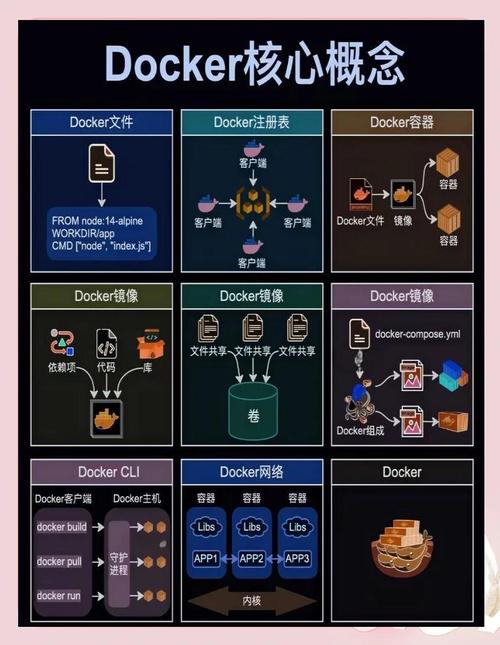
Step 8: Build and Run the Docker Container
-
Build the Docker Image: The
-ttag gives your image a name. tells Docker to build from the current directory.docker build -t python-grpc-app .
-
Run the Docker Container: The
-dflag runs the container in "detached" mode (in the background). We'll map port50051on our host machine to port50051in the container.docker run -d -p 50051:50051 --name grpc-server python-grpc-app
-
Run the Client: To run the client, you have two options:
-
Option A: Run the client from inside the same container. This is great for testing.
docker exec -it grpc-server python client.py
You should see the client output and the server logs printing the received requests.
-
Option B: Run the client from your local machine. For this to work, you need to make the gRPC server accessible from outside Docker. The easiest way is to use
hostnetworking. First, stop the current container:docker stop grpc-server && docker rm grpc-serverThen, run it with--net=host:docker run -d --net=host --name grpc-server python-grpc-app
Now, you can run
python client.pydirectly from your terminal, and it will connect to the server running inside Docker.
-
Example 2: XML-RPC (Simpler, Built-in)
This approach uses Python's standard library, so no pip install is needed.
Step 1: Project Setup
Create a new directory for this example.
mkdir python-xmlrpc-docker
cd python-xmlrpc-docker
Step 2: Write the Server Code
Create a file named xmlrpc_server.py:
# xmlrpc_server.py
from xmlrpc.server import SimpleXMLRPCServer
import threading
import time
class Calculator:
    def add(self, a, b):
        print(f"Received Add request: {a} + {b}")
        return a + b
    def subtract(self, a, b):
        print(f"Received Subtract request: {a} - {b}")
        return a - b
def run_server():
    """Starts the XML-RPC server."""
    server = SimpleXMLRPCServer(('0.0.0.0', 8000), allow_none=True)
    server.register_introspection_functions()
    # Register an instance of our class
    calculator = Calculator()
    server.register_instance(calculator)
    print("XML-RPC server starting on port 8000...")
    try:
        server.serve_forever()
    except KeyboardInterrupt:
        print("Server shutting down.")
        server.server_close()
if __name__ == '__main__':
    run_server()
Step 3: Write the Client Code
Create a file named xmlrpc_client.py:
# xmlrpc_client.py
import xmlrpc.client
def run():
    """Connects to the server and makes RPC calls."""
    proxy = xmlrpc.client.ServerProxy("http://localhost:8000/")
    try:
        print("Calling add(7, 8)...")
        result = proxy.add(7, 8)
        print(f"Result: {result}")
        print("\nCalling subtract(10, 4)...")
        result = proxy.subtract(10, 4)
        print(f"Result: {result}")
    except xmlrpc.client.Fault as err:
        print(f"A XML-RPC fault occurred: {err}")
    except Exception as e:
        print(f"An error occurred: {e}")
if __name__ == '__main__':
    run()
Step 4: Create the Dockerfile
This is much simpler since we don't need to compile anything.
# Use an official Python runtime as a parent image
FROM python:3.9-slim
# Set the working directory in the container
WORKDIR /app
# Copy the current directory contents into the container at /app
COPY . /app/
# Run the server when the container launches
CMD ["python", "xmlrpc_server.py"]
Step 5: Build and Run the Docker Container
The process is identical to the gRPC example.
-
Build the Docker Image:
docker build -t python-xmlrpc-app .
-
Run the Docker Container:
docker run -d -p 8000:8000 --name xmlrpc-server python-xmlrpc-app
-
Run the Client: Again, you can run the client from inside the container:
docker exec -it xmlrpc-server python xmlrpc_client.py
Or, for local testing, use
--net=host:docker stop xmlrpc-server && docker rm xmlrpc-server docker run -d --net=host --name xmlrpc-server python-xmlrpc-app python xmlrpc_client.py
Summary and Comparison
| Feature | gRPC | XML-RPC |
|---|---|---|
| Performance | Excellent. Uses binary Protocol Buffers. | Slower. Uses text-based XML. |
| Data Format | Protocol Buffers (.proto) |
XML |
| Code Generation | Required. protoc compiler. |
Not required. Uses introspection. |
| Dependencies | pip install grpcio-tools |
None. Part of Python standard library. |
| Type Safety | Strong. .proto files define the contract. |
Weak. Relies on string-based method names. |
| Best For | High-performance microservices, production systems. | Simple scripts, quick prototypes, internal tools. |
For any serious application, gRPC is the recommended choice. The initial setup is more involved, but the performance, type safety, and contract-first design pay off significantly in the long run.