Of course! The relationship between String and byte in Java is a fundamental and important concept, especially when dealing with input/output (I/O) operations, network communication, and file handling.
Let's break it down into key concepts, methods, and best practices.
The Core Problem: Character Encoding
The main reason you need to convert between String and byte[] is that Strings are sequences of characters, while bytes are just raw numerical data.
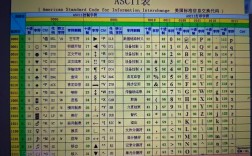
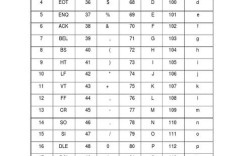
To convert a character to a byte, you need a character encoding. An encoding is essentially a dictionary that maps characters to specific byte values.
- Example: The character 'A' might be represented by the single byte
65in ASCII and UTF-8. - Example: The character '€' (Euro sign) is represented by one byte in some encodings but requires three bytes in UTF-8.
The Golden Rule: Always specify an explicit character encoding when converting between String and byte[]. If you don't, Java will use the platform's default encoding, which can lead to bugs and corrupted data when your code runs on different machines (e.g., Windows vs. Linux) or in different environments.
Converting String to byte[]
You use the String.getBytes() method for this.
Method Signatures:
byte[] getBytes(): Uses the platform's default charset. (Avoid this!)byte[] getBytes(String charsetName): Uses the specified charset. (This is the one you should use.)byte[] getBytes(Charset charset): Uses the specifiedCharsetobject. (This is the best and most robust way.)
Example:
import java.nio.charset.StandardCharsets;
import java.io.UnsupportedEncodingException;
public class StringToByteExample {
    public static void main(String[] args) {
        String text = "Hello, 世界!"; // A string with English and Chinese characters
        // --- Best Practice: Using StandardCharsets (Modern Java) ---
        // This is the most recommended way. It's type-safe and doesn't throw a checked exception.
        byte[] utf8Bytes = text.getBytes(StandardCharsets.UTF_8);
        System.out.println("UTF-8 Bytes: " + java.util.Arrays.toString(utf8Bytes));
        // --- Good Practice: Using a String for the charset name ---
        // This is also good, but it can throw an UnsupportedEncodingException.
        try {
            byte[] utf16Bytes = text.getBytes("UTF-16");
            System.out.println("UTF-16 Bytes: " + java.util.Arrays.toString(utf16Bytes));
        } catch (UnsupportedEncodingException e) {
            System.err.println("UTF-16 is not supported on this platform (very unlikely).");
        }
        // --- Bad Practice: Using the default charset ---
        // The behavior of this code depends on the operating system it runs on.
        // On a US Windows machine, it might be Cp1252. On Linux, it might be UTF-8.
        // This can cause data corruption if the bytes are read back on a different system.
        byte[] defaultBytes = text.getBytes();
        System.out.println("Default Charset Bytes: " + java.util.Arrays.toString(defaultBytes));
    }
}
Output:
UTF-8 Bytes: [72, 101, 108, 108, 111, 44, 32, -28, -72, -83, -27, -101, -67, 33]
UTF-16 Bytes: [0, 72, 0, 101, 0, 108, 0, 108, 0, 111, 0, 44, 0, 32, 0, -28, 0, -72, 0, -83, 0, -27, 0, -101, 0, -67, 0, 33]
Default Charset Bytes: [72, 101, 108, 108, 111, 44, 32, -28, -72, -83, -27, -101, -67, 33] // (On a UTF-8 system, this looks the same as UTF-8)
Notice how the Chinese characters "世界" take up 6 bytes in UTF-8, demonstrating that one character does not always equal one byte.
Converting byte[] to String
You use the String constructor for this.
Method Signatures:
String(byte[] bytes): Uses the platform's default charset. (Avoid this!)String(byte[] bytes, String charsetName): Uses the specified charset. (Use this.)String(byte[] bytes, Charset charset): Uses the specifiedCharsetobject. (Best Practice.)String(byte[] bytes, int offset, int length): Uses the default charset for a subarray. (Avoid.)String(byte[] bytes, int offset, int length, String charsetName): Uses a specified charset for a subarray. (Use if needed.)
Example:
import java.nio.charset.StandardCharsets;
public class ByteToStringExample {
    public static void main(String[] args) {
        byte[] utf8Bytes = {72, 101, 108, 108, 111, 44, 32, -28, -72, -83, -27, -101, -67, 33};
        // --- Best Practice: Using StandardCharsets ---
        String textFromUtf8 = new String(utf8Bytes, StandardCharsets.UTF_8);
        System.out.println("Reconstructed String (UTF-8): " + textFromUtf8);
        // --- Good Practice: Using a String for the charset name ---
        String textFromUtf8ByName = new String(utf8Bytes, "UTF-8");
        System.out.println("Reconstructed String (by name): " + textFromUtf8ByName);
        // --- Bad Practice: Using the default charset ---
        // If these bytes were created on a UTF-8 system but are now read on a
        // system with a default ISO-8859-1 encoding, the characters will be corrupted.
        String textFromDefault = new String(utf8Bytes);
        System.out.println("Reconstructed String (Default Charset): " + textFromDefault);
    }
}
Output:
Reconstructed String (UTF-8): Hello, 世界!
Reconstructed String (by name): Hello, 世界!
Reconstructed String (Default Charset): Hello, 世界! // (On a UTF-8 system, it works. But it's not portable!)
If you were to run this on a system with a different default encoding, the last line might print something like Hello, 世界! or garbled text.
Handling Subarrays (A Common Pitfall)
Sometimes you get a byte[] from a stream, and it might have extra data at the end. You must specify the exact length of the valid data.
byte[] fullData = {72, 101, 108, 108, 111, 44, 32, -28, -72, -83, 0, 0, 0, 0}; // "Hello, 世界" + 4 null bytes
// Correct: Specify the length of the string data
int stringLength = 10; // The first 10 bytes represent "Hello, 世"
String correctString = new String(fullData, 0, stringLength, StandardCharsets.UTF_8);
System.out.println("Correct (subarray): " + correctString); // Output: Hello, 世
// Incorrect: Uses the entire array, interpreting the null bytes as part of the string
String incorrectString = new String(fullData, StandardCharsets.UTF_8);
System.out.println("Incorrect (full array): " + incorrectString); // Output: Hello, 世界
Notice how the incorrect version included the null bytes, which might be valid data but are not part of your intended string.
Summary and Best Practices
| Task | Method (Recommended) | Key Takeaway |
|---|---|---|
String -> byte[] |
myString.getBytes(StandardCharsets.UTF_8) |
Always specify an encoding. StandardCharsets.UTF_8 is the safest choice. |
byte[] -> String |
new String(myBytes, StandardCharsets.UTF_8) |
Always specify an encoding. Make sure you know the exact length of your string data. |
| Choosing an Encoding | Use UTF-8 unless you have a specific reason not to. |
UTF-8 is the universal standard for the web, files, and APIs. It's backward-compatible with ASCII. |
| Avoid | getBytes() or new String(byte[]) with no charset. |
It relies on the platform's default, which is not portable and error-prone. |
When to Use This?
- Reading/Writing Files: When you read a text file into a
byte[]buffer, you need to decode it to aString. When you write aStringto a file, you need to encode it tobyte[]. - Network Communication: Data sent over a network (e.g., via HTTP or TCP sockets) is transmitted as bytes. You must encode your
Stringrequest bodies and decode thebyte[]responses. - Database Interaction: Text data is often stored as
BLOB(Binary Large Object) orVARBINARYtypes, which you'll work with asbyte[]before converting to aString. - Serialization: When you need to store or transmit a string in a compact binary format.