Of course! The phrase "java org.apache" is a very common starting point for developers working with Java, especially when dealing with open-source libraries. Let's break it down.
The Short Answer
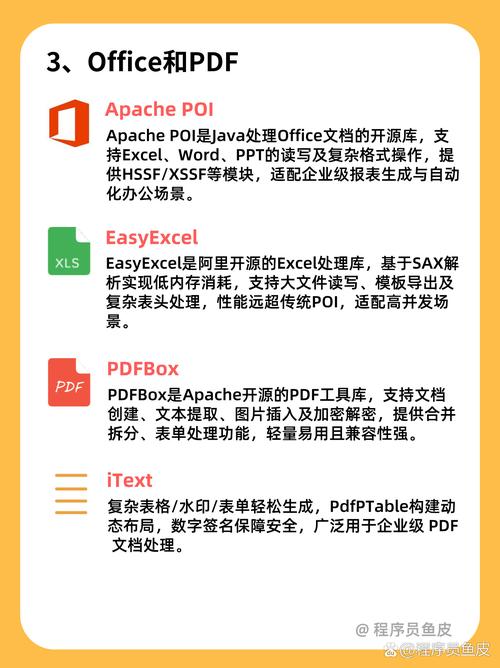
org.apache is the top-level package namespace for a massive collection of open-source Java projects maintained by the Apache Software Foundation (ASF).
When you see java org.apache in a command line or in code, it usually means:
- Command Line: You are running a Java application (like a Tomcat server or a Spark job) and are specifying the main class to execute, which is located within an
org.apachepackage. - Code: You are importing or using a class from a third-party library that the ASF provides.
Detailed Breakdown
Let's dissect the three parts: java, org, and apache.
java
This is the command to invoke the Java Virtual Machine (JVM). It's the entry point for running any Java application.
# Basic syntax
java [options] class [args...]
# Example with a main class
java -jar my-application.jar
org (Organization)
In Java, org is a standard top-level package name, short for "organization". It's used to prevent naming conflicts between different libraries. The Java Community Process (JCP) recommends this convention.
com: Typically used for commercial organizations.org: Typically used for non-profit organizations, open-source projects, and standards bodies.
apache (The Apache Software Foundation)
This is the specific organization under the org namespace. The Apache Software Foundation (ASF) is a non-profit corporation that supports dozens of open-source software projects. Many of the most important and widely used Java libraries are part of the ASF.
So, org.apache is the "home" for all these projects.
Famous Examples of org.apache Projects
When you work with Java, you will inevitably use one or more of these. Here are some of the most famous ones:
| Project | What it is | Common org.apache Packages |
|---|---|---|
| Apache Commons | A collection of small, reusable Java utilities and components. | org.apache.commons.lang3, org.apache.commons.io, org.apache.commons.collections4 |
| Apache Tomcat | The most popular web server and servlet container for Java. | org.apache.catalina (core servlet engine), org.apache.tomcat |
| Apache Spark | A unified analytics engine for large-scale data processing. | org.apache.spark, org.apache.spark.sql |
| Apache Hadoop | A framework for distributed storage and processing of large data sets. | org.apache.hadoop.fs, org.apache.hadoop.mapreduce |
| Apache Kafka | A distributed streaming platform. | org.apache.kafka.clients |
| Apache Maven | A build automation and project management tool. | org.apache.maven |
| Apache HttpClient | A library for HTTP communication in Java. | org.apache.http.client, org.apache.http.impl |
| Log4j / Log4j2 | A widely used logging framework. | org.apache.logging.log4j |
Practical Examples
Example 1: Running a Java Application from the Command Line
Imagine you have a standalone Java application packaged in a JAR file, and its main class is org.apache.spark.examples.SparkPi. You would run it like this:
# -cp specifies the classpath (the JAR file containing the class)
# org.apache.spark.examples.SparkPi is the full class name
java -cp spark-examples_2.12-3.3.1.jar org.apache.spark.examples.SparkPi
Here, java starts the JVM, and org.apache.spark.examples.SparkPi tells the JVM which class's main method to execute.
Example 2: Using org.apache in Java Code
Let's say you want to use the StringUtils class from the Apache Commons Lang library to check if a string is empty or null.
-
Add the Dependency: First, you need to add the library to your project (e.g., in a
pom.xmlfor Maven).<dependency> <groupId>org.apache.commons</groupId> <artifactId>commons-lang3</artifactId> <version>3.12.0</version> </dependency> -
Write the Code: You then import and use the class in your Java file.
import org.apache.commons.lang3.StringUtils;
public class Main {
    public static void main(String[] args) {
        String myString = null;
        // Use the utility from the Apache Commons library
        if (StringUtils.isEmpty(myString)) {
            System.out.println("The string is empty or null.");
        } else {
            System.out.println("The string is: " + myString);
        }
    }
}
Summary
| Term | Meaning |
|---|---|
java |
The command to run the Java Virtual Machine. |
org.apache |
The standard package namespace for projects from the Apache Software Foundation. |
org.apache.something |
A specific project (like Spark, Commons, Tomcat) within the ASF. |
org.apache.something.ClassName |
The fully qualified name of a specific class within that project. |
In essence, java org.apache is how you tell the Java ecosystem to run code or use functionality from one of the foundational pillars of the open-source Java world.