Of course! Here is a comprehensive guide on how to perform a Scan operation in HBase using Java. We'll cover everything from the basic setup to advanced features like filters, caching, and asynchronous scans.
Prerequisites
Before you can run any HBase Java code, you need to have the HBase Java client library in your project.
Using Maven (pom.xml)
Add the following dependency to your pom.xml. The version should match your HBase server version.
<dependency>
    <groupId>org.apache.hbase</groupId>
    <artifactId>hbase-client</artifactId>
    <version>2.4.11</version> <!-- Or your specific HBase version -->
</dependency>
<!-- You'll also need this for connection management in modern HBase -->
<dependency>
    <groupId>org.apache.hbase</groupId>
    <artifactId>hbase-common</artifactId>
    <version>2.4.11</version>
</dependency>
Using Gradle (build.gradle)
implementation 'org.apache.hbase:hbase-client:2.4.11' // Or your specific HBase version
implementation 'org.apache.hbase:hbase-common:2.4.11'
Connecting to HBase
First, you need to establish a connection to your HBase cluster. The modern and recommended way is to use a Connection object, which is thread-safe and should be created once and reused.
import org.apache.hadoop.conf.Configuration;
import org.apache.hadoop.hbase.HBaseConfiguration;
import org.apache.hadoop.hbase.TableName;
import org.apache.hadoop.hbase.client.Connection;
import org.apache.hadoop.hbase.client.ConnectionFactory;
import org.apache.hadoop.hbase.client.Table;
import java.io.IOException;
public class HBaseConnectionUtil {
    public static Connection getConnection() throws IOException {
        // You can load configuration from hbase-site.xml if it's on the classpath
        Configuration config = HBaseConfiguration.create();
        // Alternatively, you can set properties programmatically
        // config.set("hbase.zookeeper.quorum", "localhost");
        // config.set("hbase.zookeeper.property.clientPort", "2181");
        return ConnectionFactory.createConnection(config);
    }
    public static Table getTable(Connection connection, String tableNameStr) throws IOException {
        TableName tableName = TableName.valueOf(tableNameStr);
        return connection.getTable(tableName);
    }
    // Remember to close resources!
    public static void close(Connection connection, Table table) {
        try {
            if (table != null) table.close();
            if (connection != null) connection.close();
        } catch (IOException e) {
            e.printStackTrace();
        }
    }
}
The Basic Scan
A Scan allows you to retrieve one or more rows and columns from a table. Here is the simplest form of a scan.
Scenario:
- Table:
user_data - Column Family:
info - Columns:
name,email,age - Row Key:
user1,user2,user3
Java Code
import org.apache.hadoop.hbase.TableName;
import org.apache.hadoop.hbase.client.*;
import org.apache.hadoop.hbase.util.Bytes;
import java.io.IOException;
public class BasicScanExample {
    public static void main(String[] args) {
        Connection connection = null;
        Table table = null;
        try {
            // 1. Get connection and table
            connection = HBaseConnectionUtil.getConnection();
            table = HBaseConnectionUtil.getTable(connection, "user_data");
            // 2. Create a Scan object
            // This will scan all rows and all columns in the table
            Scan scan = new Scan();
            // 3. Execute the scan and get a ResultScanner
            // ResultScanner is an iterator over the Result objects
            ResultScanner scanner = table.getScanner(scan);
            // 4. Iterate over the results
            System.out.println("--- Starting Basic Scan ---");
            for (Result result : scanner) {
                // A Result object represents one row
                printResult(result);
            }
            System.out.println("--- Basic Scan Finished ---");
        } catch (IOException e) {
            e.printStackTrace();
        } finally {
            // 5. Close resources
            HBaseConnectionUtil.close(connection, table);
        }
    }
    private static void printResult(Result result) {
        // Get the row key
        String rowKey = Bytes.toString(result.getRow());
        System.out.println("RowKey: " + rowKey);
        // Get a specific cell value
        byte[] nameBytes = result.getValue(Bytes.toBytes("info"), Bytes.toBytes("name"));
        String name = Bytes.toString(nameBytes);
        System.out.println("  - Name: " + name);
        // Get another cell value
        byte[] ageBytes = result.getValue(Bytes.toBytes("info"), Bytes.toBytes("age"));
        String age = Bytes.toString(ageBytes);
        System.out.println("  - Age: " + age);
        System.out.println(); // for spacing
    }
}
Modifying the Scan
You can customize the Scan object to retrieve only the data you need, which is crucial for performance.
a) Limiting Columns
You can specify which column families and specific columns to retrieve.
Scan scan = new Scan();
// Only fetch the 'info' column family
scan.addFamily(Bytes.toBytes("info"));
// Or, fetch only specific columns from the 'info' family
scan.addColumn(Bytes.toBytes("info"), Bytes.toBytes("name"));
scan.addColumn(Bytes.toBytes("info"), Bytes.toBytes("email"));
b) Limiting Rows (Row Range Scan)
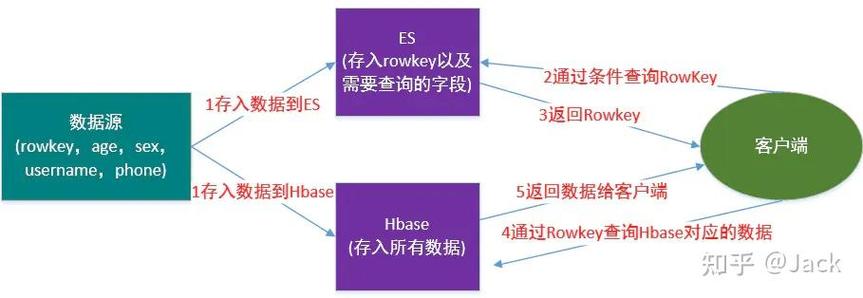
You can specify a range of rows to scan using the start and stop row keys. The stop row is exclusive.
// Scan from row 'user100' up to (but not including) 'user200'
Scan scan = new Scan();
scan.withStartRow(Bytes.toBytes("user100"));
scan.withStopRow(Bytes.toBytes("user200"));
c) Setting a Filter
Filters are the most powerful way to narrow down your results. They are applied on the RegionServer, reducing network traffic.
Example: Get users older than 30
import org.apache.hadoop.hbase.filter.CompareFilter;
import org.apache.hadoop.hbase.filter.SingleColumnValueFilter;
import org.apache.hadoop.hbase.filter.CompareOperator;
Scan scan = new Scan();
scan.addFamily(Bytes.toBytes("info"));
// Create a filter
SingleColumnValueFilter ageFilter = new SingleColumnValueFilter(
    Bytes.toBytes("info"),                  // Column Family
    Bytes.toBytes("age"),                   // Column Qualifier
    CompareOperator.GREATER,                // Operator
    Bytes.toBytes("30")                     // Value to compare against
);
// Set the filter on the scan
scan.setFilter(ageFilter);
// Important: By default, rows that don't match the filter are returned but with empty values.
// Set this to true to skip them entirely.
ageFilter.setFilterIfMissing(true);
Example: Row Filter (Prefix Scan)
import org.apache.hadoop.hbase.filter.RowFilter;
import org.apache.hadoop.hbase.filter.RegexStringComparator;
import org.apache.hadoop.hbase.filter.CompareFilter.CompareOperator;
Scan scan = new Scan();
// Create a filter to get only rows starting with "user_"
RowFilter rowFilter = new RowFilter(
    CompareOperator.EQUAL,
    new RegexStringComparator("^user_") // Regular expression
);
scan.setFilter(rowFilter);
Advanced Scan Features
a) Caching and Batch Size
For large scans, fetching results one by one is inefficient. You can tune how much data is fetched per RPC call.
setCaching(int caching): Number of rows to fetch from the server and cache on the client before returning them. Default is 1. Increasing this significantly improves performance for large scans.setBatch(int batch): Number of values to return per row. Useful if you have many columns and want to fetch them in chunks.
Scan scan = new Scan();
// Fetch 100 rows at a time from the server
scan.setCaching(100);
// For a row with 10 columns, fetch 5 columns at a time
scan.setBatch(5);
b) Asynchronous Scans
For very large tables, a synchronous scan can block your application for a long time. HBase 2.0+ introduced asynchronous client APIs.
import org.apache.hadoop.hbase.client.AsyncTable;
import org.apache.hadoop.hbase.client.Result;
// Get an async table reference
AsyncTable<Result> asyncTable = connection.getTable(TableName.valueOf("user_data")).toCompletableFuture().get();
// Create the scan
Scan scan = new Scan();
scan.addFamily(Bytes.toBytes("info"));
// Execute the scan asynchronously
asyncTable.scan(scan).forEach(result -> {
    // This block is executed for each result as it arrives
    printResult(result);
}).exceptionally(throwable -> {
    // Handle any errors
    throwable.printStackTrace();
    return null;
});
c) Counting Rows
Instead of retrieving all the data, if you only need the count of rows, use a Count method.
long count = table.getScanner(new Scan()).count();
System.out.println("Total rows in table: " + count);
This is much more efficient than iterating and counting yourself.
Complete Example with a Filter
Here is a full, runnable example that combines connection, a filter, and proper resource handling.
import org.apache.hadoop.hbase.TableName;
import org.apache.hadoop.hbase.client.*;
import org.apache.hadoop.hbase.filter.*;
import org.apache.hadoop.hbase.util.Bytes;
import java.io.IOException;
public class FilteredScanExample {
    public static void main(String[] args) {
        Connection connection = null;
        Table table = null;
        try {
            connection = HBaseConnectionUtil.getConnection();
            table = HBaseConnectionUtil.getTable(connection, "user_data");
            // 1. Create a Scan object
            Scan scan = new Scan();
            scan.addFamily(Bytes.toBytes("info"));
            scan.setCaching(50); // Optimize for larger scans
            // 2. Create a filter to find users older than 30
            SingleColumnValueFilter ageFilter = new SingleColumnValueFilter(
                Bytes.toBytes("info"),
                Bytes.toBytes("age"),
                CompareOperator.GREATER_OR_EQUAL,
                Bytes.toBytes("30")
            );
            ageFilter.setFilterIfMissing(true); // Don't return rows where the 'age' column is missing
            scan.setFilter(ageFilter);
            // 3. Execute the scan
            ResultScanner scanner = table.getScanner(scan);
            System.out.println("--- Starting Filtered Scan (Age >= 30) ---");
            for (Result result : scanner) {
                printResult(result);
            }
            System.out.println("--- Filtered Scan Finished ---");
        } catch (IOException e) {
            e.printStackTrace();
        } finally {
            HBaseConnectionUtil.close(connection, table);
        }
    }
    private static void printResult(Result result) {
        String rowKey = Bytes.toString(result.getRow());
        String name = Bytes.toString(result.getValue(Bytes.toBytes("info"), Bytes.toBytes("name")));
        String age = Bytes.toString(result.getValue(Bytes.toBytes("info"), Bytes.toBytes("age")));
        System.out.println("RowKey: " + rowKey + ", Name: " + name + ", Age: " + age);
    }
}
Best Practices
- Reuse
ConnectionandAdminObjects: Creating aConnectionis expensive. Create it once when your application starts and reuse it. The same applies to theAdminobject. - Close Resources: Always close
Table,ResultScanner, andConnectionobjects in afinallyblock or try-with-resources to prevent resource leaks. - Use Filters: Push as much of the filtering logic as possible to the server using filters. This minimizes the amount of data transferred over the network.
- Tune
Caching: For large scans, acachingvalue of 100 to 1000 can dramatically improve performance by reducing the number of RPCs. - Be Specific with Columns: Never scan an entire table if you only need a few columns. Always specify the column families or columns you need with
addFamily()oraddColumn().