Of course. This is a fundamental and crucial concept in Python, especially when dealing with text files, user input, or network data in a Chinese-speaking context. Let's break it down.
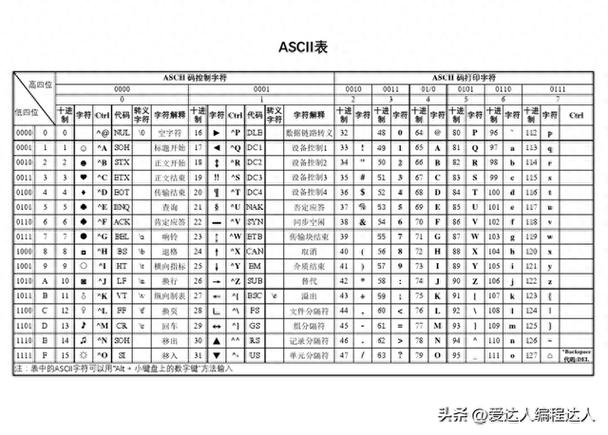
The Core Problem: Two Different Worlds
Imagine you have a document. The content is the "meaning" (e.g., the story of "Journey to the West"). How you encode that meaning into a file on a computer is the key issue.
-
Unicode (The Universal Language): Think of Unicode as a giant, universal map. Every character from every language (Chinese, English, emojis, etc.) has a unique spot on this map. This spot is called a code point.
- It's an abstract concept. It's just a number representing a character.
- In Python 3, the
strtype is a sequence of Unicode characters. When you writemy_string = "你好", Python internally knows that "你" is code pointU+4F60and "好" isU+597D.
-
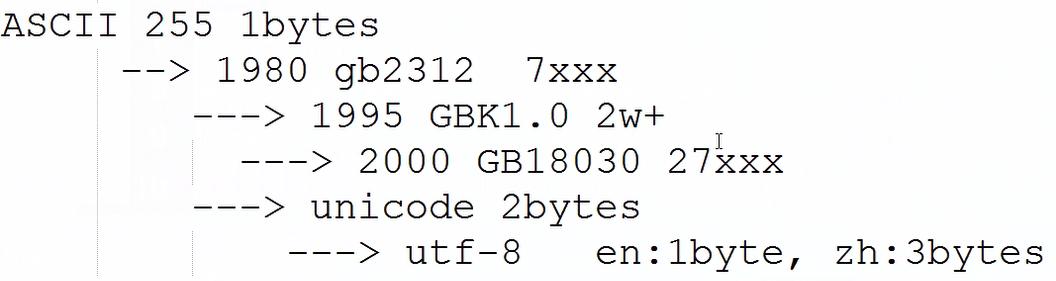
GBK (A Specific Dialect): Think of GBK as a specific set of translation rules for a limited subset of characters. It's an encoding scheme primarily used for Simplified Chinese.
- It's a way to represent Unicode characters (and some others) using one or two bytes.
- It doesn't have a spot for every character in the Unicode map. For example, it can't represent Japanese Kanji or an emoji.
- It's not compatible with other common encodings like UTF-8 or ASCII.
The conflict arises when you try to use a character that GBK doesn't understand, or when you tell Python to interpret data using the wrong encoding.
Common Scenarios and How to Handle Them
Here are the most common situations you'll encounter, with code examples.
Scenario 1: Reading a GBK-Encoded File
This is the most frequent problem. You have a file saved with GBK encoding, but Python (by default) tries to read it as UTF-8.
The Error:
You'll get a UnicodeDecodeError.
# Let's assume we have a file 'test_gbk.txt' with the content "你好世界" encoded in GBK.
# The following code will FAIL:
try:
    with open('test_gbk.txt', 'r') as f:
        content = f.read()
        print(content)
except UnicodeDecodeError as e:
    print(f"Error! {e}")
    # Output: Error! 'utf-8' codec can't decode byte 0xc4 in position 0: invalid start byte
The Solution: You must explicitly tell Python the file's encoding is GBK.
# The CORRECT way to read a GBK file
try:
    with open('test_gbk.txt', 'r', encoding='gbk') as f:
        content = f.read()
        print(content)
        # Output: 你好世界
        print(f"The type of content is: {type(content)}")
        # Output: The type of content is: <class 'str'> (It's a Unicode string!)
except FileNotFoundError:
    print("File not found. Creating a dummy one for demonstration.")
    # Create a dummy file for this example to run
    with open('test_gbk.txt', 'w', encoding='gbk') as f:
        f.write("你好世界")
    # Re-run the correct code block above
Key Takeaway: When reading a file, always specify encoding if you know it or suspect it's not UTF-8. The str object you get back is always a Unicode string in Python 3.
Scenario 2: Writing a String to a GBK-Encoded File
You have a Unicode string in Python and you want to save it to a file using the GBK encoding.
The Error:
If your string contains characters that are not representable in GBK (like an emoji or a traditional Chinese character), you'll get a UnicodeEncodeError.
my_unicode_string = "你好,世界!" # This string is fine for GBK
# my_unicode_string = "你好,世界!😊" # This string will cause an error
try:
    # This will FAIL if the string contains non-GBK characters
    with open('output_gbk.txt', 'w') as f:
        f.write(my_unicode_string)
except UnicodeEncodeError as e:
    print(f"Error! {e}")
    # Output: Error: 'gbk' codec can't encode character '\U0001f60a' in position 7: illegal multibyte sequence
The Solution: Explicitly tell Python to encode the string using GBK when writing to the file.
my_unicode_string = "你好,世界!😊" # Contains an emoji
try:
    # The CORRECT way to write a string to a GBK file
    with open('output_gbk.txt', 'w', encoding='gbk') as f:
        f.write(my_unicode_string)
except UnicodeEncodeError as e:
    print(f"Error! {e}")
    # This error will still happen because the emoji can't be encoded in GBK.
    # To handle this, you can tell Python to ignore or replace the problematic characters.
Handling Unencodable Characters:
You can provide an errors argument to handle characters that can't be encoded.
errors='ignore': Simply drops the character.errors='replace': Replaces the character with a placeholder (usually ).
my_unicode_string = "你好,世界!😊"
# Option 1: Ignore the emoji
with open('output_gbk_ignore.txt', 'w', encoding='gbk', errors='ignore') as f:
    f.write(my_unicode_string)
# File content will be: 你好,世界!
# Option 2: Replace the emoji
with open('output_gbk_replace.txt', 'w', encoding='gbk', errors='replace') as f:
    f.write(my_unicode_string)
# File content will be: 你好,世界!?
Scenario 3: Converting Between Unicode and GBK Bytes Manually
Sometimes you're not dealing with files, but with raw bytes from a network or another process. The encode() and decode() methods are your tools.
.encode(): Converts astr(Unicode) tobytes(using a specified encoding)..decode(): Convertsbytesto astr(Unicode) (using a specified encoding).
# 1. Start with a Unicode string
my_string = "Python和GBK"
# 2. Encode it into GBK bytes
gbk_bytes = my_string.encode('gbk')
print(f"Original string: {my_string}")
print(f"Type: {type(my_string)}")
print(f"\nEncoded bytes: {gbk_bytes}")
print(f"Type: {type(gbk_bytes)}")
# Output:
# Original string: Python和GBK
# Type: <class 'str'>
#
# Encoded bytes: b'Python\xb9\xe3GBK'
# Type: <class 'bytes'>
# 3. Decode the bytes back into a Unicode string
restored_string = gbk_bytes.decode('gbk')
print(f"\nDecoded string: {restored_string}")
print(f"Type: {type(restored_string)}")
# Output:
# Decoded string: Python和GBK
# Type: <class 'str'>
If you try to decode bytes with the wrong encoding, you get the familiar error:
# These bytes were encoded with GBK, but we'll try to decode them as UTF-8
wrong_string = gbk_bytes.decode('utf-8')
# This will raise: UnicodeDecodeError: 'utf-8' codec can't decode byte...
Summary and Best Practices
| Action | Python 3 str Type |
Key Method | Common Pitfall |
|---|---|---|---|
| Reading a File | str (Unicode) |
open(filename, 'r', encoding='gbk') |
Forgetting encoding, leading to UnicodeDecodeError. |
| Writing a File | str (Unicode) |
open(filename, 'w', encoding='gbk') |
Forgetting encoding, or having characters not in GBK, leading to UnicodeEncodeError. |
| String -> Bytes | bytes |
my_string.encode('gbk') |
Trying to use a string where bytes are expected (e.g., sending over a network). |
| Bytes -> String | str (Unicode) |
my_bytes.decode('gbk') |
Trying to use bytes where a string is expected, or using the wrong encoding. |
The Golden Rule:
"Unicode is for internal storage, GBK/UTF-8 are for external transmission or storage."
- Keep everything as Unicode (
str) inside your Python program. This is your "happy place." - Only encode to
bytes(usingencode()) when you need to save it to a file or send it over a network. - Only decode from
bytes(usingdecode()) when you read from a file or receive data from a network.
Modern Recommendation: While GBK is common, UTF-8 is the modern, universal standard. It can represent every character in Unicode, is backward-compatible with ASCII, and is the default encoding for Python on most systems. If you have a choice, always prefer UTF-8. However, when dealing with legacy systems or files created in mainland China, you will absolutely need to understand and use GBK.