Of course! In Python, you can sort the keys of a JSON object using the json module's dumps() function. The key parameter for this is sort_keys.
Here’s a complete guide, from the basic concept to practical examples.
The Core Concept: json.dumps() and sort_keys=True
When you serialize a Python dictionary to a JSON string using json.dumps(), the resulting string's key order is not guaranteed. To ensure the keys are always sorted alphabetically, you pass the argument sort_keys=True.
Basic Example
Let's start with a simple dictionary that has keys in a non-alphabetical order.
import json
# A Python dictionary with unsorted keys
data = {
    "name": "John Doe",
    "age": 30,
    "city": "New York",
    "email": "john.doe@example.com"
}
# 1. Serialize to JSON WITHOUT sorting keys
json_string_unsorted = json.dumps(data)
print("--- Unsorted JSON String ---")
print(json_string_unsorted)
print("-" * 30)
# 2. Serialize to JSON WITH sorting keys
json_string_sorted = json.dumps(data, sort_keys=True)
print("--- Sorted JSON String ---")
print(json_string_sorted)
print("-" * 30)
Output:
--- Unsorted JSON String ---
{"name": "John Doe", "age": 30, "city": "New York", "email": "john.doe@example.com"}
------------------------------
--- Sorted JSON String ---
{"age": 30, "city": "New York", "email": "john.doe@example.com", "name": "John Doe"}
------------------------------
As you can see, the keys in the second string ("age", "city", "email", "name") are in alphabetical order.
Why is sort_keys Useful?
Sorting keys provides several important benefits:
- Consistency and Determinism: For the same data, you will always get the same JSON string. This is crucial for testing, caching, and creating checksums or hashes of your JSON data.
- Human Readability: A sorted JSON object is much easier for a human to scan and understand.
- Diffing and Version Control: When comparing two JSON files (e.g., using Git
diff), sorted keys make the differences much clearer and more predictable. - APIs and Data Exchange: Some APIs or downstream systems might expect a consistent key order, even if the JSON specification technically does not require it.
Working with Nested JSON
The sort_keys=True parameter is recursive. It will sort the keys at every level of a nested dictionary.
import json
# A deeply nested dictionary
complex_data = {
    "user_id": "usr-123",
    "profile": {
        "first_name": "Jane",
        "last_name": "Doe",
        "is_active": True,
        "preferences": {
            "theme": "dark",
            "notifications": ["email", "sms"]
        }
    },
    "login_count": 150
}
# Serialize with sorted keys
sorted_json_string = json.dumps(complex_data, sort_keys=True)
print(sorted_json_string)
Output:
Notice how the keys inside "profile" and "preferences" are also sorted.
{
    "login_count": 150,
    "profile": {
        "first_name": "Jane",
        "is_active": true,
        "last_name": "Doe",
        "preferences": {
            "notifications": [
                "email",
                "sms"
            ],
            "theme": "dark"
        }
    },
    "user_id": "usr-123"
}
Complete Example: Writing Sorted JSON to a File
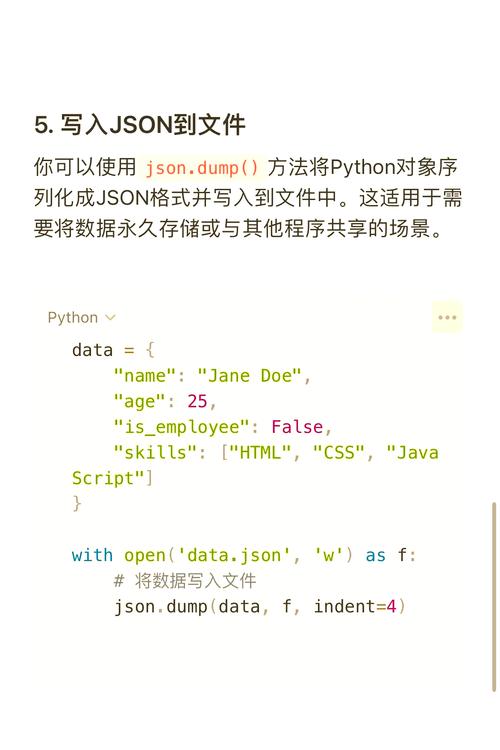
A very common use case is to read data, process it, and then write a clean, sorted JSON file.
import json
# Sample data
unsorted_data = {
    "z_last_key": "This will be last",
    "a_first_key": "This will be first",
    "c_middle_key": {
        "z_value": 99,
        "a_value": 1
    }
}
# Define the filename
filename = 'sorted_data.json'
# Open the file in write mode ('w')
# Use json.dump() to write the Python object directly to a file stream
# This is more memory-efficient than creating a string first.
with open(filename, 'w') as f:
    json.dump(unsorted_data, f, indent=4, sort_keys=True)
print(f"Successfully wrote sorted JSON to {filename}")
# --- Verify the file contents ---
print("\n--- Contents of sorted_data.json ---")
with open(filename, 'r') as f:
    print(f.read())
Output in the console:
Successfully wrote sorted JSON to sorted_data.json
--- Contents of sorted_data.json ---
{
    "a_first_key": "This will be first",
    "c_middle_key": {
        "a_value": 1,
        "z_value": 99
    },
    "z_last_key": "This will be last"
}
Explanation of json.dump() vs json.dumps():
json.dumps(data): Dumps String. Converts a Python object into a JSON string.json.dump(data, file_object): Dumps. Writes a Python object directly to a file object (a file that has been opened).
In the example above, json.dump() is used because it's the direct and efficient way to write to a file. The indent=4 argument is added to make the output file nicely formatted and readable.
Important Considerations
-
Python Data Types:
json.dumps()can only serialize basic Python types:dict-> JSON objectlist,tuple-> JSON arraystr-> JSON stringint,float-> JSON numberTrue-> JSONtrueFalse-> JSONfalseNone-> JSONnull
If you try to serialize a custom object (like an instance of a class), you will get a
TypeError. You would need to create a custom "encoder" for that. -
Performance: For very large dictionaries, sorting keys adds a small amount of processing time. However, in most applications, the benefits of consistency and readability far outweigh this negligible performance cost.