Of course. "Oracle EBS Java" is a broad topic that covers the different ways Java interacts with Oracle E-Business Suite (EBS). It's not a single technology but a collection of methods and frameworks used for extending, integrating, and customizing the EBS suite.
Here’s a comprehensive breakdown, from the core built-in technology to modern integration patterns.
The Foundation: Oracle EBS and the JVM
First, it's crucial to understand that Oracle EBS is a Java-based application. The entire EBS technology stack runs on a Java Virtual Machine (JVM).
- Application Server: Oracle EBS 11i and R12 are built on top of Oracle Application Server (OAS) in 11i and Oracle WebLogic Server (WLS) in R12.
- Core Technology Stack: The core EBS applications (like Forms, Reports, Workflow, OA Framework) are written in Java and compiled into Java bytecode that runs on this JVM.
When you talk about "Oracle EBS Java," you're often referring to custom Java code that runs within this EBS JVM environment, interacting with the EBS database and APIs.
The Primary Method: Oracle Applications Framework (OAF)
This is the most important and officially supported method for developing new, modern, web-based customizations and extensions within Oracle EBS.
What is OAF?
OAF is a Model-View-Controller (MVC) framework developed by Oracle specifically for building pages that are seamlessly integrated into the EBS standard user interface (the "Oracle Self-Service Web Applications" or "OA" pages).
Key Characteristics of OAF:
- Integrated UI: Pages built with OAF look and feel exactly like standard EBS pages.
- Declarative & Extensible: You can extend standard pages and business logic without modifying the underlying code (a core EBS principle).
- Standard APIs: Uses EBS APIs for database access, business logic, and security.
- Java-Based: You write Java code to define the controller logic, while the view (page layout) is defined in XML files.
- Fully Supported: This is Oracle's strategic direction for new customizations in the EBS UI.
How it Works (Simplified):
- Model: The business logic and data access. This is often handled by standard EBS APIs or PL/SQL packages. Your Java controller calls these APIs.
- View: The page layout (buttons, fields, regions, tables) is defined in an XML file (
.xml). This XML is processed by the OAF rendering engine to generate the HTML. - Controller: This is the Java code (
.javafile). It handles user events (like clicking a button), manages the page's state, and calls the business logic APIs.
Example: You want to add a new button to the "Customers" screen that, when clicked, shows a custom report. You would:
- Use the OAF Extension Wizard to create a new controller on the standard Customer page.
- In the Java controller, handle the button's
processFormRequestevent. - Inside this event, call a PL/SQL API to get the customer data and then call a standard Oracle Reports service to display the custom report.
Other Java-Based Technologies in EBS
While OAF is for the UI, other Java technologies are used for different purposes.
a) Oracle Workflow Business Event System
This is a powerful integration and event-driven engine within EBS.
- What it is: A system that allows you to define "events" (e.g.,
PO Approved,New Employee Hired) and "subscriptions" (actions to take when an event occurs). - Java's Role: You can write Java code to be a subscription for a business event. When the event is raised, your Java program is executed. This is a common way to trigger custom business logic or external integrations from within EBS.
b) Oracle Business Components for Java (BC4J / ADF Business Components)
- What it is: BC4J is Oracle's foundational framework for building data models and business logic in Java. It's the underlying technology that powers OAF.
- How it's used: While developers primarily interact with it through OAF, understanding BC4J is key. It handles the connection to the database, entity objects (tables), view objects (queries), and application modules (transactions). It manages data binding and validation between the UI and the database.
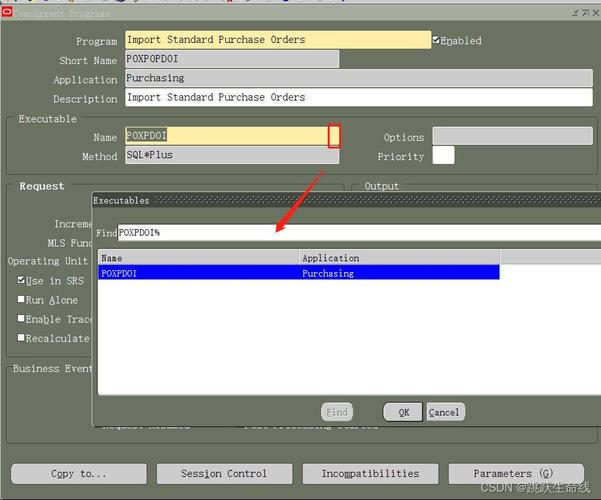
c) Custom Java Concurrent Programs
- What it is: A way to run a Java program as a "request" within the EBS concurrent processing framework.
- How it's used: This is ideal for long-running, batch-oriented processes that are too complex for PL/SQL. The Java program can perform complex calculations, call external web services, or process large files. It uses standard EBS APIs to log messages, report completion/failure, and output files.
- Implementation: You create a Java class, wrap it in a JAR file, and deploy it to the EBS Java top directory (
$JAVA_TOP). You then register a new "Java Concurrent Program" in the EBS Application Developer responsibility.
Modern Integration Patterns: Java Outside of EBS
Not all Java code runs inside the EBS JVM. Modern architectures often involve Java applications running on separate servers that interact with EBS.
a) SOAP Web Services (EBS as a Service)
- What it is: Oracle EBS can expose its standard APIs (like the
Order Management APIorHR Employee API) as SOAP web services. - Java's Role: An external Java application (e.g., a microservice, a mobile app backend) can act as a client. It uses a Java SOAP client library (like JAX-WS or Apache CXF) to make HTTP requests to the EBS web service, passing XML data and receiving a response. This is a standard, loosely-coupled integration pattern.
b) REST APIs (Oracle Integration Cloud - OIC)
- What it is: Oracle has been moving towards REST APIs. The primary way to expose EBS as a REST service is through Oracle Integration Cloud (OIC).
- Java's Role: An external Java application can make RESTful calls (using libraries like
RestTemplateorOkHttp) to an OIC integration point. OIC then handles the communication with the EBS backend, often by calling a PL/SQL API or a SOAP service. This is the modern, preferred way for cloud-based integrations.
c) Custom Java Middleware
- What it is: You might build a dedicated Java application (e.g., using Spring Boot) that sits between EBS and other systems.
- Java's Role: This middleware application would:
- Listen for events from a source system.
- Transform the data.
- Call an EBS API (via SOAP, REST, or even a direct database connection if appropriate) to perform an action in EBS.
- This provides a layer of abstraction and can be more scalable and maintainable than direct point-to-point integrations.
Summary Table: Oracle EBS Java Technologies
| Technology | Primary Purpose | Runs Inside EBS JVM? | Key Use Case |
|---|---|---|---|
| Oracle Applications Framework (OAF) | Building custom web UI pages | Yes | Extending or creating new pages within the standard EBS interface. |
| Workflow Business Events | Event-driven integration & logic | Yes | Triggering custom Java code when a business event (e.g., PO approved) occurs. |
| Custom Java Concurrent Program | Batch processing & reporting | Yes | Running complex, long-running Java jobs from the EBS Request window. |
| SOAP Web Services | Integration with external systems | No (Client) | An external Java app calls an EBS API exposed as a SOAP service. |
| REST APIs (via OIC) | Modern cloud integration | No (Client) | An external Java app calls a REST endpoint that integrates with EBS. |
| Custom Java Middleware | Integration & orchestration | No | A dedicated Java app that sits between EBS and other systems. |
Key Considerations for Developers
- APIs are King: Always use official EBS APIs (
PO_DOCUMENT_PUB,HR_EMPLOYEE_API, etc.) for database access and business logic. Never write direct SQL or DML from your Java code, as this bypasses standard EBS features like security, auditing, and concurrent processing. - Security: Leverage EBS's standard security. Your Java code will run with the privileges of the user who initiated the request (e.g., the concurrent program user or the person logged into the OAF page).
- EBS Standards: Follow EBS coding standards, especially for error handling and logging (using
FND_LOGpackage). - Deployment: Java code for OAF and Concurrent Programs must be deployed to the correct
$JAVA_TOPdirectory on the EBS Application Server and registered in the EBS database.