Of course! Here is a comprehensive guide to creating a TCP server in Java, starting with a simple, single-threaded example and progressing to a more robust, multi-threaded version.
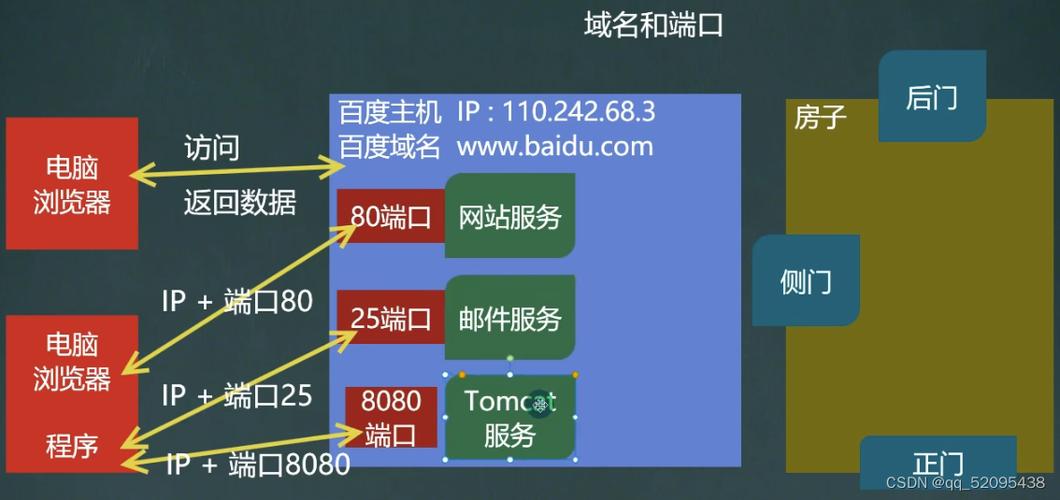
Core Concepts
Before diving into the code, let's understand the key components involved in a TCP server in Java:
ServerSocket: This is the entry point for your server. Its primary job is to listen for incoming connection requests from clients on a specific port. It doesn't handle the communication itself; it just accepts connections.Socket: When a client connects, theServerSocketreturns aSocketobject for that specific connection. ThisSocketrepresents the communication channel between your server and that one client. You use it to get input and output streams.InputStream&OutputStream: Once you have aSocket, you get its input stream to read data from the client and its output stream to send data back to the client.BufferedReader&PrintWriter: These are wrappers around the basic streams that make reading and writing text data much easier and more efficient.BufferedReaderreads text line by line, andPrintWriterwrites text with convenient methods likeprintln().
Simple Single-Threaded TCP Server
This is the most basic example. It can only handle one client at a time. After a client connects, the server waits for that client to send a message and then closes the connection.
How it works:
- Create a
ServerSocketon a specific port (e.g., 6789). - Call
serverSocket.accept(). This method blocks (waits) until a client connects. - Once a client connects,
accept()returns aSocketobject for that client. - Get the
InputStreamandOutputStreamfrom theSocket. - Read data from the client, process it, and send a response.
- Close the client's
Socketand the server'sServerSocket.
SimpleTcpServer.java
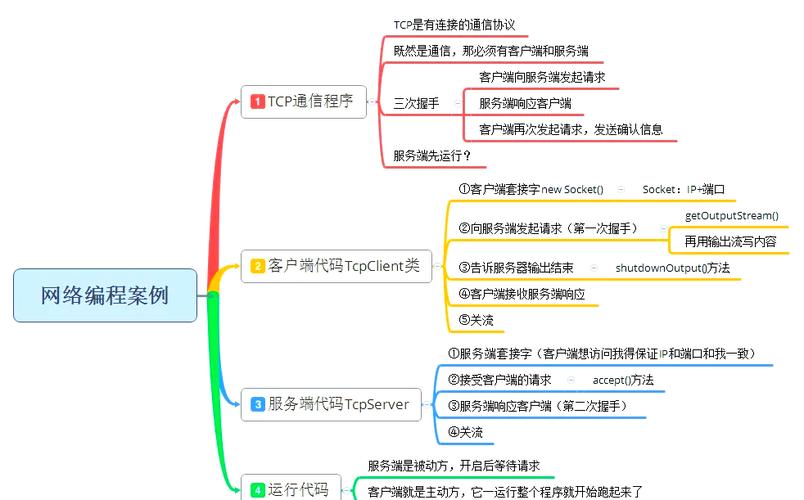
import java.io.BufferedReader;
import java.io.IOException;
import java.io.InputStreamReader;
import java.io.PrintWriter;
import java.net.ServerSocket;
import java.net.Socket;
public class SimpleTcpServer {
    public static void main(String[] args) {
        int port = 6789;
        // The try-with-resources statement ensures that the server socket is closed automatically.
        try (ServerSocket serverSocket = new ServerSocket(port)) {
            System.out.println("Server is listening on port " + port);
            // The accept() method blocks until a client connects.
            Socket clientSocket = serverSocket.accept();
            System.out.println("Client connected: " + clientSocket.getInetAddress().getHostAddress());
            // Set up streams for communication with the client
            // BufferedReader for reading text from the client
            BufferedReader in = new BufferedReader(new InputStreamReader(clientSocket.getInputStream()));
            // PrintWriter for sending text to the client
            PrintWriter out = new PrintWriter(clientSocket.getOutputStream(), true); // 'true' for auto-flush
            // Read a line of text from the client
            String inputLine = in.readLine();
            System.out.println("Received from client: " + inputLine);
            // Send a response back to the client
            out.println("Hello from server! I received your message: " + inputLine);
            // Close the client socket
            clientSocket.close();
            System.out.println("Client disconnected. Server shutting down.");
        } catch (IOException e) {
            System.out.println("Server exception: " + e.getMessage());
            e.printStackTrace();
        }
    }
}
How to Test It:
- Save the code as
SimpleTcpServer.java. - Compile it:
javac SimpleTcpServer.java - Run it:
java SimpleTcpServer - You'll see:
Server is listening on port 6789 - Open a new terminal and use a command-line tool like
netcat(ortelnet) to connect:nc localhost 6789
- Type a message and press Enter. For example, type
Hello Server. - You will see the response from your server in the
netcatterminal:Hello from server! I received your message: Hello Server - The server terminal will show the received message and then shut down.
Multi-Threaded TCP Server (More Robust)
A single-threaded server is impractical for real-world applications because it can only handle one client at a time. If a client is slow or disconnected, no other clients can connect. The solution is to handle each client connection in a separate thread.
How it works:
- The main thread's only job is to start the
ServerSocketand run in a loop, continuously callingaccept()to wait for new clients. - Every time a new client connects, the
accept()method returns aSocket. - We immediately create a new
ClientHandlerthread, passing the newSocketto it. - The main thread then goes back to
accept()to wait for the next client, while the new thread handles the communication with the client it was assigned. - This allows the server to handle many clients concurrently.
MultiThreadedTcpServer.java
import java.io.IOException;
import java.net.ServerSocket;
import java.net.Socket;
public class MultiThreadedTcpServer {
    public static void main(String[] args) {
        int port = 6789;
        try (ServerSocket serverSocket = new ServerSocket(port)) {
            System.out.println("Server is listening on port " + port);
            while (true) { // Keep the server running indefinitely
                Socket clientSocket = serverSocket.accept();
                System.out.println("New client connected: " + clientSocket.getInetAddress().getHostAddress());
                // Create a new thread for the client
                ClientHandler clientHandler = new ClientHandler(clientSocket);
                new Thread(clientHandler).start();
            }
        } catch (IOException e) {
            System.out.println("Server exception: " + e.getMessage());
            e.printStackTrace();
        }
    }
}
ClientHandler.java
This class implements the Runnable interface, meaning it contains the code that will be executed in a new thread for each client.
import java.io.BufferedReader;
import java.io.IOException;
import java.io.InputStreamReader;
import java.io.PrintWriter;
import java.net.Socket;
public class ClientHandler implements Runnable {
    private final Socket clientSocket;
    public ClientHandler(Socket socket) {
        this.clientSocket = socket;
    }
    @Override
    public void run() {
        System.out.println("Handler started for client: " + clientSocket.getInetAddress().getHostAddress());
        try (BufferedReader in = new BufferedReader(new InputStreamReader(clientSocket.getInputStream()));
             PrintWriter out = new PrintWriter(clientSocket.getOutputStream(), true)) {
            String inputLine;
            // Read lines from the client until "exit" is sent or the connection is closed
            while ((inputLine = in.readLine()) != null) {
                System.out.println("Received from " + clientSocket.getInetAddress().getHostAddress() + ": " + inputLine);
                if ("exit".equalsIgnoreCase(inputLine)) {
                    System.out.println("Client " + clientSocket.getInetAddress().getHostAddress() + " requested to close.");
                    break;
                }
                // Echo the message back to the client
                out.println("Server echo: " + inputLine);
            }
        } catch (IOException e) {
            System.out.println("Error handling client " + clientSocket.getInetAddress().getHostAddress() + ": " + e.getMessage());
        } finally {
            try {
                // Ensure the client socket is closed when the handler is done
                if (clientSocket != null && !clientSocket.isClosed()) {
                    clientSocket.close();
                    System.out.println("Connection with " + clientSocket.getInetAddress().getHostAddress() + " closed.");
                }
            } catch (IOException e) {
                e.printStackTrace();
            }
        }
    }
}
How to Test It:
-
Save both files:
MultiThreadedTcpServer.javaandClientHandler.java. -
Compile them:
javac MultiThreadedTcpServer.java ClientHandler.java -
Run the server:
java MultiThreadedTcpServer -
Open two or more new terminals.
-
In each terminal, connect to the server using
nc:# In terminal 1 nc localhost 6789 # In terminal 2 nc localhost 6789
-
Type messages in each terminal. You will see the server echoing messages from both clients simultaneously in the server's console output.
-
Type
exitin one of the client terminals. That connection will close, but the other client will remain connected.
Using a ThreadPoolExecutor (More Efficient)
Creating a new thread for every single client can be inefficient if you have thousands of connections. A better approach is to use a thread pool. A thread pool reuses a fixed number of threads to handle client requests, which reduces the overhead of thread creation and destruction.
This is a very common and production-ready pattern.
ThreadPoolTcpServer.java
import java.io.IOException;
import java.net.ServerSocket;
import java.net.Socket;
import java.util.concurrent.ExecutorService;
import java.util.concurrent.Executors;
public class ThreadPoolTcpServer {
    // Use a fixed-size thread pool. 10 threads is a good starting point.
    private static final int THREAD_POOL_SIZE = 10;
    private final ExecutorService pool = Executors.newFixedThreadPool(THREAD_POOL_SIZE);
    public static void main(String[] args) {
        int port = 6789;
        new ThreadPoolTcpServer().start(port);
    }
    public void start(int port) {
        try (ServerSocket serverSocket = new ServerSocket(port)) {
            System.out.println("Server is listening on port " + port + " with a thread pool of size " + THREAD_POOL_SIZE);
            while (true) {
                Socket clientSocket = serverSocket.accept();
                System.out.println("New client connected: " + clientSocket.getInetAddress().getHostAddress());
                // Submit a new task to the thread pool instead of creating a new thread
                pool.execute(new ClientHandler(clientSocket));
            }
        } catch (IOException e) {
            System.out.println("Server exception: " + e.getMessage());
            e.printStackTrace();
        } finally {
            // Shutdown the thread pool when the server is stopped
            pool.shutdown();
        }
    }
}
Note: You can reuse the exact same ClientHandler.java class from the previous example.
This version is more scalable and resource-efficient, making it suitable for applications that need to handle a large number of concurrent clients.