Of course. Here is a comprehensive guide to ArcSDE for Java, covering what it is, its architecture, how to use it, and its modern alternatives.
What is ArcSDE for Java?
ArcSDE for Java is a Java API (Application Programming Interface) that was part of the ArcSDE family from Esri. ArcSDE itself was a software subsystem that acted as the geographic data server for an ArcGIS platform.
In simple terms, ArcSDE for Java allowed Java developers to connect their Java applications (like web servers, desktop tools, or batch processing systems) to a geodatabase (typically in a DBMS like Oracle, SQL Server, PostgreSQL, or DB2) to perform all the core GIS operations:
- Querying geographic data (features, attributes, rasters)
- Inserting, updating, and deleting geographic features
- Managing spatial data schemas (tables, feature classes, relationships)
- Versioning (editing multi-user, long-term transactional data)
- Geoprocessing (running complex spatial analysis tools)
The Architecture: How It Fits In
Understanding the architecture is key to understanding what ArcSDE for Java does.
+---------------------+      +-------------------------+      +---------------------+
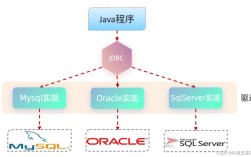
|      Java App       |----->|   ArcSDE for Java API    |----->|      ArcSDE         |
| (e.g., WebLogic,    |      | (JAR libraries, e.g.,   |      | (Geographic Data    |
|  Tomcat, Desktop App)|      |  sdejava.jar)           |      |  Server)            |
+---------------------+      +-------------------------+      +----------+----------+
                                                                       |
                                                                       | (TCP/IP)
                                                                       v
                                                            +---------------------+
                                                            |      DBMS           |
                                                            | (Oracle, SQL Server,|
                                                            |  PostgreSQL, etc.)  |
+---------------------+- Java Application: Your custom code written in Java. This could be a web application using a framework like Spring or a standalone desktop application.
- ArcSDE for Java API: This is the layer your Java code interacts with. It provides a set of Java classes and methods (like
SeConnection,SeLayer,SeQuery) that abstract away the complexities of talking directly to the database and the ArcSDE server. - ArcSDE Server: The core Esri software that sits between your application and the database. It handles the translation of requests into database-specific SQL and manages all the geodentric behaviors like coordinate systems, topology, and versioning.
- DBMS: The underlying relational database management system (Oracle, SQL Server, etc.) where the actual spatial data (geometry as BLOBs, attributes in tables) is stored.
Key Components of the ArcSDE for Java API
The API is built around a few core classes that you'll use repeatedly:
SeConnection: Represents the connection to the ArcSDE server. You create one of these to establish communication.SeLayer: Represents a single feature class or raster in the geodatabase. It contains metadata like the spatial column name, coordinate system, and spatial index information.SeQuery: Used to execute queries against a feature class. You can define spatial filters (e.g., "find all points within this polygon"), attribute filters (SQLWHEREclause), and the columns you want to retrieve.SeRow: Represents a single row of data returned by a query. You can use it to get attribute values and the geometry object.SeShape: Represents the geometry of a feature (point, line, polygon, etc.). You can create, read, and write shapes using this class.SeCoordinateReference: Represents a spatial reference system (coordinate system and projection).
A Simple Code Example: Querying Features
This example demonstrates the basic workflow to connect to a geodatabase, query a feature class, and print the results.
import com.esri.sde.sdk.client.SeConnection;
import com.esri.sde.sdk.client.SeException;
import com.esri.sde.sdk.client.SeQuery;
import com.esri.sde.sdk.client.SeRow;
import com.esri.sde.sdk.client.SeShape;
import com.esri.sde.sdk.client.SeLayer;
import com.esri.sde.sdk.client.SeColumn;
public class ArcSDEJavaExample {
    public static void main(String[] args) {
        // --- Connection Parameters ---
        String server = "your-sde-server";
        int port = 5151; // Default ArcSDE port
        String database = "your_database";
        String username = "sde_user";
        String password = "sde_password";
        String instance = "sde:oracle11g:your_oracle_service"; // e.g., "sde:oracle11g:orcl"
        // --- 1. Establish Connection ---
        SeConnection connection = null;
        try {
            connection = new SeConnection(server, port, database, username, password, instance);
            System.out.println("Successfully connected to ArcSDE.");
            // --- 2. Define the Layer (Feature Class) to Query ---
            String layerName = "COUNTIES"; // The name of your feature class
            SeLayer layer = new SeLayer(connection, layerName);
            layer.getInfo(); // Fetch metadata for the layer
            // --- 3. Create and Configure the Query ---
            SeQuery query = new SeQuery(connection, layer);
            // Specify which columns to retrieve (e.g., 'NAME' and 'STATE_FIPS')
            String[] columnsToFetch = {"NAME", "STATE_FIPS"};
            query.setColumns(columnsToFetch);
            // Optional: Add a spatial filter (e.g., a rectangle)
            // SeEnvelope envelope = new SeEnvelope(-180, -90, 180, 90); // World envelope
            // query.setSpatialConstraints(SeQuery.SE_SPATIALCONTAINS, SeQuery.SE_SHAPE_RELATIONMASK, envelope);
            // Optional: Add an attribute filter (SQL WHERE clause)
            // query.setWhere("STATE_FIPS = '06'"); // e.g., California
            // --- 4. Prepare and Execute the Query ---
            query.prepareQuery();
            query.execute();
            // --- 5. Fetch and Process the Results ---
            SeRow row = new SeRow(connection, layer, query);
            SeShape shape = new SeShape(layer.getCoordRef());
            while (query.fetch(row)) {
                // Get attribute values
                String countyName = (String) row.getDoubleOrString(columnsToFetch[0]);
                String stateFips = (String) row.getDoubleOrString(columnsToFetch[1]);
                // Get the geometry
                // row.getShape(shape); // Uncomment to get the geometry object
                // System.out.println("Geometry: " + shape.toString());
                System.out.println("Found County: " + countyName + ", State FIPS: " + stateFips);
            }
            System.out.println("Query finished.");
        } catch (SeException e) {
            System.err.println("ArcSDE Error: " + e.getSeError().getErrDesc());
            e.printStackTrace();
        } finally {
            // --- 6. Close the Connection ---
            if (connection != null) {
                try {
                    connection.close();
                    System.out.println("Connection closed.");
                } catch (SeException e) {
                    System.err.println("Error closing connection: " + e.getMessage());
                }
            }
        }
    }
}
How to Get Started (The Old Way)
- Get the ArcSDE API: You needed to download the ArcSDE installation kit from Esri. The Java API JAR file (
sdejava.jar) was included in this kit. - Add the JAR to your Project: Add
sdejava.jarto your project's classpath in your IDE (e.g., Eclipse, IntelliJ) or build tool (Maven, Gradle). - Install ArcSDE Server: The API is useless without a running ArcSDE server instance connected to a supported DBMS.
- Configure Connection: Your application needs the connection details for the ArcSDE server.
The Modern Replacement: The ArcGIS API for Java
ArcSDE for Java is a legacy technology. Esri has transitioned its entire platform to a more modern, service-oriented architecture. The primary and recommended way to work with Esri data in Java today is through the ArcGIS API for Java.
Key Differences: ArcSDE for Java vs. ArcGIS API for Java
| Feature | ArcSDE for Java | ArcGIS API for Java |
|---|---|---|
| Data Access | Direct connection to the geodatabase via ArcSDE server. | Connection to web services (REST, SOAP). |
| Architecture | Thick client, direct DBMS access. | Thin client, HTTP-based communication. |
| Data Model | Works with raw database tables, layers, shapes (SeShape, SeLayer). |
Works with high-level GIS objects (Feature, FeatureSet, MapImage). |
| Authentication | Database username/password. | OAuth 2.0, API Keys, Portal authentication. |
| Primary Use Case | Building custom desktop applications or complex batch processes that need deep, direct database access. | Building modern web applications (often with frameworks like Spring Boot), mobile apps, or any app that consumes GIS services. |
| Dependency | Requires a licensed ArcSDE server installation. | Requires access to an ArcGIS Online account or an ArcGIS Enterprise (Portal for ArcGIS) deployment. |
Why the Shift?
- Cloud-Native: The service-based model is much more scalable and fits perfectly with cloud architectures (AWS, Azure, GCP).
- Simplicity & Security: Connecting to a REST API is simpler and more secure than managing direct database connections and user permissions across a network.
- Platform Independence: You don't need to install heavy Esri server software on your database server. The data can be published as a service from an ArcGIS Enterprise server, which can be anywhere.
- Broader Access: The ArcGIS API for Java can connect to data from ArcGIS Online, thousands of public services, and your own private services, all from the same API.
Conclusion
- ArcSDE for Java is a powerful but legacy API for building applications that require direct, programmatic access to an ArcSDE geodatabase. It's primarily used for maintaining or extending very old systems.
- For any new development, you should use the ArcGIS API for Java. It is the modern, supported, and standard way to build Java applications that interact with Esri's mapping and GIS data. It abstracts away the database complexity and allows you to focus on building your application logic by consuming ready-to-use GIS web services.