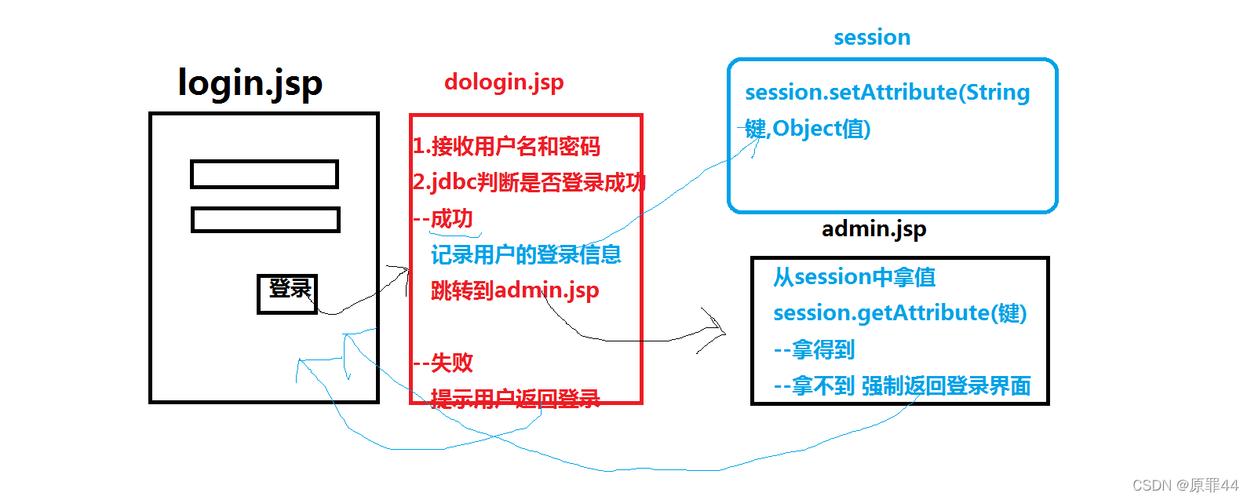
Session(会话)是 Web 开发中一个非常重要的概念,它用来在多个请求之间保存和共享特定用户的数据,当用户访问一个网站时,服务器可以为该用户创建一个独一无二的 Session 对象,并将用户的信息(如登录状态、购物车内容等)存储在这个对象中,只要用户没有关闭浏览器或 Session 超时,这个 Session 就会一直存在,用户在不同页面之间跳转时,服务器都能通过这个 Session 识别出他,并获取到他之前存储的信息。
Session 的工作原理
理解 Session 的工作原理是正确使用它的前提。
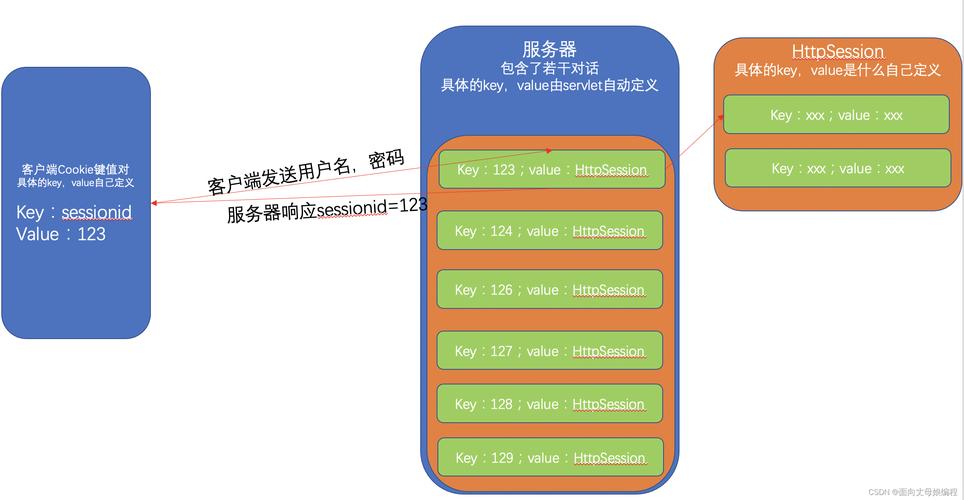
- 用户首次访问:当用户第一次访问一个需要 Session 的网站时(访问登录页面),服务器会创建一个
HttpSession对象,这个对象有一个唯一的 ID,我们称之为 Session ID。 - Session ID 的传递:服务器会将这个 Session ID 通过一个名为
JSESSIONID的 Cookie 发送到用户的浏览器,浏览器会自动保存这个 Cookie。 - 后续请求:当用户再次向服务器发送请求(比如点击“个人中心”)时,浏览器会自动带上这个
JSESSIONIDCookie。 - 服务器识别:服务器收到请求后,会从 Cookie 中读取
JSESSIONID,然后根据这个 ID 在服务器的内存(或数据库、缓存等)中找到对应的HttpSession对象。 - 数据交互:服务器就可以通过这个
HttpSession对象来读取或修改与该用户相关的数据。
关键点:
- Session 依赖于 Cookie:默认情况下,Session ID 是通过 Cookie 传递的。
- Session 存储在服务器端:用户的敏感数据(如登录信息)存储在服务器上,而不是客户端,这比直接使用 Cookie 存储数据更安全。
- Session 有生命周期:Session 不是永久的,它有一个超时时间(30分钟),如果用户在超时时间内没有进行任何操作,Session 就会失效,服务器会自动销毁它。
在 Java Web (Servlet) 中如何使用 Session
在传统的 Java Web 开发中,我们通常在 Servlet 中操作 Session。
1 获取 Session 对象
使用 HttpServletRequest 的 getSession() 方法。
// 获取当前请求的Session对象
// 如果Session不存在,会自动创建一个新的Session(常用)
HttpSession session = request.getSession();
// 获取当前请求的Session对象
// 如果Session不存在,则返回null,不会自动创建
HttpSession session = request.getSession(false);
2 向 Session 中存取数据
Session 对象提供了类似 Map 的 API,可以存取各种类型的 Java 对象。
- 存数据:
session.setAttribute(String name, Object value) - 取数据:
session.getAttribute(String name) - 删数据:
session.removeAttribute(String name)
示例代码 (LoginServlet.java):
import javax.servlet.ServletException;
import javax.servlet.annotation.WebServlet;
import javax.servlet.http.HttpServlet;
import javax.servlet.http.HttpServletRequest;
import javax.servlet.http.HttpServletResponse;
import javax.servlet.http.HttpSession;
import java.io.IOException;
@WebServlet("/login")
public class LoginServlet extends HttpServlet {
    @Override
    protected void doPost(HttpServletRequest request, HttpServletResponse response) throws ServletException, IOException {
        String username = request.getParameter("username");
        String password = request.getParameter("password");
        // 简单的验证逻辑
        if ("admin".equals(username) && "password123".equals(password)) {
            // 1. 获取Session
            HttpSession session = request.getSession();
            // 2. 将用户信息存入Session
            session.setAttribute("username", username);
            session.setAttribute("loginTime", System.currentTimeMillis());
            // 3. 设置Session的最大非活动时间(单位:秒),例如30分钟
            session.setMaxInactiveInterval(30 * 60);
            // 登录成功,重定向到主页
            response.sendRedirect("welcome.jsp");
        } else {
            // 登录失败,转发到登录页面并提示错误
            request.setAttribute("errorMsg", "用户名或密码错误!");
            request.getRequestDispatcher("login.jsp").forward(request, response);
        }
    }
}
示例代码 (WelcomeServlet.java):
import javax.servlet.ServletException;
import javax.servlet.annotation.WebServlet;
import javax.servlet.http.HttpServlet;
import javax.servlet.http.HttpServletRequest;
import javax.servlet.http.HttpServletResponse;
import javax.servlet.http.HttpSession;
import java.io.IOException;
@WebServlet("/welcome")
public class WelcomeServlet extends HttpServlet {
    @Override
    protected void doGet(HttpServletRequest request, HttpServletResponse response) throws ServletException, IOException {
        // 1. 获取Session
        HttpSession session = request.getSession();
        // 2. 从Session中获取用户信息
        String username = (String) session.getAttribute("username");
        // 3. 判断用户是否已登录
        if (username == null) {
            // 如果Session中没有用户信息,说明用户未登录或Session已过期
            response.sendRedirect("login.jsp");
        } else {
            // 如果用户已登录,显示欢迎信息
            request.setAttribute("welcomeMsg", "欢迎您, " + username + "!");
            request.getRequestDispatcher("welcome.jsp").forward(request, response);
        }
    }
}
3 获取 Session ID 和其他信息
HttpSession session = request.getSession();
// 获取Session的唯一ID
String sessionId = session.getId();
System.out.println("Session ID: " + sessionId);
// 获取Session的创建时间(毫秒时间戳)
long creationTime = session.getCreationTime();
System.out.println("Creation Time: " + new java.util.Date(creationTime));
// 获取Session最后一次被访问的时间(毫秒时间戳)
long lastAccessedTime = session.getLastAccessedTime();
System.out.println("Last Access Time: " + new java.util.Date(lastAccessedTime));
// 获取Session的最大非活动时间(秒)
int maxInactiveInterval = session.getMaxInactiveInterval();
System.out.println("Max Inactive Interval: " + maxInactiveInterval + " seconds");
4 销毁 Session
当用户退出登录时,我们需要手动销毁 Session。

-
使 Session 失效(推荐)
HttpSession session = request.getSession(); session.invalidate(); // 销毁当前Session,并使其失效 response.sendRedirect("login.jsp"); // 跳转到登录页 -
手动移除所有属性
HttpSession session = request.getSession();
java.util.Enumeration<String> attributeNames = session.getAttributeNames();
while (attributeNames.hasMoreElements()) {
    String name = attributeNames.nextElement();
    session.removeAttribute(name);
}
// 注意:仅仅移除属性并不会销毁Session对象本身,只是清空了数据。
// 通常还是推荐使用 invalidate()。
在主流框架(如 Spring Boot)中使用 Session
在现代框架中,我们通常不直接操作 HttpServletRequest,而是通过更便捷的方式。
1 在 Spring MVC 中使用
Spring MVC 提供了非常简洁的 API 来操作 Session。
import org.springframework.stereotype.Controller;
import org.springframework.web.bind.annotation.GetMapping;
import org.springframework.web.bind.annotation.PostMapping;
import org.springframework.web.bind.annotation.RequestParam;
import org.springframework.web.servlet.ModelAndView;
import javax.servlet.http.HttpSession;
@Controller
public class LoginController {
    @PostMapping("/login")
    public String login(@RequestParam String username,
                        @RequestParam String password,
                        HttpSession session) {
        if ("admin".equals(username) && "password123".equals(password)) {
            // 向Session中存数据
            session.setAttribute("username", username);
            return "redirect:/welcome"; // 重定向到欢迎页
        }
        return "login"; // 返回登录页
    }
    @GetMapping("/welcome")
    public ModelAndView welcome(HttpSession session) {
        // 从Session中取数据
        String username = (String) session.getAttribute("username");
        if (username == null) {
            return new ModelAndView("redirect:/login");
        }
        ModelAndView mav = new ModelAndView("welcome");
        mav.addObject("username", username);
        return mav;
    }
    @GetMapping("/logout")
    public String logout(HttpSession session) {
        // 使Session失效
        session.invalidate();
        return "redirect:/login";
    }
}
2 在 Spring Boot 中使用
Spring Boot 的使用方式与 Spring MVC 基本一致,因为它集成了 Spring MVC。
额外说明:Spring Boot 中的 @SessionAttributes
如果你希望将某个 Model 的属性自动保存到 Session 中,可以使用 @SessionAttributes 注解。
import org.springframework.stereotype.Controller;
import org.springframework.ui.Model;
import org.springframework.web.bind.annotation.GetMapping;
import org.springframework.web.bind.annotation.ModelAttribute;
import org.springframework.web.bind.annotation.SessionAttributes;
// @SessionAttributes 指定 Model 中名为 "user" 的属性会自动同步到 Session 中
@Controller
@SessionAttributes("user")
public class UserController {
    @GetMapping("/profile")
    public String profile(Model model) {
        // 如果Session中没有 "user" 属性,这里会创建一个新的 User 对象并添加到 Model 中
        // Spring Boot 会自动将其存入 Session
        model.addAttribute("user", new User("John Doe", "john@example.com"));
        return "profile";
    }
    @GetMapping("/updateProfile")
    public String updateProfile(@ModelAttribute User user) {
        // 直接修改 user 对象,因为 "user" 在 Session 中,所以修改是持久化的
        // ... 业务逻辑 ...
        return "redirect:/profile";
    }
}
class User {
    private String name;
    private String email;
    // ... 构造器、getter、setter ...
}
Session 的注意事项和最佳实践
- Session 与 Cookie 的关系:默认情况下,Session ID 通过 Cookie 传递,如果用户禁用了 Cookie,Session 可能会失效,这时可以考虑使用 URL 重写(在 URL 后面附加
;jsessionid=xxx)作为备选方案,但会增加开发复杂度。 - Session 存储什么:只存储必要的数据,Session 存储在服务器内存中,如果存储的数据量过大或过多,会消耗大量服务器资源,影响性能,不要将大对象(如文件、图片)存入 Session。
- 安全性:
- 设置超时:一定要为 Session 设置合理的超时时间(
setMaxInactiveInterval),防止用户忘记退出后,Session 长期有效造成安全风险。 - 敏感信息:不要在 Session 中存储密码等高度敏感的信息,通常只存储用户 ID 或用户名等标识性信息,敏感数据应存储在数据库中。
- 设置超时:一定要为 Session 设置合理的超时时间(
- 分布式环境(集群):在负载均衡或集群环境下,一个用户的请求可能被分配到不同的服务器上,Session 数据只存在 A 服务器的内存中,当请求被分配到 B 服务器时,B 服务器就找不到该用户的 Session 了,解决方案有:
- Session 复制:将一台服务器上的 Session 复制到所有其他服务器,性能开销大,不推荐。
- Session 粘性:确保同一个用户的请求总是被分配到同一台服务器,简单但有单点故障风险。
- Session 共享(推荐):使用外部存储(如 Redis、Memcached)来集中管理 Session,所有服务器都从同一个地方读取和写入 Session,这是目前最主流的解决方案。
| 功能 | Servlet API | Spring MVC / Spring Boot |
|---|---|---|
| 获取 Session | request.getSession() |
方法参数 HttpSession session |
| 存数据 | session.setAttribute(name, value) |
session.setAttribute(name, value) |
| 取数据 | session.getAttribute(name) |
session.getAttribute(name) |
| 删数据 | session.removeAttribute(name) |
session.removeAttribute(name) |
| 销毁 Session | session.invalidate() |
session.invalidate() |
| 高级特性 | 无 | @SessionAttributes (自动同步 Model 到 Session) |
Session 是维护用户状态的基石,理解其原理并正确使用它,对于构建健壮、安全的 Web 应用至关重要。