Of course! This is a fundamental concept in Java. Let's break down the differences between List and Array, how to convert between them, and when to use each one.
The Core Difference: Flexibility vs. Performance
| Feature | Array (e.g., String[]) |
List (e.g., ArrayList<String>) |
|---|---|---|
| Size | Fixed. You must specify the size when you create it. | Dynamic. Can grow and shrink as you add or remove elements. |
| Type | Can hold primitive types (int[], double[]) or objects. |
Can only hold objects. For primitives, you must use their wrapper classes (Integer, Double). |
| Methods | Has a fixed length. Provides basic methods like length. |
Has many useful methods (add(), remove(), size(), sort(), etc.). |
| Performance | Faster for accessing elements by index (array[0]). Memory is contiguous. |
Slightly slower for random access, but much more flexible. Adding/removing elements is easy. |
| Syntax | String[] names = new String[5]; |
List<String> names = new ArrayList<>(); |
Java Array
An array is a container object that holds a fixed number of values of a single type.
How to Declare and Initialize
// Method 1: Declare and then initialize
String[] fruits;
fruits = new String[3]; // Create an array to hold 3 Strings
// Method 2: Declare and initialize in one line
String[] colors = new String[]{"Red", "Green", "Blue"};
// Method 3: Shorthand syntax (commonly used)
String[] planets = {"Mercury", "Venus", "Earth", "Mars"};
Key Characteristics
- Fixed Size: Once created, you cannot change its length.
  String[] names = new String[2];
  names[0] = "Alice";
  names[1] = "Bob";
  // names[2] = "Charlie"; // This will throw an ArrayIndexOutOfBoundsException
- Accessing Elements: Use square bracket notation
[].System.out.println(names[0]); // Output: Alice
- Getting Length: Use the
.lengthproperty (not a method).System.out.println("Array length: " + names.length); // Output: Array length: 2
Java List
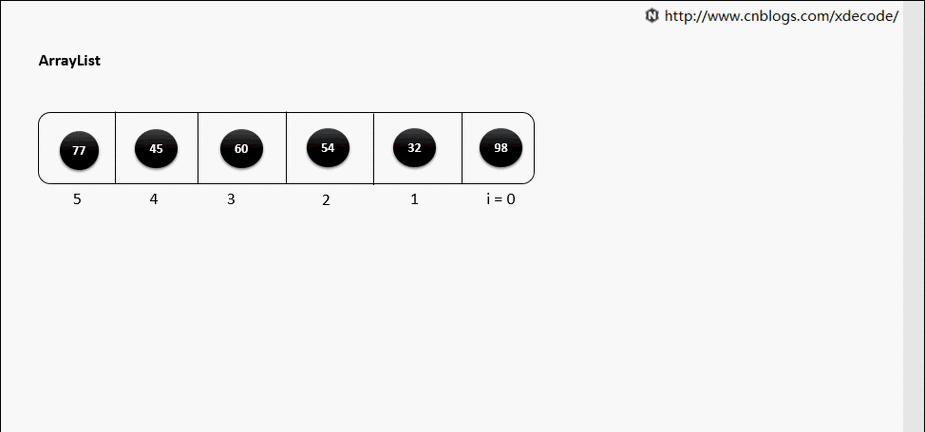
A List is an interface that represents an ordered collection (also known as a sequence). You cannot create a List directly; you must use one of its implementations. The most common one is ArrayList.
ArrayList is like a resizable array. It provides the flexibility of a List with good performance.
How to Declare and Initialize
You must specify the type of elements the list will hold using Generics (<String>, <Integer>, etc.).
// Import the List and ArrayList classes
import java.util.ArrayList;
import java.util.List;
// Method 1: Using the interface as the type (Best Practice)
List<String> shoppingList = new ArrayList<>();
// Method 2: Using the concrete class as the type (Also works)
ArrayList<String> shoppingList2 = new ArrayList<>();
// Initialize with elements
List<Integer> numbers = new ArrayList<>(Arrays.asList(10, 20, 30));
Key Characteristics
- Dynamic Size: You can add or remove elements easily.
List<String> names = new ArrayList<>(); names.add("Alice"); names.add("Bob"); names.add("Charlie"); // No problem! System.out.println(names.size()); // Output: 3 - Accessing Elements: Use the
get(index)method.System.out.println(names.get(0)); // Output: Alice
- Getting Size: Use the
.size()method (not a property).System.out.println("List size: " + names.size()); // Output: List size: 3 - Common Methods:
add(element): Adds an element to the end.add(index, element): Inserts an element at a specific position.remove(index): Removes the element at the given index.remove(Object): Removes the first occurrence of the specified element.contains(Object): Checks if the list contains the element.sort(Comparator): Sorts the list.
Conversion Between List and Array
This is a very common task.
List to Array
You can use the toArray() method.
import java.util.ArrayList;
import java.util.List;
List<String> namesList = new ArrayList<>();
namesList.add("Alice");
namesList.add("Bob");
// Method 1: To an Object array (less common)
Object[] namesArray1 = namesList.toArray();
System.out.println(namesArray1[0]); // Output: Alice
// Method 2: To a strongly-typed String array (recommended)
String[] namesArray2 = namesList.toArray(new String[0]);
System.out.println(namesArray2[1]); // Output: Bob
Array to List
This is slightly trickier. You can use Arrays.asList().
Important Note: The List returned by Arrays.asList() is a fixed-size view of the original array. You can modify its elements (e.g., list.set(0, "New")), but you cannot add or remove elements from it (e.g., list.add() or list.remove() will throw an UnsupportedOperationException).
import java.util.Arrays;
import java.util.List;
String[] namesArray = {"Alice", "Bob", "Charlie"};
// Convert the array to a List
List<String> namesList = Arrays.asList(namesArray);
// This works (modifying an element)
namesList.set(0, "Alicia");
System.out.println(namesList); // Output: [Alicia, Bob, Charlie]
System.out.println(namesArray[0]); // The original array is also changed! Output: Alicia
// This will THROW an UnsupportedOperationException
// namesList.add("David");
// namesList.remove(0);
How to Create a Modifiable List from an Array
If you need a truly resizable ArrayList, the best way is to pass the array to the ArrayList constructor.
import java.util.ArrayList;
import java.util.Arrays;
import java.util.List;
String[] namesArray = {"Alice", "Bob", "Charlie"};
// Create a new, modifiable ArrayList from the array
List<String> modifiableList = new ArrayList<>(Arrays.asList(namesArray));
// Now you can add and remove elements without any issues!
modifiableList.add("David");
modifiableList.remove("Alice");
System.out.println(modifiableList); // Output: [Bob, Charlie, David]
Summary: When to Use Which?
Use an Array when... |
Use a List (specifically ArrayList) when... |
|---|---|
| ✅ The number of elements is fixed and known in advance. | ✅ The number of elements will change during the program's execution. |
| ✅ You need maximum performance for element access. | ✅ You need the convenience of built-in methods like add(), remove(), sort(). |
✅ You are working with primitive types (int, double) for performance. |
✅ You are working with a collection of objects and need type safety with generics. |
| ✅ You are passing data to a method that specifically requires an array. | ✅ You want to avoid the complexity of managing the size of the collection yourself. |