
Of course! *args and **kwargs are powerful features in Python that allow you to write more flexible and reusable functions. They are used to pass a variable number of arguments to a function.

Let's break them down one by one.
*args (Arbitrary Positional Arguments)
The *args syntax allows a function to accept any number of positional arguments. Inside the function, these arguments are accessible as a tuple.
The is the Magic
The (asterisk) is the key part. It "unpacks" the positional arguments passed to the function into a tuple named args. The name args is a convention, but you could technically name it anything (e.g., *numbers, *values). However, args is the standard and highly recommended.
Example 1: Summing Numbers
Imagine you want to create a function that can sum any number of values.
def sum_all(*args):
    """This function can accept any number of arguments and returns their sum."""
    print(f"Arguments received (as a tuple): {args}")
    print(f"Type of args: {type(args)}")
    total = 0
    for number in args:
        total += number
    return total
# --- Let's use the function ---
# Calling with 3 arguments
result1 = sum_all(1, 2, 3)
print(f"Sum of 1, 2, 3 is: {result1}\n") # Output: 6
# Calling with 5 arguments
result2 = sum_all(10, 20, 30, 40, 50)
print(f"Sum of 10, 20, 30, 40, 50 is: {result2}\n") # Output: 150
# Calling with no arguments
result3 = sum_all()
print(f"Sum of no arguments is: {result3}\n") # Output: 0
Output:
Arguments received (as a tuple): (1, 2, 3)
Type of args: <class 'tuple'>
Sum of 1, 2, 3 is: 6
Arguments received (as a tuple): (10, 20, 30, 40, 50)
Type of args: <class 'tuple'>
Sum of 10, 20, 30, 40, 50 is: 150
Arguments received (as a tuple): ()
Type of args: <class 'tuple'>
Sum of no arguments is: 0
Example 2: Combining with Regular Arguments
You can use *args alongside standard positional arguments. The standard arguments must come before *args.
def display_info(name, age, *hobbies):
    """Displays user info and a list of their hobbies."""
    print(f"Name: {name}")
    print(f"Age: {age}")
    print("Hobbies:")
    if hobbies:
        for hobby in hobbies:
            print(f"- {hobby}")
    else:
        print("- No hobbies listed.")
# --- Let's use the function ---
display_info("Alice", 30, "Reading", "Hiking", "Coding")
Output:
Name: Alice
Age: 30
Hobbies:
- Reading
- Hiking
- Coding
**kwargs (Arbitrary Keyword Arguments)
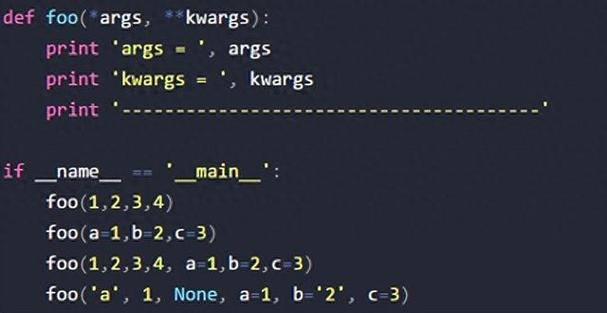
The **kwargs syntax allows a function to accept any number of keyword arguments (i.e., arguments passed as key=value). Inside the function, these arguments are accessible as a dictionary.
The is the Magic
The (double asterisk) is the key part. It "unpacks" the keyword arguments into a dictionary named kwargs. The name kwargs is the standard convention (short for "keyword arguments").
Example 1: Creating a User Profile
Let's create a function that can build a user profile from a set of optional details.
def build_user_profile(username, **details):
    """Builds a user profile dictionary."""
    profile = {'username': username}
    # The keyword arguments are in the 'details' dictionary
    print(f"Details received (as a dictionary): {details}")
    print(f"Type of details: {type(details)}")
    for key, value in details.items():
        profile[key] = value
    return profile
# --- Let's use the function ---
profile1 = build_user_profile("johndoe", location="USA", occupation="Engineer", age=28)
print(f"Profile 1: {profile1}\n")
profile2 = build_user_profile("janedoe", location="Canada", level="Expert")
print(f"Profile 2: {profile2}\n")
# Calling with no extra keyword arguments
profile3 = build_user_profile("guest")
print(f"Profile 3: {profile3}\n")
Output:
Details received (as a dictionary): {'location': 'USA', 'occupation': 'Engineer', 'age': 28}
Type of details: <class 'dict'>
Profile 1: {'username': 'johndoe', 'location': 'USA', 'occupation': 'Engineer', 'age': 28}
Details received (as a dictionary): {'location': 'Canada', 'level': 'Expert'}
Type of details: <class 'dict'>
Profile 2: {'username': 'janedoe', 'location': 'Canada', 'level': 'Expert'}
Details received (as a dictionary): {}
Type of details: <class 'dict'>
Profile 3: {'username': 'guest'}
Example 2: Combining with All Argument Types
You can combine regular arguments, *args, and **kwargs in a single function. The order must be:
- Standard positional arguments
*args**kwargs
def ultimate_function(a, b, *args, **kwargs):
    print(f"Standard arguments: a={a}, b={b}")
    print(f"Positional arguments (*args): {args}")
    print(f"Keyword arguments (**kwargs): {kwargs}")
ultimate_function(1, 2, 3, 4, 5, name="John", city="New York")
Output:
Standard arguments: a=1, b=2
Positional arguments (*args): (3, 4, 5)
Keyword arguments (**kwargs): {'name': 'John', 'city': 'New York'}
The Reverse: Unpacking with and
The same and operators that are used in function definitions can also be used when calling functions. This is called "unpacking" and it's incredibly useful.
Unpacking with (for lists/tuples)
If you have a list or tuple of arguments, you can "unpack" them into positional arguments for a function call.
def greet(greeting, name, punctuation):
    print(f"{greeting}, {name}{punctuation}")
# Our data is in a list
my_args = ["Hello", "World", "!"]
# Unpack the list into positional arguments using *
greet(*my_args)
# This is equivalent to: greet("Hello", "World", "!")
Output:
Hello, World!Unpacking with (for dictionaries)
If you have a dictionary of keyword arguments, you can "unpack" them into keyword arguments for a function call.
def introduce(name, age, city):
    print(f"My name is {name}, I am {age} years old, and I live in {city}.")
# Our data is in a dictionary
my_kwargs = {
    "name": "Alice",
    "age": 30,
    "city": "Paris"
}
# Unpack the dictionary into keyword arguments using **
introduce(**my_kwargs)
# This is equivalent to: introduce(name="Alice", age=30, city="Paris")
Output:
My name is Alice, I am 30 years old, and I live in Paris.Summary Table
| Feature | *args |
**kwargs |
|---|---|---|
| Full Name | Arbitrary Positional Arguments | Arbitrary Keyword Arguments |
| Syntax | *args |
**kwargs |
| Function Definition | def my_func(*args): |
def my_func(**kwargs): |
| Type Inside Function | Tuple | Dictionary |
| Use Case | When you don't know how many positional arguments will be passed. | When you don't know how many keyword arguments will be passed. |
| Order in Definition | Comes after standard positional arguments. | Comes after standard and *args arguments. |
| Unpacking (Calling) | my_func(*my_list) |
my_func(**my_dict) |
By mastering *args and **kwargs, you can write functions that are far more adaptable and can handle a wide variety of inputs, making your code cleaner and more robust.


