Of course! Let's dive deep into java.nio.ByteBuffer. It's a fundamental and powerful class in Java's NIO (New I/O) package.
What is ByteBuffer?
At its core, ByteBuffer is a container for a sequence of bytes. It's not just a simple array; it's a buffer that provides a rich set of features for managing and manipulating byte data.
Think of it like a slab of memory with:
- Capacity: The total amount of data it can hold (fixed when created).
- Limit: The first position that should not be read or written. It acts as a boundary.
- Position: The current index for the next read or write operation.
- Mark: A bookmark to remember a specific position, to which you can later "reset".
This "slab of memory" model is what makes ByteBuffer so efficient for I/O operations, especially with channels.
Key Concepts: The Buffer States
The power of ByteBuffer comes from its state, managed by the four properties mentioned above. Understanding them is crucial.
Imagine a buffer with a capacity of 10.
Capacity: 10
+---------------------------------------------------+
| | | | | | | | | | | | | | | | | | | | | | | | | |
+---------------------------------------------------+
Position: 0, Limit: 10
Putting Data (Writing)
When you write data into the buffer (e.g., using put() methods), the position is advanced.
ByteBuffer buffer = ByteBuffer.allocate(10);
buffer.put((byte) 'H'); // Position is now 1
buffer.put((byte) 'e'); // Position is now 2
buffer.put((byte) 'l'); // Position is now 3
buffer.put((byte) 'l'); // Position is now 4
buffer.put((byte) 'o'); // Position is now 5
// Current state:
// Capacity: 10
// Position: 5
// Limit: 10
Flipping the Buffer This is the most important and common operation. After you finish writing data, you must flip the buffer before you can read from it.
flip() does two things:

- Sets the
positionto0. - Sets the
limitto the currentposition.
This effectively tells the buffer: "I'm done writing. The data you can read now is from index 0 up to (but not including) the old position."
buffer.flip();
// Current state after flip():
// Capacity: 10
// Position: 0
// Limit: 5  (This is crucial! It prevents reading past the data you just wrote)
Getting Data (Reading)
Now you can read data from the buffer (e.g., using get() methods). The position is advanced again.
byte b1 = buffer.get(); // Reads 'H', Position is now 1
byte b2 = buffer.get(); // Reads 'e', Position is now 2
// ... and so on
Rewinding, Clearing, and Compacting
rewind(): Sets thepositionback to0. Thelimitremains unchanged. Useful for re-reading the data in the buffer.clear(): Resets the buffer to its initial state (position = 0,limit = capacity). It does not erase the data! It just prepares the buffer for new writing operations. The old data is simply overwritten as you write from the start.compact(): A more advanced operation. It copies any unread data to the beginning of the buffer and then sets thepositionto the end of that data. This is useful when you've read some data but there's still more to read. It prepares the buffer for writing new data at the end of the existing, unread data.
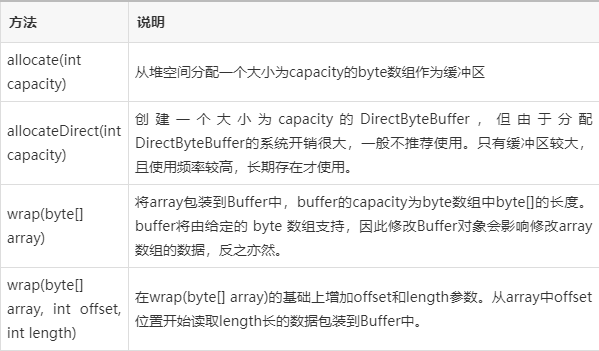
Creating a ByteBuffer
There are three main ways to create one:
-
Allocate a new buffer:
// Allocates a new byte buffer with the specified capacity.
// The buffer's contents are initially zero.
ByteBuffer buffer = ByteBuffer.allocate(1024); // 1 KB
-
Wrap an existing byte array:
byte[] byteArray = { 'H', 'e', 'l', 'l', 'o' }; ByteBuffer buffer = ByteBuffer.wrap(byteArray); // The buffer now directly uses the underlying array. Changes to one affect the other. -
Wrap an existing array with an offset and length:
byte[] bigArray = new byte[1000];
// ... fill bigArray with data ...
// Create a buffer that only sees a portion of the big array
ByteBuffer buffer = ByteBuffer.wrap(bigArray, 10, 100); // offset=10, length=100
Common Methods
| Category | Method | Description |
|---|---|---|
| Writing (Put) | put(byte b) |
Puts a single byte into the buffer at the current position and increments position. |
put(byte[] src) |
Puts bytes from the source array into the buffer. | |
put(ByteBuffer src) |
Puts bytes from the source buffer into this buffer. | |
| Reading (Get) | byte get() |
Reads a single byte from the current position and increments position. |
byte get(int index) |
Reads a byte from the specified index without changing the position. | |
get(byte[] dst) |
Reads bytes from the buffer into the destination array. | |
| Control | flip() |
Switches from writing mode to reading mode. |
clear() |
Prepares the buffer for a new sequence of write operations. | |
rewind() |
Rewinds the position to zero. | |
compact() |
Compacts unread data to the beginning and prepares for writing. | |
duplicate(), slice(), asReadOnlyBuffer() |
Creates views of the original buffer. | |
| Viewing Data | array() |
Returns the byte array that backs this buffer (if it has one). |
toString() |
Returns a summary of the buffer's state (e.g., java.nio.HeapByteBuffer[pos=5 lim=10 cap=10]). |
Example: Writing and Reading Data
This example demonstrates the full lifecycle of a ByteBuffer.
import java.nio.ByteBuffer;
public class ByteBufferExample {
    public static void main(String[] args) {
        // 1. Allocate a buffer
        ByteBuffer buffer = ByteBuffer.allocate(50);
        // 2. Write data into the buffer
        System.out.println("--- WRITING PHASE ---");
        System.out.println("Initial State: " + buffer);
        // position: 0, limit: 50, capacity: 50
        String message = "Hello, NIO World!";
        byte[] messageBytes = message.getBytes();
        buffer.put(messageBytes);
        System.out.println("After putting data: " + buffer);
        // position: 17 (length of message), limit: 50, capacity: 50
        // 3. Flip the buffer to prepare for reading
        System.out.println("\n--- FLIPPING PHASE ---");
        buffer.flip();
        System.out.println("After flipping: " + buffer);
        // position: 0, limit: 17, capacity: 50
        // 4. Read data from the buffer
        System.out.println("\n--- READING PHASE ---");
        byte[] receivedBytes = new byte[buffer.remaining()]; // buffer.remaining() is (limit - position)
        buffer.get(receivedBytes);
        String receivedMessage = new String(receivedBytes);
        System.out.println("Received Message: " + receivedMessage);
        System.out.println("After reading all data: " + buffer);
        // position: 17, limit: 17, capacity: 50 (Buffer is "drained")
        // 5. Prepare the buffer for reuse
        System.out.println("\n--- REUSING THE BUFFER ---");
        buffer.clear(); // Reset position to 0 and limit to capacity
        System.out.println("After clearing: " + buffer);
        // position: 0, limit: 50, capacity: 50
        // Ready to write new data!
    }
}
Output of the example:
--- WRITING PHASE ---
Initial State: java.nio.HeapByteBuffer[pos=0 lim=50 cap=50]
After putting data: java.nio.HeapByteBuffer[pos=17 lim=50 cap=50]
--- FLIPPING PHASE ---
After flipping: java.nio.HeapByteBuffer[pos=0 lim=17 cap=50]
--- READING PHASE ---
Received Message: Hello, NIO World!
After reading all data: java.nio.HeapByteBuffer[pos=17 lim=17 cap=50]
--- REUSING THE BUFFER ---
After clearing: java.nio.HeapByteBuffer[pos=0 lim=50 cap=50]
ByteBuffer and NIO Channels
ByteBuffer is the heart of Java's NIO. It's used to transfer data between Channels and Streams.
A Channel (like FileChannel or SocketChannel) represents an open connection to an entity (like a file or a network socket) that can perform I/O operations. Unlike streams, channels are bidirectional.
The classic I/O pattern with a channel looks like this:
import java.io.RandomAccessFile;
import java.nio.ByteBuffer;
import java.nio.channels.FileChannel;
public class ChannelExample {
    public static void main(String[] args) throws Exception {
        RandomAccessFile file = new RandomAccessFile("test.txt", "rw");
        FileChannel channel = file.getChannel();
        // 1. Create a buffer
        ByteBuffer buffer = ByteBuffer.allocate(1024);
        // 2. Read data from the channel INTO the buffer
        int bytesRead = channel.read(buffer);
        while (bytesRead != -1) {
            System.out.println("Read " + bytesRead + " bytes");
            // 3. Flip the buffer to prepare for reading its content
            buffer.flip();
            // 4. Process the data from the buffer
            while (buffer.hasRemaining()) {
                System.out.print((char) buffer.get());
            }
            // 5. Clear the buffer to be ready for the next read from the channel
            buffer.clear();
            bytesRead = channel.read(buffer);
        }
        file.close();
    }
}
Summary
| Feature | Description |
|---|---|
| Purpose | A high-performance container for sequences of bytes, designed for I/O operations. |
| Core Concept | Manages a block of memory with position, limit, and capacity to separate reading and writing phases. |
| Key Operation | flip() is essential to switch from writing to reading. |
| Performance | It's more efficient than traditional streams because it avoids multiple context switches between Java and native code during large data transfers. |
| Use Case | The standard way to handle data in NIO, including file I/O (FileChannel), network I/O (SocketChannel, ServerSocketChannel), and memory-mapped files (MappedByteBuffer). |