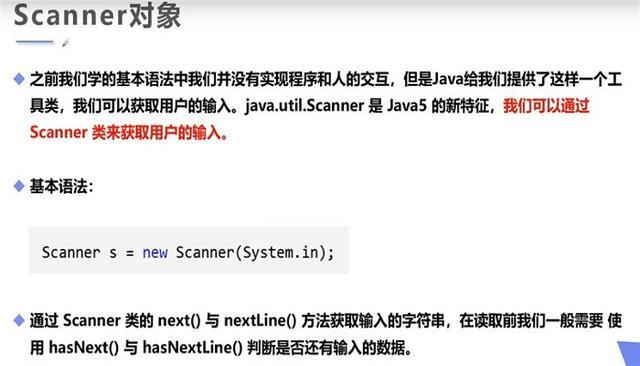
Of course! The Scanner class in Java is a powerful and commonly used tool for getting input from various sources, most commonly the user's keyboard.
Here’s a comprehensive guide covering its usage, key features, and best practices.
What is the Scanner Class?
The Scanner class, part of the java.util package, is used to parse primitive types and strings using regular expressions. It breaks its input into tokens based on a delimiter (by default, whitespace) and then allows you to read those tokens as different data types (like int, double, String, etc.).
Basic Setup: Importing and Creating a Scanner
To use Scanner, you first need to import it and then create an instance of it. The most common constructor takes an InputStream as an argument. For keyboard input, you use System.in.
import java.util.Scanner; // 1. Import the Scanner class
public class BasicScanner {
    public static void main(String[] args) {
        // 2. Create a Scanner object that reads from the standard input (keyboard)
        Scanner scanner = new Scanner(System.in);
        System.out.println("Enter your name:");
        // 3. Read a line of text
        String name = scanner.nextLine();
        System.out.println("Hello, " + name + "!");
        // 4. Always close the scanner to free up system resources
        scanner.close();
    }
}
Explanation:
import java.util.Scanner;: This line tells the Java compiler where to find theScannerclass.Scanner scanner = new Scanner(System.in);: This creates a newScannerobject,scanner, that is linked to the standard input stream (System.in), which is your keyboard.scanner.nextLine();: This method waits for the user to type a line of text and press Enter. It then returns the entire line as aString.scanner.close();: This is a crucial step. It closes the scanner and releases any underlying system resources (like the file or stream it was reading from). Forgetting to close resources can lead to memory leaks.
Common Methods for Reading Input
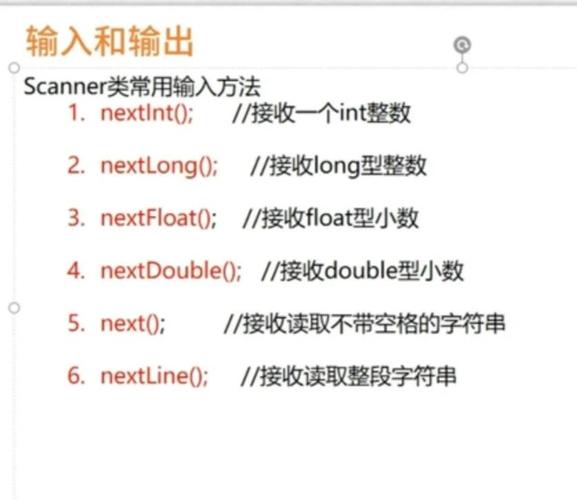
The Scanner class provides a variety of methods to read different types of data. A key thing to remember is that these methods block execution—the program will pause and wait for the user to enter something.
| Method | Description | Example |
|---|---|---|
nextLine() |
Reads the entire line of input until the user presses Enter. Returns a String. |
String fullName = scanner.nextLine(); |
next() |
Reads the next token (a sequence of characters separated by whitespace). Returns a String. |
String firstName = scanner.next(); |
nextInt() |
Reads the next token and tries to parse it as an int. Throws InputMismatchException if it can't. |
int age = scanner.nextInt(); |
nextDouble() |
Reads the next token and tries to parse it as a double. Throws InputMismatchException if it can't. |
double price = scanner.nextDouble(); |
nextBoolean() |
Reads the next token and tries to parse it as a boolean (true or false). |
boolean isStudent = scanner.nextBoolean(); |
hasNext() |
Returns true if there is another token of any type in the input. |
while (scanner.hasNext()) { ... } |
hasNextInt() |
Returns true if the next token can be read as an int without throwing an exception. |
if (scanner.hasNextInt()) { ... } |
Handling Different Data Types (The Pitfall)
A common mistake is mixing nextLine() with other methods like nextInt() or nextDouble(). This can lead to unexpected behavior because nextLine() consumes the entire line, including the newline character (\n) that is left in the input buffer by other methods.
The Problem:
import java.util.Scanner;
public class ScannerProblem {
    public static void main(String[] args) {
        Scanner scanner = new Scanner(System.in);
        System.out.print("Enter your age: ");
        int age = scanner.nextInt(); // User types "25" and presses Enter
        System.out.print("Enter your city: ");
        String city = scanner.nextLine(); // This line is skipped! It reads the leftover "\n".
        System.out.println("Age: " + age);
        System.out.println("City: " + city); // Prints an empty line
        scanner.close();
    }
}
The Solution:
There are two common ways to fix this.
Solution 1: Use nextLine() for everything and parse manually.
This is often the cleanest and safest approach.
import java.util.Scanner;
public class Solution1 {
    public static void main(String[] args) {
        Scanner scanner = new Scanner(System.in);
        System.out.print("Enter your age: ");
        int age = Integer.parseInt(scanner.nextLine()); // Read as String, then parse to int
        System.out.print("Enter your city: ");
        String city = scanner.nextLine(); // Now this works correctly
        System.out.println("Age: " + age);
        System.out.println("City: " + city);
        scanner.close();
    }
}
Solution 2: Add an extra nextLine() call to consume the leftover newline.
import java.util.Scanner;
public class Solution2 {
    public static void main(String[] args) {
        Scanner scanner = new Scanner(System.in);
        System.out.print("Enter your age: ");
        int age = scanner.nextInt();
        // Consume the leftover newline character before the next nextLine()
        scanner.nextLine();
        System.out.print("Enter your city: ");
        String city = scanner.nextLine();
        System.out.println("Age: " + age);
        System.out.println("City: " + city);
        scanner.close();
    }
}
Reading from Files
Scanner is not just for keyboard input. You can also use it to read from files. You just need to pass a File object to its constructor.
import java.io.File;
import java.io.FileNotFoundException;
import java.util.Scanner;
public class FileScanner {
    public static void main(String[] args) {
        try {
            File myFile = new File("resources/data.txt"); // Path to your file
            Scanner fileScanner = new Scanner(myFile);
            while (fileScanner.hasNextLine()) {
                String line = fileScanner.nextLine();
                System.out.println(line);
            }
            fileScanner.close();
        } catch (FileNotFoundException e) {
            System.out.println("An error occurred.");
            e.printStackTrace();
        }
    }
}
Best Practices and Alternatives
Best Practices
- Always Close the Scanner: Use a
try-with-resourcesblock to automatically close the scanner, even if an exception occurs. This is the modern, recommended way.try (Scanner scanner = new Scanner(System.in)) { // ... use scanner ... } // scanner.close() is called automatically here - Validate Input: Always check if the input is in the correct format before trying to parse it. Use
hasNextInt(),hasNextDouble(), etc., to prevent your program from crashing.System.out.print("Enter a number: "); if (scanner.hasNextInt()) { int number = scanner.nextInt(); System.out.println("You entered: " + number); } else { System.out.println("Invalid input. Please enter a valid integer."); } - Be Mindful of Delimiters: The default delimiter is whitespace. You can change it using
useDelimiter(). For example, to read a CSV file, you might set the delimiter to a comma:scanner.useDelimiter(",");
Alternatives to Scanner
For simple console applications, Scanner is great. However, for more complex or high-performance applications, consider these alternatives:
-
BufferedReader: Part of thejava.iopackage. It's generally faster thanScannerbecause it reads larger chunks of data into a buffer. It only readsStrings, so you have to handle parsing manually.import java.io.BufferedReader; import java.io.InputStreamReader; BufferedReader reader = new BufferedReader(new InputStreamReader(System.in)); String line = reader.readLine();
-
ConsoleClass: Part ofjava.io. It's designed specifically for interacting with the user's console. It has methods likereadLine()andreadPassword()(which hides the input). It can be more convenient but doesn't work in some non-interactive environments (like some IDEs).
Summary
| Feature | Scanner |
BufferedReader |
|---|---|---|
| Primary Use | General-purpose parsing of input (keyboard, files, strings). | High-performance reading of text from a source (keyboard, files). |
| Input Types | Can parse primitives (int, double) and String. |
Only reads Strings. Parsing must be done manually. |
| Ease of Use | Very easy for reading numbers and tokens. | Requires manual parsing but is very flexible. |
| Performance | Slower due to parsing logic. | Faster, especially for large inputs, due to buffering. |
| Exception Handling | InputMismatchException for type mismatches. |
IOException for general I/O errors. |
For most beginner and intermediate Java programs, Scanner is the perfect choice for handling user input due to its simplicity and built-in parsing capabilities. Just remember to close it properly and be cautious when mixing different next...() methods.