Of course. Let's break down "Java Heap Space" in detail, from what it is to how to diagnose and fix errors related to it.

What is the Java Heap Space?
In simple terms, the Java Heap Space is the part of memory where all Java objects are created. When you use the new keyword in your code to create an object, that object is stored in the heap.
It's a shared memory space that is accessible by all threads running inside a single Java Virtual Machine (JVM). The heap is managed automatically by the JVM's Garbage Collector (GC).
Key Characteristics of the Heap:
- Shared: All threads in the JVM can access the heap.
- Dynamic: Its size can change during the runtime of the application (unless configured otherwise).
- Managed by GC: The garbage collector reclaims memory from objects that are no longer in use (i.e., there are no more references to them).
- Bounded: The heap has a maximum size, which you can configure when you start the JVM. If you try to store more data than this maximum size allows, you get an
OutOfMemoryError.
The Heap vs. The Stack
It's crucial to distinguish the heap from the Java Stack. They serve different purposes.
| Feature | Java Heap Space | Java Stack |
|---|---|---|
| Purpose | Stores objects and arrays. | Stores method calls and local variables. |
| Location | A large, shared memory area. | A smaller, memory area for each thread. |
| Lifetime | Lives as long as there is at least one reference to it. | Lives for the duration of a method call (pushed on the stack when the method is called, popped when it returns). |
| Management | Managed by the Garbage Collector. | Managed by the JVM automatically (LIFO - Last-In, First-Out). |
| Size | Can be large (e.g., hundreds of MBs or GBs). | Small and fixed per thread. |
| Error | java.lang.OutOfMemoryError: Java heap space |
java.lang.StackOverflowError |
Example:
public class Example {
    public static void main(String[] args) {
        // 1. 'myList' is a reference variable on the stack.
        // 2. The new ArrayList() object is created on the heap.
        List<String> myList = new ArrayList<>();
        // 3. The "Hello" string is also an object, created on the heap.
        // 4. The reference 's' is on the stack.
        String s = "Hello";
        // 5. The 'myList' reference (on the stack) now points to the ArrayList object (on the heap).
        myList.add(s);
    }
}
The OutOfMemoryError: Java heap space
This is the most common error related to the heap. It means your application has run out of memory in the heap to create new objects.
Why does it happen?
The error occurs when the Garbage Collector cannot free up enough memory to accommodate a new object, and the heap has reached its maximum configured size.
Common causes include:
-
Memory Leaks: This is the #1 cause. A memory leak happens when objects are no longer needed but are still being referenced by the application, preventing the GC from cleaning them up.
 (图片来源网络,侵删)
- Example: Adding objects to a cache or a collection but never removing them.
- Example: Static collections that grow indefinitely.
-
Large Data Loads: The application is legitimately trying to process a very large amount of data all at once (e.g., loading a massive file into memory, processing a huge result set from a database).
-
Inefficient Algorithm: An algorithm that creates an excessive number of temporary objects in a loop, overwhelming the GC's ability to clean them up fast enough.
-
Insufficient Heap Size: The heap is simply too small for the application's needs. This is common in production environments where the default heap size (e.g., 1/4 of the machine's RAM) might not be enough.
How to Diagnose and Fix OutOfMemoryError
Follow these steps to identify the root cause and solve the problem.
Step 1: Get a Heap Dump
A heap dump is a snapshot of the memory at a specific point in time. It shows you exactly which objects are in the heap, how many there are, and what is keeping them alive.
How to generate a heap dump:
-
On
OutOfMemoryError: You can configure the JVM to automatically generate a heap dump when the error occurs. Add these JVM flags:-XX:+HeapDumpOnOutOfMemoryError -XX:HeapDumpPath=/path/to/dumps/ -
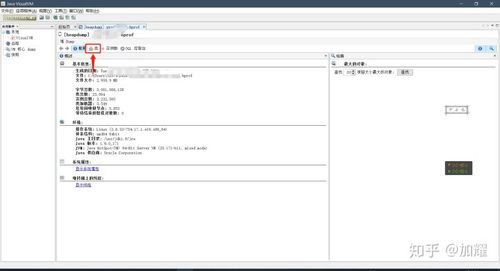
Manually using JCMD (JDK 6+):
# Find the Java process ID (PID)
jps -l
# Generate the heap dump for the PID
jcmd <PID> GC.heap_dump /path/to/dumps/dump.hprof
Step 2: Analyze the Heap Dump
Use a memory analysis tool to inspect the .hprof file. The best tool for this is Eclipse MAT (Memory Analyzer Tool).
What to look for in Eclipse MAT:
- Leak Suspects Report: MAT automatically generates a report that often pinpoints the area of the heap causing the problem. It's a great starting point.
- Dominator Tree: This view is extremely powerful. It shows you which objects are "dominating" large chunks of memory. If you see a large collection (like a
HashMaporArrayList) at the top of the dominator tree, it's likely holding onto a lot of objects that should have been garbage collected. - Histogram: This shows you a list of all classes and the number of instances and their total size. Look for unexpectedly large numbers of a particular class (e.g., millions of
Stringobjects or customUserobjects). - Path to GC Roots: This is the most critical feature. When you find a large object, you can ask MAT: "What is keeping this object alive?". It will show you the chain of references from the object back to a "GC Root" (like a static variable, a running thread, or a JNI reference). This chain reveals the leak.
Step 3: Implement Fixes
Based on your analysis, apply the appropriate fix.
| Diagnosis | Fix |
|---|---|
| Memory Leak (e.g., a static cache growing forever) | Code Fix: Review the code. Ensure objects are removed from the cache when they are no longer needed. Use a weak reference cache (WeakHashMap) if appropriate. |
| Processing a large file all at once | Code Fix: Implement streaming or batch processing. Read the file in chunks instead of loading the entire file into a single byte[] or String. |
| Inefficient object creation in a loop | Code Fix: Refactor the code. Reuse objects, use primitive types instead of their wrapper classes (e.g., int instead of Integer), or optimize the algorithm. |
| Heap size is simply too small | Configuration Fix: Increase the maximum heap size using JVM flags. -Xms512m -Xmx2g ( -Xms is initial heap size, -Xmx is maximum heap size). |
Step 4: Monitor and Tune
After fixing the bug, it's good practice to monitor your application's memory usage in production. Tools like VisualVM (bundled with the JDK), JConsole, or APM solutions (like New Relic, Datadog) can help you track heap usage, GC activity, and catch issues before they cause an OutOfMemoryError.
You can also tune the Garbage Collector itself (e.g., switch from the default GC to G1GC or ZGC for better performance with larger heaps).
Summary
| Concept | Description |
|---|---|
| What it is | The memory area where all Java objects are created. |
| Managed by | The Garbage Collector (GC). |
| Error | java.lang.OutOfMemoryError: Java heap space |
| Main Cause | Memory leaks or processing data larger than the heap's capacity. |
| Diagnosis | Generate a heap dump and analyze it with a tool like Eclipse MAT. |
| Fix | Correct the memory leak in the code, or increase the heap size (-Xmx). |