Of course! Using Python with HiveServer2 is the standard way to interact with Apache Hive from a Python application. The primary library for this is pyhive.
Here's a comprehensive guide covering everything from installation to advanced usage, including error handling and connection management.
Prerequisites
Before you start, you need:
- A running Hadoop/Hive cluster.
- HiveServer2 service running on your cluster. Note the host and port (default is
10000). - Authentication credentials: A username and password. You might also need to configure Kerberos for secure clusters.
- The PyHive library installed in your Python environment.
Installation
You can install pyhive using pip. It's a good practice to install it within a virtual environment.
# Create and activate a virtual environment (optional but recommended)
python -m venv hive_env
source hive_env/bin/activate  # On Windows: hive_env\Scripts\activate
# Install pyhive
pip install pyhive
pyhive is a lightweight library that acts as a client. It requires a separate library to handle the low-level communication protocol (Thrift). For HiveServer2, you need thrift and thrift_sasl.

# Install the required Thrift libraries
pip install thrift thrift_sasl
Basic Connection and Query Execution
The main class you'll use is pyhive.hive.Connection. You create a connection object, then use a cursor to execute queries.
Example: Simple Query
This example connects to Hive, runs a simple query, and prints the results.
from pyhive import hive
# Connection details
host = 'your-hive-server-host'  # e.g., 'localhost' or your cluster's hostname
port = 10000
database = 'default' # The database to connect to
username = 'your_username' # Your Hive username
try:
    # 1. Establish a connection
    # The auth parameter can be 'NONE', 'NOSASL', 'LDAP', 'KERBEROS', etc.
    conn = hive.Connection(host=host, port=port, database=database, username=username)
    # 2. Create a cursor
    cursor = conn.cursor()
    # 3. Execute a query
    # Note: HiveQL queries are strings. Use triple quotes for multi-line queries.
    query = "SELECT * FROM your_table_name LIMIT 10"
    cursor.execute(query)
    # 4. Fetch the results
    print(f"--- Query: {query} ---")
    print(cursor.fetchall())
    # 5. Get column names (optional but very useful)
    print("\n--- Column Names ---")
    print(cursor.description)
except Exception as e:
    print(f"An error occurred: {e}")
finally:
    # 6. Close the connection
    if 'conn' in locals() and conn:
        conn.close()
        print("\nConnection closed.")
Explanation:
hive.Connection(...): Creates a connection object. You must provide thehostandport.conn.cursor(): Creates a cursor object, which is used to execute commands and fetch results.cursor.execute(query): Sends the SQL/HiveQL query to the server.cursor.fetchall(): Retrieves all the rows from the result set as a list of tuples.cursor.description: A read-only attribute that returns a list of tuples describing the columns in the result set. Each tuple contains(name, type_code, display_size, internal_size, precision, scale, null_ok). This is great for building dynamic applications.finallyblock: This ensures thatconn.close()is always called, even if an error occurs, preventing resource leaks.
Fetching Results in Different Ways
fetchone(): Fetches the next single row from the result set.fetchmany(size): Fetches the nextsizenumber of rows.fetchall(): Fetches all remaining rows.
# ... (connection setup) ...
cursor.execute("SELECT * FROM your_table LIMIT 5")
print("--- Using fetchone() ---")
while True:
    row = cursor.fetchone()
    if row is None:
        break
    print(row)
print("\n--- Using fetchmany(2) ---")
cursor.execute("SELECT * FROM your_table LIMIT 5")
while True:
    rows = cursor.fetchmany(2) # Fetch 2 rows at a time
    if not rows:
        break
    print(rows)
Handling Large Datasets
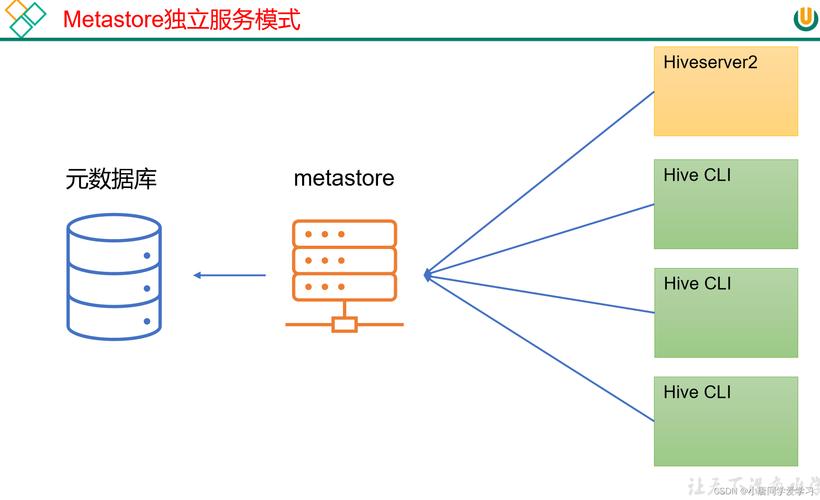
For very large tables, fetchall() will load all the data into your Python application's memory, which can cause it to crash. The best practice is to process rows one by one or in batches.
# --- Efficient way to process large datasets ---
cursor.execute("SELECT * FROM very_large_table")
# Process rows one by one without loading everything into memory
for row in cursor:
    # Do something with each row, e.g., transform, write to a file, etc.
    print(row)
    # Example: if row[0] is an ID, you could process it here
    # process_data(row)
Authentication Methods
Hive clusters can be secured in different ways. pyhive supports several authentication mechanisms.
a. No Authentication (For development/ insecure clusters)
This is the default if you don't specify anything.
conn = hive.Connection(host='localhost', port=10000)
b. LDAP Authentication
For clusters using LDAP for user authentication.
conn = hive.Connection(
    host='localhost',
    port=10000,
    username='your_ldap_user',
    password='your_ldap_password',
    auth='LDAP'
)
c. Kerberos Authentication (Most common for secure enterprise clusters)
This is more complex and requires you to have a Kerberos ticket.
Step 1: Get a Kerberos Ticket
Before running your Python script, you must have a valid Kerberos ticket. You typically get this using the kinit command in your terminal.
kinit -f your_principal@YOUR_REALM.COM
# Example: kinit -f user@EXAMPLE.COM
Step 2: Configure the Python Script
You need to tell pyhive which principal to use on the HiveServer2 end.
from pyhive import hive
# The service principal for HiveServer2 on your cluster
# Format: hive/_HOST@YOUR_REALM.COM
# _HOST is a placeholder that Hive will replace with the FQDN of the server.
service_principal = "hive/_HOST@EXAMPLE.COM"
conn = hive.Connection(
    host='your-hive-server-host',
    port=10000,
    database='default',
    auth='KERBEROS',
    kerberos_service_principal=service_principal
)
# ... rest of the code ...
Error Handling
Always wrap your database logic in try...except blocks. The pyhive library can raise various exceptions, the most common being pyhive.hive.OperationalError.
from pyhive import hive
from pyhive.hive import OperationalError
try:
    conn = hive.Connection(host='localhost', port=10000)
    cursor = conn.cursor()
    cursor.execute("SELECT * FROM non_existent_table")
except OperationalError as e:
    print(f"Database error: {e}")
    # This often happens if the table doesn't exist, query is invalid,
    # or there's a permission issue.
except Exception as e:
    print(f"An unexpected error occurred: {e}")
finally:
    if 'conn' in locals() and conn:
        conn.close()
Advanced: Using with Pandas
A very common use case is to load Hive query results directly into a Pandas DataFrame for analysis. The pandas.read_sql_query function makes this incredibly easy.
First, make sure you have pandas installed:
pip install pandas
import pandas as pd
from pyhive import hive
host = 'your-hive-server-host'
port = 10000
database = 'default'
username = 'your_username'
# Define the query
query = "SELECT * FROM your_table_name WHERE some_column > 100"
try:
    # Use pandas to read the SQL query directly into a DataFrame
    df = pd.read_sql_query(query, hive.Connection(host=host, port=port, database=database, username=username))
    # Now you can work with the DataFrame
    print(f"Successfully loaded DataFrame with {len(df)} rows.")
    print("\nFirst 5 rows:")
    print(df.head())
    print("\nDataFrame Info:")
    df.info()
except Exception as e:
    print(f"An error occurred: {e}")
This is the recommended approach for data analysis tasks as it's concise and leverages the power of Pandas.
Summary and Best Practices
- Always close connections: Use a
try...finallyblock to ensureconn.close()is called. - Process large datasets row-by-row: Avoid
fetchall()for large tables to prevent memory issues. - Handle exceptions: Catch
OperationalErrorand other exceptions gracefully. - Use Pandas for analysis: For data manipulation and analysis,
pd.read_sql_queryis the most efficient and readable method. - Secure your credentials: Avoid hardcoding passwords in your scripts. Use environment variables or a secrets management tool for production code.
- Test your connection: Start with a simple
SELECT 1;query to ensure your connection parameters and authentication are correct before running complex queries.