Of course! In Python, "color index" can refer to a few different concepts depending on the context. Here’s a breakdown of the most common meanings and how to work with them.
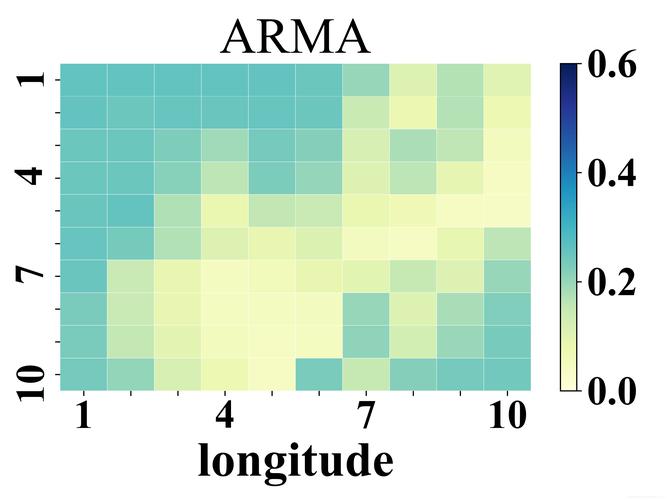
Color Index in Matplotlib (Colormaps and Normalization)
This is the most frequent use of the term in data visualization. A "color index" here is a single numerical value that is mapped to a specific color using a colormap. The process involves two key steps:
- Normalization: You map your data values (which might be in any range, e.g., 0-1000) to a standard range of
[0, 1]. - Colormap Application: You use this normalized
[0, 1]value as an "index" to look up a color in a colormap.
Key Classes and Functions:
matplotlib.colors.Normalize: The standard class for normalization.matplotlib.cm.Colormap: An object that maps a[0, 1]index to an RGBA (Red, Green, Blue, Alpha) color.matplotlib.cm.get_cmap(): A function to get a colormap by name (e.g., 'viridis', 'plasma').
Example: Mapping Data Values to Colors
Let's say we have some data and we want to create a scatter plot where each point's color represents its value.
import numpy as np
import matplotlib.pyplot as plt
import matplotlib.colors as mcolors
# 1. Sample Data
# Let's create data ranging from 10 to 500
data_values = np.random.uniform(10, 500, 100)
x_coords = np.random.rand(100) * 100
y_coords = np.random.rand(100) * 100
# 2. Define the Colormap
# 'viridis' is a popular, perceptually uniform colormap
cmap_name = 'viridis'
cmap = plt.get_cmap(cmap_name)
# 3. Normalize the Data
# We need to map our data range (10-500) to the colormap range (0-1)
norm = mcolors.Normalize(vmin=10, vmax=500)
# 4. Create the "Color Index"
# The normalized values are our color indices
color_indices = norm(data_values)
# 5. Map the Color Index to an Actual Color
# We can get the RGBA color for each data point
colors_from_cmap = cmap(color_indices)
# 6. Plot the Data
fig, (ax1, ax2) = plt.subplots(1, 2, figsize=(12, 5))
# Plot 1: Scatter plot using the colors
scatter = ax1.scatter(x_coords, y_coords, c=data_values, cmap=cmap_name, norm=norm)
ax1.set_title(f"Scatter Plot with '{cmap_name}' Colormap")
fig.colorbar(scatter, ax=ax1, label='Data Value')
# Plot 2: Show the colormap itself
gradient = np.linspace(0, 1, 256)
gradient = np.vstack((gradient, gradient))
ax2.imshow(gradient, aspect='auto', cmap=cmap_name)
ax2.set_title(f"'{cmap_name}' Colormap Gradient")
ax2.set_xticks([0, 64, 128, 192, 255])
ax2.set_xticklabels([f"{int(norm.inverse(x))}" for x in [0, 0.25, 0.5, 0.75, 1]])
ax2.set_yticks([])
plt.tight_layout()
plt.show()
In this example, color_indices is the "color index". It's the normalized value that matplotlib uses internally to pick a color from the cmap.
Color Index in Image Processing (Pixel Values)
In image processing, an image is essentially a grid (or array) of pixels. Each pixel has a color, which is represented by one or more numerical values.
- Grayscale Image: A single 2D array where the "color index" of a pixel at
(row, col)is a single integer (e.g., 0 for black, 255 for white). - RGB Image: A 3D array (or stack of 2D arrays) where the "color index" for a pixel is a triplet of integers
(R, G, B). Each value typically ranges from 0 to 255. - RGBA Image: Similar to RGB, but with a fourth value for Alpha (transparency).
Example: Accessing and Modifying Pixel Color Indices
import numpy as np
import matplotlib.pyplot as plt
# Create a sample RGB image (100x100 pixels)
# The shape is (height, width, color_channels)
height, width = 100, 100
red_channel = np.ones((height, width)) * 255   # All red
green_channel = np.zeros((height, width))      # No green
blue_channel = np.zeros((height, width))       # No blue
# Stack the channels to form the image
rgb_image = np.dstack((red_channel, green_channel, blue_channel))
# Display the image
plt.imshow(rgb_image)"A Pure Red Image")
plt.axis('off')
plt.show()
# --- Accessing a "Color Index" (Pixel Value) ---
# Get the color at the center of the image
center_y, center_x = height // 2, width // 2
pixel_color_index = rgb_image[center_y, center_x]
print(f"Shape of the image array: {rgb_image.shape}")
print(f"Color 'index' (RGB value) at the center pixel: {pixel_color_index}")
# Output: Color 'index' (RGB value) at the center pixel: [255.   0.   0.]
# --- Modifying a "Color Index" ---
# Let's make a small white square in the top-left corner
rgb_image[10:20, 10:20] = [255, 255, 255] # White
plt.imshow(rgb_image)"Image with a White Square")
plt.axis('off')
plt.show()
Color Index in Web Development (HTML/CSS Names)
Sometimes you might want to map an index (like an integer from 0 to 9) to a predefined set of color names (e.g., for a chart or a UI element). You can create a simple list or dictionary to do this.
Example: Mapping an Integer to a CSS Color Name
# A list of CSS color names
css_colors = [
    'red', 'green', 'blue', 'yellow', 'purple',
    'orange', 'cyan', 'magenta', 'brown', 'pink'
]
# Function to get a color by index
def get_color_by_index(idx):
    """Returns a CSS color name based on an index."""
    if 0 <= idx < len(css_colors):
        return css_colors[idx]
    else:
        return 'gray' # Default color for out-of-bounds index
# --- Usage ---
# Get the color for item 3
color_for_item_3 = get_color_by_index(3)
print(f"Color for index 3 is: {color_for_item_3}") # Output: yellow
# Get the color for item 10 (out of bounds)
color_for_item_10 = get_color_by_index(10)
print(f"Color for index 10 is: {color_for_item_10}") # Output: gray
# You can use these with a plotting library like matplotlib
labels = ['A', 'B', 'C', 'D', 'E', 'F']
indices = range(len(labels))
# Map indices to colors
bar_colors = [get_color_by_index(i) for i in indices]
plt.bar(indices, [10, 15, 7, 12, 9, 11], color=bar_colors)
plt.xticks(indices, labels)"Bar Chart with Indexed CSS Colors")
plt.show()
Summary Table
| Context | Meaning of "Color Index" | Key Python Tools | Example Use Case |
|---|---|---|---|
| Matplotlib | A normalized value [0, 1] used to select a color from a colormap. |
matplotlib.colors.Normalize, plt.get_cmap(), cmap(value) |
Creating heatmaps, scatter plots, or any plot where color represents a data dimension. |
| Image Processing | The numerical value(s) representing a pixel's color (e.g., a single grayscale value or an RGB triplet). | numpy, PIL (Pillow), matplotlib.image |
Manipulating images, computer vision, analyzing pixel data. |
| General Mapping | An integer key used to look up a color from a predefined list or dictionary. | list, dict |
Assigning fixed colors to categories in a chart or UI elements. |