Of course! Here is a comprehensive guide to the List interface in Java, covering its core concepts, common implementations, usage, and best practices.
What is a List in Java?
A List is an interface in the Java Collections Framework that represents an ordered collection (also known as a sequence). It allows you to store a group of elements where:
- Duplicates are allowed: You can have multiple elements that are equal to each other.
- Order is preserved: Elements are stored in the order they are added. This order is maintained when you iterate over the list.
- Elements are indexed: Each element has a specific position (index), starting from
0.
The List interface is part of the java.util package and extends the Collection interface.
Key Characteristics
| Feature | Description |
|---|---|
| Order | Maintains insertion order. |
| Duplicates | Allows duplicate elements. |
| Null Elements | Allows any number of null elements (unless restricted by a specific implementation). |
| Random Access | Some implementations (like ArrayList) allow fast, constant-time access to elements by their index. |
| Thread Safety | Most implementations are not thread-safe by default. |
Common List Implementations
You can't instantiate an interface directly, so you always use one of its concrete classes. Here are the most common ones:
| Implementation | Description | When to Use It |
|---|---|---|
ArrayList |
A resizable-array implementation of the List interface. It's the most common and versatile List. |
Default choice. Use when you need fast random access (get(index)) and are doing more reads than writes. |
LinkedList |
Implements the List interface and also the Deque interface. It stores elements as nodes with links to the next and previous elements. |
Use when you need frequent insertions or deletions in the middle of the list. |
Vector |
A legacy class similar to ArrayList, but it is synchronized (thread-safe). It's generally slower and considered a legacy class. |
Rarely used in modern code. Prefer Collections.synchronizedList(new ArrayList<>()) or CopyOnWriteArrayList. |
Stack |
A legacy class that extends Vector and implements a Last-In-First-Out (LIFO) stack. |
Rarely used. Prefer the Deque interface (e.g., ArrayDeque) for LIFO behavior. |
Core Methods of the List Interface
Here are the most frequently used methods:
| Method Signature | Description |
|---|---|
add(E e) |
Appends the specified element to the end of the list. |
add(int index, E e) |
Inserts the specified element at the specified position in the list. |
get(int index) |
Returns the element at the specified position in the list. |
set(int index, E e) |
Replaces the element at the specified position with the specified element. |
remove(int index) |
Removes the element at the specified position. |
remove(Object o) |
Removes the first occurrence of the specified element. |
size() |
Returns the number of elements in the list. |
isEmpty() |
Returns true if this list contains no elements. |
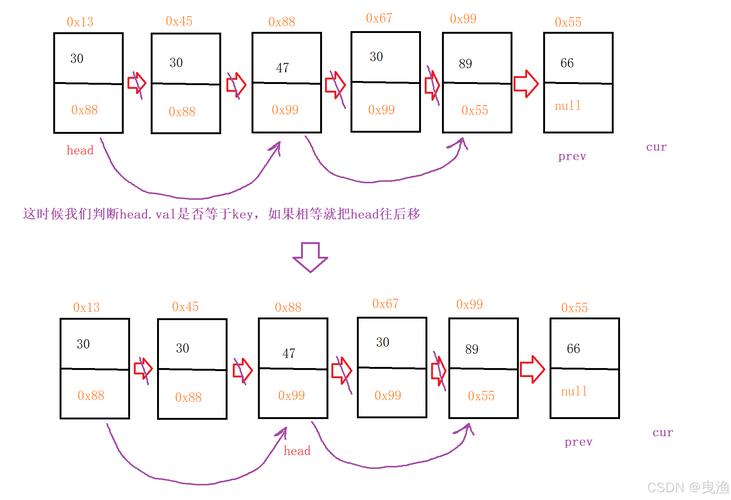
contains(Object o) |
Returns true if this list contains the specified element. |
clear() |
Removes all of the elements from this list. |
iterator() |
Returns an iterator over the elements in this list in proper sequence. |
toArray() |
Returns an array containing all of the elements in this list in proper sequence. |
Code Examples
Basic Operations with ArrayList
This is the most common scenario. We'll create a list of strings and perform basic operations.
import java.util.ArrayList;
import java.util.List;
public class ListExample {
    public static void main(String[] args) {
        // 1. Create a new ArrayList
        List<String> fruits = new ArrayList<>();
        // 2. Add elements to the list
        fruits.add("Apple");
        fruits.add("Banana");
        fruits.add("Orange");
        fruits.add("Apple"); // Duplicate is allowed
        System.out.println("Initial list: " + fruits); // Output: [Apple, Banana, Orange, Apple]
        // 3. Add an element at a specific index
        fruits.add(1, "Mango");
        System.out.println("After adding 'Mango' at index 1: " + fruits); // Output: [Apple, Mango, Banana, Orange, Apple]
        // 4. Get an element by index
        String fruit = fruits.get(2);
        System.out.println("Fruit at index 2: " + fruit); // Output: Banana
        // 5. Replace an element at a specific index
        fruits.set(3, "Grape");
        System.out.println("After replacing index 3 with 'Grape': " + fruits); // Output: [Apple, Mango, Banana, Grape, Apple]
        // 6. Remove an element by value (removes the first occurrence)
        fruits.remove("Apple");
        System.out.println("After removing the first 'Apple': " + fruits); // Output: [Mango, Banana, Grape, Apple]
        // 7. Remove an element by index
        fruits.remove(0);
        System.out.println("After removing element at index 0: " + fruits); // Output: [Banana, Grape, Apple]
        // 8. Get the size of the list
        System.out.println("Size of the list: " + fruits.size()); // Output: 3
        // 9. Check if the list contains an element
        System.out.println("Does the list contain 'Grape'? " + fruits.contains("Grape")); // Output: true
        // 10. Iterate over the list using an enhanced for-loop
        System.out.println("Iterating with for-each loop:");
        for (String f : fruits) {
            System.out.println(f);
        }
    }
}
Choosing Between ArrayList and LinkedList
Let's see a performance difference.
import java.util.ArrayList;
import java.util.LinkedList;
import java.util.List;
public class ListPerformance {
    public static void main(String[] args) {
        final int N = 100000;
        List<Integer> arrayList = new ArrayList<>();
        List<Integer> linkedList = new LinkedList<>();
        // --- Test adding to the end ---
        long startTime = System.nanoTime();
        for (int i = 0; i < N; i++) {
            arrayList.add(i); // O(1) amortized
        }
        long endTime = System.nanoTime();
        System.out.println("ArrayList add to end: " + (endTime - startTime) / 1_000_000 + " ms");
        startTime = System.nanoTime();
        for (int i = 0; i < N; i++) {
            linkedList.add(i); // O(1)
        }
        endTime = System.nanoTime();
        System.out.println("LinkedList add to end: " + (endTime - startTime) / 1_000_000 + " ms");
        // --- Test adding to the middle ---
        startTime = System.nanoTime();
        for (int i = 0; i < N; i++) {
            arrayList.add(arrayList.size() / 2, i); // O(n) - slow
        }
        endTime = System.nanoTime();
        System.out.println("ArrayList add to middle: " + (endTime - startTime) / 1_000_000 + " ms");
        startTime = System.nanoTime();
        for (int i = 0; i < N; i++) {
            linkedList.add(linkedList.size() / 2, i); // O(n) - but much faster than ArrayList for this
        }
        endTime = System.nanoTime();
        System.out.println("LinkedList add to middle: " + (endTime - startTime) / 1_000_000 + " ms");
        // --- Test getting by index ---
        startTime = System.nanoTime();
        for (int i = 0; i < N; i++) {
            arrayList.get(i); // O(1) - very fast
        }
        endTime = System.nanoTime();
        System.out.println("ArrayList get by index: " + (endTime - startTime) / 1_000_000 + " ms");
        startTime = System.nanoTime();
        for (int i = 0; i < N; i++) {
            linkedList.get(i); // O(n) - very slow
        }
        endTime = System.nanoTime();
        System.out.println("LinkedList get by index: " + (endTime - startTime) / 1_000_000 + " ms");
    }
}
Typical Output:
ArrayList add to end: 15 ms
LinkedList add to end: 20 ms
ArrayList add to middle: 1325 ms
LinkedList add to middle: 25 ms
ArrayList get by index: 5 ms
LinkedList get by index: 4123 ms
Conclusion:
ArrayListis king for random access (get) and adding/removing at the end.LinkedListis much better for adding/removing elements from the middle of the list, but is terrible for random access.
Best Practices
-
Prefer Interfaces for Type Declarations: Always code to the
Listinterface, not a specific implementation. This makes your code more flexible.// Good: Flexible, you can change implementation easily List<String> names = new ArrayList<>(); // Bad: Hard to change the implementation later ArrayList<String> names = new ArrayList<>();
-
Choose the Right Implementation:
- Use
ArrayListby default. It's fast and efficient for most use cases. - Use
LinkedListif you are doing manyadd()orremove()operations in the middle of the list. - Use
Vectoronly if you need thread-safety and are okay with the performance overhead. Otherwise, useCollections.synchronizedList()orCopyOnWriteArrayList.
- Use
-
Be Aware of
NullPointerException: You cannot addnullto a list if you are using certain methods that don't allow it (e.g.,sortwith aComparatorthat doesn't handlenull). Also, callingget()on an index that doesn't exist throwsIndexOutOfBoundsException. -
Use
for-eachfor Iteration: When you just need to iterate through all elements without modifying the list, the enhancedfor-eachloop is clean and readable.for (String item : myList) { // process item } -
Use an Iterator for Safe Removal: If you need to remove elements from a list while iterating, you must use an
Iterator. Using afor-eachloop or a traditionalforloop withremove()will throw aConcurrentModificationException.// Correct way to remove while iterating Iterator<String> iterator = fruits.iterator(); while (iterator.hasNext()) { String fruit = iterator.next(); if (fruit.startsWith("A")) { iterator.remove(); // Safely removes the last element returned by next() } }