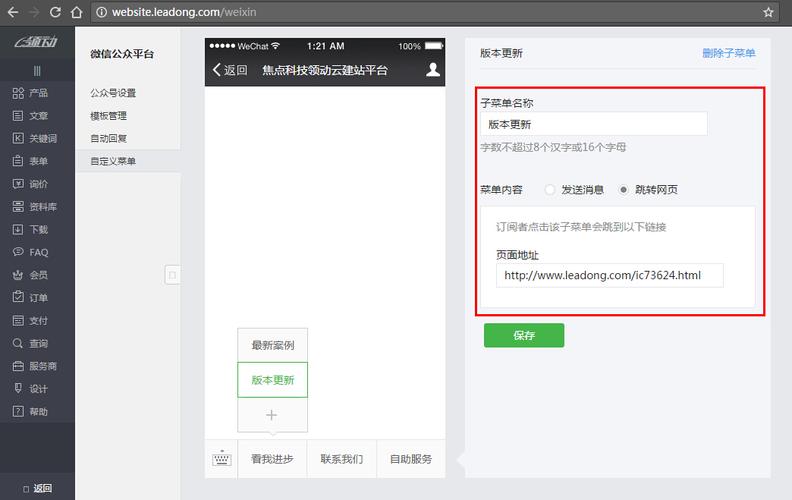
微信公众平台的自定义菜单创建是一个典型的 RESTful API 调用过程,核心步骤是:
(图片来源网络,侵删)
- 获取 Access Token:调用所有接口的凭证。
- 构建菜单数据:按照微信规定的 JSON 格式,组装你的菜单结构。
- 发送 HTTP POST 请求:将菜单数据发送到微信提供的接口地址。
下面我们分步讲解,并提供完整的 Java 代码示例。
第一步:准备工作
在开始写代码之前,你需要在微信公众平台后台完成以下配置:
-
获取 AppID 和 AppSecret:
- 登录 微信公众平台。
- 进入 “开发” -> “基本配置” 页面。
- 你可以在这里找到你的
AppID和AppSecret,这两个是调用 API 的关键。
-
服务器 IP 白名单:
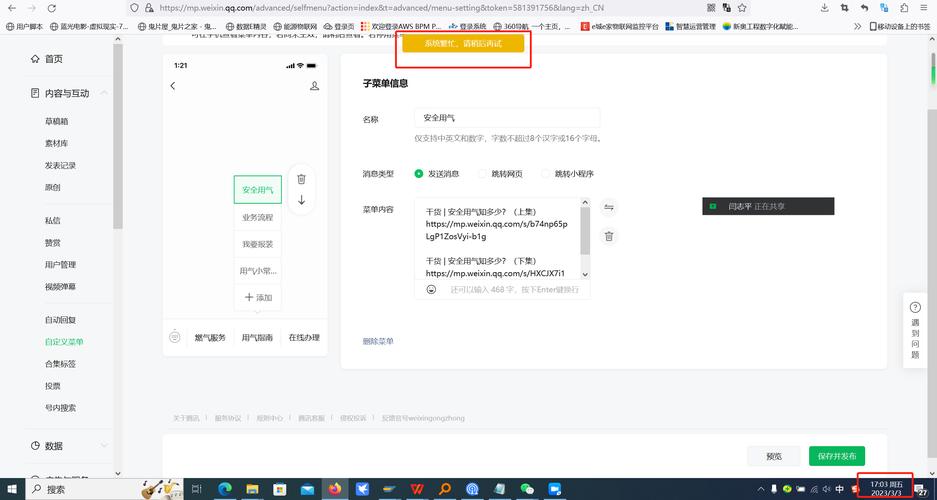 (图片来源网络,侵删)
- 在 “基本配置” 页面,找到 “开发者权限” -> “服务器 IP 白名单”。
- 将你的 Java 应用程序所在的服务器 IP 地址添加到白名单中,这是为了安全,只有白名单内的服务器才能调用 API。
第二步:核心逻辑与代码实现
我们将使用 Java 和流行的 OkHttp 库来发送 HTTP 请求,以及 Gson 库来处理 JSON 数据。
添加 Maven 依赖
在你的 pom.xml 文件中添加以下依赖:
<dependencies>
    <!-- OkHttp: 用于发送 HTTP 请求 -->
    <dependency>
        <groupId>com.squareup.okhttp3</groupId>
        <artifactId>okhttp</artifactId>
        <version>4.12.0</version> <!-- 使用较新稳定版本 -->
    </dependency>
    <!-- Gson: 用于处理 JSON -->
    <dependency>
        <groupId>com.google.code.gson</groupId>
        <artifactId>gson</artifactId>
        <version>2.10.1</version> <!-- 使用较新稳定版本 -->
    </dependency>
</dependencies>
创建菜单数据模型
我们需要创建 Java 类来与微信的 JSON 菜单数据结构对应,一个典型的菜单结构包含 button 数组,每个 button 可以是 click(点击事件)、view(跳转链接)或 sub_button(子菜单)。
// WxMenu.java - 菜单的根对象
import java.util.List;
public class WxMenu {
    private List<Button> button;
    // Getters and Setters
    public List<Button> getButton() {
        return button;
    }
    public void setButton(List<Button> button) {
        this.button = button;
    }
}
// Button.java - 菜单按钮
public class Button {
    private String name; // 按钮名称
    private String type; // 按钮类型: click, view, miniprogram 等
    private String key; // click 事件key
    private String url; // view 链接
    private String appid; // 小程序 appid
    private String pagepath; // 小程序页面路径
    private List<Button> sub_button; // 子按钮
    // Getters and Setters
    public String getName() { return name; }
    public void setName(String name) { this.name = name; }
    public String getType() { return type; }
    public void setType(String type) { this.type = type; }
    public String getKey() { return key; }
    public void setKey(String key) { this.key = key; }
    public String getUrl() { return url; }
    public void setUrl(String url) { this.url = url; }
    public String getAppid() { return appid; }
    public void setAppid(String appid) { this.appid = appid; }
    public String getPagepath() { return pagepath; }
    public void setPagepath(String pagepath) { this.pagepath = pagepath; }
    public List<Button> getSub_button() { return sub_button; }
    public void setSub_button(List<Button> sub_button) { this.sub_button = sub_button; }
}
编写 API 调用工具类
这个工具类将包含获取 Access Token 和创建菜单的核心方法。
(图片来源网络,侵删)
import com.google.gson.Gson;
import okhttp3.*;
import java.io.IOException;
import java.util.ArrayList;
import java.util.List;
public class WeChatApiUtil {
    // 替换成你自己的 AppID 和 AppSecret
    private static final String APP_ID = "你的AppID";
    private static final String APP_SECRET = "你的AppSecret";
    // 微信 API 地址
    private static final String ACCESS_TOKEN_URL = "https://api.weixin.qq.com/cgi-bin/token?grant_type=client_credential&appid=%s&secret=%s";
    private static final String CREATE_MENU_URL = "https://api.weixin.qq.com/cgi-bin/menu/create?access_token=%s";
    private static final OkHttpClient client = new OkHttpClient();
    private static final Gson gson = new Gson();
    /**
     * 获取 Access Token
     * @return Access Token 字符串
     * @throws IOException 如果请求失败
     */
    public static String getAccessToken() throws IOException {
        String url = String.format(ACCESS_TOKEN_URL, APP_ID, APP_SECRET);
        Request request = new Request.Builder().url(url).build();
        try (Response response = client.newCall(request).execute()) {
            if (!response.isSuccessful()) {
                throw new IOException("Unexpected code " + response + " - body: " + response.body().string());
            }
            String responseBody = response.body().string();
            // 使用 Gson 解析 JSON,提取 access_token
            AccessTokenResponse tokenResponse = gson.fromJson(responseBody, AccessTokenResponse.class);
            if (tokenResponse.getAccessToken() == null) {
                throw new IOException("Failed to get access token: " + tokenResponse.getErrmsg());
            }
            return tokenResponse.getAccessToken();
        }
    }
    /**
     * 创建自定义菜单
     * @param menu 菜单对象
     * @param accessToken Access Token
     * @throws IOException 如果请求失败
     */
    public static void createMenu(WxMenu menu, String accessToken) throws IOException {
        String url = String.format(CREATE_MENU_URL, accessToken);
        String json = gson.toJson(menu);
        RequestBody body = RequestBody.create(json, MediaType.get("application/json; charset=utf-8"));
        Request request = new Request.Builder().url(url).post(body).build();
        try (Response response = client.newCall(request).execute()) {
            if (!response.isSuccessful()) {
                throw new IOException("Unexpected code " + response + " - body: " + response.body().string());
            }
            String result = response.body().string();
            // 检查微信返回的 JSON 状态码
            WxApiResponse apiResponse = gson.fromJson(result, WxApiResponse.class);
            if (apiResponse.getErrcode() != 0) {
                throw new IOException("WeChat API Error: " + apiResponse.getErrcode() + " - " + apiResponse.getErrmsg());
            }
            System.out.println("菜单创建成功!");
        }
    }
    // 用于解析获取 Access Token 返回的 JSON
    private static class AccessTokenResponse {
        private String access_token;
        private int expires_in;
        private String errmsg;
        private int errcode;
        public String getAccessToken() { return access_token; }
        public int getExpiresIn() { return expires_in; }
        public String getErrmsg() { return errmsg; }
        public int getErrcode() { return errcode; }
    }
    // 用于解析微信 API 通用返回的 JSON
    private static class WxApiResponse {
        private int errcode;
        private String errmsg;
        public int getErrcode() { return errcode; }
        public String getErrmsg() { return errmsg; }
    }
    public static void main(String[] args) {
        try {
            // 1. 获取 Access Token
            String accessToken = getAccessToken();
            System.out.println("Access Token: " + accessToken.substring(0, 20) + "..."); // 出于安全考虑,只打印部分
            // 2. 构建菜单
            WxMenu menu = new WxMenu();
            List<Button> buttons = new ArrayList<>();
            // 第一个按钮:点击事件
            Button clickButton = new Button();
            clickButton.setName("今日歌曲");
            clickButton.setType("click");
            clickButton.setKey("V1001_TODAY_MUSIC");
            buttons.add(clickButton);
            // 第二个按钮:跳转链接
            Button viewButton = new Button();
            viewButton.setName("搜索");
            viewButton.setType("view");
            viewButton.setUrl("https://www.soso.com/");
            buttons.add(viewButton);
            // 第三个按钮:子菜单
            Button subButton = new Button();
            subButton.setName("菜单");
            subButton.setType("null"); // 标识为父按钮
            List<Button> subButtons = new ArrayList<>();
            Button subButton1 = new Button();
            subButton1.setName("二级菜单1");
            subButton1.setType("click");
            subButton1.setKey("V1001_GOOD");
            subButtons.add(subButton1);
            Button subButton2 = new Button();
            subButton2.setName("二级菜单2");
            subButton2.setType("view");
            subButton2.setUrl("https://www.soso.com/");
            subButtons.add(subButton2);
            subButton.setSub_button(subButtons);
            buttons.add(subButton);
            menu.setButton(buttons);
            // 3. 发送请求创建菜单
            createMenu(menu, accessToken);
        } catch (IOException e) {
            System.err.println("发生错误: " + e.getMessage());
            e.printStackTrace();
        }
    }
}
第三步:代码解释
-
WeChatApiUtil类:APP_ID和APP_SECRET:请务必替换成你自己的。OkHttpClient:OkHttp的核心,用于执行网络请求。Gson:Google的 JSON 库,用于将 Java 对象序列化为 JSON 字符串,以及将 JSON 字符串反序列化为 Java 对象。
-
getAccessToken()方法:- 拼接获取
access_token的 URL。 - 使用
OkHttp发送一个GET请求。 - 将返回的 JSON 响应体解析为
AccessTokenResponse对象,并提取access_token。 - 注意:
access_token有 2 小时的有效期,建议你缓存起来,过期后再重新获取,不要每次请求都调用此方法。
- 拼接获取
-
createMenu()方法:- 拼接创建菜单的 URL,并将
access_token作为参数。 - 使用
Gson将WxMenuJava 对象转换为 JSON 字符串。 - 创建一个
POST请求,并将 JSON 字符串作为请求体(RequestBody)。 - 发送请求并处理响应,微信会返回一个 JSON,其中包含
errcode(错误码)和errmsg(错误信息)。errcode为 0,表示成功。
- 拼接创建菜单的 URL,并将
-
main()方法:- 这是程序的入口,演示了如何使用上述工具。
- 构建菜单:我们创建了一个包含三个按钮的菜单。
- "今日歌曲":
type为click,用户点击后,微信服务器会推送一条click事件给你的服务器,你需要处理这个事件。key用于唯一标识这个按钮。 - "搜索":
type为view,用户点击后会直接跳转到https://www.soso.com/。 - "菜单":
type为null(或不设置type),它作为一个父按钮,下面包含两个子按钮,子按钮可以是click或view类型。
- "今日歌曲":
第四步:其他重要操作
除了创建菜单,你可能还需要查询和删除菜单。
查询菜单
public static String getMenu(String accessToken) throws IOException {
    String url = String.format("https://api.weixin.qq.com/cgi-bin/menu/get?access_token=%s", accessToken);
    Request request = new Request.Builder().url(url).build();
    try (Response response = client.newCall(request).execute()) {
        if (!response.isSuccessful()) {
            throw new IOException("Unexpected code " + response);
        }
        return response.body().string();
    }
}
删除菜单
public static void deleteMenu(String accessToken) throws IOException {
    String url = String.format("https://api.weixin.qq.com/cgi-bin/menu/delete?access_token=%s", accessToken);
    Request request = new Request.Builder().url(url).build();
    try (Response response = client.newCall(request).execute()) {
        if (!response.isSuccessful()) {
            throw new IOException("Unexpected code " + response);
        }
        String result = response.body().string();
        WxApiResponse apiResponse = gson.fromJson(result, WxApiResponse.class);
        if (apiResponse.getErrcode() != 0) {
            throw new IOException("WeChat API Error: " + apiResponse.getErrcode() + " - " + apiResponse.getErrmsg());
        }
        System.out.println("菜单删除成功!");
    }
}
注意事项
- Access Token 缓存:
access_token有效期 2 小时,一定要做好缓存,避免频繁请求导致接口调用次数超限或性能问题。 - 按钮数量限制:菜单栏最多只能有 3 个一级按钮,每个一级按钮下最多可以有 5 个二级按钮。
- 按钮名称长度:按钮名称长度不能超过 16 个汉字(或 8 个英文字母),子菜单按钮名称长度不能超过 60 个汉字(或 30 个英文字母)。
- HTTPS:所有与微信服务器的通信都必须使用
HTTPS协议。 - 错误处理:代码中已经包含了基本的错误处理,但在生产环境中,你需要更健壮的异常处理和日志记录。
通过以上步骤和代码,你就可以成功地在 Java 应用中为你的微信公众号创建自定义菜单了。