Of course! A "JSON reader" in Python typically refers to the process of reading data from a JSON file and converting it into a native Python data structure.

The core of this functionality is Python's built-in json module. It's simple, powerful, and should be your first choice for any JSON handling.
Here's a complete guide, from the basics to more advanced use cases.
The Basics: Reading a JSON File
The most common task is to read a JSON file and load its contents into a Python object (usually a dictionary or a list).
Step 1: Create a Sample JSON File
First, let's create a sample JSON file named data.json to work with.
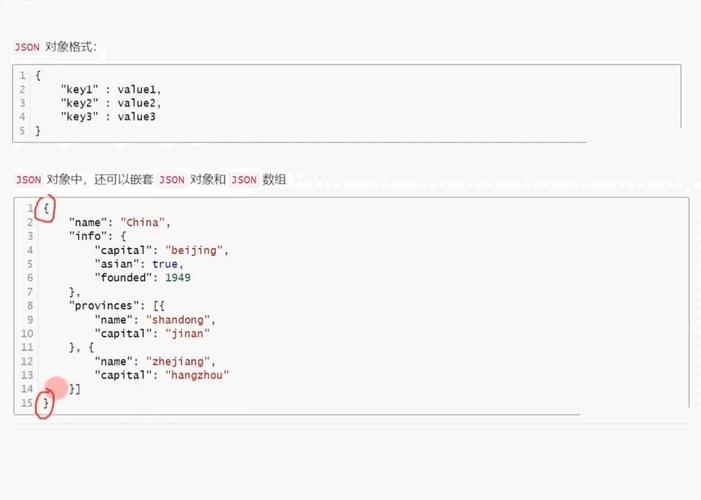
data.json
{
  "name": "John Doe",
  "age": 30,
  "isStudent": false,
  "courses": [
    {
      "title": "History",
      "credits": 3
    },
    {
      "title": "Mathematics",
      "credits": 4
    }
  ],
  "address": {
    "street": "123 Python Lane",
    "city": "Codeville"
  }
}
Step 2: Use the json Module to Read the File
The primary function for reading from a file is json.load().
read_json.py
import json
try:
    # Open the JSON file in read mode ('r')
    with open('data.json', 'r') as file:
        # Use json.load() to parse the file object and convert it to a Python dict
        data = json.load(file)
    # Now 'data' is a standard Python dictionary
    print("Successfully loaded JSON data!")
    print("-" * 20)
    # You can access the data using standard Python dictionary/list syntax
    print(f"Name: {data['name']}")
    print(f"Age: {data['age']}")
    print(f"Is Student: {data['isStudent']}")
    print("-" * 20)
    print("Courses:")
    for course in data['courses']:
        print(f"  - {course['title']} ({course['credits']} credits)")
    print("-" * 20)
    print(f"City: {data['address']['city']}")
except FileNotFoundError:
    print("Error: The file 'data.json' was not found.")
except json.JSONDecodeError:
    print("Error: The file 'data.json' is not a valid JSON.")
except Exception as e:
    print(f"An unexpected error occurred: {e}")
Explanation:
import json: Imports the necessary module.with open('data.json', 'r') as file:: Opens the file in read mode ('r'). Using awithstatement is best practice as it automatically closes the file for you.data = json.load(file): This is the key step.json.load()reads the contents of thefileobject and parses the JSON text into a corresponding Python object.- JSON objects become Python dictionaries
dict. - JSON arrays
[...]become Python listslist. - JSON strings become Python
str. - JSON numbers become Python
intorfloat. - JSON booleans (
true/false) become PythonTrue/False. - JSON
nullbecomes PythonNone.
- JSON objects become Python dictionaries
Reading JSON from a String
Sometimes your JSON data might not be in a file, but in a Python string. For this, you use json.loads() (note the s for string).
read_json_string.py
import json
json_string = '''
{
  "name": "Jane Doe",
  "skills": ["Python", "SQL", "JavaScript"]
}
'''
# Use json.loads() to parse a string
data_from_string = json.loads(json_string)
print("Data loaded from a string:")
print(f"Name: {data_from_string['name']}")
print(f"First skill: {data_from_string['skills'][0]}")
Common Scenarios & Error Handling
Handling Large Files
For very large JSON files (e.g., several gigabytes), loading the entire file into memory with json.load() can cause a MemoryError. In this case, you should use the ijson library, which is a streaming parser.
Installation:
pip install ijson
Example with ijson:
import ijson
# Assuming 'large_data.json' is a very large file
try:
    with open('large_data.json', 'rb') as file: # ijson requires binary mode ('rb')
        # items() will yield each item in the 'users' array as it's parsed
        # This is much more memory-efficient
        users = ijson.items(file, 'users.item') # 'users.item' is a path to the objects
        print("Processing users one by one...")
        for user in users:
            # Process each user object individually
            print(f"  - Processing user: {user.get('id', 'N/A')}")
            # You can do your processing here without loading all users at once
except FileNotFoundError:
    print("Error: The file was not found.")
except Exception as e:
    print(f"An error occurred: {e}")
Handling Different Encodings
JSON files should ideally be saved in UTF-8, which is the default for json.load(). If you have a file in a different encoding (like Latin-1), you can specify it when opening the file.
# For a file encoded in 'latin-1'
with open('data_latin1.json', 'r', encoding='latin-1') as file:
    data = json.load(file)
Pretty-Printing JSON
When debugging, it's helpful to print a Python object back as a nicely formatted (pretty-printed) JSON string. Use json.dumps() (dump string) with the indent parameter.
import json
data = {"name": "John", "age": 30, "isStudent": False}
# Convert the Python dict to a formatted JSON string
pretty_json_string = json.dumps(data, indent=4)
print("Pretty-printed JSON:")
print(pretty_json_string)
Output:
Pretty-printed JSON:
{
    "name": "John",
    "age": 30,
    "isStudent": false
}
Summary of Key Functions
| Function | Purpose | Input | Output |
|---|---|---|---|
json.load(file_object) |
Parses a JSON file. | A file object opened in read mode ('r'). |
A Python dict, list, etc. |
json.loads(json_string) |
Parses a JSON string. | A string containing JSON data. | A Python dict, list, etc. |
json.dump(python_object, file_object) |
Writes a Python object to a JSON file. | A Python object and a file object opened in write mode ('w'). |
Writes to the file (returns None). |
json.dumps(python_object) |
Converts a Python object to a JSON string. | A Python object. | A JSON formatted string. |
For your specific request of a "JSON reader," json.load() is the function you will use most often.