Of course! Here is a comprehensive guide to Reflection in Java, covering what it is, why it's used, how to use it, and its pros and cons.
What is Reflection in Java?
In simple terms, Reflection in Java is the ability of a program to inspect and modify its own structure and behavior at runtime.
Think of it like a program being able to look at itself in a mirror. At runtime, a reflective program can:
- Examine classes, interfaces, fields, and methods.
- Find out what modifiers a class or method has (e.g.,
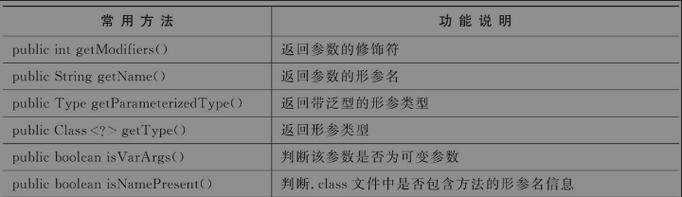
public,static,final). - Get information about a method's parameters and return types.
- Create new instances of classes, even if the class name is not known at compile time.
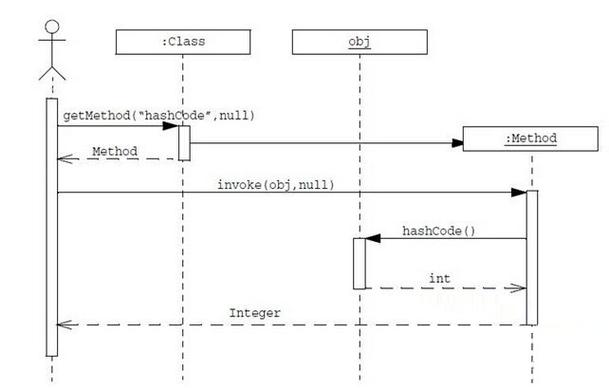
- Invoke methods on objects, even if the method is private.
- Get and set the values of fields, including private ones.
Without reflection, all of these actions must be determined at compile time. Reflection allows you to perform them at runtime.
The Core Classes for Reflection
The reflection API is primarily located in the java.lang.reflect package. The most important classes are:
Class: The entry point to the reflection API. An object of theClassclass represents a class or interface in a running Java application.Method: Represents a class method.Field: Represents a class field (or instance variable).Constructor: Represents a class constructor.Modifier: A utility class to decode class and member access modifiers.
How to Use Reflection: A Step-by-Step Guide
Let's use a simple Person class for our examples.
The Target Class
// File: Person.java
package com.example;
public class Person {
    private String name;
    private int age;
    public Person() {
        this.name = "Unknown";
        this.age = 0;
    }
    public Person(String name, int age) {
        this.name = name;
        this.age = age;
    }
    public void sayHello() {
        System.out.println("Hello, my name is " + this.name + " and I am " + this.age + " years old.");
    }
    private void secretThought() {
        System.out.println("This is a private thought.");
    }
}
Getting the Class Object
You cannot instantiate a Class object using the new keyword. Instead, you get a reference to it in one of three ways:
import com.example.Person;
public class ReflectionDemo {
    public static void main(String[] args) throws ClassNotFoundException {
        // Method 1: Using the .class literal (Recommended)
        Class<?> personClass1 = Person.class;
        // Method 2: Using the getClass() method on an instance
        Person person = new Person();
        Class<?> personClass2 = person.getClass();
        // Method 3: Using the fully qualified name of the class (Useful when class name is a String)
        String className = "com.example.Person";
        Class<?> personClass3 = Class.forName(className);
        System.out.println("Class Name: " + personClass1.getName());
        System.out.println("Simple Name: " + personClass1.getSimpleName());
        System.out.println("Package Name: " + personClass1.getPackage().getName());
    }
}
Inspecting Class Information
Once you have the Class object, you can inspect its details.
// Continuing in the main method...
System.out.println("\n--- Inspecting Class Information ---");
// Get public constructors
System.out.println("Public Constructors:");
for (java.lang.reflect.Constructor<?> constructor : personClass1.getConstructors()) {
    System.out.println("  - " + constructor);
}
// Get all declared fields (including private)
System.out.println("\nAll Declared Fields:");
for (java.lang.reflect.Field field : personClass1.getDeclaredFields()) {
    System.out.println("  - " + field.getName() + " (Type: " + field.getType().getSimpleName() + ")");
}
// Get all declared methods (including private)
System.out.println("\nAll Declared Methods:");
for (java.lang.reflect.Method method : personClass1.getDeclaredMethods()) {
    System.out.println("  - " + method.getName());
}
Creating an Instance Using a Constructor
You can create a new object using a specific constructor.

// Continuing in the main method...
System.out.println("\n--- Creating an Instance Dynamically ---");
try {
    // Get the constructor that takes a String and an int
    java.lang.reflect.Constructor<?> constructor = personClass1.getConstructor(String.class, int.class);
    // Create a new instance using the constructor
    Object personInstance = constructor.newInstance("Alice", 30);
    // We now have an Object. We can cast it to the actual type.
    Person p = (Person) personInstance;
    p.sayHello(); // Output: Hello, my name is Alice and I am 30 years old.
} catch (NoSuchMethodException | InstantiationException | IllegalAccessException | InvocationTargetException e) {
    e.printStackTrace();
}
Invoking a Method
You can call a method on an object, even if it's private.
// Continuing in the main method...
System.out.println("\n--- Invoking a Method ---");
try {
    // Create a default instance
    Object personInstance = personClass1.getConstructor().newInstance();
    // Get the public method
    Method sayHelloMethod = personClass1.getMethod("sayHello");
    System.out.println("Invoking public 'sayHello' method...");
    sayHelloMethod.invoke(personInstance); // Output: Hello, my name is Unknown and I am 0 years old.
    // Get the private method
    Method secretThoughtMethod = personClass1.getDeclaredMethod("secretThought");
    System.out.println("\nInvoking private 'secretThought' method...");
    // To access private members, you must first set them to be accessible
    secretThoughtMethod.setAccessible(true);
    secretThoughtMethod.invoke(personInstance); // Output: This is a private thought.
} catch (Exception e) {
    e.printStackTrace();
}
Modifying Field Values
You can get and set the value of a field, even a private one.
// Continuing in the main method...
System.out.println("\n--- Modifying Field Values ---");
try {
    Object personInstance = personClass1.getConstructor().newInstance();
    Person p = (Person) personInstance;
    System.out.println("Initial name: " + p.name); // Output: Unknown
    // Get the private 'name' field
    Field nameField = personClass1.getDeclaredField("name");
    // Make the private field accessible
    nameField.setAccessible(true);
    // Set the value of the field on the instance
    nameField.set(personInstance, "Bob");
    System.out.println("Modified name: " + p.name); // Output: Bob
} catch (Exception e) {
    e.printStackTrace();
}
Why Use Reflection? (Use Cases)
Reflection is a powerful but advanced feature. It's not for everyday programming but is essential in specific scenarios:
- Development Tools and IDEs: Frameworks like Eclipse, IntelliJ IDEA, and profilers use reflection to analyze classes, find their methods, and build UIs for debugging and inspection.
- Dependency Injection Frameworks: Frameworks like Spring and Hibernate use reflection to:
- Scan the classpath for beans/components.
- Inspect dependencies (
@Autowired,@Inject) and inject them at runtime. - Create instances of these beans and manage their lifecycle.
- Object Serialization (e.g., JSON/XML): Libraries like Jackson (for JSON) or Gson use reflection to inspect an object's fields and convert them into a string representation (like JSON) without needing manual mapping code.
- Testing Frameworks: JUnit and other testing tools use reflection to find methods annotated with
@Testand automatically execute them. - Dynamic Proxies: When you need to create a proxy object for an interface at runtime, reflection is used to intercept method calls.
- When the class name is not known at compile time: For example, loading a plugin from a JAR file where the class name is read from a configuration file.
Drawbacks and Risks of Reflection
Reflection is powerful because it can break the fundamental rules of Java's type system. This power comes with significant drawbacks:
- Performance Overhead: Reflection operations are significantly slower than direct code calls. Methods like
getMethod(),newInstance(), andinvoke()involve a lot of JVM lookups and security checks. Avoid using it in performance-critical loops. - Security Risks: Reflection can bypass access control modifiers (
private,protected). This can break encapsulation, a core principle of object-oriented programming. It can be a security risk if used to access sensitive data or methods. - Type Safety: Since reflection works with
Objectand genericClass<?>types, you lose compile-time type checking. Errors (like calling a method that doesn't exist) will only be caught at runtime as exceptions (NoSuchMethodException,IllegalAccessException), leading to less robust code. - Maintainability: Code that uses reflection is often harder to read, understand, and debug. The connection between the code and what it's doing is not immediately obvious.
Best Practices
- Use Reflection as a Last Resort: If you can achieve your goal with standard Java, do so.
- Cache Reflection Objects: If you need to use reflection repeatedly (e.g., in a framework), cache the
Method,Field, andConstructorobjects. The initial lookup is expensive, but subsequent calls are fast. - Handle Exceptions Gracefully: All reflection methods throw checked exceptions. Make sure to handle them appropriately (
try-catchblocks). - Minimize Accessibility: Use
setAccessible(true)only when absolutely necessary and try to revert it back tofalseif you can. - Use Modern Alternatives: For many use cases, modern Java features are a better fit:
- For Method References: Use
MethodHandle(since Java 7) for high-performance, dynamically invoked methods. - For Dynamic Code: Use the
java.lang.invokepackage, which is a more modern and safer alternative for dynamic method invocation. - For Configuration: Use annotations and annotation processing to generate code at compile time instead of inspecting it at runtime.
- For Method References: Use