Of course! Let's break down the relationship between ASCII, Unicode, and how Python handles them. This is a fundamental concept for text processing in Python.
The Short Answer (TL;DR)
- ASCII: A 7-bit character set for English (128 characters). It's a small subset of Unicode.
- Unicode: A universal character set designed to represent every character from every human language, plus symbols, emojis, etc. It uses code points (numbers like
U+0041). - Python 3: Strings are Unicode by default. When you sort strings with
sorted()or.sort(), Python sorts them based on their Unicode code point values, which is often called "Unicode sort order" or "code point order".
ASCII: The Old Standard
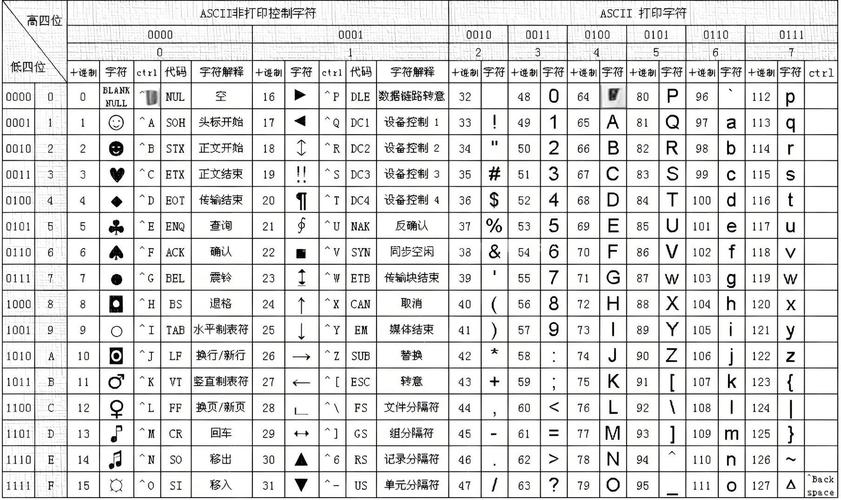
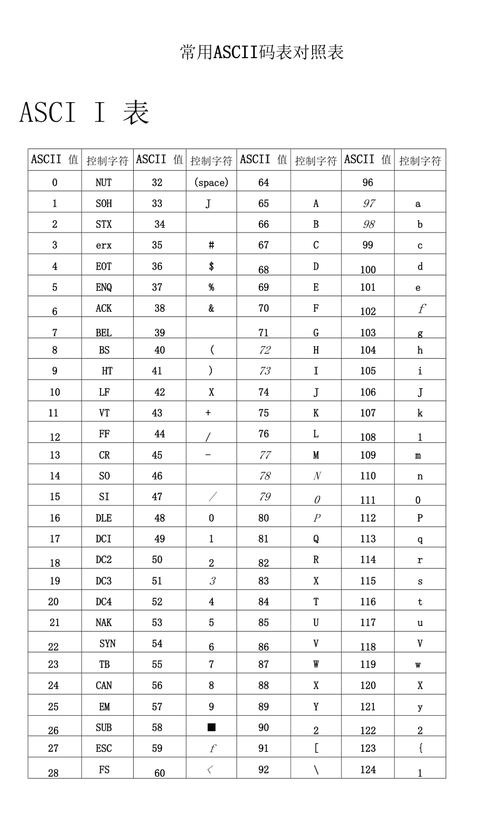
ASCII (American Standard Code for Information Interchange) is an old encoding standard. It maps 128 characters (letters A-Z, a-z, numbers 0-9, and common symbols) to numbers from 0 to 127.
A->65B->66a->970->48
Key Limitation: ASCII can only represent English. It has no characters for , , , , or 你.
# In Python, you can get the ASCII value (ordinal) of a character
# using the built-in ord() function.
print(f"The ASCII value of 'A' is: {ord('A')}")  # Output: 65
print(f"The ASCII value of 'a' is: {ord('a')}")  # Output: 97
# You can get the character from its ASCII value using chr()
print(f"The character for ASCII value 65 is: {chr(65)}") # Output: A
Unicode: The Universal Solution
Unicode was created to solve the limitations of ASCII and other regional encodings. It aims to assign a unique number, called a code point, to every character in existence.
- Code points are written as
U+followed by a hexadecimal number, e.g.,U+0041for 'A',U+00E9for 'é',U+4F60for '你'. - It's a massive standard, with over 150,000 characters assigned.
Unicode vs. UTF-8: This is a crucial distinction.
-
Unicode is the standard or the character set (the list of characters and their code points).
-
UTF-8 (Unicode Transformation Format - 8-bit) is the most common encoding or storage format for Unicode. It's a way to represent those Unicode code points in memory or in a file.
-
UTF-8 is brilliant because it's backward-compatible with ASCII. Any valid ASCII file is also a valid UTF-8 file. Characters from the ASCII set (0-127) take up 1 byte, while other characters take up 2, 3, or 4 bytes.
Python's Unicode-First Approach
This is the most important part for Python developers.
Python 3: Strings are Unicode Objects
In Python 3, a string (str) is a sequence of Unicode characters. This is a huge improvement over Python 2, where strings were just bytes by default.
# A string in Python 3 is a sequence of Unicode characters.
my_string = "Hello, 世界! 你好!" # Contains English, Chinese, and an emoji
# The len() function gives you the number of characters (code points), not bytes.
print(f"The string has {len(my_string)} characters.") # Output: 11
# You can access each character by its index
print(f"The first character is: {my_string[0]}") # Output: H
print(f"The sixth character is: {my_string[5]}") # Output: (space)
print(f"The seventh character is: {my_string[6]}") # Output: 世
The ord() and chr() Functions in Python 3
These functions work with Unicode code points, not just ASCII.
# ord() gives the Unicode code point (an integer)
print(f"Code point for 'A': {ord('A')}") # 65
print(f"Code point for 'é': {ord('é')}") # 233
print(f"Code point for '你': {ord('你')}") # 20320
# chr() gives the character for a given Unicode code point
print(f"Character for U+00E9: {chr(0x00E9)}") # é
print(f"Character for U+4F60: {chr(0x4F60)}") # 你
Sorting and "Unicode Order"
When you sort strings in Python, the default behavior is to sort them by their Unicode code point values. This is often called "Unicode sort order."
How it works: Python compares the code point of the first character of each string. If they are the same, it moves to the second character, and so on.
words = ["apple", "Zebra", "banana", "Apple", "cherry"]
# Default sort: Based on Unicode code point values
# U+005A ('Z') < U+0061 ('a')
# U+0041 ('A') < U+0061 ('a')
sorted_words = sorted(words)
print(f"Default Unicode sort: {sorted_words}")
# Output: ['Apple', 'Zebra', 'apple', 'banana', 'cherry']
Notice why this happens:
'A'has a code point of65.'Z'has a code point of90.'a'has a code point of97.
So, 65 ('Apple') comes before 90 ('Zebra'), which comes before 97 ('apple'). This is often not what humans expect when sorting alphabetically!
The "Problem" with Sorting
The default Unicode sort can be counter-intuitive for several reasons:
- Case Sensitivity: Uppercase letters have lower code points than lowercase letters (
A-Zare 65-90,a-zare 97-122). - Accents and Diacritics: (U+00E9) comes after
z(U+007A) in code point order. - Scripts: All Latin characters will sort before all Cyrillic characters, which sort before all Greek characters, and so on.
# Example of accents and scripts
accented_words = ["café", "zulu", "élan", "apple"]
print(f"Default sort on accented words: {sorted(accented_words)}")
# Output: ['apple', 'café', 'zulu', 'élan']  (because 'é' > 'z')
# Example of different scripts
mixed_scripts = ["你好", "apple", "αβγ", "Россия"]
print(f"Default sort on mixed scripts: {sorted(mixed_scripts)}")
# Output: ['Russia', 'αβγ', 'apple', '你好'] (because Cyrillic < Greek < Latin < Han)
How to Sort "Correctly" (for Humans)
For locale-aware sorting (e.g., dictionary order in English), you should use the locale module.
import locale
# IMPORTANT: You may need to set the locale for your system.
# On Linux/macOS: locale.setlocale(locale.LC_ALL, 'en_US.UTF-8')
# On Windows: locale.setlocale(locale.LC_ALL, 'English_United States.1252')
# This can vary. If it fails, check your system's available locales.
try:
    locale.setlocale(locale.LC_ALL, 'en_US.UTF-8')
except locale.Error:
    print("Locale not set. Using default sort. On Linux/macOS, try: locale.setlocale(locale.LC_ALL, 'en_US.UTF-8')")
    # Fallback to default sort if locale fails
    sorted_words = sorted(words)
else:
    # Use locale.strxfrm to transform strings for sorting
    sorted_words = sorted(words, key=locale.strxfrm)
print(f"Locale-aware sort: {sorted_words}")
# Output: ['apple', 'Apple', 'banana', 'cherry', 'Zebra']
Summary Table
| Concept | Description | Python Example |
|---|---|---|
| ASCII | 7-bit encoding for English. A=65, a=97. |
ord('A') -> 65 |
| Unicode | Universal character set. Every character has a unique code point (e.g., U+00E9 for ). |
ord('é') -> 233 |
| UTF-8 | A popular encoding for storing Unicode. Backwards-compatible with ASCII. | "你好".encode('utf-8') -> b'\xe4\xbd\xa0\xe5\xa5\xbd' |
Python 3 str |
A sequence of Unicode characters. The default string type. | s = "hello" |
ord(c) |
Returns the Unicode code point (integer) of a character c. |
ord('你') -> 20320 |
chr(i) |
Returns the character for a given Unicode code point i. |
chr(20320) -> '你' |
| Unicode Sort | Default string sort in Python. Sorts by code point value. Can be case-sensitive and counter-intuitive. | sorted(['apple', 'Zebra']) -> ['Zebra', 'apple'] |
| Locale Sort | Human-friendly sorting using the locale module. |
sorted(words, key=locale.strxfrm) |