Of course. Let's dive deep into asyncio in Python 3.5.
This is a crucial version for asyncio because it was the first version to include the async and await keywords in the standard library, making asynchronous code much cleaner and more readable than the previous @asyncio.coroutine and yield from syntax.
The Big Picture: Why Asynchronous I/O?
Before we look at the code, it's essential to understand the "why".
-
Traditional (Synchronous) I/O: When your program needs to read a file, make a network request, or query a database, it sends the request and then waits. The entire program freezes until the I/O operation is complete. If you have 1000 requests to make, you make them one by one, waiting for each one to finish before starting the next. This is inefficient for I/O-bound tasks.
-
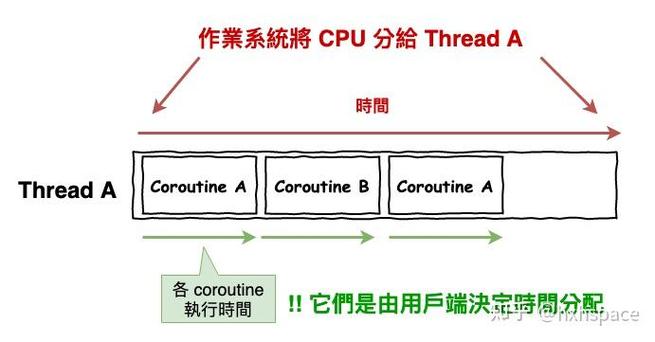
Asynchronous I/O: When your program needs to do I/O, it doesn't wait. It says, "Hey, system, please do this work and let me know when you're done." In the meantime, it's free to run other tasks. When the I/O is complete, the system notifies the program, which can then process the result. This allows a single thread to handle thousands of concurrent I/O operations, making it incredibly efficient for network services, web scrapers, and database applications.
 (图片来源网络,侵删)
The Core Concepts in Python 3.5
asyncio is built around a few key concepts:
-
Event Loop: The heart of
asyncio. It's a single thread that runs and manages all the tasks. It continuously checks for completed I/O operations and runs the corresponding callbacks or coroutines. You can think of it as the manager of your asynchronous program. -
Coroutine: A special function defined with
async def. When you call it, it doesn't run immediately. Instead, it returns a coroutine object, which is a "waitable" object that represents the ongoing operation. You need toawaitit or schedule it on the event loop for it to actually run. -
async defandawait: The new, clean syntax introduced in Python 3.5.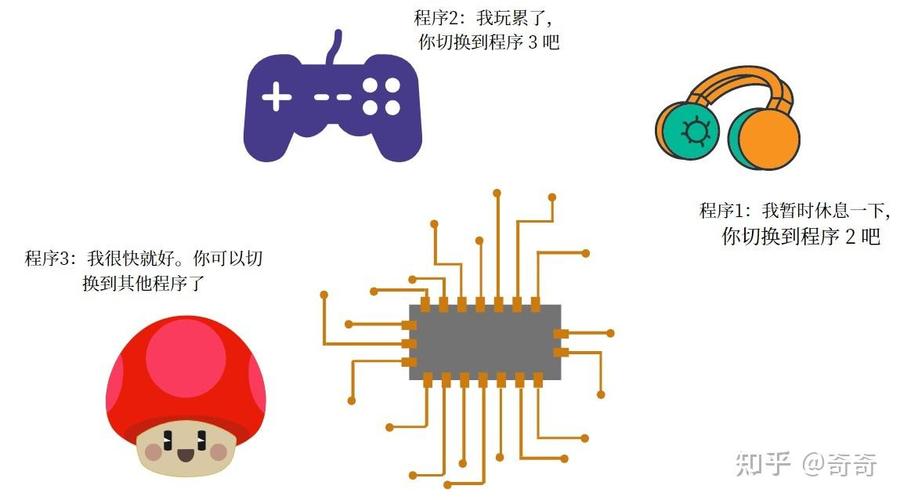 (图片来源网络,侵删)
async def: Defines a coroutine function.await: Pauses the execution of the current coroutine until the awaited coroutine (I/O operation, etc.) is complete. While it's waiting, it gives control back to the event loop so other tasks can run.
-
Task: An object used to schedule a coroutine to run on the event loop "soon". Wrapping a coroutine in a
Taskis the standard way to make it run concurrently with other tasks. A task is a "future" with a callback. -
Future: A low-level object that represents an eventual result of an asynchronous operation. You usually don't interact with them directly in high-level code; you use
awaiton coroutine objects orTasksinstead.
The async/await Syntax (The Game Changer)
This is the most important part of Python 3.5's asyncio. Let's compare it to the old way.
The "Old" Way (Python 3.4)
# In Python 3.4
import asyncio
@asyncio.coroutine
def old_coroutine():
    # 'yield from' was used to delegate to another coroutine
    print("Start...")
    yield from asyncio.sleep(1) # This was the syntax for async sleep
    print("...End")
loop = asyncio.get_event_loop()
loop.run_until_complete(old_coroutine())
loop.close()
The "New" Way (Python 3.5+)
# In Python 3.5 and later
import asyncio
# The 'async def' syntax defines a coroutine
async def new_coroutine():
    print("Start...")
    # 'await' pauses this coroutine until asyncio.sleep is done
    await asyncio.sleep(1)
    print("...End")
# To run it, you still need an event loop
loop = asyncio.get_event_loop()
loop.run_until_complete(new_coroutine())
loop.close()
Why is async/await better?
- Readability: It looks and feels like normal, sequential code.
awaitclearly signals a suspension point. - No Confusing Decorators: You don't need the
@asyncio.coroutinedecorator. Theasync defkeyword is all you need. - Static Analysis: Tools like linters and IDEs can understand
async deffunctions and prevent you from accidentally calling a coroutine withoutawaiting it.
A Practical Example: Concurrent Network Requests
Let's build a simple program that fetches web pages concurrently using aiohttp, a popular asynchronous HTTP client/server library.
Step 1: Install aiohttp
pip install aiohttp
Step 2: The Code (Python 3.5)
This code will fetch three URLs. Notice how they are fetched concurrently, not sequentially.
import asyncio
import aiohttp
import time
# A list of URLs to fetch
URLS = [
    "http://python.org",
    "https://github.com",
    "https://www.python.org/psf-landing/",
]
async def fetch_url(session, url):
    """A coroutine to fetch a single URL."""
    print(f"Starting fetch for: {url}")
    try:
        # aiohttp.ClientSession.get() is a coroutine, so we must await it
        async with session.get(url, timeout=10) as response:
            # response.text() is also a coroutine
            html = await response.text()
            print(f"Finished fetch for: {url} ({len(html)} bytes)")
            return len(html)
    except Exception as e:
        print(f"Error fetching {url}: {e}")
        return 0
async def main():
    """The main coroutine to run our fetchers."""
    # We use a single ClientSession for all requests for efficiency
    async with aiohttp.ClientSession() as session:
        # Create a list of tasks. Each task wraps a coroutine.
        tasks = [fetch_url(session, url) for url in URLS]
        # asyncio.gather() runs all tasks concurrently and waits for them all to complete.
        # It returns the results in the same order as the tasks.
        results = await asyncio.gather(*tasks)
        print("\n--- All Fetches Complete ---")
        for url, size in zip(URLS, results):
            print(f"{url}: {size} bytes")
        return results
# Standard boilerplate to run the main coroutine
if __name__ == "__main__":
    start_time = time.time()
    # Get the event loop
    loop = asyncio.get_event_loop()
    # Run the main coroutine until it's complete
    loop.run_until_complete(main())
    end_time = time.time()
    print(f"\nTotal time taken: {end_time - start_time:.2f} seconds")
    # It's good practice to close the loop
    loop.close()
How It Works:
async def fetch_url(...): This is our worker coroutine. It takes asessionand aurl. Theawait session.get(...)is the key part. It tells the event loop, "I'm waiting for a network response. Don't block me; go run other tasks."async def main(): This is the entry point for our application's logic.tasks = [...]: We create a list of coroutine objects. None of them have run yet.- *`asyncio.gather(tasks)
**: This is the magic. It takes all the coroutines, wraps them inTasks(if they aren't already), and schedules them to run concurrently on the event loop. Theawaitongather()makesmain()wait until every single one of thefetch_url` tasks is finished. loop.run_until_complete(main()): This starts the event loop and tells it to run themain()coroutine to completion. Oncemain()is done, the loop stops.
Key asyncio Functions in Python 3.5
-
asyncio.get_event_loop(): Gets the current event loop for the current OS thread. -
loop.run_until_complete(coroutine): Runs a coroutine until it completes. This is the primary way to start anasyncioprogram. -
asyncio.sleep(delay): A coroutine that suspends the current coroutine for a given number of seconds. It's the "Hello, World!" of testing coroutines. -
*`asyncio.gather(awaitables)`**: Runs awaitable objects (coroutines, futures, tasks) concurrently and returns a list of their results.
-
asyncio.create_task(coro): Schedules a coroutine to be executed on the event loop and returns aTaskobject. This is useful if you want to start a task and do other things beforeawaiting it.async def my_task(): await asyncio.sleep(1) print("Task done!") async def main(): # Start the task, but don't wait for it yet task = asyncio.create_task(my_task()) print("Doing other work...") await asyncio.sleep(0.5) print("Other work done.") # Now, wait for the task to complete await task loop.run_until_complete(main())
Summary for Python 3.5
- Major Improvement: The introduction of
async defandawaitmadeasynciovastly more accessible and readable. - Core Idea: Use
async defto define I/O-bound operations andawaitto pause their execution without blocking the whole program. - Concurrency Model: A single-threaded event loop manages multiple tasks that yield control to each other during I/O waits.
- Common Workflow:
- Define your logic in
async deffunctions. - Use
awaiton any long-running, non-blocking operation (likeasyncio.sleepor anaiohttprequest). - Use
asyncio.gather()orasyncio.create_task()to run your coroutines concurrently. - Start the event loop with
loop.run_until_complete(main()).
- Define your logic in
While Python 3.5 was a landmark version, it's worth noting that asyncio has continued to evolve with more features and improvements in subsequent versions (like asyncio.run() in 3.7). However, the fundamental async/await syntax and concepts established in 3.5 remain the bedrock of modern asynchronous Python programming.